

Moonshot has announced that, to meet the demand for integrating the Kimi API into Codex and Claude Code, the Kimi API now supports OpenAI's Responses API format, with the base_url set to https://api.moonshot.cn/v1 ; it also supports Anthropic's Messages API format, with the base_url set to https://api.moonshot.cn/ anthropic.
According to ITHome, users of Codex or Claude Code can connect directly to models including kimi-k3, kimi-k2.7-code-highspeed, kimi-k2.7-code, and kimi-k2.6 through a custom model provider, without format conversion or a local proxy.
For detailed integration instructions, see the official documentation (the links are clickable):
Codex: https://platform.kimi.com/docs/guide/codex-kimi
Claude Code: https://platform.kimi.com/docs/guide/claude-code-kimi
If Kimi Code, Kimi Work, or another local agent is already installed on your computer, you can send it the following text and have the local agent configure it for you.
● Configure the Codex CLI and Codex / ChatGPT desktop client:
Please follow this tutorial https://platform.kimi.com/docs/guide/codex-kimi and help me configure the Codex/ChatGPT App and Codex CLI● Configure Claude Code:
Please follow this tutorial https://platform.kimi.com/docs/guide/claude-code-kimi and help me configure Claude CodeNote:
OpenAI's Responses API supports text and image input, but does not currently support video input. To analyze video, first use ffmpeg to extract key frames and then provide them to the model.
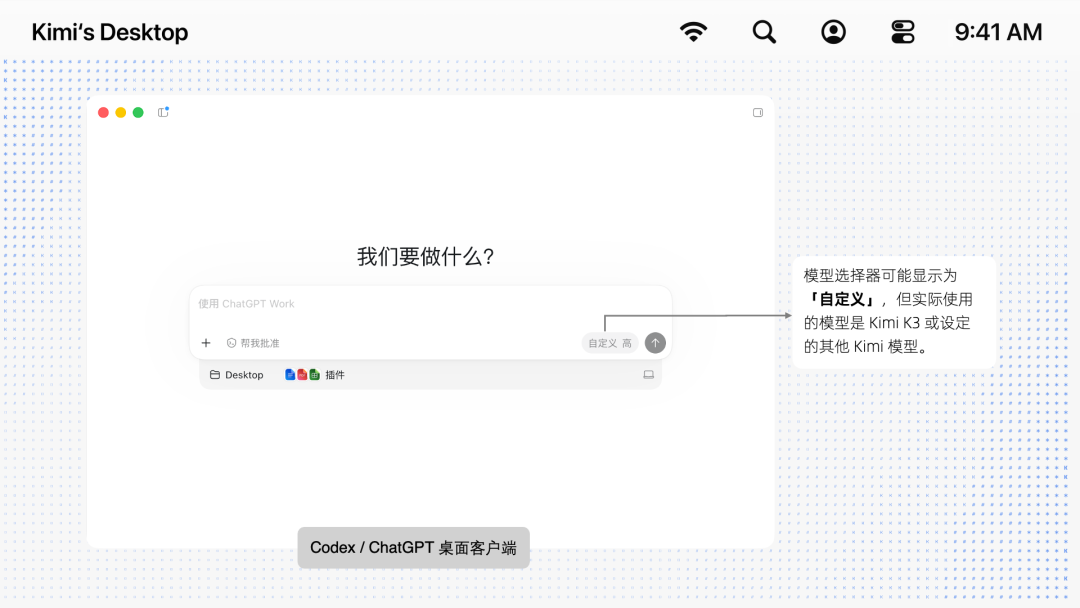
The model selector in the Codex desktop client, which is now ChatGPT after the update, may be displayed as “Custom,” but the model actually used is Kimi K3 or another Kimi model you have configured.