
- Monthly visits
- 0
- Pricing
- Not set
- Listed
- —
- Updated
- 2026-11-03
01What Is Yunce Omni?
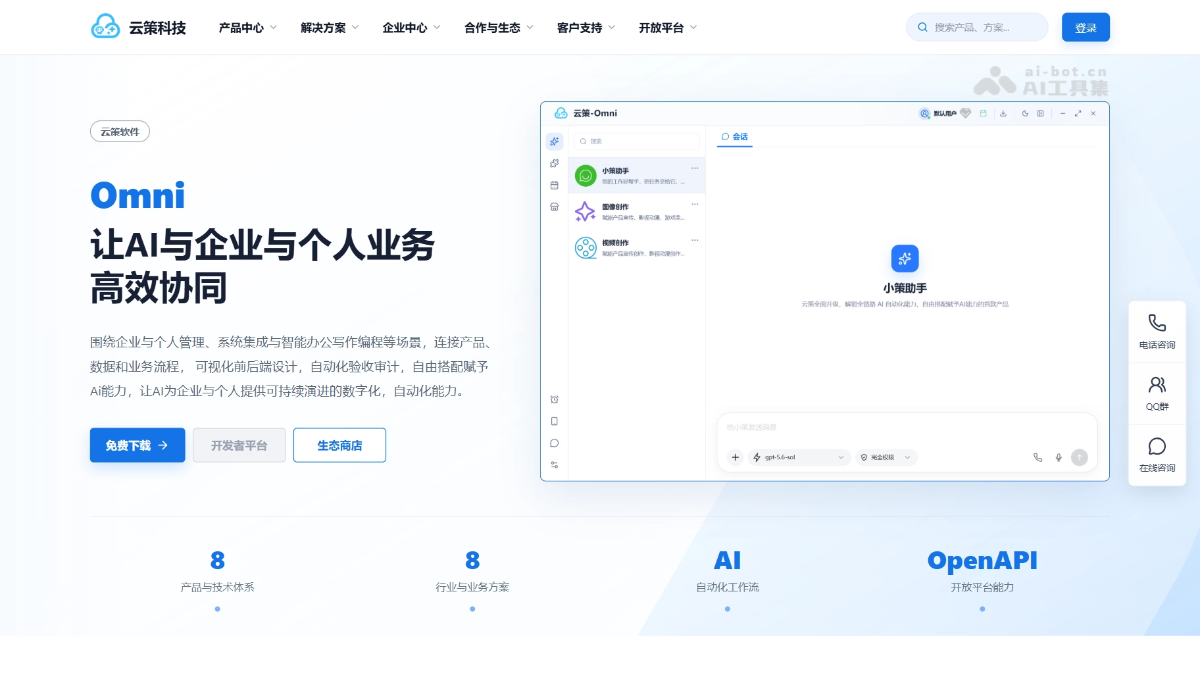
Yunce Omni is a cross-platform desktop local AI workspace and the first Internet product that lets users customize and equip AI with capabilities. Through a combination of “models + skills + plugins + virtual runtime environments,” Yunce Omni enables AI to complete practical tasks within authorized boundaries, including project development, image and video creation, data operations, remote management, and automated acceptance testing.
02Key Features of Yunce Omni
Virtual environments: Runtime environments are installed in isolation as plugins. They start when needed and consume no background processes when not in use, allowing anyone to set them up with one click.
Model Ark: Centrally connect and manage text, image, and video models from multiple providers. Supports mainstream protocols such as OpenAI and Anthropic, with keys stored only on the local machine.
Skills workbench: Skills such as Xiaoce Assistant, image creation, and video creation package complete AI workflows, enabling AI to understand tasks and organize processes.
Plugin ecosystem: Plugins are executable capability units. They are available to skills only after on-demand installation, registration, and authorization, covering development, creation, automation, and more.
Local project development and visual acceptance: AI can read, write, compile, and test code within authorized directories, and complete visual acceptance using the DOM, diagnostic information, and screenshots.
Desktop workspace: Provides access to skills, plugins, the store, scheduled tasks, and more, with dual-interface mode, theme switching, background operations, and notifications.
Data security: Except for account login, all user data is stored locally and is not uploaded to platform servers.
MCP external connections: Built-in local MCP services organize authorized capabilities into an AI-callable tool directory, supporting controlled external connections.
03How to Use Yunce Omni
Download and install: Visit the Yunce Omni official website https://www.yuncehub.com/ to download the client, then run it and sign in after installation.
Connect models: In “Model Ark,” select a provider and model type, enter the API Key and other parameters, and connect the required AI models in one place.
Install skills: Install skills such as Xiaoce Assistant, image creation, and video creation in the skills workbench, and start independent sessions as needed.
Install plugins: Install the required executable plugins from the plugin ecosystem. Plugins are loaded into the selected virtual environment as needed without polluting the system.
Authorize directories: Bind the AI’s working scope to a local project directory and define clear file read/write boundaries.
Get started: Enter a task in the skills interface. Xiaoce automatically combines the capabilities of installed plugins to complete development, creation, data processing, and other work.
Review results: Preview and interact with frontend projects in Omni’s built-in subwindow, using DOM snapshots, screenshots, and diagnostic information for visual acceptance.
Extend connections (optional): Use the built-in MCP service to expose authorized capabilities to external tools and generate temporary credentials for controlled connections.
04Core Advantages of Yunce Omni
Zero environmental pollution: Runtime environments are installed in isolated virtual directories without modifying the system PATH. Anyone can install them with one click, and they consume no background processes when not in use.
Flexible model access: Model Ark centrally connects to multimodal models from multiple providers and is compatible with mainstream protocols such as OpenAI and Anthropic. Users can configure models freely; the platform does not purchase models or participate in billing.
Composable capabilities: The loosely coupled “models + skills + plugins” architecture lets skills handle task understanding and plugins handle deterministic execution. They can be installed and upgraded independently for flexible expansion.
Closed-loop visual acceptance: Frontend projects can be previewed interactively in a built-in subwindow. DOM snapshots, console diagnostics, and actual screenshots support acceptance and help prevent visual issues that code-only reviews may miss.
Controlled permissions and security: File operations are strictly limited to authorized directories. Plugins must pass four levels of installation, registration, activation, and authorization checks before they can be called. MCP external connections support temporary credentials.
Desktop-grade experience: Supports a complete desktop workspace with dual-interface mode, window docking, startup launch, background operations, and task reminders, making it suitable for long-term use rather than one-off conversations.
Broad scenario coverage: From project development and image and video creation to remote management and game automation development, one platform covers a wide range of practical work scenarios.
05Application Scenarios for Yunce Omni
Software development and testing: AI completes scaffolding, dependency installation, coding, compilation, and unit testing within authorized project directories, then performs visual acceptance in a built-in subwindow to cover the full “development–testing–acceptance” workflow.
Frontend page creation and interaction acceptance: From page generation to DOM snapshots, element inspection, responsive switching, and layout audits, AI can directly view the actual rendering and fix visual issues.
AI image and video creation: Text-to-image, reference-image creation, text-to-video, compositing, and editing can all be completed in one place. Generated results are managed centrally within sessions, making the workflow suitable for content creators producing assets in batches.
Remote server and database management: Combined with remote management and automated acceptance capabilities, AI can assist with operations tasks, process data, and check service status, making it suitable for individual website owners and small teams.
Game development and repetitive task automation: Repetitive work such as game automation development, information retrieval and organization, and scheduled tasks can be orchestrated and executed by AI. Users only need to set the objectives and boundaries.
© Disclaimer: domains and linked content may change over time. AIEZZ does not control third-party websites. Review external content and risks independently.
User reviews0