

- Monthly visits
- 0
- Pricing
- Free & Paid
- Listed
- 2025-09-01
- Updated
- 2026-08-25
01Product Positioning
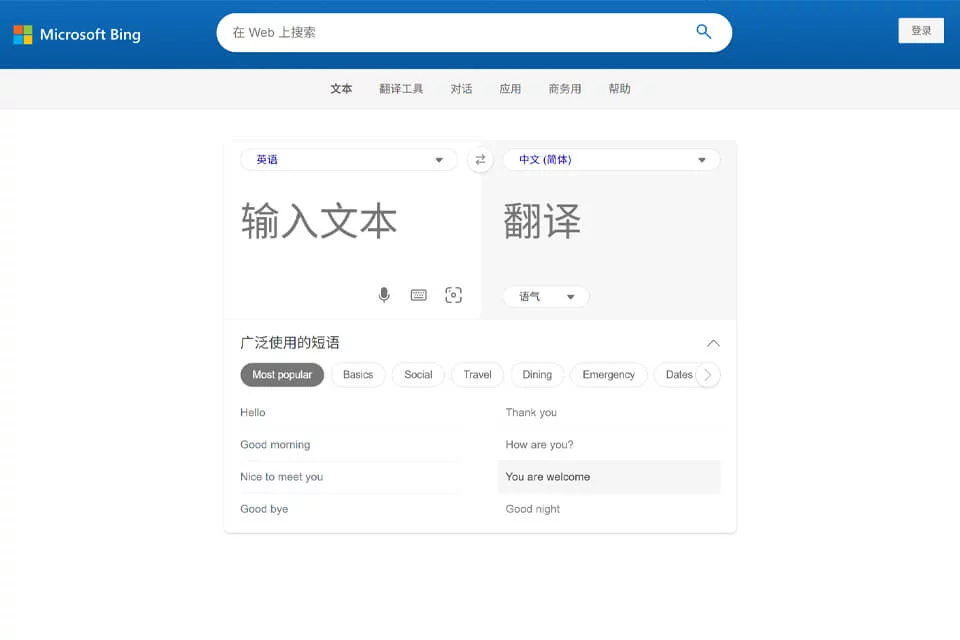
Bing Translator is a web-based tool from Microsoft for everyday cross-language understanding. Its core task is to convert input text into a target language. The page also links to Microsoft Translator's conversation, app, and business services, but these entry points do not offer exactly the same scope as the web translator.
It is suitable for quick understanding and expression, but should not be described as a complete localization platform capable of replacing professional translators.
02Key Features
The current webpage provides automatic source-language detection, target-language selection, and text translation. Its language list covers many languages and regional variants. The input area also provides voice input, an on-screen keyboard, and image text capture.
Results can be rendered in a standard, informal, or formal tone. The page includes common-phrase categories for social situations, travel, dining, emergencies, dates and numbers, and technology. Conversation translation, mobile apps, and business services are provided through separate entry points.
03Use Cases
Travelers can look up greetings and expressions for dining and emergency communication. Students and general readers can use it to understand short sentences and foreign-language materials. Office users can first translate email excerpts or everyday communications and then adjust them based on context.
Image capture is suitable for text on signs, menus, or screenshots, while voice input is useful for quickly submitting content when typing is inconvenient.
04Usage Considerations
The current webpage does not present document uploads and full-page website translation as primary translation types, so these capabilities should not be promised as definite features of the current webpage. Language, input-method, and tone options may also vary by regional page.
Machine translation may misinterpret proper names, specialized terminology, and context. Contracts, academic papers, medical and legal content, and formal external materials should be reviewed line by line by a human.
© Disclaimer: domains and linked content may change over time. AIEZZ does not control third-party websites. Review external content and risks independently.
User reviews0