
- Monthly visits
- 0
- Pricing
- Free
- Listed
- 2025-09-01
- Updated
- 2026-08-25
01Product Positioning
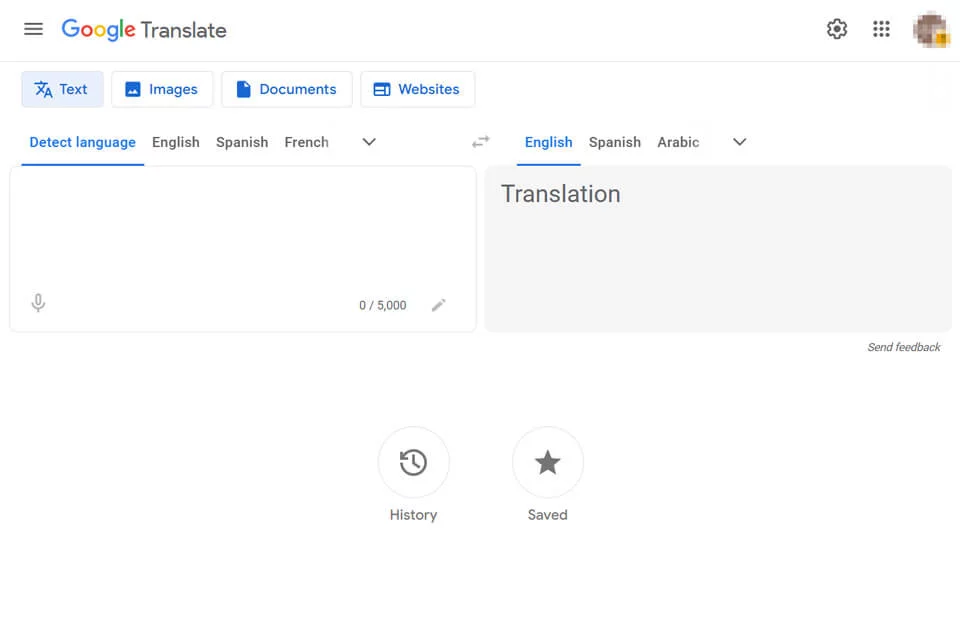
Google Translate is a general-purpose translation service for everyday cross-language understanding. The current page divides different tasks into four categories: text, images, documents, and websites, allowing users to choose an entry point based on the format of their source material.
It is suitable for quickly obtaining an initial translation and understanding the general meaning, but it does not guarantee the final accuracy of technical terms, cultural context, or formal documents.
02Key Features
Text translation supports automatic source-language detection and target-language selection, and the input area offers voice input. Image translation recognizes and converts text in images, while the document and website options handle files and web addresses respectively.
After signing in, users can access translation history and saved content. The available languages, file formats, size limits, and page compatibility may vary by option, so users should follow the prompts shown on the page during use.
03Use Cases
Travelers can translate menus, signs, and everyday expressions. Students and researchers can first grasp the general meaning of materials in foreign languages. Office workers can translate email excerpts, general documents, and website content. Content teams can use machine translations as initial localization drafts.
The image option is suitable for screenshots and photographed text, while the website option is useful for quickly browsing foreign-language pages. However, the original layout and interactive features may not be preserved completely.
04Usage Considerations
Voice recognition can be affected by pronunciation and background noise. Image recognition can be affected by clarity, fonts, and layout. Document and website translation may also omit complex formatting or dynamic content.
Contracts, medical, legal, and academic citations, brand copy, and content intended for public release should not be used directly as machine translations. The original text should be checked sentence by sentence and reviewed by someone familiar with the target language and the relevant professional field.
© Disclaimer: domains and linked content may change over time. AIEZZ does not control third-party websites. Review external content and risks independently.
User reviews0