



When running an independent site, I realized that I was doing the same thing every Monday morning.
Open Google Search Console and manually export last month's query data. Open GA4 and export the top 50 landing pages by traffic as a CSV. Use Excel to combine the two tables—align GSC impressions and clicks with GA4 sessions and conversions by URL. Then manually color-code them: mark traffic drops in red and conversion rates below average in yellow.
The whole process took about an hour and a half. After finishing, I would post it in the group, and the client would reply, "Received."
I did this for three years, every week.

That was until last month, when a technical friend glanced at my screen and said something that really hit home: "Isn't this just a matter of connecting to an API? Why are you still doing it manually every week?"
I froze for a moment. He was right. It wasn't because I didn't know that GSC and GA4 had APIs. It was because whenever I thought about "writing a script to call an API," the image that came to mind was an entire engineering project—writing Python, handling authentication, handling pagination, mapping fields, building a frontend display... All of that could indeed save time, but the startup cost was so high that I kept putting it off.
What was the turning point? Codex.

I. First, what is Codex—and why isn't it ChatGPT?
When many people hear "AI writing code," their first reaction is, "I'll ask ChatGPT to write a script for me." I tried that too. ChatGPT gives you a piece of code, you paste it into your editor, configure the environment, install dependencies, run it, paste the error back in and ask it to fix it, run it again, get another error... After seven or eight rounds, it was more exhausting than manually exporting the data.
Codex has a completely different role. It is a programming agent that runs directly in the terminal—with its own independent sandbox environment, it can read files, write files, install packages, execute commands, and handle errors. You don't need to copy code back and forth from start to finish. You give it an instruction in natural language, and it plans, writes, runs, and fixes things on its own.
For example, the instruction I gave it was:
"Export the GSC query data from the most recent 28 days, merge it with GA4 landing-page data by URL, and create a table of the 20 pages with the biggest traffic declines."
It completed all of the following by itself:
•Checked whether the current environment had the Google API Python libraries and installed them if necessary•Read the file paths for my GSC and GA4 credentials and handled OAuth•Called the GSC API to retrieve query and page dimensions, handling pagination automatically•Called the GA4 Data API to retrieve sessions and conversions by landing page•Cleaned the URLs (removed parameters, removed trailing slashes, and standardized the www prefix)•Merged the intersection by URL and calculated the impressions-clicks-conversions funnel for each page•Output a Markdown table sorted by the magnitude of traffic decline
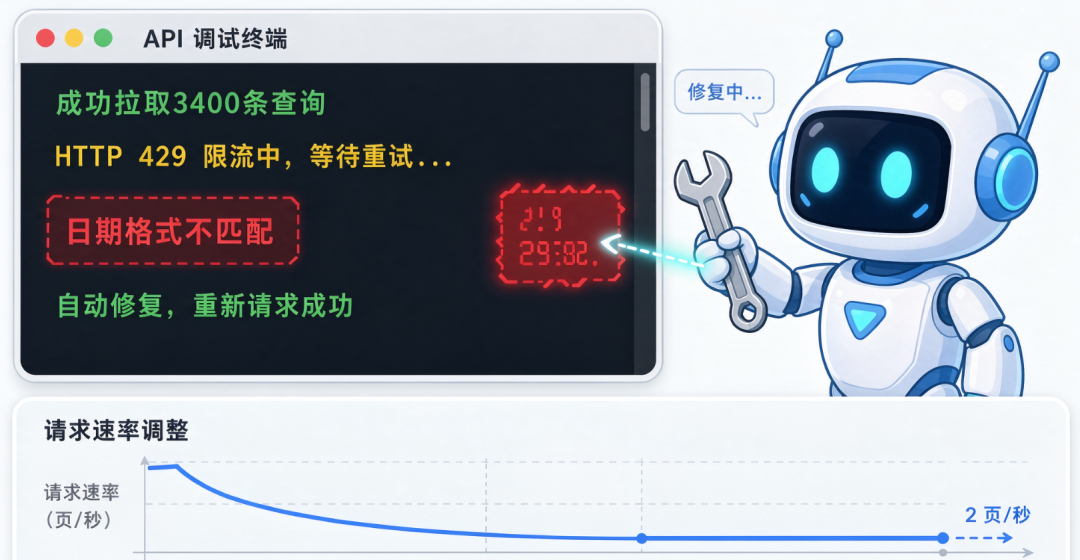
I watched the screen while it completed the entire process on its own. The GA4 API returned a date-format error once in the middle—it read the error message, fixed it itself, ran again, and succeeded.
🔴 The difference between AI coding tools isn't "whether they can write code"—they all can. The key is "whether they can get it running on their own."
II. The complete process of using Codex to close the GSC+GA4 data loop
Below, I'll review how I built this workflow in the order I actually performed the operations. No theory—every step was genuinely run in my terminal.
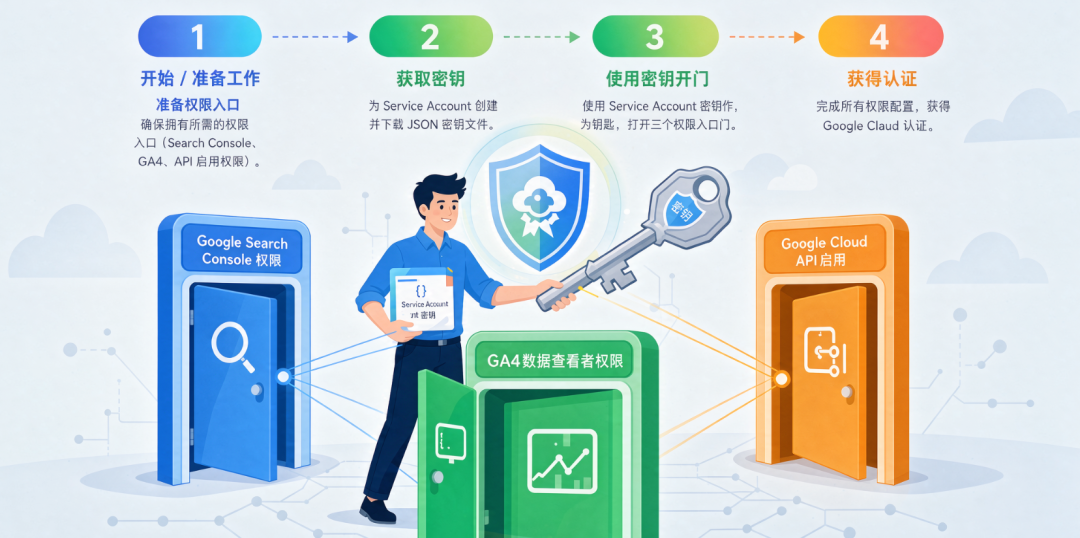
1. Preparation: Google Cloud authentication
This step is unavoidable. Both the GSC and GA4 APIs require Google Cloud OAuth or Service Account authentication. Whether you use AI or not, you have to do this part manually.
What I did:
•Created a project in Google Cloud Console and enabled the Search Console API and Google Analytics Data API•Created a Service Account and downloaded the JSON key file locally•Added the Service Account's email as a "restricted user" (full permissions) in GSC•Added the email as a "Viewer" in the GA4 admin panel
Codex can't help you with this step—authentication and authorization are human-computer interaction processes, and it can't click through Google's authorization pages for you. But for every subsequent step, as long as the credential file paths are correct, it can connect seamlessly.
⚠️ The first place most API automation gets stuck isn't the code; it's permissions. Google's permission system is like a Russian nesting doll—GSC has one entry point, GA4 has another, and Google Cloud has yet another. The permissions at these three entry points don't carry over to one another. Once you patiently complete this step, everything afterward becomes much smoother.
2. The first Skill: retrieving GSC query data
Codex works like this—you can package a set of tasks into a reusable Skill (skill file), place it in the ~/.codex/skills/ directory, and every time you call the same Skill, it executes the same logic.
I started by writing the simplest version: retrieve only GSC query-dimension data.
This Skill told Codex three things: which API to use, which dimensions to retrieve, and what format to output. After running it once, it took about 40 seconds and output a list of the top 100 queries, including clicks, impressions, CTR, and average position.
I compared this result with the CSV I had manually exported the previous month—the data matched exactly. At that moment, I felt that the "manual era" had ended.
But it wasn't completely accurate. The GSC API has a catch: it returns only 1000 rows by default, and anything beyond that requires pagination. The first time I ran it, my site had more than 3400 queries for the month—Codex noticed that the number of returned rows didn't match, added pagination logic, and ran it again. The second time, it got everything.
It discovered the issue itself. It fixed it itself. That is a completely different experience from using ChatGPT to write a script.
3. The second Skill: connecting GA4
After retrieving the GSC data, I had it retrieve GA4 landing-page data as well.
This was considerably more difficult. The GA4 Data API requires you to build a "data request body" yourself—defining the dimensions you want (landingPage), metrics (sessions, conversions, eventCount), date range, and filters. The request-body JSON structure is completely different from GSC's, and the field names in GA4's response come in a long eventName_xxx format that must be parsed manually.
Codex's approach to reading and writing to the GA4 API left a strong impression on me—it didn't mechanically call the API according to instructions. Before making the call, it first performed a Schema inspection: it called the GA4 Metadata API to retrieve all the available dimensions and metrics for the property, along with how the field names were constructed, and only then built the request body.
💡 This way of working—"understand the situation before taking action"—is exactly how a real person approaches a new API. AI has automated it.
After both Skills finished running, I had two tables:
•GSC query dimensions: keywords, page URLs, clicks, impressions, CTR, average position•GA4 landing-page dimensions: page URLs, sessions, conversions, average engagement time
Next came the merge.
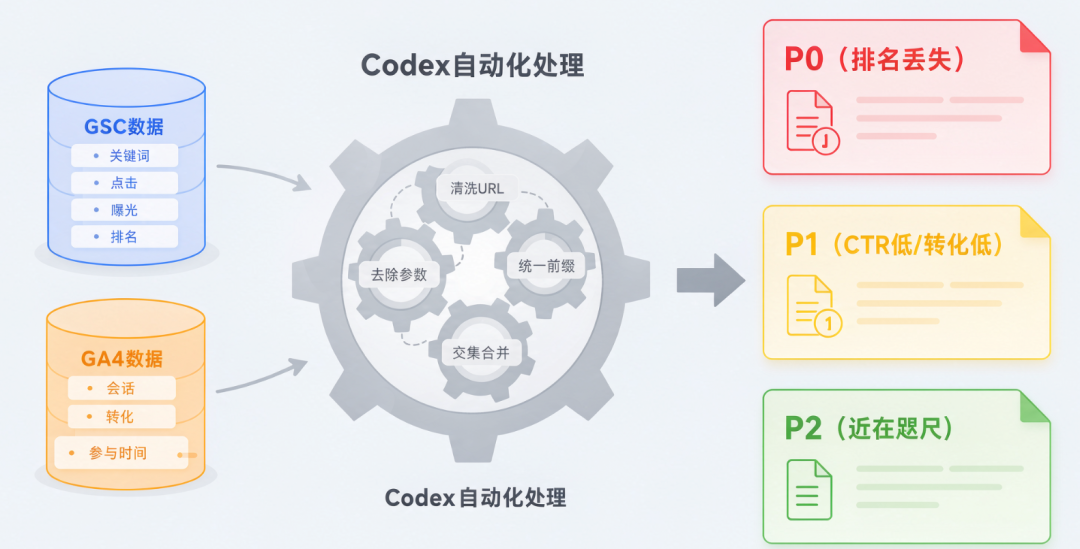
4. Merging—from two tables to a prioritized Todo list
Combining two tables sounds simple—match URL to URL and put them together. But in practice, there are countless small pitfalls.
I asked Codex to first "look at" samples from both tables. It found that GSC page URLs included the https:// prefix, while GA4 landing-page paths contained only /blog/seo-guide. GSC URLs had query parameters such as ?utm_source=google at the end, while GA4 had already stripped them. Some pages had data in GSC but not in GA4, and vice versa.
Codex cleaned up these differences itself—removing prefixes, parameters, and anchors, standardizing trailing slashes, and then merging the intersection.
After merging, it gave me a diagnostic result prioritized by issue type rather than a cold pivot table:
Priority|Page characteristics|Diagnostic direction
🔴 P0|Impressions down more than 30%, position falling from the top 5 to outside the top 10|Lost rankings—check backlinks and content freshness
🟡 P1|High impressions, low CTR (CTR 50% below average)|Title isn't compelling enough—revise the Title and Meta
🟡 P1|High clicks, low conversions (conversion rate 40% below average)|Landing page doesn't convert well enough—check page content and CTA
🟢 P2|Ranking in positions 8–20 with high search volume|Within reach—add internal links and strengthen the content
📊 Turning two isolated reports into a Todo list prioritized by severity—that is the meaning of a "data loop." It's not about looking at data; it's about knowing what to do.
III. The actual pitfalls I encountered
Looking back after writing the Skills and getting them to run, everything seemed "obvious." But at the time, several things genuinely blocked me.
Pitfall 1: GA4 metric names aren't intuitive
In the GA4 API, the number of sessions isn't called sessions; it's called sessions. The number of conversions isn't called conversions; it's called eventCount, but only for events you have marked as conversions. Average engagement time isn't called avgTimeOnPage; it's called userEngagementDuration, and you then have to divide it by the number of sessions yourself.
You can of course figure these things out by reading the documentation—but you have to spend an hour or two checking them one by one. That is the time Codex saved me. Before constructing the API request, it called the GA4 Metadata endpoint and retrieved the names, types, and descriptions of every available metric for the property, then matched the English meaning to determine which field corresponded to "the number of sessions I want."
Pitfall 2: GSC API quota limits
The GSC API has a daily quota limit, just like manual operations in GSC. The first time, I set pagination too aggressively—making 20 concurrent page requests triggered rate limiting immediately. After receiving HTTP 429, Codex paused for a few seconds and retried. The second time, it reduced the pagination rate to 2 pages per second, and everything ran steadily.
This experience made me realize that no matter how smart AI is, it is still calling APIs written by people. It can take the dirty work of handling rate limits, data formats, and field naming off your hands, but you still need to know where the pitfalls are.
Pitfall 3: Codex sometimes over-engineers
Once I asked it to "group the data by page type"—what I meant was to distinguish categories by prefixes such as /blog/ and /product/ in the URL path. Codex interpreted this as reading each page's HTML structure and extracting its page type. It did indeed accomplish that—it used the requests library to crawl the HTML of each page, analyzed meta tags and schema markup, and then categorized them.
It worked, but took nearly 4 minutes. All I actually wanted was a simple conditional bucket based on the URL path prefix.
⚠️ When collaborating with AI, the granularity of the task determines its efficiency. The more precise you are, the faster it works. If you are too vague, it will use the most complex way to "understand" the task—and it won't necessarily tell you that it took a detour.
IV. How to make it "reusable"—not a one-off script
Getting it to work once is easy. Turning it into a "data loop" that can run every week and work on another site is the valuable part.
Packaging it with Codex's Skill mechanism
Codex supports Skill files—Markdown instruction files placed in the ~/.codex/skills/ directory. At its core, it is simply a highly precise operations manual. Every time Codex calls this Skill, it executes the same SOP from start to finish, avoiding the problem of "making temporary changes last time and forgetting to revert them."
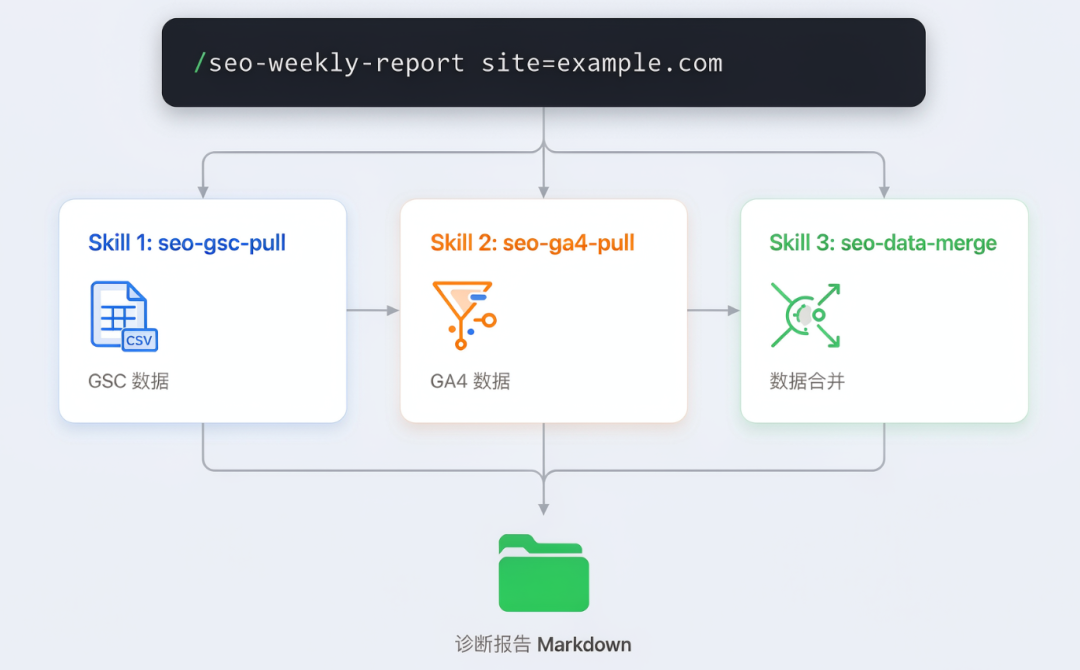
I split the GSC+GA4 data retrieval → cleaning → merging → diagnosis → output workflow into three independent Skills:
Skill|Purpose|Output
seo-gsc-pull|Retrieve GSC query and page-dimension data with automatic pagination|Two CSVs: gsc_queries.csv, gsc_pages.csv
seo-ga4-pull|Retrieve GA4 landing-page and conversion data with automatic metric matching|ga4_landing.csv
seo-data-merge|Merge the three tables, clean URLs, and output a diagnostic ranking|Markdown diagnostic report + merged CSV
The advantage of splitting them into three is that if GSC acts up, I only run the GSC section; if the GA4 quota is insufficient, I only run the GA4 section. They don't block each other. Also, for sites belonging to different clients, the data sources for the first two Skills may differ, but the third Skill (merging and diagnosis) can be reused—you only need to change the site URL parameter.
Triggering the entire workflow with one command
After splitting the three Skills, I wrote an "orchestration Skill" in Codex:
/seo-weekly-report site=example.comWhen Codex sees this command, it calls three Skills in sequence—pull GSC data, pull GA4 data, and merge the diagnostics—then outputs a page-level diagnostic report sorted by P0/P1/P2 in the terminal. The whole process takes just over 2 minutes to run.
💡 "Automation" isn't about writing a script that never breaks. It's about turning repetitive work into a process that can be triggered with a single sentence and adapt to changing data.
V. How My Work Actually Changed After Setting This Up
Without exaggerating, my Monday mornings have changed completely.
Before:
•Spend 40 minutes manually exporting, cleaning, and merging GSC and GA4 data•Spend 20 minutes color-coding and prioritizing in Excel•Spend 20 minutes writing a "weekly SEO summary" and posting it in the group chat•The client replies, "Got it, thanks for your hard work."
Now:
•Arrive at the office on Monday and type /seo-weekly-report into the terminal•Two minutes later, the diagnostic report is generated in the reports/ directory•Copy and paste it into WeChat, add two comments, and send it
But at the same time—something interesting happened. Before, I would "spend a long time" preparing a report, and the client felt that I had done a lot of work. Now I produce the result in two minutes, and some clients instead think, "That was so fast—did you really look at it carefully?"
Funny? But that's real human nature.
So I've adjusted my strategy. After the report is generated, I pick out the P0 pages, spend 15 minutes opening and reviewing them one by one, and add a sentence called "Manual Review Notes" to the report. Those 15 minutes aren't wasted—they make the client feel that "someone really looked at it," rather than receiving a machine-generated report spit out by AI.
🔴 AI does the dirty work for you. But your judgment, your experience, and your willingness to take that extra look—those are the parts that won't be automated. And they're exactly what clients care about most.

VI. A Few Practical Suggestions for Anyone Who Wants to Build This
If you also want to use Codex to build a complete SEO data loop, here are a few lessons I paid for with real money (and time):
① Don't pursue perfection right away. Start by getting GSC working on its own.
Just one Skill: pull query data from the most recent 28 days and output a CSV. Once this works, you already have the capability for "fully automated rank tracking." Going from zero to one took me half an hour—most of that time was spent dealing with Google Cloud permissions. Once I got the first Skill working, the psychological barrier was gone.
② Secure your credential files properly—this is the "weak point" of the entire pipeline.
Once a Google Cloud Service Account JSON key file is leaked, someone else can read and write your GSC and GA4 data. Don't put this file in a Git repository. Reference its path through an environment variable, and use syntax like `${GSC_CREDENTIALS_PATH}` in the Codex Skill instead of hard-coding it.
③ Have Codex log the time spent on each step.
Add a line to the Skill saying, "Please record the time spent after each operation." This isn't for show—it tells you where the bottleneck is: a slow GSC API fetch, extensive GA4 pagination, or overly complex URL-cleaning logic. You can only optimize effectively once you know the cause.
④ Before reusing it across sites, make sure the GA4 property structures of the new and old sites are consistent.
The same Skill may run normally for Client A but fail for Client B—80% of the time, this is because the custom dimensions and event names in the two GA4 properties are different. The first time you run it for a new site, have Codex pull the GA4 Metadata once to inspect the structure.
📊 My actual data: Building the complete workflow from scratch for one client takes about 45 minutes (including Google permission setup), and subsequent weekly runs take about 2 minutes.
There are several open-source Codex SEO Skills on GitHub that you can adapt directly—owensky-dev wrote seo-gsc-ga4-analyst, and AminForou created an MCP server called mcp-gsc. You don't need to reinvent the wheel from scratch. Take an existing Skill, run it once to see what the output looks like, and then adapt it to your needs. It's 10 times faster than writing one from scratch.
Of course, the output from an existing Skill may not perfectly fit your needs. For example, owensky-dev's Skill pulls 90 days of data by default, while I prefer analyzing a 28-day window. This kind of small change only requires modifying one parameter in the Skill file; Codex will read your change and follow it.
The entire process—from an idea to something that runs reliably—took me about two afternoons. The first afternoon was spent handling permissions and API integration, and the second was spent writing the Skill and refining the output format. Every week afterward, it helps me reclaim those two afternoons.
Last week, a fellow operator of an international trade site asked me, "What tool do you use to monitor your data?"
I said, "Codex."
He asked whether it was expensive.
I said, "It's no more expensive than the time you spent in Excel last week."
He paused for a few seconds. Then he said—"Then send me a copy of that Skill."