

What Is WeMM-Embedding?
WeMM-Embedding is a family of universal multimodal embedding models developed by the WeChat Vision team. It converts text, images, videos, visual documents, and interleaved multimodal inputs into unified vector representations. These vectors can support workflows that need to represent and compare content across different modalities.
Each model obtains its embedding from the last-layer hidden state at the dedicated <embedding> token position and then applies L2 normalization. Audio input is not currently supported.
Key Features
- Unified multimodal representations: The same model family handles text, images, videos, visual documents, and interleaved inputs.
- Multiple model sizes: Choose among 2B, 4B, and 9B parameter variants.
- Matryoshka Representation Learning: Use supported shorter vector dimensions when storage or retrieval efficiency matters.
- Two inference interfaces: Examples are provided for both Transformers and Sentence Transformers.
- Production serving: The repository includes configurations and wrapper scripts for vLLM and SGLang.
- Evaluation tooling: The included MMEB-v3 pipeline supports single-node and multi-node inference.
Choose a Model and Dimension
The model zoo contains three variants on Hugging Face. Select a model according to your available compute and required full embedding size.
- WeMM-Embedding-2B: Supports dimensions 64, 128, 256, 512, 1024, and 2048.
- WeMM-Embedding-4B: Supports dimensions 64, 128, 256, 512, 1024, and 2560.
- WeMM-Embedding-9B: Supports dimensions 64, 128, 256, 512, 1024, 2048, and 4096.
A smaller supported dimension reduces vector storage and downstream computation. For example, the README reports that the 2B model at 256 dimensions retains 98.7% of its full-dimensional image and video performance on MMEB-v2.
Installation and Setup
1. Obtain the repository and model
Work from a local copy of the repository, then download a model from its Hugging Face page or configure the relevant example to use a Hugging Face model identifier when supported.
2. Install the dependencies
Install the versions declared by the project:
pip install -r requirements.txt3. Pin Transformers for reproducibility
The project recommends transformers==5.2.0 for inference and reproducibility because newer releases may differ in preprocessing behavior.
pip install transformers==5.2.0Prepare the paths to your model, test image, and test video before running the examples.
Basic Usage with Transformers
The Transformers example generates independent embeddings for text, image, and video inputs. Run it with a local model path and a supported output dimension:
python examples/transformers_inference.py \
  --model /path/to/WeMM-Embedding-2B \
  --image /path/to/image.jpg \
  --video /path/to/video.mp4 \
  --dimension 2048
Replace the placeholder paths with files on your system. For the 2B model, 2048 is the full vector size. To request the model's full embedding dimension without specifying it explicitly, omit --dimension:
python examples/transformers_inference.py \
  --model /path/to/WeMM-Embedding-2B \
  --image /path/to/image.jpg \
  --video /path/to/video.mp4
Basic Usage with Sentence Transformers
The Sentence Transformers example routes text, image, and video inputs through SentenceTransformer.encode(). It also supports Matryoshka dimension selection through --dimension.
python examples/sentence_transformers_inference.py \
  --model /path/to/WeMM-Embedding-2B \
  --image /path/to/image.jpg \
  --video /path/to/video.mp4 \
  --dimension 2048
Because SentenceTransformer can load the model directly, you may replace the local path with a Hugging Face model identifier:
python examples/sentence_transformers_inference.py \
  --model tencent/WeMM-Embedding-2B \
  --image /path/to/image.jpg \
  --video /path/to/video.mp4 \
  --dimension 2048
Use Matryoshka Embeddings Correctly
Matryoshka embeddings let you shorten a full vector to one of the dimensions supported by the selected model. Truncate the final axis and then normalize the shortened vector again:
embedding = torch.nn.functional.normalize(
    embedding[..., :d],
    dim=-1
)
Set d only to a listed dimension for your model. The second normalization step is important because truncation changes the vector norm. When using the supplied command-line examples, select the desired Matryoshka dimension with --dimension.
Serve the Model with vLLM
The repository reports testing with vLLM 0.27.0. Start a pooling server and provide the model's embedding chat template:
MODEL_PATH=/path/to/WeMM-Embedding-2B
vllm serve "$MODEL_PATH" \
  --runner pooling \
  --chat-template "$MODEL_PATH/embedding_chat_template.jinja"
An equivalent wrapper is available at scripts/serve_vllm.sh.
Serve the Model with SGLang
SGLang 0.5.9 is the tested version documented by the project. Apply the supplied video patch before launching the embedding server:
MODEL_PATH=/path/to/WeMM-Embedding-2B
python scripts/patch_sglang_video.py
python -m sglang.launch_server \
  --model-path "$MODEL_PATH" \
  --is-embedding \
  --enable-precise-embedding-interpolation
The repository also provides scripts/serve_sglang.sh as a one-command wrapper.
Run the MMEB-v3 Evaluation
The mmeb_v3_eval/ directory contains the evaluation code used for the reported MMEB-v3 results. It is based on the official VLM2Vec pipeline and adds a WeMM-Embedding backbone, aligned dataset instructions, batched inference, multi-node multi-GPU execution, and 64-frame video sampling.
First enter the evaluation directory and download the data:
cd mmeb_v3_eval
DATA_ROOT=/path/to/MMEB-V3 bash scripts/download_data.sh
Then run the evaluation with your model, dataset, and output paths:
MODEL_PATH=/path/to/WeMM-Embedding-2B \
DATA_BASEDIR=/path/to/MMEB-V3 \
OUTPUT_DIR=exps/wemm_embedding \
bash scripts/run_eval.sh
Consult mmeb_v3_eval/README.md for the documented data setup and single-node or multi-node commands.
Advanced Tips
- Match dimensions to the model: Do not request 2560 dimensions from the 2B model or 4096 dimensions from the 4B model. Use only the dimensions listed for the selected checkpoint.
- Re-normalize truncated vectors: If you manually shorten a full embedding, always apply L2 normalization afterward.
- Keep preprocessing reproducible: Use the recommended Transformers version when reproducing results because preprocessing can change across releases.
- Use the appropriate loading method: The documented Transformers command uses a model path, while the Sentence Transformers example can also load
tencent/WeMM-Embedding-2Bdirectly. - Account for unsupported audio: The models do not currently accept audio, and the reported MMEB-v3 audio score is therefore zero.
- Use serving wrappers for convenience: The shell scripts in
scripts/package the documented vLLM and SGLang launch configurations.
Performance Context
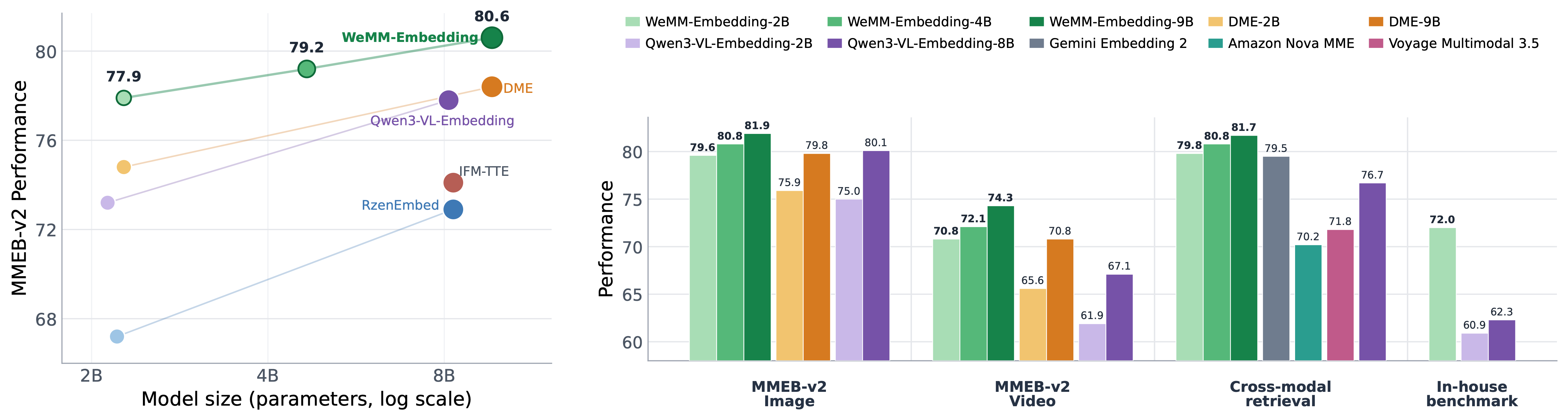
The README reports results across 78 MMEB-v2 datasets and all 190 MMEB-v3 tasks. On MMEB-v2, the 2B, 4B, and 9B variants report average scores of 77.9, 79.2, and 80.6 respectively. On MMEB-v3, their reported overall scores are 56.0, 58.2, and 59.5. Metrics vary by task group: image and video tasks use Hit@1, visual-document and text tasks use NDCG@5, and agent, MCMR, and audio tasks use Hit@1.
Benchmark scores should be interpreted with the documented task coverage in mind. MMEB-v3 assigns a score of zero to unsupported tasks, including audio for WeMM-Embedding.
Conclusion
WeMM-Embedding provides one model family for generating normalized representations from several visual and textual input types. Start with the 2B checkpoint and a supplied inference example, select a supported Matryoshka dimension when compact vectors are useful, and move to vLLM, SGLang, or the MMEB-v3 pipeline when you need serving or evaluation. Tencent-authored repository code is released under the Apache License 2.0 unless otherwise noted.