

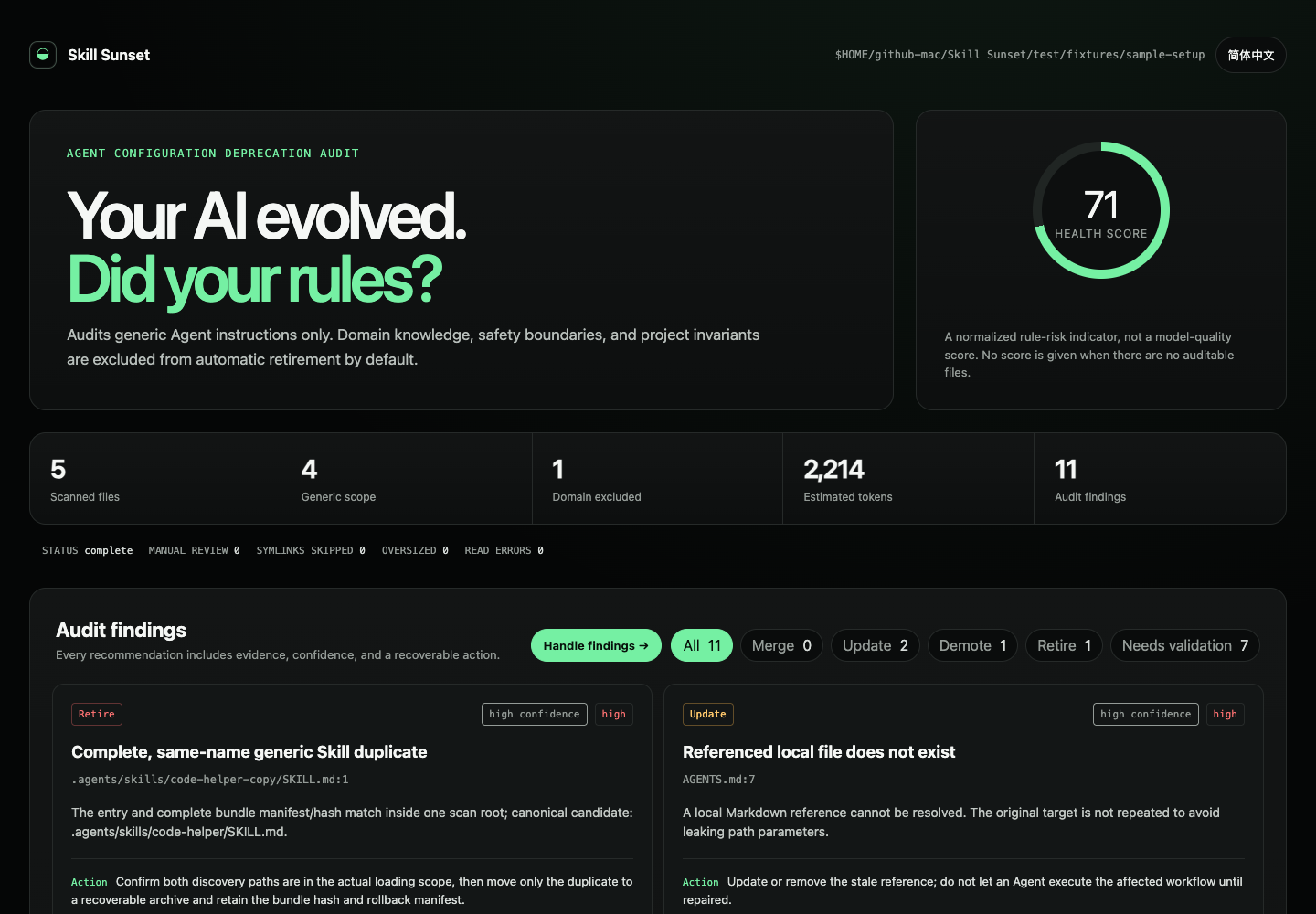
What Is Skill Sunset?
Skill Sunset is a command-line tool for auditing accumulated AI agent instructions. It scans files such as AGENTS.md, CLAUDE.md, and SKILL.md to identify stale references, duplicated Skills, oversized always-loaded content, malformed frontmatter, and other maintenance issues.
The tool combines deterministic checks with conservative review hypotheses. It does not treat every old-looking instruction as obsolete, and no finding authorizes deletion. Instead, it separates issues that can be verified statically from behavior-related rules that require testing.
Important: A
TESTverdict means “evaluate this hypothesis.” It does not mean that a newer AI model has made the instruction unnecessary.
The audit runs locally and is read-only. Its core does not call an AI API, consume model quota, or read provider credentials.
Key Features
- Static instruction checks: Finds broken local references, stale absolute paths, malformed Skill frontmatter, oversized always-loaded files, and possible plaintext credentials.
- Conservative duplicate handling: Detects same-name Skills and verifies the complete bundle before recommending recoverable retirement.
- Behavior hypotheses: Labels model-era compensation rules as
TESTrather than declaring them obsolete. - Multiple report formats: Produces bilingual HTML, Markdown, JSON, Codex and Claude handoff prompts, an evaluation plan, an experiment template, and a rollback manifest.
- Protected instruction categories: Excludes domain knowledge, safety rules, authorization gates, and project invariants from automatic retirement.
- CI support: Can return severity-based exit codes through
--fail-on. - Privacy-conscious reports: Redacts paths below the user home as
$HOME/...and represents other absolute targets as$ABSOLUTE/<name>.
Requirements and Supported Environments
Skill Sunset supports Node.js 20, 22, and 24. It is verified through GitHub Actions on Ubuntu, macOS, and Windows. Other Linux distributions are expected to work with Node.js 20 or newer, although they are not currently included in the project's CI matrix.
Preset scan targets are available for Codex at ~/.codex and Claude Code at ~/.claude. You can also audit any explicitly supplied bounded directory.
Installation and Setup
No global installation is required. Run the latest published package directly with npx:
npx skill-sunset@latest audit --codex --openThis command audits the Codex configuration and opens the generated HTML report. To audit Claude Code instead, run:
npx skill-sunset@latest audit --claude --openTo scan a project or another bounded directory, pass its path to audit:
npx skill-sunset@latest audit /path/to/setupThe primary report language defaults to --lang auto. Select a language explicitly with --lang en or --lang zh-CN. Each report bundle still includes portable English and Simplified Chinese HTML pages.
Run Your First Audit
Audit the Current Directory
Before changing instruction files, create a recoverable copy. For example, back up AGENTS.md and write the report to a dedicated directory:
cp AGENTS.md AGENTS.md.skill-sunset.bak
npx skill-sunset@latest audit . --out .skill-sunset --open
The audit is read-only. It reports potential maintenance work but does not modify or delete the scanned files.
Understand the Report Bundle
By default, a generated bundle can contain the following artifacts:
.skill-sunset/
├── index.html
├── index.en.html
├── index.zh-CN.html
├── audit-report.md
├── audit.json
├── execution-prompt-codex.md
├── execution-prompt-claude.md
├── eval-plan.md
├── experiment-template.json
└── rollback-manifest.json
Use the HTML files for interactive human review, audit-report.md for a portable text report, and audit.json for automation. The execution prompts support handoff to Codex or Claude Code, while the evaluation plan and experiment template help validate behavioral hypotheses.
The generated rollback-manifest.json remains empty until an authorized execution agent records actual changes and hashes.
Interpret the Verdicts
MERGE: Exact duplicates or conflicting same-name Skills should be reviewed for consolidation.UPDATE: A path, reference, tool assumption, or version-coupled instruction may need correction.DEMOTE: Useful detail is loaded too broadly and may belong in progressive disclosure.RETIRE: Byte-identical, complete, generic Skill bundles with the same name exist inside one scan root. Only recoverable archival is recommended.TEST: A possible obsolescence claim requires an old-versus-new behavioral evaluation before cleanup.
These verdicts are review categories, not automatic change approvals. Confirm each issue against the repository, current tools, and representative tasks before editing an instruction.
Example: From Finding to Rollback
Suppose an AGENTS.md file contains an unconditional tool requirement and a link to a missing deployment guide:
Always use Context7 for every task.
[Deployment runbook](docs/deploy.md)
If docs/deploy.md does not exist, Skill Sunset may report three distinct concerns:
UPDATE / broken-referencebecause the runbook target cannot be resolved.UPDATE / context7-assumptionbecause current tool availability needs verification.TEST / unconditional-toolingbecause “for every task” requires representative behavioral evaluation.
Apply Only Confirmed Changes
First, locate the real deployment runbook and verify the current tool list. Correct only the stale reference that you can confirm. Treat the unconditional tooling rule as a separate experiment candidate rather than deleting it based on the static report.
After editing, rerun the audit and the project's own tests:
npx skill-sunset@latest audit . --out .skill-sunset --format json
npm test
Validate a TEST Finding
For a TEST item, complete the generated .skill-sunset/experiment-template.json. Validate the manifest without executing its commands:
npx skill-sunset@latest test .skill-sunset/experiment-template.json --root .Validation alone runs no commands. Execution requires the separate --run flag:
npx skill-sunset@latest test .skill-sunset/experiment-template.json --root . --runA passing experiment proves only the acceptance criteria encoded in that manifest. It does not establish that the instruction is universally unnecessary.
Roll Back a Regression
If references, project tests, or task behavior regress, restore the saved file and audit again:
cp AGENTS.md.skill-sunset.bak AGENTS.md
npx skill-sunset@latest audit . --out .skill-sunset
Use Skill Sunset in CI
Request JSON output and set a severity threshold for automation:
npx skill-sunset@latest audit /path/to/setup --format json --fail-on highThis form is suitable for CI pipelines that need machine-readable output and a failure condition for high-severity findings. Review the JSON artifact rather than treating the exit status as authorization to change or delete instructions.
Advanced Safety and Workflow Tips
Keep Scan Roots Bounded
Pass the smallest directory that contains the instruction setup you intend to audit. Duplicate analysis and retirement recommendations are evaluated within one scan root, so a clear boundary makes the results easier to interpret.
Separate Static Fixes from Behavioral Changes
Broken links and confirmed stale paths can usually be investigated directly. Rules concerning model behavior or unconditional tool use should remain separate candidates with explicit acceptance criteria, representative tasks, and a rollback plan.
Treat Experiment Execution as Privileged
Experiment manifests are validation-only unless --run is supplied. Commands execute without a shell and receive a minimal, non-secret environment allowlist by default.
Full environment inheritance requires --inherit-env in addition to --run. Because inherited variables may include provider credentials, use this option only with trusted commands. Never place credentials in an experiment manifest.
Understand Stored Experiment Data
Dry runs and result files retain executable names, argument counts, command hashes, output sizes, and output hashes. They do not retain command arguments or output bodies. This reduces exposure, but experiment definitions and commands should still be reviewed carefully.
Do Not Treat Secret Scanning as Proof
Skill Sunset can flag possible plaintext credentials, and the project uses Gitleaks as a publication guard. However, the README explicitly notes that this is not proof that every credential format can be recognized.
Local Development
To work on the repository itself, run its tests, inspect the package contents, and generate a demonstration report from the included fixture:
npm test
npm pack --dry-run
node ./bin/skill-sunset.js audit ./test/fixtures/sample-setup --out ./demo-report --open
The project's GitHub Actions workflow runs Gitleaks and tests across its supported operating-system and Node.js matrix. Additional project information is available in the repository's changelog, contribution guide, and security policy.
Current Scope
Version 0.2.0 provides static checks, conservative duplicate retirement, localized reports, path redaction, a gated command experiment harness, CI severity exits, and adversarial output tests. Current-provider capability snapshots, session-usage adapters, and task-quality adapters are described as future evidence layers rather than existing features.
Conclusion
Skill Sunset provides a cautious workflow for maintaining AI instruction files without assuming that old rules are automatically obsolete. Start with a read-only audit, distinguish deterministic problems from behavioral hypotheses, validate changes with project tests and controlled experiments, and preserve a recoverable rollback path throughout the process.