

What Is AI Writer?
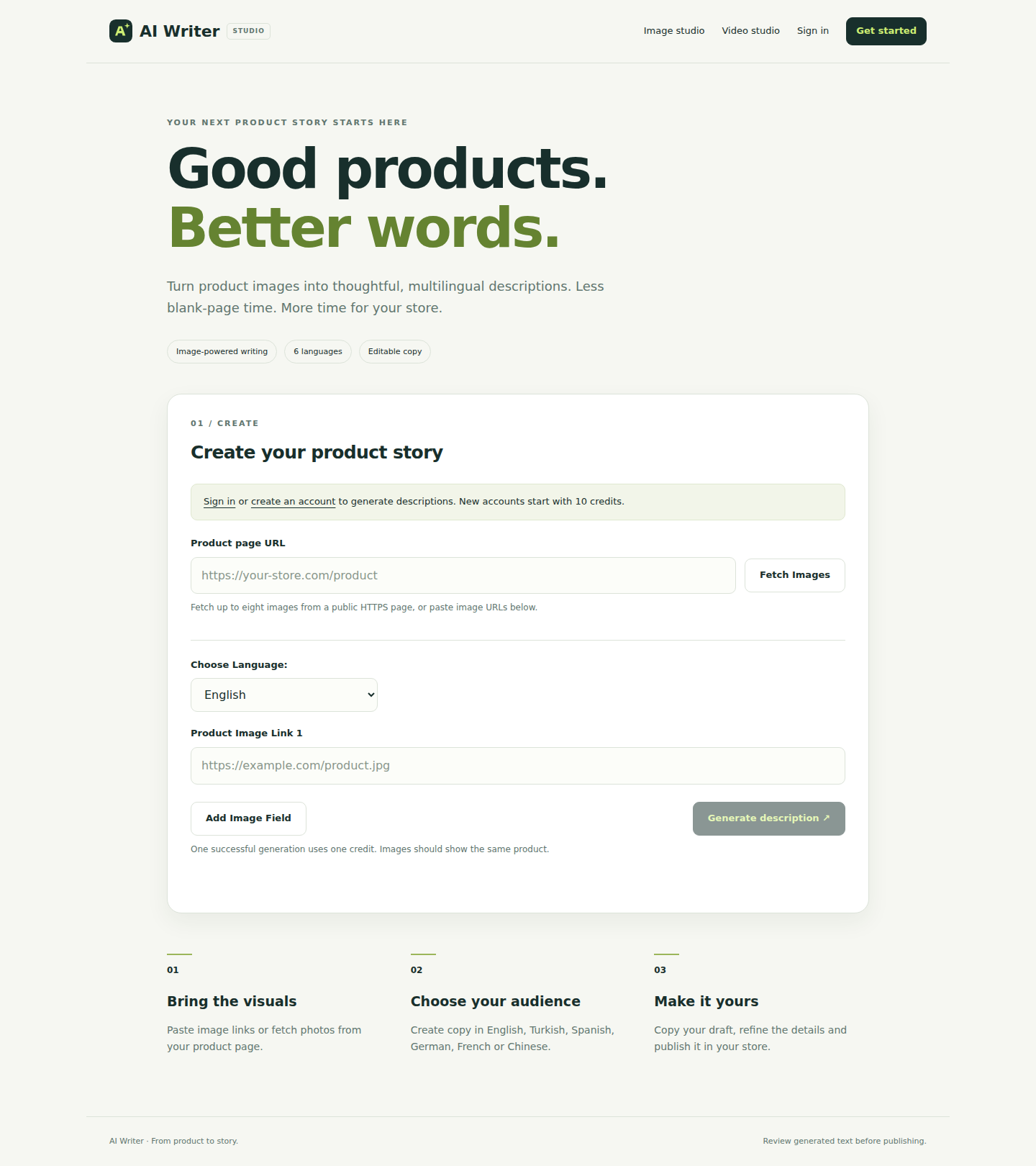
AI Writer is an open-source application that turns product photos into editable ecommerce descriptions. You can provide between one and eight public HTTPS image URLs, select an output language and use an OpenAI vision-capable Chat Completions model to create a draft.
The application supports English, Turkish, Spanish, German, French and Chinese. It also includes account authentication, browser-based editing, translation and a credit system backed by MySQL.
AI Writer creates drafts rather than verified product specifications. Review every description before publishing because images cannot reliably prove details such as measurements, fabric composition or certifications.
Key Features
- Image-based writing: Generate copy from one to eight publicly accessible HTTPS product images.
- Product-page fetching: Use Puppeteer to collect image links from a public product page.
- Six output languages: Generate content in English, Turkish, Spanish, German, French or Chinese.
- Editing and translation: Refine generated drafts in the browser, copy them and translate them with one action.
- Accounts and credits: The application uses bcrypt passwords, MySQL sessions and a balance that protects against parallel overspending.
- Failure refunds: Reserved credits are returned when supported generation requests fail.
- Experimental video input: Extract up to eight frames from a short YouTube video and use them as visual input.
Prerequisites
Before installation, prepare the following:
- Node.js 22.12 or later and npm.
- Docker with Compose, or access to an existing MySQL 8 or newer server.
- An OpenAI API key with access to a vision-capable Chat Completions model.
- Chrome installed through Puppeteer if you want to fetch images from product pages.
- FFmpeg and FFprobe available on
PATHif you want to try experimental video processing.
FFmpeg is optional when you only plan to generate descriptions from images.
Install AI Writer Automatically
The interactive setup script is the simplest installation method. Clone the repository, enter its directory, run the installer and start the application:
git clone https://github.com/csadigital/ai-writer.git
cd ai-writer
npm run setup
npm start
The installer downloads application dependencies and Chrome, asks for your OpenAI API key without echoing it, creates database and session secrets, and initializes MySQL. It preserves existing .env values and creates a local backup.
During setup, choose docker to start a persistent MySQL container automatically. Docker must already be installed and running. Choose existing to connect to your own MySQL server. With administrator credentials, the installer can create a dedicated database and application user; it does not save the administrator password.
After startup, open http://localhost:3000 in your browser.
Stop the Docker Database
To stop the local MySQL container without deleting its persistent data, run:
docker compose -f compose.mysql.yml stopChanging database credentials in .env does not reset a previously initialized Docker volume. Keep the original credentials or perform a deliberate database migration.
Install AI Writer Manually
Manual setup gives you direct control over the environment and database configuration. Clone the project, install its exact dependencies and create an environment file:
git clone https://github.com/csadigital/ai-writer.git
cd ai-writer
npm ci
cp .env.example .env
node -e "console.log(require('node:crypto').randomBytes(32).toString('hex'))"
Copy the generated value into SESSION_SECRET in .env. The secret must contain at least 32 characters. Then add your OpenAI API key and MySQL connection settings. Use fresh credentials and never commit the .env file.
Create the database and application user with a MySQL administrator, grant that user access to the database, and initialize the tables with schema.sql:
mysql -h 127.0.0.1 -u ai_writer -p ai_writer < schema.sql
npm start
Open http://localhost:3000, create an account and sign in.
Configure the Environment
The application reads its settings from environment variables. Configure at least the OpenAI credential, session secret and database connection.
OPENAI_API_KEY: Required OpenAI API credential.OPENAI_MODEL: Vision-capable Chat Completions model. The default isgpt-4.1-mini.SESSION_SECRET: Required random secret containing at least 32 characters.DB_HOSTandDB_PORT: MySQL address. Defaults are127.0.0.1and3306.DB_USERandDB_PASSWORD: Local MySQL application credentials.DB_NAME: Database name. The default isai_writer.PORT: Application HTTP port. The default is3000.NODE_ENV: Runtime mode. The default isdevelopment.TRUST_PROXY: Set whether the application trusts one HTTPS reverse proxy. The default is0.
The selected model must support image input through the Chat Completions API. See the official OpenAI image-input guide for compatible request behavior.
Generate Your First Product Description
- Create an account: Register through the local application and sign in. Every new account starts with ten credits.
- Add product photos: Supply between one and eight public HTTPS image URLs. The model must be able to access these URLs.
- Select a language: Choose English, Turkish, Spanish, German, French or Chinese.
- Generate the draft: Submit the images for visual analysis and description generation.
- Edit the result: Review the draft in the browser and correct unsupported claims, tone or product details.
- Copy the text: Copy the revised description into your ecommerce workflow.
A successful description generation costs one credit. If the generation request fails, the application refunds its reserved credit.
Example Image Workflow
For a product with multiple angles, provide a small set of direct image URLs such as:
https://example.com/products/item-front.jpg
https://example.com/products/item-side.jpg
https://example.com/products/item-detail.jpg
Use only public HTTPS addresses. Multiple views can give the model more visible context, but they do not replace verified specifications from your product catalog.
Fetch Images from a Product Page
Instead of collecting every image URL manually, AI Writer can use Puppeteer to inspect a public product page and collect image links. This workflow requires the Chrome installation managed by Puppeteer.
- Provide a public product-page URL to the page-fetching workflow.
- Let the application collect candidate image links.
- Select appropriate product photos from the fetched results.
- Generate and review the description as usual.
Only process pages and images you are authorized to use. For a public deployment, browser automation should be sandboxed and network access should be restricted.
Translate an Existing Draft
After generating or editing a description, use the translation action to produce another supported language. A successful translation costs one credit. Review the translated text for product terminology, brand voice and factual accuracy before publishing it.
Use the Experimental Video Workflow
AI Writer can extract up to eight frames from a short YouTube video and submit those frames as visual context. Local frames are sent to the model as data URLs because localhost image links would not be accessible to the API.
The video must meet all of these limits:
- It must not be a live video.
- It must be no longer than three minutes.
- It must be no larger than 50 MB.
- FFmpeg and FFprobe must be available on
PATH. - You must be authorized to process the media.
This feature depends on upstream YouTube downloader availability, and YouTube may reject automated downloads. Failed processing returns the reserved credit.
Development and Testing
Use the development command while changing the application:
npm run devRun the project checks, automated tests and production-dependency audit with:
npm run check
npm test
npm audit --omit=dev
The test suite covers authentication, session rotation, CSRF protection, URL validation, escaped output, image generation, translation, credit refunds and parallel credit spending. Local tests isolate database and AI services, so they do not use production credentials or make paid API calls. Continuous integration also creates a temporary real MySQL server to verify installer schema creation and database-user grants.
Advanced Tips
Choose Images Carefully
Use clear photos that show the product from useful angles. Keep the request within the one-to-eight-image limit. More images should add meaningful visual information rather than repeat the same view.
Keep Factual Data Outside Visual Guesswork
Do not treat generated claims about dimensions, composition or certifications as authoritative. Add verified specifications from your inventory or product information system during editing.
Protect Secrets and Database Access
Keep .env private, use dedicated database credentials and avoid committing API keys or session secrets. If you use an existing MySQL server, grant the application user access only to its intended database.
Prepare Before Public Deployment
Read the repository's deployment guide before exposing AI Writer to the internet. A public server requires HTTPS, restricted network egress and a sandboxed browser. DNS validation by itself is not a complete defense against DNS rebinding.
The built-in credits limit spending, but the project does not include billing integration, automated credit purchases, password recovery or email verification. Publishing the repository also does not create a hosted application or live demo.
Understand the Main Project Files
app.js: Express application plus account and credit routes.db.js: MySQL connection pool.youtube.js: Bounded experimental video workflow.lib/ai.js: Model requests and multilingual prompts.lib/network.js: Public HTTPS URL validation.views/: EJS pages and shared layout.public/: Styles, browser code and branding.schema.sql: Account database table.scripts/setup.js: Interactive installer.compose.mysql.yml: Optional local MySQL service.test/: Automated regression checks.
Conclusion
AI Writer provides a practical local workflow for converting product photos into multilingual ecommerce drafts. Start with the interactive installer, connect a vision-capable OpenAI model, add public HTTPS images and review every result before publishing. Its account, credit, translation and testing features provide a solid foundation, while production deployments still require careful browser isolation, network controls and HTTPS.