

What Is Oh-My-McDonald
Oh-My-McDonald is a conversational AI Skill based on McDonald's official MCP. You can use natural language to tell the AI your budget, taste preferences, and exclusions, allowing it to query real menu items. You can also compare prices across stores, view coupons and campaigns, calculate nutrition data, and, after confirmation, record the items you have eaten and the stores you have visited.
The project obtains business data through McDonald's official MCP, then uses local Python scripts for data processing, record storage, and image rendering. It requires no web interface and does not depend on the OpenAI API or any other image-generation API.
Visit the Oh-My-McDonald GitHub repository
Problems the Project Solves
- Query menu items, stores, prices, offers, and nutrition information in the same conversation.
- Select from real candidate menu items returned by MCP based on budget, taste preferences, and exclusions.
- Compare prices for the same item and specification at up to three selected stores.
- View your coupons, coupon expiration times, and published campaigns.
- Calculate energy, protein, fat, carbohydrates, sodium, and calcium for precisely matched menu items.
- Save menu collections and store-visit records after confirming that you actually consumed an item or visited a store.
- Convert query results into voxel-style PNG images that are easy to view and share.
Four Voxel Visualization Scenes
The project includes a Python voxel renderer with 43 low-poly voxel models. Images are generated using a rule of 8 pixels per grid cell.
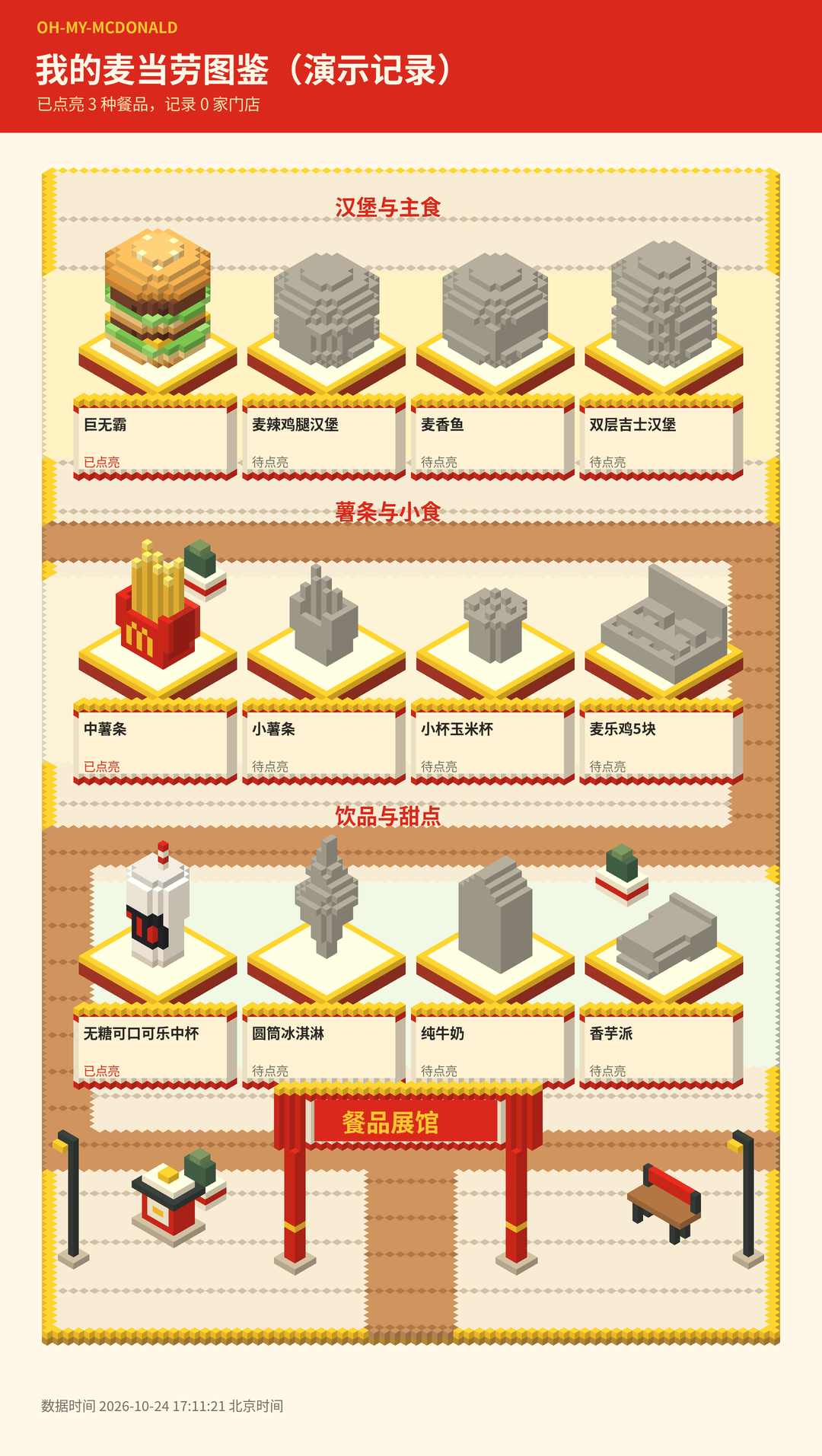
Menu Collection
The menu collection uses exhibition areas, winding paths, and menu-item displays to show exploration progress. Only items that have actually been eaten and confirmed for saving are illuminated; unconfirmed items remain gray.
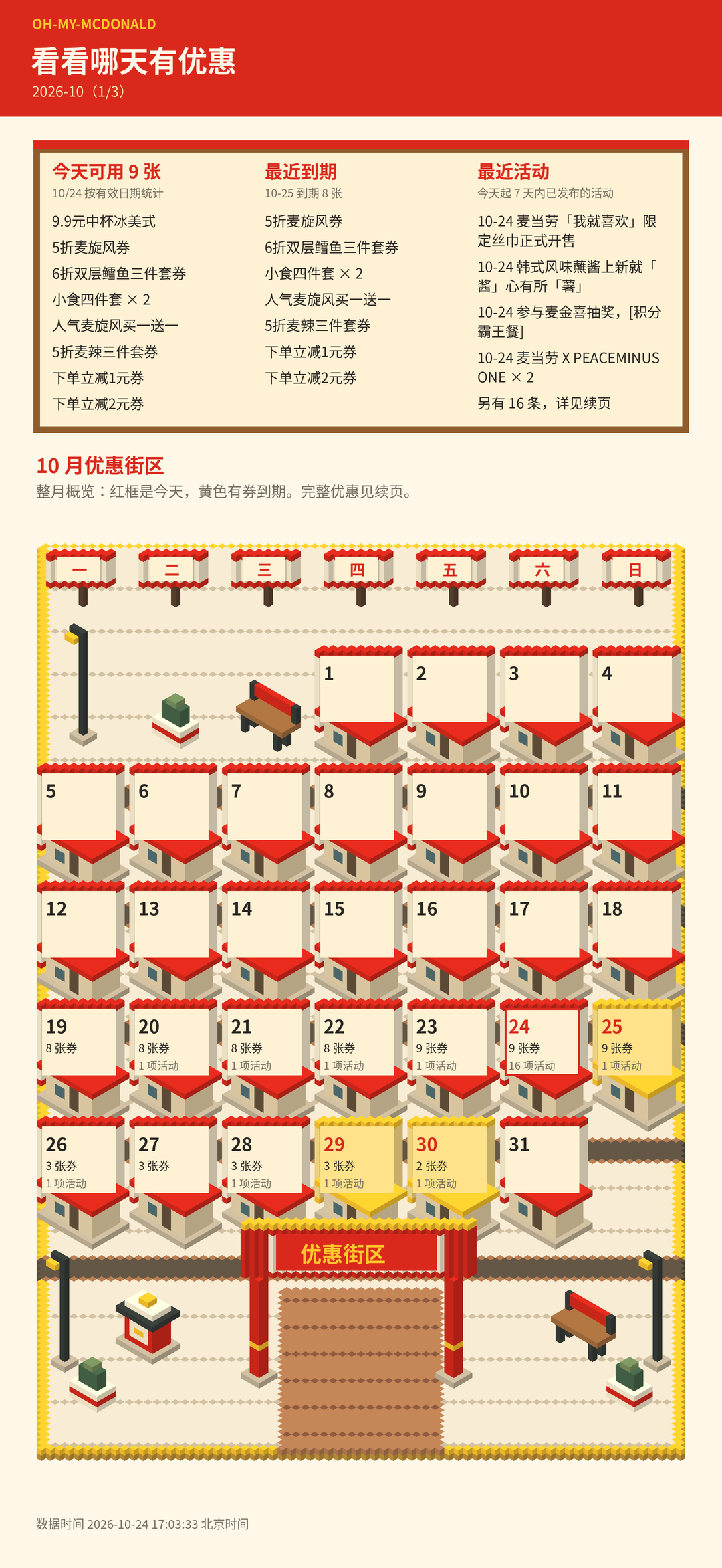
Offer Calendar
The offer calendar counts the validity dates of your coupons, highlighting coupons valid today, coupons expiring soon, and published campaigns. Full details can be placed on continuation pages to keep all the information from being crowded into a single image.
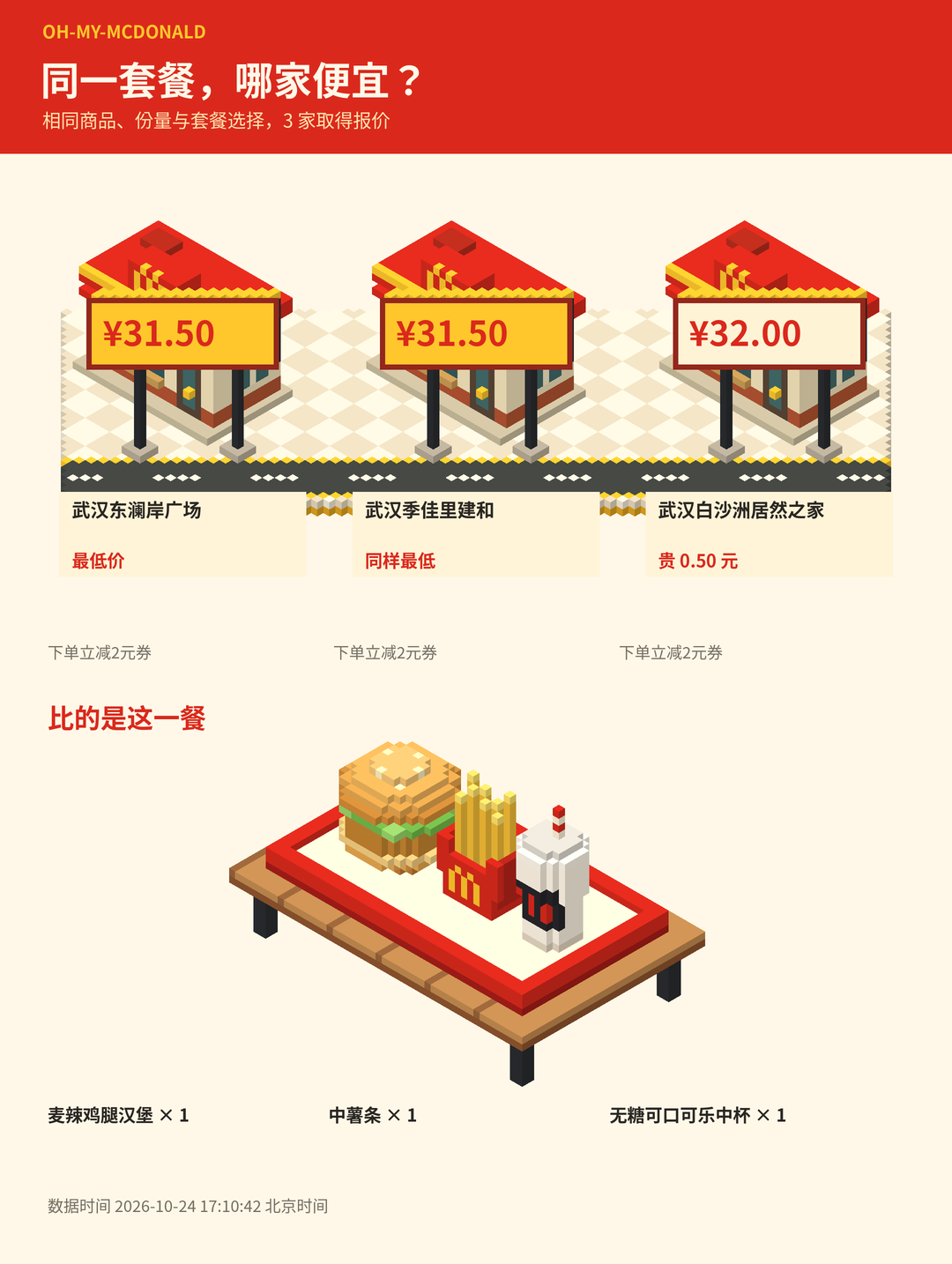
Store Price Comparison
The store price comparison scene arranges selected stores along a voxel street and displays the corresponding price at each entrance. The street is used only for data visualization and does not represent real roads or geographic relationships between stores.
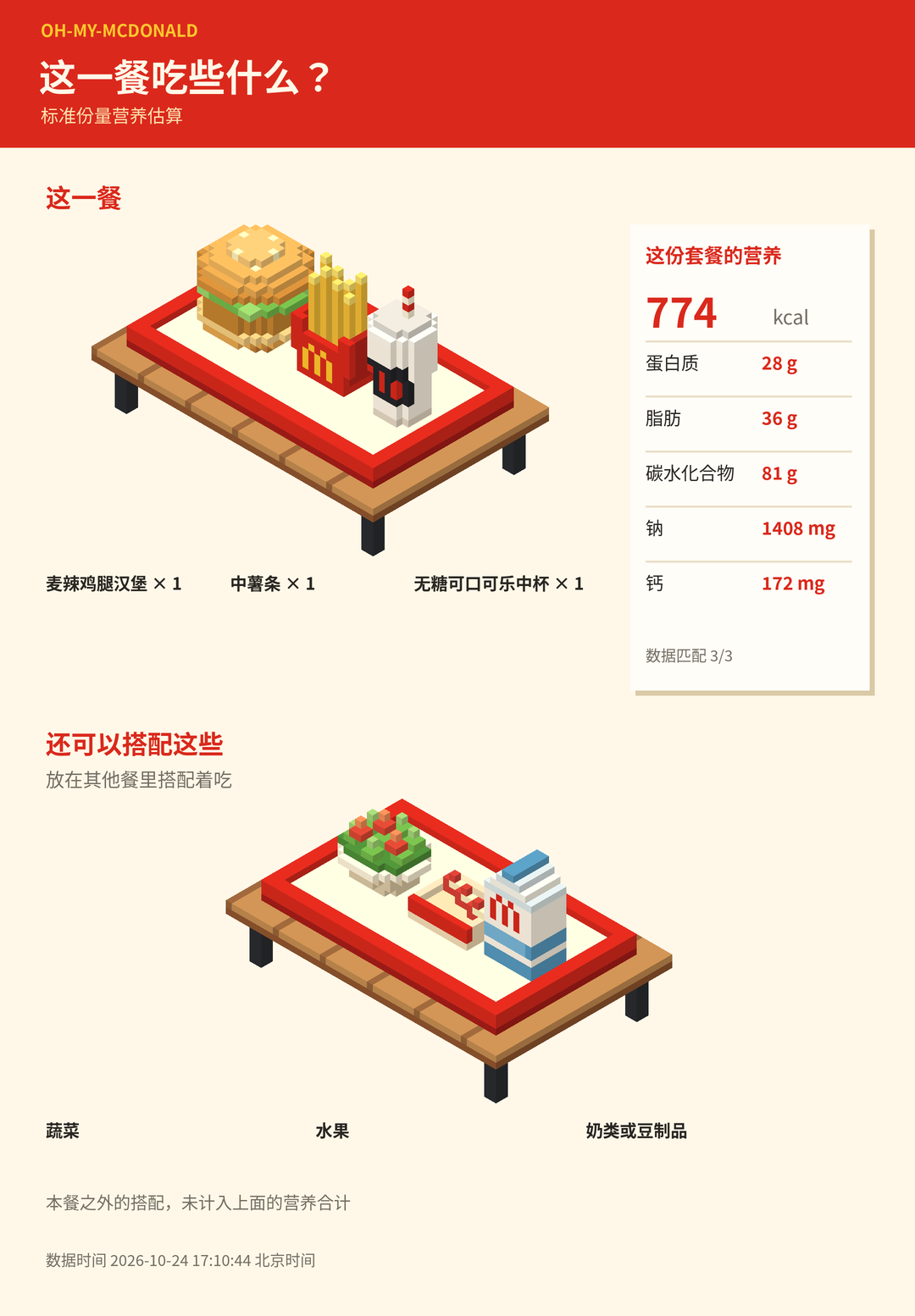
Nutrition Table
The nutrition scene places the food from the meal on the same plate and uses a receipt to display nutrition data. Vegetables, fruit, and dairy are supplementary suggestions outside the meal and are not included in the nutrition totals for the food on the plate.
Prerequisites
Before getting started, make sure the following requirements are met:
- Python 3.11 or later.
- The ability to create and use Python virtual environments normally.
- A Chinese-capable font installed; Noto Sans CJK is recommended.
- Access credentials for McDonald's official MCP if you need live queries.
The project's main dependencies are Pillow >=10,<13 and NumPy >=1.24,<3. Complete dependencies are listed in requirements.txt.
Step 1: Clone the Project
git clone https://github.com/xiaozhangup/Oh-My-McDonald.git
cd Oh-My-McDonald
Step 2: Create a Virtual Environment
Run the following on Linux or macOS:
python -m venv .venv
source .venv/bin/activate
Windows PowerShell users should run:
.venv\Scripts\Activate.ps1Step 3: Install Dependencies
python -m pip install -r requirements.txtIt is recommended to always install dependencies in an activated virtual environment to avoid conflicts with other packages in the system Python installation.
Step 4: Configure a Chinese Font
The voxel images contain Chinese menu-item names, store names, and offer titles, so an available Chinese font is required. After installing Noto Sans CJK, you can specify the font file path through OMM_FONT.
export OMM_FONT="/path/to/your/font.ttf"Replace the example path with the actual path to a font file on your computer. If Chinese text does not display correctly in the images, first check this environment variable and the font path.
Step 5: View Command Help
python oh-my-mcdonald/scripts/oh_my_mcdonald.py --helpThis command displays the subcommands and parameters provided by the local utility script. More complete documentation is available in oh-my-mcdonald/references/commands.md in the repository.
Connect to McDonald's Official MCP
Obtain an MCP Token
Visit the McDonald's MCP console and follow the instructions on the official page to obtain an MCP Token. Credentials should be stored in local environment variables or Codex configuration. Do not write a real Token into project files or commit it to the Git repository.
Configure the Token Through an Environment Variable
export MCD_MCP_TOKEN="YOUR_MCD_MCP_TOKEN"Read Credentials Through Codex Configuration
If the local configuration file already contains an mcd-mcp configuration, you can explicitly specify the file with --codex-config:
python oh-my-mcdonald/scripts/oh_my_mcdonald.py \
  --codex-config /本机/config.toml stores --city 武汉 --keyword 东澜岸
Both methods read credentials only on the local machine. For the complete integration process, refer to MCP_INTEGRATION.md in the repository root.
MCP Tools Used by the Project
query-nearby-stores: Query nearby stores.query-meals: Query menu items.query-meal-detail: Query menu-item details.query-store-coupons: Query store offers.query-my-coupons: Query the user's coupon collection.calculate-price: Calculate the price of specified items.campaign-calendar: Query the campaign calendar.list-nutrition-foods: Obtain menu-item data required for nutrition calculations.order-list: Query order records.
Basic Usage 1: Query Stores
The following command queries stores in Wuhan whose names or locations are related to “东澜岸”:
python oh-my-mcdonald/scripts/oh_my_mcdonald.py stores \
  --city 武汉 \
  --keyword 东澜岸
After obtaining store results, you can use a valid store ID to continue querying menu-item details and prices.
Basic Usage 2: Query Menu-Item Details
python oh-my-mcdonald/scripts/oh_my_mcdonald.py detail \
  --store 1960151 \
--code 9900005456--storespecifies the store ID.--codespecifies the menu-item code.
The IDs in the example are provided only to illustrate the parameter format. In actual use, use valid store IDs and menu-item codes returned by the current MCP query.
Basic Usage 3: Query a Basket Quote
Basket contents are provided through a JSON file. The project calculates the quote according to the specified store and current test plan.
python oh-my-mcdonald/scripts/oh_my_mcdonald.py quote \
  --store 1960151 \
  --basket examples/basket.json
When comparing stores, make sure you are comparing the same item and specification. The project compares at most three selected stores and does not infer prices at other stores from partial store results.
Basic Usage 4: View Voxel Models Offline
If you do not have an MCP Token yet, you can first verify the local rendering environment and view the built-in models:
python oh-my-mcdonald/scripts/oh_my_mcdonald.py \
  --out output models
Generated results are written to the output directory. This step is useful for checking whether Pillow, NumPy, and the Chinese font are configured correctly.
Use the Skill in an AI Client
The project provides oh-my-mcdonald/SKILL.md, which describes the project's capabilities, workflows, and limitations to AI clients that support Skills. The client must also support MCP integration and local command execution.
A typical workflow is as follows:
- The user makes a natural-language request involving budget, taste, stores, offers, or nutrition.
- The AI selects the appropriate MCP tool to obtain real business data.
- The AI filters the returned results based on budget and exclusions.
- The local Python script is called as needed to process the data.
- When visualization is needed, the local renderer generates a PNG.
- For consumption or store-visit records, the AI waits for the user's explicit confirmation before writing the record.
You can make requests such as:
- I have a budget of 35 yuan today, and I don't want anything spicy. What do you recommend?
- Randomly choose one item from the real menu items that meet the requirements.
- Compare the price of this meal at three nearby stores.
- Show me the coupons I can use today and the latest campaigns.
- Calculate the energy and protein in this meal.
- I confirm that I just ate this burger. Please record it.
- Generate a menu collection image of the items I have eaten.
Candidate menu items must come from MCP query results and must not be invented by the AI. A single random selection may use at most six candidate item combinations.
Advanced Tips and Usage Principles
Clarify the Store, Item, and Specification First
Prices are affected by the store, item specification, and offer plan. Before comparing prices, fix the item and specification, and have the AI clearly list the stores selected for the comparison. Only then will the results be comparable.
Handle Missing Nutrition Data Strictly
Nutrition calculations use only precisely matched menu items. If some nutrition fields are missing, identify the missing fields separately. Do not treat missing values as zero or substitute a similarly named item that cannot be confirmed.
Distinguish In-Meal Statistics from Supplementary Suggestions
The nutrition table can display supplementary suggestions such as vegetables, fruit, and dairy, but the meal's nutrition values include only the food on the plate. When interpreting the generated image, do not add supplementary items outside the meal to the total.
Require User Confirmation Before Recording
Order records can only serve as pending information and cannot directly prove that the user has eaten an item. The project should save a record and illuminate the menu collection only after the user explicitly confirms that they actually consumed the item. The same principle applies to store-visit records.
Understand the Offer Calendar Correctly
The calendar counts coupons according to the validity dates in the user's coupon collection. Whether a coupon can be used at a particular time, store, or for a particular item still depends on the specific conditions returned by MCP.
Protect Local Credentials
Prefer reading the Token through the MCD_MCP_TOKEN environment variable or local Codex configuration. Do not write credentials into scripts, example JSON files, screenshots, or version-control files.
Run Automated Tests
The project uses Python unittest. Run the following command from the repository root:
python -m unittest discover -s tests -vThe README records 51 existing tests that use synthetic data to verify business processing, output, and rendering logic. Validation details and limitations for real MCP queries are documented in docs/VALIDATION.md.
Implementation Boundaries to Know
- The project does not support automatic ordering, payment, or coupon collection.
- The project does not provide cloud synchronization or background polling.
- Price comparisons cover at most three selected stores and apply only to the same product, the same specification, and the current test plan.
- The voxel streets are illustrative scenes and do not include real roads or geographic relationships.
- Real MCP data in the preview is a snapshot from a specific date and does not represent subsequent real-time results.
- Food consumption records and restaurant exploration records must both be confirmed by the user.
Quick Project Directory Overview
oh-my-mcdonald/SKILL.md: Skill description file for AI clients.oh-my-mcdonald/scripts/oh_my_mcdonald.py: Local helper script and main command entry point.oh-my-mcdonald/references/commands.md: Detailed command reference.docs/images/: Scene preview images.docs/VALIDATION.md: Real query validation results and limitations.examples/basket.json: Shopping basket JSON example.MCP_INTEGRATION.md: MCP integration and invocation workflow.tests/: Automated tests.
Conclusion
Oh-My-McDonald combines McDonald's official MCP, natural-language interaction, and local voxel rendering to support meal selection, price comparison, and nutrition analysis while also building confirmed personal exploration records. It is recommended to complete offline model rendering and testing first, then configure the MCP token. For prices, promotions, and nutrition, always rely on the real data returned by the current MCP.
The project is open source under the MIT License. You can report issues through GitHub Issues or submit a Pull Request to help improve it.