

Project Overview
Post-Production VFX · Seedance 2.5 Skill is a prompt rewriting tool that can be called by Codex. It turns ordinary ideas or reference materials into cinematic video prompts ready for Seedance 2.5.
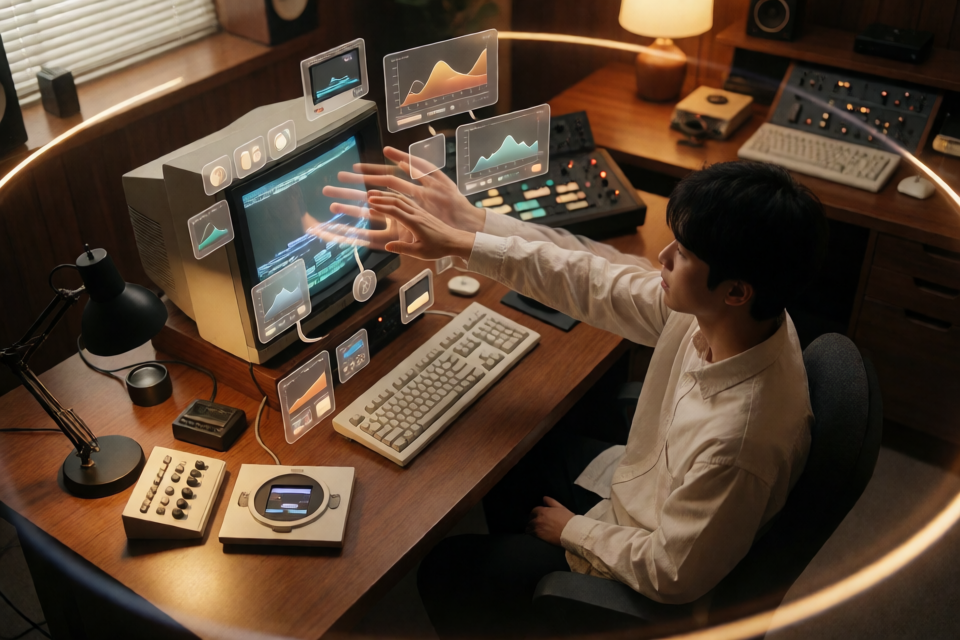
The project centers on a warm retro studio: the same real creator uses gestures, a CRT monitor, and continuous camera movement to bring color curves, parameter panels, monitor windows, and node interfaces into the scene as three-dimensional objects.
Start by watching the project's 11-second demo video to understand the default visual effects and camera rhythm.
By default, this Skill only outputs copyable video-generation prompts. It does not automatically submit video-generation tasks.
Core Capabilities
- Character consistency: Locks the character's identity, clothing, hairstyle, and facial features to reduce drift across shots.
- Spatial continuity: Keeps the wooden desk, CRT, keyboard, desk lamp, and room layout consistent.
- Continuous shot design: Supports shots such as fisheye push-ins, extreme close-up selfies, rear-side orbiting shots, high-angle views, and vertical top-down shots.
- 3D interface presentation: Turns color grading curves, parameter panels, monitors, and node windows into spatial objects with perspective, occlusion, depth of field, reflections, and parallax.
- Rhythm and quality checks: Redistributes shots according to the target duration and checks the timeline, transition logic, hand structure, and final hero frame.
- Content replacement: Replaces the character, product, room, duration, narration, and specified on-screen text.
Default Visual System
Unless a major change is requested, the Skill organizes prompts around the following visual system:
- Approximately 11 seconds, 16:9 landscape, with a realistic cinematic look.
- The primary colors are warm brown, amber, cream white, dark wood, and black, without a blue-purple cyberpunk style.
- The protagonist is the same young Asian male creator in the same 1990s-style personal studio.
- Uses a five-part structure: multi-armed creator, extreme fisheye close-up and split screen, CRT interface emergence, orbit rising into a top-down shot, and finger-controlled 3D post-production interface.
- The music leans toward fast-paced modern electronic music at approximately 120–135 BPM, with camera, device, and UI actions timed to the beat whenever possible.
Install the Skill
Step 1: Prepare the Project Directory
After obtaining the project, confirm that the directory contains at least SKILL.md, agents, assets, and references.
Step 2: Copy It to the Codex Skills Directory
Run the following commands in a terminal:
mkdir -p ~/.codex/skills
cp -R post-production-skill ~/.codex/skills/sd-2-5-retro-vfx
These commands create the Codex skills directory and copy the project as sd-2-5-retro-vfx.
Step 3: Reopen Codex
Reopen Codex after copying is complete. You can then call the Skill with $sd-2-5-retro-vfx.
Basic Usage
Rewrite an Ordinary Idea as a Complete Prompt
To use the default retro studio visual system, enter:
Use $sd-2-5-retro-vfx to rewrite my idea or reference material as a cinematic post-production VFX video prompt for a retro studio.Then provide your idea or reference material. The Skill organizes the prompt around character consistency, spatial continuity, camera movement, 3D UI, and pacing.
Replace the Character and Product
To retain the default structure while replacing the main subjects, use a more specific request:
Use $sd-2-5-retro-vfx. Keep the 11-second five-part shot structure and warm retro studio,
replace the protagonist with the character I uploaded, replace the CRT with the specified product,
and output the video-generation prompt in Chinese.
This wording clearly separates what should be retained from what should be replaced, helping prevent conflicts between the scene style, shot count, and subject requirements.
How to Write Clearer Adaptation Requirements
When calling the Skill, describe your goal in the following order:
- Specify what to retain: For example, the 11-second duration, five-part shot structure, warm retro studio, or 16:9 landscape format.
- Specify what to replace: Explain what the character, product, room, on-screen text, or narration should be replaced with.
- Specify the output language: Clearly request Chinese or English prompts.
- Explain the relationship between reference materials: If you uploaded character or product references, state which default elements they should replace.
- State what must not change: For example, require the character's appearance, product design, and room layout to remain consistent across all shots.
A structured example is:
Use $sd-2-5-retro-vfx:
Keep the 11-second duration, 16:9 format, five-part continuous shots, and warm cinematic look;
replace the default character with the character I uploaded;
replace the CRT with the specified product;
add the narration and on-screen text I provided;
keep the character, product, and room layout consistent across shots;
output the video-generation prompt in Chinese.
The character, product, narration, and on-screen text referenced here should be provided by you. The Skill will adapt the prompt accordingly.
Understanding 3D Post-Production Interfaces
This project emphasizes that the UI in the scene should not be a flat 2D HUD pasted onto a screen. Color curves, parameter panels, monitors, and node windows should have spatial relationships with the real environment.
When reviewing the generated result, confirm that the prompt includes the following visual relationships:
- Perspective: Interface angles should match the camera position and movement.
- Occlusion: The character's fingers, equipment, or desk may reasonably obscure parts of the interface.
- Depth of field: Interfaces and physical objects at different distances should show changes in focus.
- Reflections: Interface lighting can create plausible reflections on the CRT, desk, or other materials.
- Parallax: As the camera moves, foreground and background layers should shift according to their distance.
Advanced Usage Tips
Redistribute Shots According to Duration
The project defaults to approximately 11 seconds. If you change the total duration, explicitly ask the Skill to redistribute the pacing of the five shots instead of only replacing the duration number. This helps preserve the camera movement, transitions, and final hero frame.
Protect Character and Spatial Continuity
List the character's identity, clothing, hairstyle, facial features, positions of key props, and room layout as constraints that must not change randomly. These restrictions are especially useful when switching between fisheye, orbiting, and top-down shots, helping maintain the credibility of a single scene.
Handle the Multi-Arm Effect Carefully
The multi-arm effect at the opening is only a brief compositing effect. The prompt must also state that the character's body remains anatomically normal, preventing a temporary visual effect from becoming persistent bodily distortion.
Sync Actions to the Music
The default music direction is fast-paced modern electronic music at approximately 120–135 BPM. You can ask for camera cuts, device actions, and UI emergence to align with the beat whenever possible, strengthening the short film's rhythm.
Use the Project's Reference Files
For deeper adjustments, review the following files:
- Complete Chinese master prompt: Understand the full structure of the Chinese prompt.
- English master prompt: Get the English master prompt.
- Adaptation examples: Reference ways to replace characters, products, narration, and other elements.
SKILL.md: Contains the Skill entry point and generation rules.agents/openai.yaml: Contains Codex display information and default invocation copy.
Pre- and Post-Generation Checklist
After receiving the prompt, use the following checklist for a quick review:
- Are the total duration and shot timeline reasonable?
- Do the transitions have clear action or spatial logic?
- Are the character's identity, clothing, hairstyle, and facial features consistent?
- Are the wooden desk, CRT, keyboard, desk lamp, and room layout continuous?
- Is the hand structure normal, with the multi-arm effect appearing only briefly?
- Does the UI have perspective, occlusion, depth of field, reflections, and parallax rather than appearing as a 2D overlay?
- Does the ending form a clear hero frame?
- Have platform watermarks, logos, unrelated subtitles, and permanent bodily distortion been excluded?
Project File Structure
post-production-skill/
├── SKILL.md
├── README.md
├── agents/
│   └── openai.yaml
├── assets/
│   └── post-production-vfx-demo.mp4
└── references/
    ├── master-prompt.md
    ├── master-prompt-zh.md
    └── adaptation-examples.md
SKILL.md defines the entry point and generation rules, references stores the Chinese and English master prompts and adaptation examples, and assets contains the demo video.
Summary
sd-2-5-retro-vfx is suited to turning brief ideas into more complete Seedance 2.5 video prompts. After installation, call the corresponding Skill in Codex and clearly specify the retained elements, replacements, duration, and output language to generate copyable prompts centered on a retro studio, continuous shots, and 3D post-production interfaces.