

What Is the AIBuildAI LLM-Post-Train Agent?
The AIBuildAI LLM-Post-Train Agent is a recursive self-improving agent for automated, customized post-training of large language models. Instead of applying one fixed training recipe, it studies a task, designs candidate post-training algorithms, collects and curates training data, writes code, runs experiments, evaluates the results, and iteratively improves the model.
The repository contains the source code for running, reading, and modifying the agent. It is designed for organizations and researchers who need post-training strategies tailored to proprietary data, model families, evaluation procedures, and deployment goals.
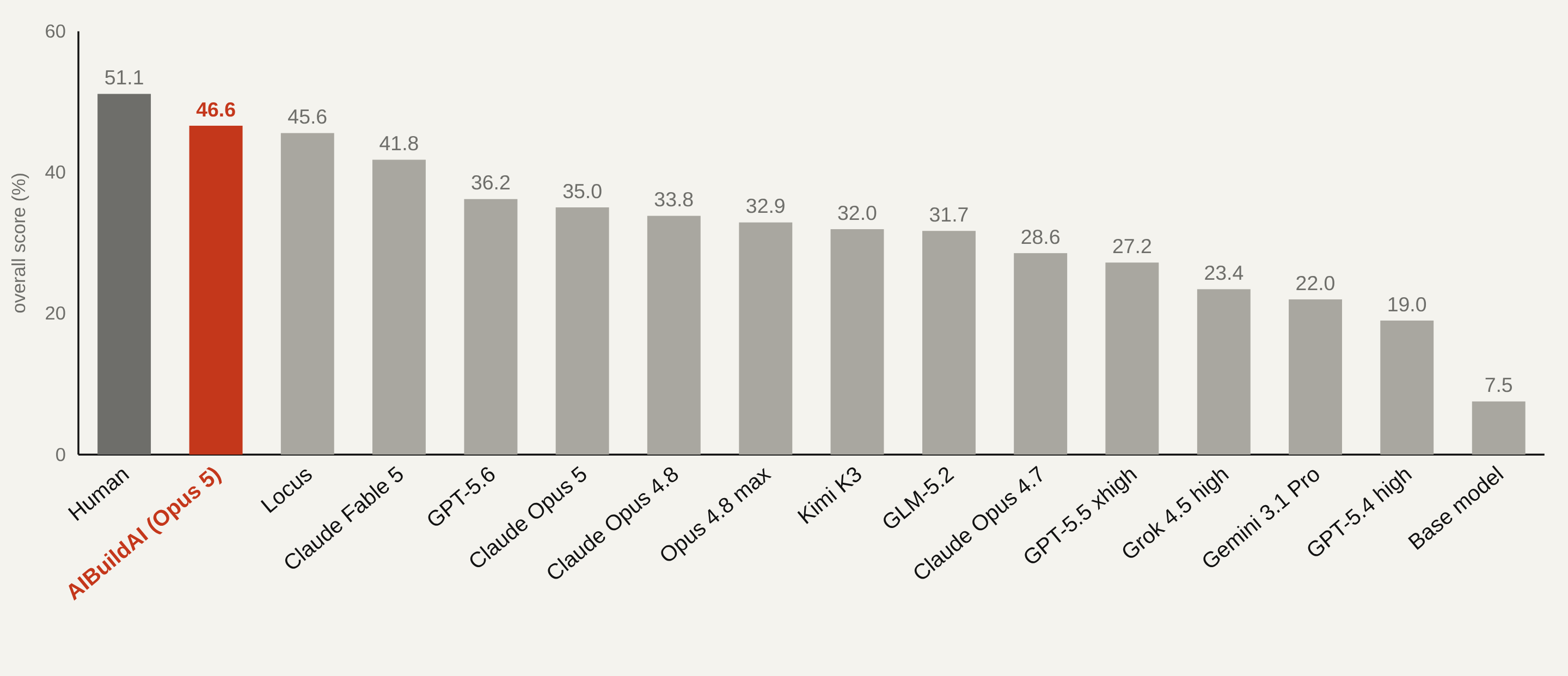
On PostTrainBench, the project reports an overall score of 46.6%, ranking first among the evaluated models and agents and behind only the human expert baseline of 51.1%.
How the Agent Works
A run begins with a task and a scoring procedure. The system prepares a frozen task description, establishes a baseline, launches experiments, grades each completed candidate using the same score program, and turns the best result into a deliverable.
Two capabilities distinguish the system from a general coding agent:
- Knowledge system: Agents can query the AIBuildAI Knowledge Base over MCP. Its curated skill documents cover post-training workflows, methods, datasets, and frameworks.
- Meta search: A meta agent can investigate the task and write a task-specific search program rather than executing a predetermined experiment topology.
Every run also receives a live web workspace, a durable execution graph, journaled work units, sandboxed subprocesses, and resource controls. Run events are stored in a private PostgreSQL cluster under ~/.aibuildai/postgresql, supporting resumable and replayable execution.
Key Features
- Automated design and execution of LLM post-training experiments.
- Task-specific search strategies, including meta search and several fixed search methods.
- Knowledge retrieval for methods, datasets, frameworks, and workflow decisions.
- Typed agents, deterministic programs, and nested searches.
- Task-defined grading and consistent candidate ranking.
- Live browser-based monitoring through a local workspace service.
- Bubblewrap sandboxes and cgroup-v2 limits for memory and processes.
- Locally generated memory derived from previous runs.
- Optional paper drafting and PDF compilation after aggregation.
- Support for Claude and other models exposed through Anthropic-compatible endpoints.
System Requirements
Before installing the project, confirm that the host meets these requirements:
- Linux on x86_64 with a systemd user session.
- Python 3.11 through 3.13.
- A C toolchain including
gccandmake. - zlib and readline development headers.
bwrap, provided by thebubblewrappackage, with unprivileged user namespaces enabled.- Network access to GitHub releases and
ftp.postgresql.org. - A Claude Code login, an Anthropic API key, or another model available through an Anthropic-compatible endpoint.
- A CUDA GPU is recommended, although the agents detect and use the available hardware.
The first run builds a private PostgreSQL installation from the official source tarball. It also downloads pinned copies of tools such as ruff, tectonic, micromamba, caddy, and PostgreSQL into ~/.cache/aibuildai. The system uses these owned copies instead of equivalent host installations.
You do not need conda. The agent creates Program environments with its owned micromamba installation.
Check cgroup-v2 delegation
A run is bounded by one cgroup-v2 tree. The systemd user manager must delegate at least the memory and pids controllers. Check the current configuration with:
U=$(id -u)
cat /sys/fs/cgroup/user.slice/user-$U.slice/user@$U.service/cgroup.subtree_control
The output should include memory and pids. If either is absent, an administrator must add Delegate=pids memory cpu to a drop-in under /etc/systemd/system/user@$U.service.d/, reload systemd, and have you log in again.
Install the Agent
1. Install operating-system packages
On Debian or Ubuntu, install the compiler, required headers, and bubblewrap:
sudo apt-get install build-essential zlib1g-dev libreadline-dev bubblewrap2. Clone the repository
git clone https://github.com/aibuildai-inc/aibuildai-llm-posttrain-agent.git
cd aibuildai-llm-posttrain-agent
3. Create a Python virtual environment
python -m venv .venv
source .venv/bin/activate
4. Install the pinned dependencies
pip install -r requirements.lock
pip install -e . --no-deps
The editable installation provides the aibuildai command. Use the lock file because the pinned version of claude-agent-sdk is the version verified for this codebase.
If you plan to modify the repository and run its quality gate, also install the development dependencies:
pip install -r requirements-dev.lock5. Optionally prepare owned tools
The tools can be downloaded and built during the first run. To prepare them in advance, execute:
aibuildai setupConfigure Model Access
Option 1: Use a Claude Code login
claude auth loginOption 2: Provide an API key
export AIBUILDAI_API_KEY=sk-ant-...If AIBUILDAI_API_KEY is not set, the application checks ANTHROPIC_AUTH_TOKEN and then ANTHROPIC_API_KEY.
Use another Anthropic-compatible endpoint
Set AIBUILDAI_BASE_URL to the endpoint and place its key in AIBUILDAI_API_KEY:
export AIBUILDAI_BASE_URL=https://openrouter.ai/api
export AIBUILDAI_API_KEY=your-key
export AIBUILDAI_SMALL_FAST_MODEL=provider/model-id
Bare model identifiers beginning with deepseek- automatically target DeepSeek's Anthropic-compatible endpoint. OpenRouter model identifiers include a provider prefix and require both AIBUILDAI_BASE_URL and AIBUILDAI_SMALL_FAST_MODEL.
If an endpoint uses different names for Claude model tiers, map them with AIBUILDAI_HAIKU_MODEL, AIBUILDAI_SONNET_MODEL, and AIBUILDAI_OPUS_MODEL. Use AIBUILDAI_SUBAGENT_MODEL when sub-agents should run a model different from their role's configured model.
Optional service settings
AIBUILDAI_KB_BASE_URLselects the knowledge-base MCP service. By default, the client uses the project's public fixed snapshot.AIBUILDAI_KB_TOKENsupplies a bearer token if the knowledge service requires authentication.AIBUILDAI_WEB_PORTselects the local workspace service port.AIBUILDAI_WEB_NAMEnames a second workspace service on the same host and requires an explicit web port.
Create and Launch a Basic Run
Every run is described by one YAML file. Generate a documented starter configuration with:
aibuildai config > task.yamlThe generated file includes every configuration field, its default value, and its documentation. The required top-level sections are run, llm, work_units, search, and resources; the starter fills them in.
Launch the run with:
aibuildai run task.yamlThe command prints a workspace URL similar to http://127.0.0.1:<port>/run/<run-id>. Open it to follow the run live. A browser is optional, and execution continues normally without one.
Run the GSM8K Example
The included example post-trains Qwen/Qwen3-1.7B-Base to solve grade-school mathematics word problems from GSM8K. According to the repository, this example takes approximately two hours on one GPU.
1. Build the task folder
bash examples/gsm8k-qwen3-1.7b-base/setup.sh ~/gsm8k-exampleThe setup downloads roughly 4 GB, including the base model weights and both GSM8K splits. It writes the task statement and frozen grader into ~/gsm8k-example/task/ and warms the pip cache for packages installed into the run's own Program environment.
The resulting task folder contains the base weights that the agent may tune, 7,473 training problems, the grader, and the 1,319-problem test split read by that grader.
2. Start post-training
aibuildai run ~/gsm8k-example/task.yamlThe example uses meta search, a 90-minute exploration wall clock, and corresponding per-agent budgets. The README recommends raising those budgets for a serious run.
3. Understand the grading contract
The grader is the complete definition of success. It prompts the model with a question followed by an answer prefix, decodes greedily, and extracts the number after the final ####. The README reports that the base model scores 0.105 on the first 200 test problems because the untuned base model does not initially follow the required answer format.
4. Evaluate the final model
The deliverable is a merged model directory. Replace <run-home> with the generated run directory name and evaluate all test examples using the run's Program environment:
H=~/gsm8k-example/playground/gsm8k-qwen3-1.7b-base/<run-home>
$H/program-environment/env/bin/python ~/gsm8k-example/task/grade/evaluate.py --model-path $H/deliverable/final_model --limit -1
Use the Agent with Your Own Task
- Copy
examples/gsm8k-qwen3-1.7b-base.yaml, or generate a complete starter withaibuildai config. - Create a task folder containing everything the run may use.
- Include a readable task description, such as a README, task statement, or paper, along with every required data file.
- Set
run.data_rootto that folder. - Review the model, search, budget, work-unit, and resource settings.
- Launch the YAML file with
aibuildai run.
During setup, the system reads the entire task folder, freezes the statement as the run's README, and constructs the run's score program from it. The task folder should therefore be complete and should clearly define the expected deliverable and evaluation method.
The configuration also supports run.setup_from_scratch and run.task_prompt. These settings allow Setup to obtain the data and evaluation from a task statement instead of starting with a prepared task folder.
Important Configuration Choices
Model selection
llm.default.model selects the base model used by the agents. Reasoning can be adjusted with settings such as effort and max_thinking_tokens. Use llm.by_role to pin models to individual roles, or llm.auto to let the router choose by role.
Search method
search.kind controls the experiment strategy. Supported values described by the README include:
meta, where a meta agent writes a task-specific search program.nb_tree, a whole-experiment tree search.nb.tree, the default in the general starter.linear.parallel.
The contents of search.input depend on the selected strategy. Meta search accepts the report option, while fixed strategies use their own parameters and may include parallel and early_stopping.
Time and spending limits
run.budget.wall_clock_minutes defaults to 1,440 minutes. When the limit is reached, no new exploration begins, but in-flight work and delivery are allowed to finish. run.budget.cost_usd provides an optional soft run-level spending limit.
Each entry under work_units has its own budget. A work unit can use fixed minutes, depth-scaled time, or an expected duration with slack.
Resource limits
Use resources.work_unit.cpu_max_cores and resources.work_unit.memory_max_gb to impose hard CPU and memory limits on each work unit. Each unit runs in a bubblewrap sandbox with cgroup limits on memory and processes, while the task folder is mounted read-only.
Advanced Tips
Enable knowledge retrieval
Add the kb MCP configuration when you want agents to consult the AIBuildAI Knowledge Base. The client exposes tools for searching skills, loading a skill, and reading references. The corpus includes workflow guidance, methodology cards, dataset cards, and framework cards.
The default public service is a fixed corpus snapshot. To host your own version, deploy the open-source knowledge-base repository and point AIBUILDAI_KB_BASE_URL to it.
Choose meta search for task-specific topology
Fixed tree search cannot naturally express every workflow, such as running a sweep before training, holding a tournament afterward, or combining several models. With search.kind: meta, a meta agent investigates the task, can run pilots, consults bundled design skills and the knowledge base, and writes a Python search package.
The generated package is composed from three primitives:
- Agent: An LLM session with tools, policies, and typed output.
- Program: A deterministic computation in a managed worker with dedicated resource limits.
- Search: An orchestrator that can spawn and coordinate Agents, Programs, and nested Searches using typed inputs and outputs.
The package is verified and can optionally be reviewed with a LaTeX design report. It then runs as a child search in the same journaled run. Regardless of topology, the run's value remains the best score earned by any node.
Build reusable local memory
After accumulating runs for a task, consolidate their lessons into an editable local memory document:
aibuildai memorize task.yamlSet memory.enable to inject that local memory into every agent. Knowledge learned from your runs stays on your machine and is not added to the remote knowledge base.
Control external tools
Use disallowed_tools to prevent every role from using selected built-in tools. For example, a task can prohibit WebSearch and WebFetch when evaluation rules require an offline workflow.
Add MCP integrations
The mcps configuration can enable the knowledge base, Kaggle competition submission, or custom MCP servers. Kaggle integration supports a maximum-submission setting under submission.max_submissions.
Generate a paper
Enable writer.enable to draft a paper after aggregation, or run the paper command on a completed run directory:
aibuildai write-paper <run-dir>The command drafts a paper from the finished run and compiles it to PDF.
Validate source changes
This project line does not include a test suite. Its repository gate is:
./check.shThe gate runs pyright, ruff, semgrep, and a lock-file drift check. Install requirements-dev.lock before using it.
Understand the Run Outputs
Each run creates a home directory under the configured playground root:
{playground_root}/<task-name>/<timestamp>_<run-id>/
  run_config.json
  public/
  private/
  deliverable/
  workspace/
  program-environment/
resource_samples.jsonlrun_config.jsoncontains the final configuration and run ID used for resumption.public/contains the frozen README and data prepared by Setup for candidates.private/contains the score program, metric manifest, baseline attempt, and winner record.deliverable/contains the runnable model package or another task-defined result.workspace/contains attempts, artifacts, scratch data, and per-search working directories.program-environment/contains the run's isolated Program environment.resource_samples.jsonlrecords host resource measurements collected during execution.
Conclusion
AIBuildAI LLM-Post-Train Agent provides an end-to-end system for designing, running, grading, and refining model post-training workflows. Start with the supplied GSM8K example to verify the installation and learn the run structure. Then define a clear task folder and grader, select an appropriate search strategy, set realistic budgets and resource limits, and use the live workspace to follow the resulting experiments.
For deeper architectural details, consult the repository's architecture documentation. The project is distributed under the Apache License 2.0.