

Project Overview
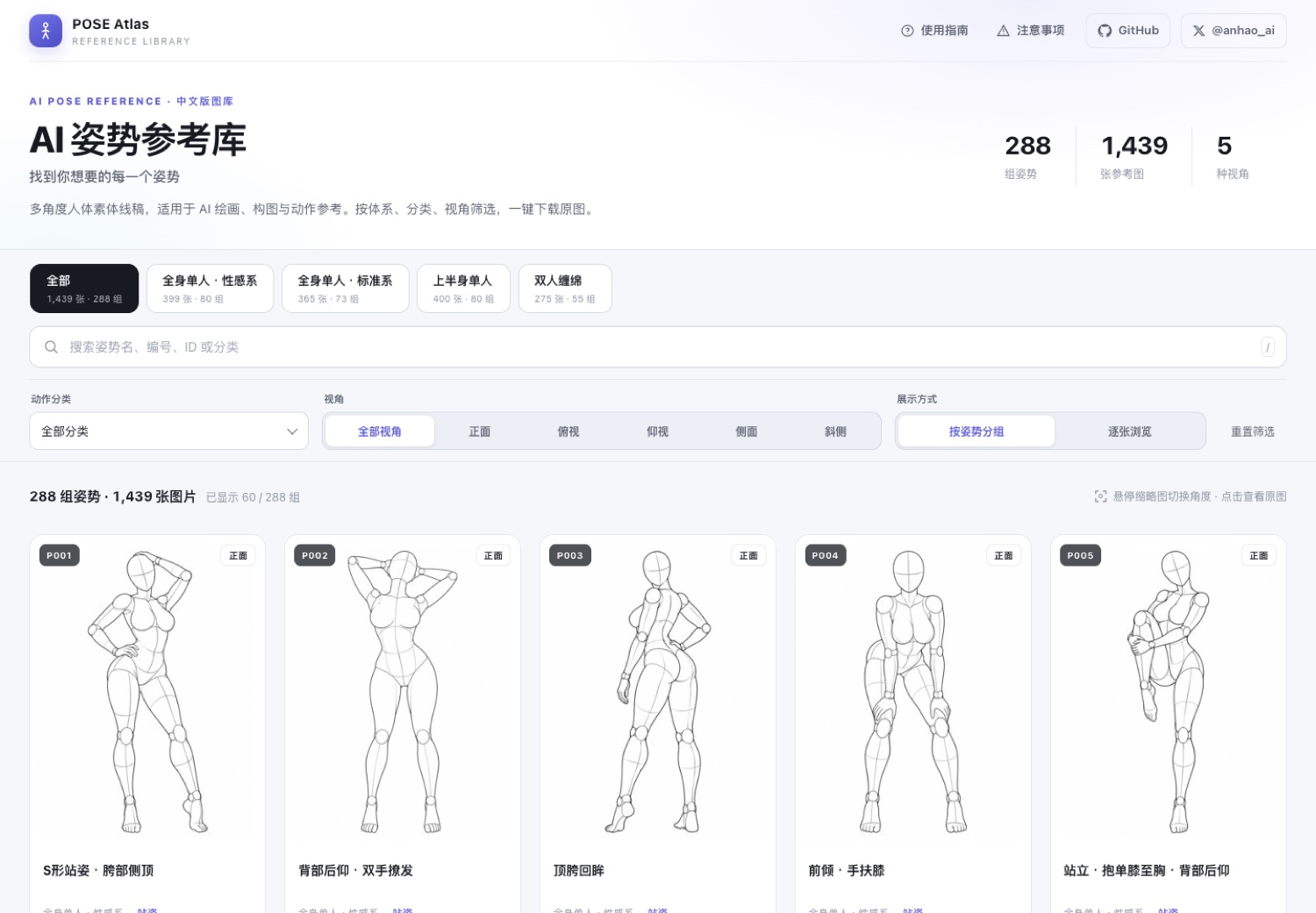
AI Pose Gallery Chinese Edition is a static human pose reference gallery for AI art, 3D creation, and photography. The project includes 288 groups and 1,439 images of multi-angle reference material, with the original site's Japanese metadata fully translated into Chinese.
The repository also stores 1,439 JPG thumbnails and 1,439 PNG originals, for a total of 2,878 image files. The frontend is a zero-dependency single-page application that requires no framework installation or build tools.
Visit the online demo to see it in action, or get the complete project from the GitHub repository.
The gallery contains adult-oriented pose references, and some category names involve sexual activity terminology. The content is intended only for artistic creation, movement reference, and frontend technology learning. Minors must not access it.
Key Features
Search and Combined Filters
The gallery organizes content into four systems, and the page displays the image and pose-group count for each system. The search box supports pose names, numbers, IDs, and category keywords. Press / to focus the search box quickly.
- Tabs for four pose systems
- 26 action categories
- Five viewpoints: front, three-quarter, side, top, and bottom
- Combined system, category, and viewpoint filters
- One-click filter reset
Grouped and Individual Browsing
The page provides grouped by pose and individual image modes. Group cards display multiple angle thumbnails for the same pose. Hover over or click a thumbnail to switch the card's main image.
After opening the lightbox, the page first displays the 300×400 thumbnail, then loads the 900×1200 PNG original. The lightbox supports PNG downloads, record ID copying, and opening the image in a new window.
←and→: switch angles for the current pose↑and↓: switch posesEsc: close the lightbox- Swipe left or right on mobile: switch images
Responsive Layout
The desktop version uses a multi-column grid, while the mobile version uses a two-column grid. The filter panel on mobile devices can be expanded or collapsed for easier browsing on smaller screens.
Data Scale and Structure
The 1,439 records are distributed across four systems:
- Full-body single person · Standard: 365 records
- Full-body single person · Sexy: 399 records
- Upper-body single person: 400 records
- Couples embracing: 275 records
The frontend reads data/pose-zh.json. Each record contains a unique ID, system, pose number, category, pose name, angle, thumbnail path, original-image path, and search string.
{
  "id": "full_sexy_P001_front",
  "体系": "全身单人・性感系",
  "姿势编号": "P001",
  "分类": "站姿",
  "姿势名称": "S形站姿・胯部侧顶",
  "角度": "正面",
  "缩略图": "thumbs/…jpg",
  "原图": "img/…png",
  "检索": "用于前端模糊搜索的拼接串"
}
data/pose.json retains the original Japanese fields and data for translation review or data restoration. data/translations.csv provides 323 Japanese-Chinese comparison records.
Getting the Project
Prepare Git and Python 3, then clone the repository and enter the project directory:
git clone https://github.com/anhao/ai-pose-gallery-zh.git
cd ai-pose-gallery-zh
The project has no npm or Python dependency installation steps. The core page is index.html, and the data and images are already stored in the corresponding repository directories.
Important Directories
index.html: zero-dependency single-page gallerydata/: Japanese data, Chinese data, categories, and translation comparison tablesthumbs/: 1,439 300×400 JPG thumbnailsimg/: 1,439 900×1200 PNG originalsscripts/: download, translation, validation, and release scripts_headers: Cloudflare Pages caching policyrobots.txtandsitemap.xml: search engine configuration
Run the Gallery Locally
The page loads JSON data through fetch, so you cannot open index.html by double-clicking it. When using the local file protocol directly, the browser blocks requests because of its security policy.
Start a Python HTTP server in the repository root:
python3 -m http.server 8000Then open:
http://127.0.0.1:8000After the page loads, follow these steps to learn the basic workflow:
- Select a pose system from the top tabs.
- Select an action category and one or more viewpoints.
- Enter a pose name, number, ID, or category keyword in the search box.
- Switch between grouped and individual modes.
- Click a card to open the lightbox, then navigate with the keyboard or touch gestures.
- Download the PNG original or copy the record ID in the lightbox.
Maintain Images and Translation Data
Redownload Images
The repository provides a concurrent download script. Existing files are skipped automatically, so the command can be run repeatedly and supports resumable downloads and automatic retries.
python3 scripts/download.pyThe default concurrency is 48. To adjust it, set WORKERS:
WORKERS=64 python3 scripts/download.pyUpdate the Chinese Translation
The translation dictionary is located at scripts/i18n.py. After modifying the translations, run the application script to regenerate the Chinese data:
python3 scripts/apply_translation.pyThe generated result is used by the frontend. After updating, check that the systems, categories, pose names, angles, and search fields in data/pose-zh.json meet expectations.
Verify Image Integrity
The verification script checks the existence, file size, and image headers of all 2,878 files:
python3 scripts/verify.pyRun verification after redownloading assets, moving directories, or before a production deployment to reduce the risk of missing or corrupted images online.
Deploy to Cloudflare Pages
This project is a pure static site. Connecting it to GitHub and letting Cloudflare Pages publish it automatically is recommended.
- Sign in to the Cloudflare Dashboard.
- Go to Workers & Pages, then select Create, Pages, and Connect to Git.
- Select the project repository and set the production branch to
main. - Set Framework preset to
None. - Set Build command to
bash scripts/build.sh. - Set Build output directory to
dist. - Save and deploy. The
https://<project>.pages.devaddress is usually available after about 2 to 5 minutes.
After that, every git push to the production branch automatically rebuilds and publishes the site through Cloudflare Pages.
Do not set the Build output directory directly to the repository root. The
.gitdirectory in the root may contain hundreds of megabytes of data, and Cloudflare may trigger its 25 MiB single-file limit while scanning pack files.scripts/build.shcopies only the files required by the site intodist.
The repository's largest single file is approximately 917 KB, and the publish directory contains approximately 2,883 files, meeting Cloudflare Pages' limits of no more than 25 MiB per file and 20,000 files per deployment.
Deploy from the Command Line
If you do not connect GitHub, you can generate the publish directory first and upload it with Wrangler:
bash scripts/build.sh
npx wrangler pages deploy dist --project-name ai-pose-gallery-zh
_headers configures one-year immutable caching for img/ and thumbs/, preventing browsers from repeatedly requesting unchanged images.
Advanced Configuration Recommendations
Change the Production Domain
Absolute URLs in the repository point to https://ai-pose-gallery.anhao.app/ by default. If you deploy a fork to your own domain, update the following locations:
- The canonical URL in
index.html - Open Graph
og:*URLs - Twitter Card
twitter:*settings - The site URL in the JSON-LD structured data
- The sitemap URL in
robots.txt - The homepage URL in
sitemap.xml
Updating these URLs consistently helps prevent search engines from treating the custom domain and the pages.dev domain as duplicate pages.
Preserve SEO Semantics
The page already includes dedicated description, keywords, author, Open Graph, and Twitter Card settings, as well as WebSite and ImageGallery JSON-LD data. When modifying the frontend, continue to maintain a single main heading, clear section headings, and image alt text containing the pose name and viewpoint.
Thumbnails use lazy loading, and the lightbox displays the small image before requesting the original. When extending page functionality, it is recommended to preserve this loading order to prevent simultaneous requests for 900×1200 PNGs from affecting initial-load performance.
Keep Fields Consistent When Editing Data
Search, filtering, grouping, and angle switching all depend on fields in pose-zh.json. When editing records manually, pay particular attention to the uniqueness of id, relative image paths, system names, categories, pose numbers, and angle names, then run the verification script after making changes.
Copyright and Usage Boundaries
Copyright for the images and original data belongs to the original author, ギア. The repository maintainer makes no claim to these assets, and the project does not constitute a license for commercial use of the original works.
The code in scripts/ and index.html is licensed under the MIT License, but that license does not cover the images and original data in img/, thumbs/, and data/. Before redistributing or using the assets, confirm that the intended use complies with applicable copyright requirements.
Summary
The Chinese version of AI Pose Gallery integrates fully localized data, local image assets, and a responsive frontend into a zero-dependency static project. You can preview it locally with a Python HTTP server, use the built-in scripts to redownload assets, update translations, and validate materials, then deploy it quickly with Cloudflare Pages. When deploying your own version, remember to adjust the domain-related SEO settings and comply with the project's content guidelines and copyright boundaries.