

What the Instagram Research Tool Does
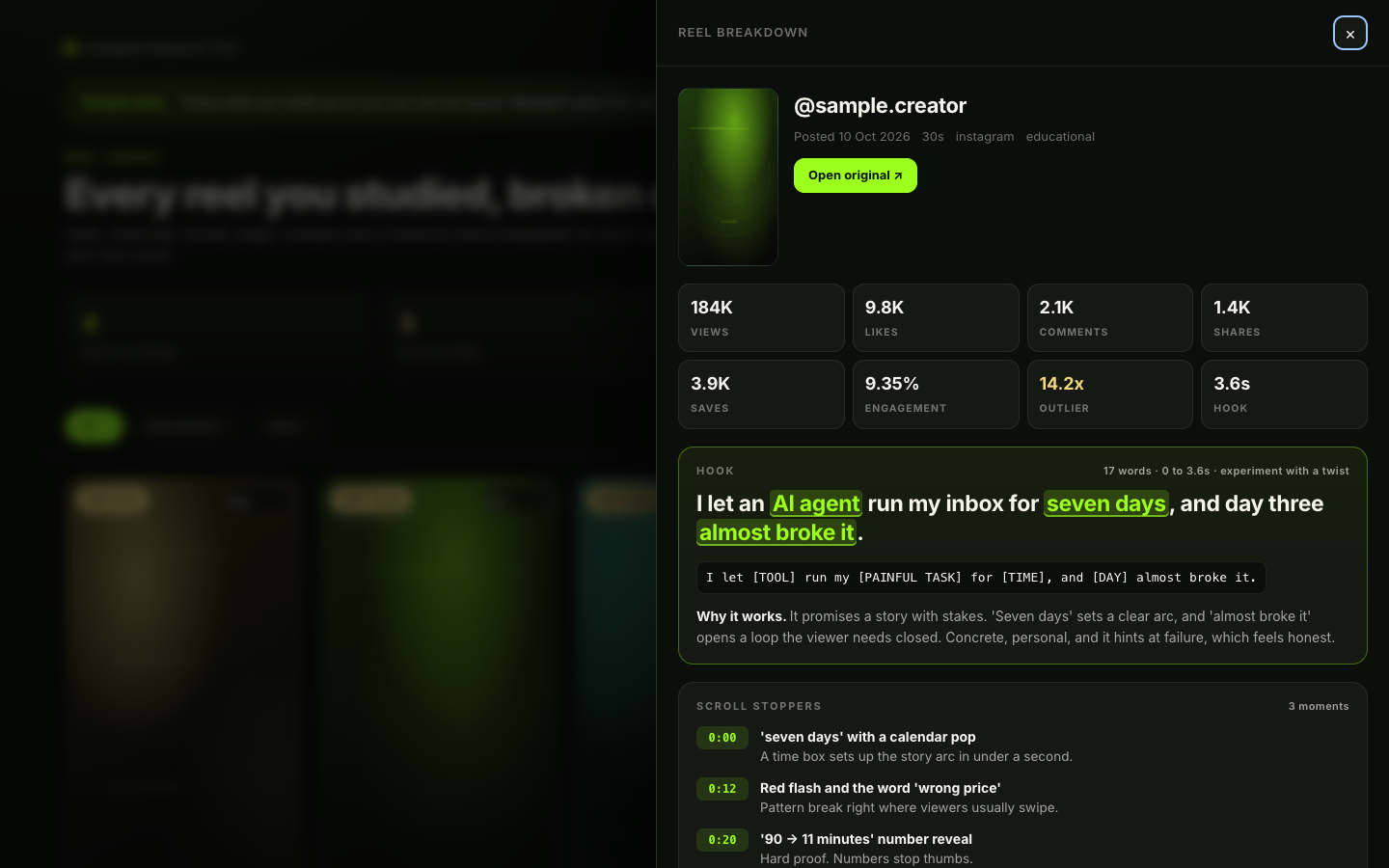
The Instagram Research Tool turns saved reels and niche searches into a searchable research library. With Claude Code, it can analyze a reel’s transcript, hook, format, angle, performance numbers, visual structure, and likely scroll-stopping moments.
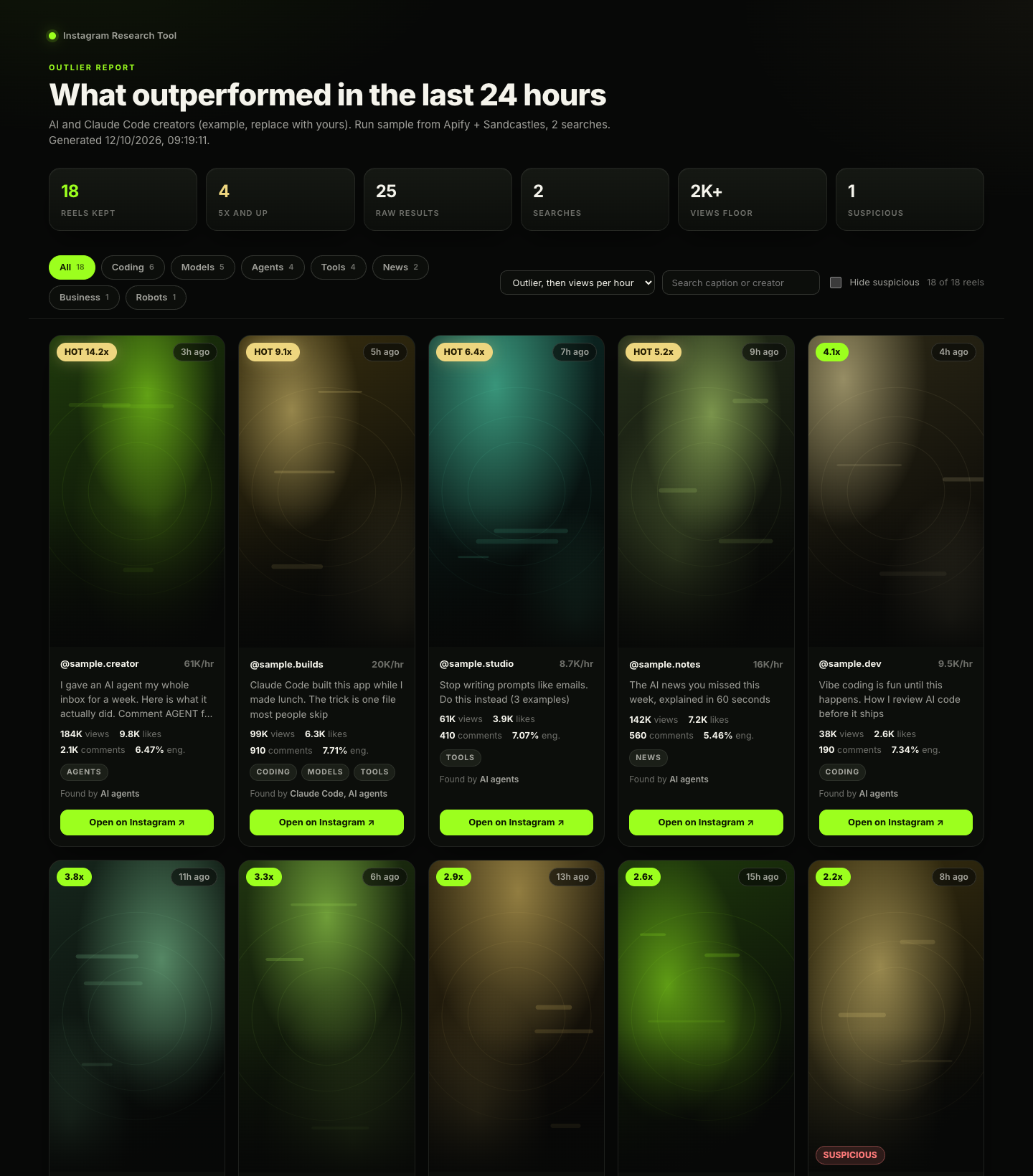
It also creates a daily outlier report that highlights reels performing unusually well in your niche. Each breakdown ends with a new hook and script written in the style described in your voice.md file, rather than copying the original creator.
The generated library opens in your browser, allowing you to compare researched reels and revisit ideas before filming.
What You Need
- Claude Code
- Node.js 18 or later
- One data source, such as Sandcastles, Apify, yt-dlp, or your own data
- Optional: ffmpeg for frame-by-frame visual analysis
- Optional: Whisper for local transcription when your provider does not supply a transcript
- Optional: an iPhone for saving reels with the Share button
The project has zero npm dependencies. If you want frame extraction, install ffmpeg with brew install ffmpeg. For local transcription, install Whisper with pipx install openai-whisper.
Choose a Data Source
The data provider retrieves source material such as video files, captions, transcripts, and performance numbers. Claude Code performs the analysis, so you can change providers without changing the analysis workflow.
- Sandcastles: A paid MCP provider with reel breakdown data, timed transcripts, hook analysis, and outlier search. The MCP requires a Pro plan or higher.
- Apify: Provides reel data and video files through paid, per-result actors. It supports daily hashtag searches, ranked by views per hour rather than an outlier score.
- yt-dlp: A free option for individual public Instagram, TikTok, and YouTube Shorts links. It can use local Whisper for transcripts, but Instagram view counts may be unavailable.
- Any source: Use a video file, an export from another service, or numbers you enter yourself.
You can use different providers for different jobs, such as yt-dlp for individual reels and Apify or Sandcastles for daily searches. The provider-specific instructions are available in the repository’s providers directory.
Install and Run the Setup Wizard
- Clone the repository and enter its directory:
git clone https://github.com/manthanpatelll/instagram-research-tool.git
cd instagram-research-tool
claude- Start the first-run wizard inside Claude Code:
/research-setupThe wizard asks which provider you want to use, connects the required service, asks about your niche, creates daily search queries, and learns your writing style from three of your captions. It also guides you through the optional iPhone share workflow and runs a self-test.
The repository stores your main settings in config.json, your niche searches in niche.json, and your writing guidance in voice.md. Review these files after setup if you want to refine the results manually.
Explore the Sample Workflows First
You can inspect the project without connecting a provider. The included samples use synthetic data and do not represent real creators.
npm run library
npm run sample-report
npm run selftest
npm run libraryopens a sample reel library.npm run sample-reportopens a sample outlier report.npm run selftestruns offline checks. A successful run exits with code 0.
Analyze an Individual Reel
Once setup is complete, pass a public reel link to the reel research skill:
/reel-research <reel link>The tool retrieves the available source data, normalizes it, transcribes the video when necessary, and uses extracted frames for visual analysis. The result is saved as a JSON file in library/reels/ and included in the browser library.
A typical breakdown includes:
- Views, likes, comments, engagement rate, outlier score when available, and posting date
- A timestamped transcript
- The opening hook, hook type, word count, delivery time, power words, and explanation of why it works
- The reel’s category, visual layout, pacing, and format
- The topic, specific angle, common belief, and contrasting claim
- A shot-by-shot visual timeline with on-screen text and retention purpose
- Two to five likely scroll-stopping moments with timestamps
- A new hook and complete script written in your voice
Process Saved Reels from an Inbox
If you use the optional iPhone workflow, tap Share on a reel and choose Save to Research. The shortcut writes the link to an inbox file in iCloud Drive, which can sync to your Mac.
To process the saved links, run:
/reel-research inboxThe tool reads new links, analyzes them with your selected provider, and adds the results to the library. Without an iPhone, you can paste links directly into Claude Code or point inboxPath in config.json to another text file that synchronizes with your computer.
Generate a Daily Outlier Report
The outlier workflow searches your configured niche, filters the results, merges duplicates, and ranks qualifying reels. By default, it examines the previous 24 hours and excludes reels with fewer than 2,000 views. If fewer than 15 reels qualify, the window can expand up to 48 hours.
/outliersThe report is saved under reports/ and opens as an HTML page. Claude Code also explains the top 10 results in chat and suggests an idea angle for your content.
For a broader search window, use:
/outliers --48hThe default daily search uses the queries in niche.json. Organize those queries into clusters that reflect how creators in your niche actually caption and describe reels.
Understand the Processing Pipeline
The project follows a clear sequence from source data to research output:
- A reel link, video file, or source export enters the workflow.
- The selected provider supplies numbers, captions, videos, or transcripts.
- The tool uses the provider transcript or falls back to local Whisper when transcription is set to
auto. frames.mjsuses ffmpeg to create contact sheets for visual review.- Claude Code analyzes the hook, format, angle, visuals, and retention moments.
- The completed breakdown is saved as JSON and displayed through
out/library.html. - The outlier workflow stores raw search data, filters it, ranks it, and builds an HTML report.
Configure Important Settings
Open config.json to adjust the workflow:
providerselects the individual-reel source:sandcastles,apify,ytdlp, orany.searchProviderselects Sandcastles or Apify for daily searches.inboxPathidentifies the synced inbox file.windowHourscontrols the normal outlier window.maxWindowHourslimits how far the report can expand its search window.minViewsremoves low-view results from reports.transcriptioncontrols whether the source transcript or local Whisper is used.myHandleoptionally stores your Instagram handle.
Missing performance numbers remain empty. The tool does not invent values, so results from sources with limited metadata may show unknown view or engagement counts.
Automate Your Morning Research
The repository includes guidance for automating the inbox and outlier workflows with cron or macOS launchd. The relevant examples run commands such as:
claude -p "/reel-research inbox"
claude -p "/outliers"
See docs/iphone-shortcut.md for the iPhone share setup and optional daily automation examples. Review any scheduled command before enabling it, particularly if your chosen provider charges per result or per analysis.
Use Research Without Copying
The tool is designed for studying ideas, not reposting content. Use a reel’s topic, angle, and format as research, then add your own experience, results, products, or perspective.
The generated My version section is intended to produce new wording in your voice. It does not reuse the creator’s lines, jokes, or stories, and the project checks for copied phrases before saving. Downloaded videos remain on your computer for analysis and should not be re-uploaded.
Conclusion
The Instagram Research Tool combines Claude Code with a data provider to make reel research repeatable. After setup, you can save reels from your phone, analyze them individually, review a daily outlier report, and develop original scripts from proven formats and angles.
Start with the sample commands, run /research-setup, and then refine niche.json and voice.md so the research matches your audience and writing style.