

What Earshot Does
Earshot is a local audio-analysis and sound-synthesis toolkit designed for AI coding agents. It converts sound into structured evidence: plain-language descriptions, calibrated matching scores, timed events, objective measurements, visual sound sheets, and launch-film critiques.
It can answer questions such as whether an effect sounds like a deep mechanical key press, where a specific event occurs in a long recording, how two candidate sounds differ, or whether a soundtrack aligns with picture cuts. It can also synthesize effects from code through earshot forge.
Earshot runs locally on a CPU and is available through a command-line interface, a Python API, and an MCP server for tools such as Claude Code. After the initial model download, its standard analysis features can work offline.
Key Capabilities
- Describe sounds:
describereturns calibrated tags, alternative interpretations, AudioSet labels, and measurements. - Match and rank candidates:
matchevaluates how well one file fits a description, whileranksorts multiple files against a query. - Find events:
findidentifies the best matching moments in a longer recording and reports trim-ready start and end times. - Compare audio:
comparesearches reference recordings, whileabexplains differences between two sounds or trims. - Assess realness:
realnessestimates whether audio resembles a real or professionally produced recording rather than a code-synthesized sound. - Analyze soundtracks:
timelineidentifies events, sections, levels, beats, and synchronization with video cuts or cue frames. - Create visual reports:
sheetproduces an annotated PNG containing video frames, events, sections, waveform, spectrogram, loudness, and synchronization markers. - Critique launch films:
critiquecompares a film with a profile built from seven professional launch films and suggests timestamped fixes. - Measure objectively:
measurereports properties such as LUFS, true peak, loudness range, envelope, spectrum, tempo, and key without using models. - Synthesize effects:
forgerenders sounds from code and searches recipe parameters using Earshot's critics and model-free measurements.
Install Earshot
Prerequisites
You need Python 3.10 or newer and both ffmpeg and ffprobe available on your system path. Earshot is CPU-only and does not use a GPU.
Create the environment
git clone https://github.com/Leonxlnx/earshot
cd earshot
python -m venv .venv
.venv/bin/python -m pip install torch --index-url https://download.pytorch.org/whl/cpu
.venv/bin/python -m pip install -e ".[mcp,llm,dev]"
.venv/bin/python -m earshot doctor --load
On Windows, replace .venv/bin/python with .venv/Scripts/python.
The first model-backed operation downloads approximately 1.4 GB into .cache/hf inside the repository, unless you configure EARSHOT_HOME. Earshot uses the CLAP model laion/larger_clap_general for text-audio embeddings and MIT/ast-finetuned-audioset-10-10-0.4593 for AudioSet tagging.
Run the diagnostic command whenever you need to verify dependencies, data files, models, precision, or CPU settings:
.venv/bin/python -m earshot doctor --loadConfigure CPU and cache settings
EARSHOT_THREADScontrols the number of Torch CPU threads.EARSHOT_HOMEchanges the cache root.EARSHOT_PRECISION=fp32forces FP32. The default is BF16 only on CPUs with native support and FP32 elsewhere.EARSHOT_OFFLINE=1enables offline operation after the models have been downloaded.
Basic Command-Line Usage
Describe a sound
Start with describe when you want a concise explanation of an unfamiliar file:
earshot describe enter.oggThe summary can include duration, transient shape, likely sound categories, calibrated z-scores, peak level, brightness, and alternative readings. Add --json for the complete structured result or --out result.json to save it.
Test a specific description
Use match when you already know the sound you want. Alternative descriptions help distinguish the target from likely confusions:
earshot match key.ogg "a deep thocky mechanical keyboard press" --alts "a clicky blue switch keyboard" "a mouse click"The result includes cosine similarity, a vocabulary-calibrated z-score, and a verdict such as strong, plausible, weak, or no match.
Rank several candidate files
To choose the best candidate from a collection, pass the description followed by the paths:
earshot rank "a fast crisp air whoosh" sounds/one.wav sounds/two.wav sounds/three.wavThis is useful when an agent has downloaded or rendered several possible effects and needs an evidence-based ordering.
Find an event inside a long recording
The find command searches within a recording and returns sample-trim times:
earshot find keys.ogg "a single mechanical key press" --top 4Each result contains a start time, end time, duration, score, and verdict. Those timestamps can then be used to extract a clean event from a larger source.
Measure without model interpretation
Use measure when you need reproducible audio properties instead of semantic judgments:
earshot measure soundtrack.wav --jsonThis reports objective information including loudness, true peak, loudness range, envelope, spectrum, tempo, and key.
Analyze a Film Soundtrack
Build a listening timeline
Use timeline to create a second-by-second listening transcript. Supplying a video lets Earshot evaluate synchronization with picture cuts and cue frames:
earshot timeline soundtrack.wav --video film.mp4 --jsonThe result can include detected events, sections, levels, loudness, a beat grid, and audiovisual synchronization evidence.
Create an annotated sound sheet
A sound sheet places the main analysis layers into one image that a visual agent can inspect:
earshot sheet soundtrack.wav --video film.mp4 -o out.png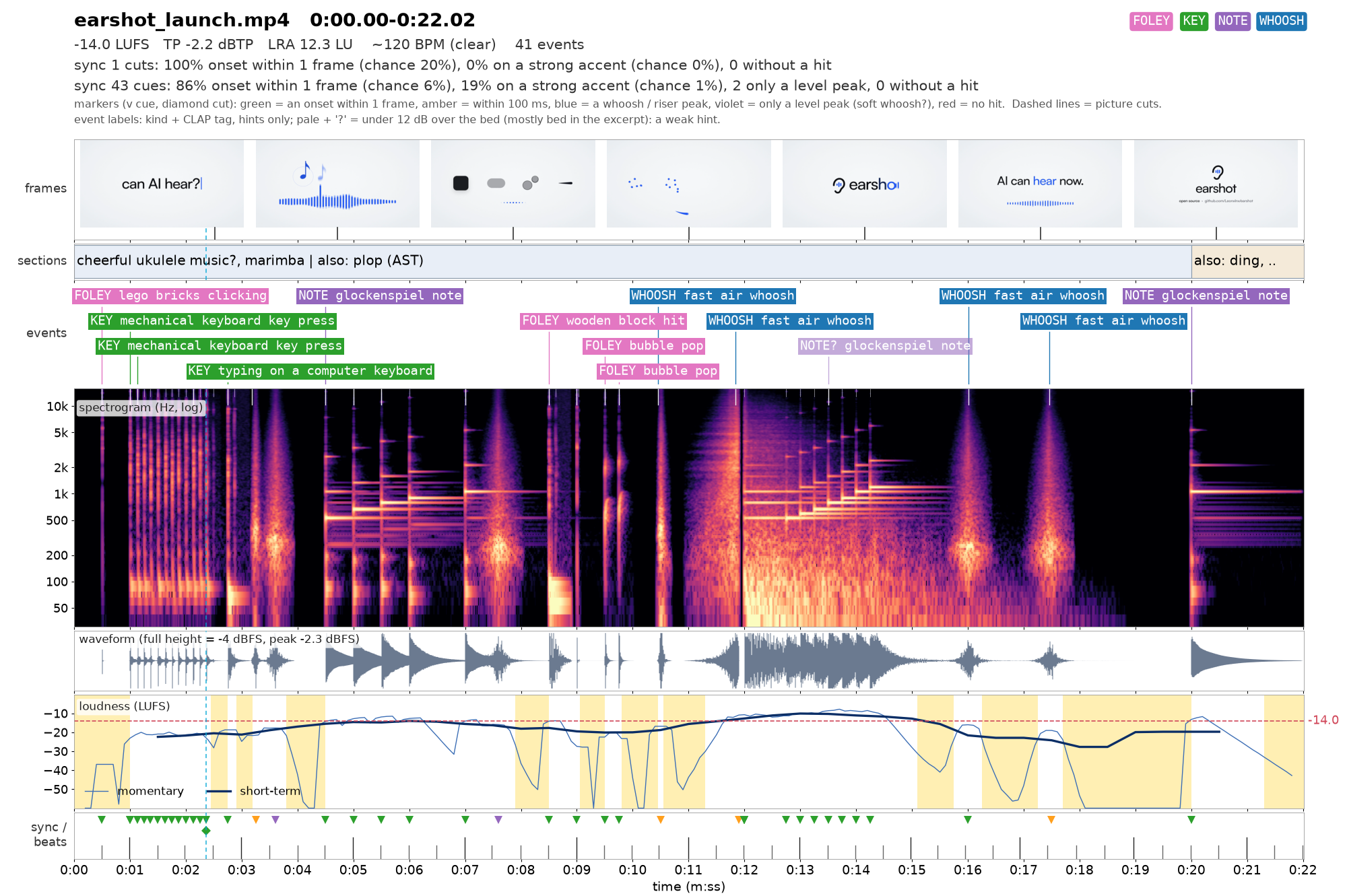
The generated PNG can combine representative frames, labelled events, sections, waveform, spectrogram, loudness, beats, and synchronization markers.
Generate a launch-film critique
Run critique to compare a film with Earshot's included profile of seven professional launch films:
earshot critique film.mp4The report gives a verdict, identifies metrics that are inside or outside the profile range, and prioritizes timestamped fixes. Treat this as a comparison with one particular launch-film style rather than a universal measure of quality.
You can also construct a profile from films you admire:
earshot profile reference-one.mp4 reference-two.mp4 reference-three.mp4 -o custom-profile.jsonUse Earshot from Python
The Python interface avoids launching a fresh process for each operation. This is useful because individual CLI calls load the models and can take approximately 20 to 40 seconds before returning.
import earshot

earshot.describe("whoosh.wav")
earshot.find("typing.ogg", "a single isolated key press")
earshot.timeline("soundtrack.wav", video="film.mp4")

from earshot import api
api.rank("a crisp UI click", ["click-a.wav", "click-b.wav"])
api.critique("film.mp4")
The earshot.api namespace exposes operations including ranking, critique, and multi-file realness analysis. Keeping these calls in one Python process lets the loaded models be reused.
Run Earshot as an MCP Server
For an agent that will make repeated requests, the MCP server is preferable to separate CLI calls because the models remain warm after the first request.
claude mcp add earshot --scope user -e EARSHOT_THREADS=3 -- /path/to/earshot/.venv/bin/python -m earshot mcpFor another MCP-compatible client, add equivalent settings to its .mcp.json:
{"mcpServers":{"earshot":{"command":"/path/to/earshot/.venv/bin/python","args":["-m","earshot","mcp"],"env":{"EARSHOT_THREADS":"3"}}}}On a slow machine, start Claude Code with MCP_TIMEOUT=60000. The optional llm_critique tool reads GEMINI_API_KEY from the environment. Do not place a literal API key in a configuration file.
Generate Sounds with Earshot Forge
Forge creates sounds without embedding recorded audio. Its recipes use physical synthesis components such as modal resonators, contact excitations, filtered noise, a computed room, and a microphone model.
List the included recipes first:
earshot forgeThe repository includes recipes for clicks, impacts, key presses, pops, and whooshes. To search for a key-press sound using real recordings as references, run:
earshot forge keypress --refs path/to/real/keypresses/ --budget 144 --reps 2 --tone 1.5 --keep 4 --robust 8 --dir made/keypressTo target a specific description while naming likely confusions:
earshot forge whoosh --target "a fast crisp air whoosh" --alts "a wind gust" "a sword swing" --refs path/to/real/whooshes/ --tone 1.5 --dir made/whooshForge renders parameterized candidates, scores them with a critic, retains strong results, and mutates them through evolutionary search. Its scoring considers description match, named alternatives, estimated realness, proximity to references, measured shape, tonal balance, tail behavior, and length.
The output includes diverse WAV files and a report.json containing candidate parameters and scores. With --robust N, selected candidates are rendered again with new random seeds so you can check whether the recipe remains reliable rather than succeeding only once.
Judge Forge results carefully
Forge optimizes against Earshot's own models, so a high model score does not guarantee that a sound is perceptually better.
Compare the generated sound's one-third-octave balance, tail, and length with the reference recordings. Inspect its spectrogram beside the references, test robust re-renders, and conduct a human blind test when quality matters. The README specifically warns that the realness model can be fooled by techniques such as combining a modal resonator, room response, and noise floor.
Advanced Workflow Tips
- Use the right interface for the workload. The CLI is convenient for a few investigations. Use one Python process or the MCP server for repeated analysis so the models stay loaded.
- Start broad, then test hypotheses. Run
describe, form a target description, and then usematchwith explicit alternatives. - Separate semantic and objective evidence. Combine model-based judgments with
measure, tonal-balance checks, waveform inspection, and spectrograms. - Save structured output. Use
--jsonor--outwhen another program or agent needs to inspect all fields rather than the plain-language summary. - Use real reference recordings. Reference directories improve comparison and Forge evaluation, but you remain responsible for the provenance and licences of those recordings.
- Install the included agent skills. Copy or symlink
skills/earshotandskills/real-soundinto~/.claude/skills/or a project's.claude/skills/. They document command selection, verdict interpretation, soundtrack production, mixing, QA, and licensing checks.
Understand the Limits
Earshot is strongest at loudness, timing, picture synchronization, matching exposed single sounds, ranking candidates, and identifying obvious code-synthesized sources. Tags extracted from busy mixes, along with music genre and mood judgments, should be treated as hints.
It cannot determine taste, emotion, provenance, licences, or speech content. Its models do not evaluate frequencies above 14 kHz. A realness verdict is evidence rather than proof, and the built-in launch profile represents only the seven films used to create it.
Consult the repository's validation documentation for measured results and its limits documentation before relying on scores in a production workflow.
Conclusion
Earshot gives coding agents a practical way to inspect and create sound using local CPU tools. Begin with describe, match, and find; move to timeline, sheet, and critique for complete films; and use Forge when you need parameterized effects made entirely in code. For reliable decisions, combine model verdicts with measurements, reference comparisons, visual inspection, and human listening.