

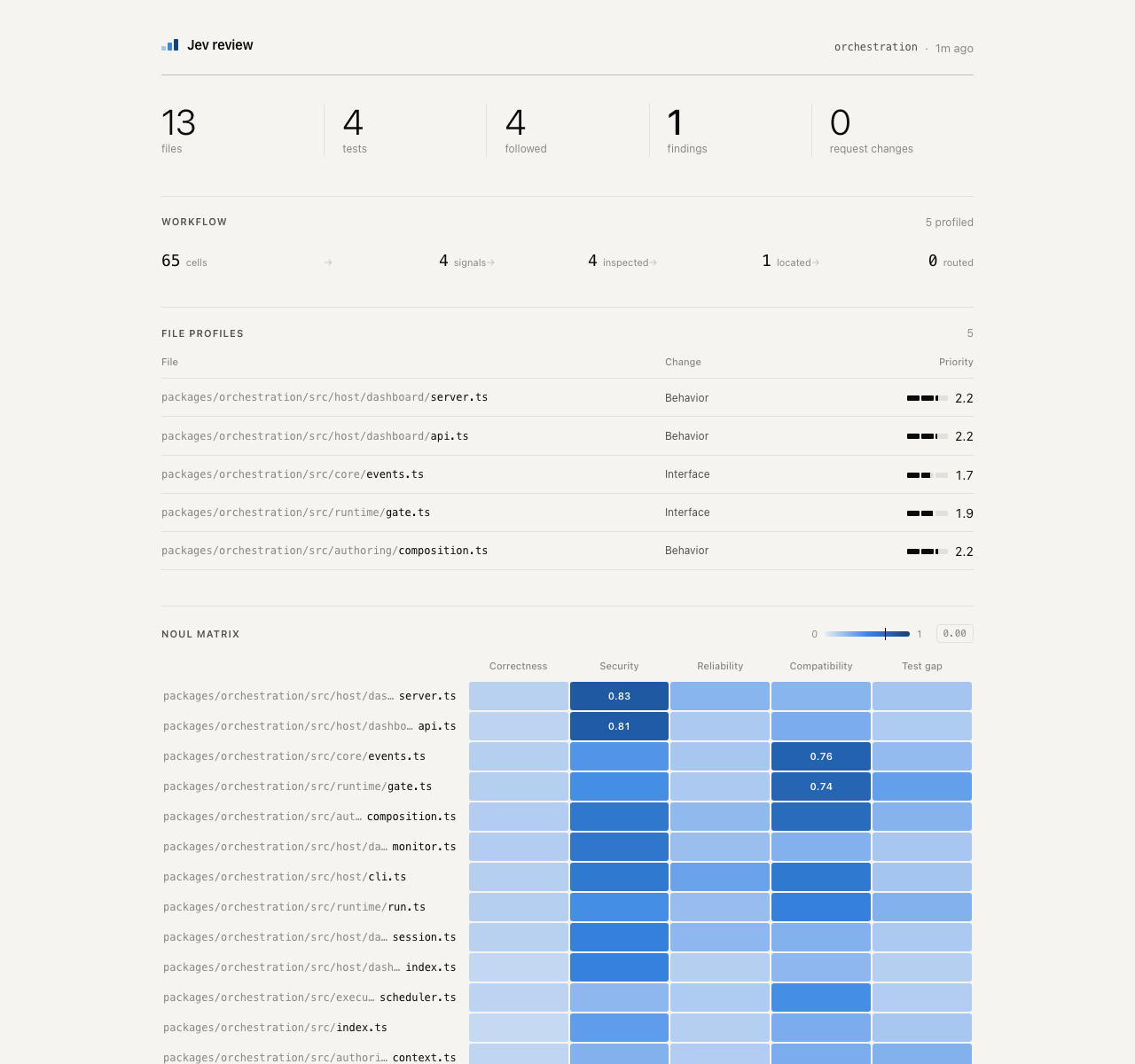
What Jev Review Does
Jev Review is a small code-review workflow built with TypeSafe Jev. It can review a Git diff or scan every non-ignored source file within a selected scope, then present the findings in a quiet local dashboard.
The workflow keeps orchestration and policy in application code while using Jev for bounded, structured judgments. Findings are intended as review prompts rather than definitive proof that a defect exists.
How the Review Workflow Works
Jev Review follows a staged process designed to narrow attention before assigning impact:
- Build a risk matrix.
- Choose and score file profiles.
- Select relevant evidence.
- Classify the underlying mechanism.
- Score severity.
- Route selected findings to a reviewer when required by the workflow.
The reviewer screens for correctness, security, reliability, compatibility, and test coverage. When judging test gaps, it can use changed or related tests as context. It also selects concrete diff hunks or source regions before scoring impact, while applying structured hints, counterexamples, decision boundaries, thresholds, and workflow policy.
Prerequisites and Installation
Before starting, install Node.js 24 or later and Git. You also need a TypeSafe API key.
Clone or otherwise obtain the project, then install its dependencies:
npm installCreate the environment file from the provided example:
cp .env.example .envOpen .env and add your API key:
TYPESAFE_API_KEY=your_api_keyDo not expose this file through the dashboard. Jev Review binds the dashboard to 127.0.0.1 and does not serve environment files.
Review a Current Git Diff
To print a review of the current Git diff as JSON, run the change-review command and provide the path to a Git repository:
npm run review:changes -- /path/to/git/repositoryThis mode is useful when you want feedback focused on the changes currently present in a repository.
To save the result for later viewing in the dashboard, use the save variant:
npm run review:changes:save -- /path/to/git/repositoryScan a Complete Codebase
For a broader review, scan every non-ignored source file under a repository or package scope:
npm run review:codebase -- /path/to/git/repository-or-packageThis command prints the complete codebase scan as JSON. To save the report for the dashboard instead, run:
npm run review:codebase:save -- /path/to/git/repository-or-packageUse the change-review entry point when you need a focused review of active modifications, and use the complete-codebase entry point when you want to inspect the available source files across a selected scope.
Open the Local Dashboard
After saving a change review or codebase scan, start the local dashboard:
npm run dashboardOpen http://127.0.0.1:4317 in your browser. Large reports are displayed in collapsible sections, making it easier to navigate findings without leaving the local environment.
Command Reference
npm run review:changes -- <path>prints a current-diff review as JSON.npm run review:changes:save -- <path>saves a current-diff review for the dashboard.npm run review:codebase -- <path>prints a complete codebase scan as JSON.npm run review:codebase:save -- <path>saves a complete codebase scan for the dashboard.npm run dashboardstarts the local dashboard.npm run checktypechecks the project, verifies dependency flow, and syntax-checks the dashboard client.
Understand the Project Structure
The implementation is organized under src/ in layers that depend only on lower layers:
src/
  domain/      config.ts, types.ts, patch.ts
  adapters/    git.ts, repository-files.ts
               report-store.ts
  review/      changes.ts, codebase.ts
               *-judgments.ts, workflow.ts
  cli/         review-*.ts, save-*.ts
  dashboard/   server.ts, public/
The layers have the following responsibilities:
- Domain: shared configuration, report types, policy, and diff parsing.
- Adapters: Git and complete-source discovery, plus atomic report saving and loading.
- Review: mode-specific workflows, Jev calls, and staged orchestration.
- CLI: explicit review and save entry points.
- Dashboard: the local-only HTTP server and plain client.
Imports flow downward from cli and dashboard to review, then to adapters and domain. The dashboard and CLI layers do not import one another.
Advanced Usage and Project Checks
Run the project checks before relying on a workflow change or contributing an architectural modification:
npm run checkThis command checks types, verifies the dependency flow, and syntax-checks the dashboard client. The dependency script fails when it detects upward imports, imports between cli and dashboard, or dependency cycles.
For more focused reviews, save a change report after making the relevant Git changes and inspect it through the dashboard. For broader investigations, provide the path to the repository or package scope you want to scan. The two entry points keep change-oriented and complete-source workflows separate.
Remember that Jev Review is an experiment in composing fast typed judgments. It does not currently integrate compiler diagnostics, static analyzers, repository indexing, or generated explanations. Treat its findings as prompts for human review, especially before making changes based solely on a reported severity.
Conclusion
Jev Review provides two practical review modes: a focused analysis of the current Git diff and a scan of a complete non-ignored codebase scope. Install the dependencies, configure TYPESAFE_API_KEY, save a report, and open the local dashboard to inspect structured findings. Its staged judgments, evidence selection, and explicit workflow policy make it a useful local experiment for organizing AI-assisted code review.