


What Is NamiGPT
NamiGPT is a foundational large language model tutorial for Chinese beginners. It implements GPT-2 from scratch using PyTorch without calling ready-made Transformer modules, and can load OpenAI's official pretrained weights for inference and text generation.
The project does not prioritize training efficiency. Instead, it emphasizes understanding: the core model is located in gpt2/model.py and contains fewer than 200 lines of code. The tutorial uses the three-word example “猫吃鱼” as a guide, gradually breaking down tokenization, vectors, attention matrices, and the final generation process.
The name NamiGPT pays tribute to Karpathy's nanoGPT. It focuses more on teaching Chinese beginners from the ground up, explaining every step of GPT-2 through minimal examples.
What You Will Learn
- How a tokenizer converts text into token IDs.
- How embedding and positional encoding construct model inputs.
- How Self-Attention and Multi-Head Attention are computed.
- What roles residual connections, LayerNorm, FFN, and activation functions each play.
- How multiple Transformer Blocks are stacked to form GPT-2.
- How to load OpenAI's official weights into a hand-written model.
- How to generate text using greedy, temperature, and top-k strategies.
- How to verify that the hand-written implementation matches the HuggingFace implementation through tests.
Key Project Features
Core Components Implemented from Scratch
NamiGPT does not directly call ready-made Transformer modules. The model itself includes LayerNorm, Attention, FFN, Block, and GPT components, making it suitable for reading line by line to understand how data and tensors flow.
Chapter Scripts Run Independently
The inference series consists of 15 progressively structured topics, including the tokenizer, Embedding, positional encoding, self-attention, multi-head attention, residual connections, layer normalization, feed-forward networks, activation functions, Transformer Blocks, stacking, weight loading, text generation, and interpretability. Each topic includes a corresponding runnable script.
Interactive Visualizations
The project provides an animated visualization of the Transformer architecture and a complete visualization of the inference matrices. When code or formulas are difficult to understand, you can observe how the matrix elements in the “猫吃鱼” example are calculated cell by cell.
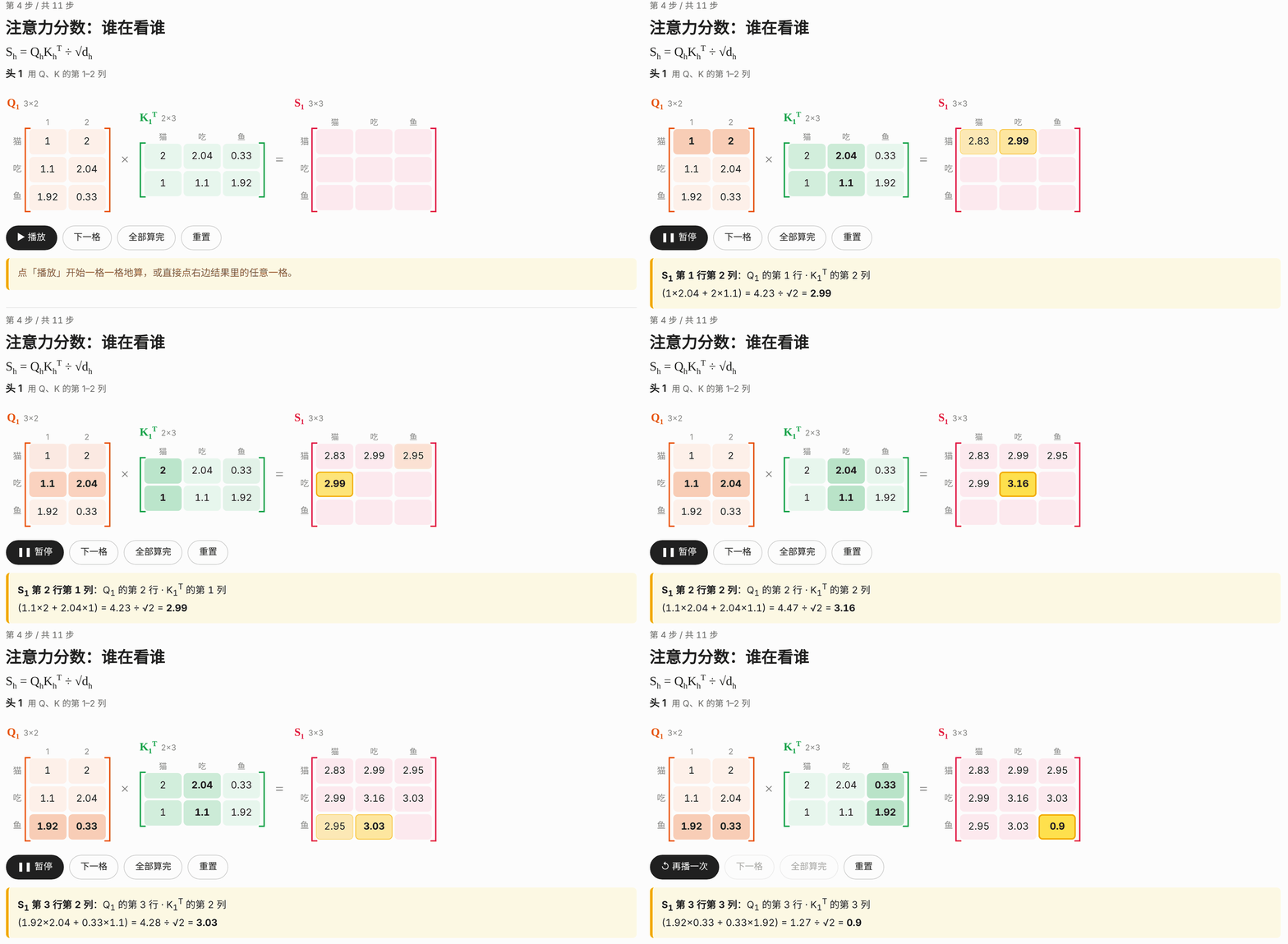
It is recommended to first view Transformer Explained in One Image, then use Large Language Model Inference Visualization alongside the chapter code.
Alignment with HuggingFace Results
The repository includes shape checks and alignment tests against the official HuggingFace implementation. In addition to quickly comparing random weights, you can download the actual GPT-2 weights for further verification.
Before Installation
Before starting, you should be able to read basic Python code and understand fundamental linear algebra concepts such as matrix multiplication. The project's stated environment is Python 3.9 or later and PyTorch 2.x.
First clone the repository, enter the project directory, and install the dependencies:
git clone https://github.com/aa1143/NamiGPT.git
cd NamiGPT
pip install -r requirements.txt
If network restrictions affect downloads of the official weights from HuggingFace, you can set a mirror address in the current terminal:
export HF_ENDPOINT=https://hf-mirror.comThis mirror is used only to download the official weights. When from_pretrained is called later, the model structure still comes from NamiGPT's hand-written implementation.
Step 1: Understand GPT-2 Chapter by Chapter
The most suitable approach for beginners is not to read the complete model immediately, but to study each chapter according to the inference data flow:
- Input stage: First learn the Tokenizer, Embedding, and positional encoding.
- Attention stage: Understand Self-Attention, then expand to Multi-Head Attention.
- Module stage: Learn residual connections, LayerNorm, FFN, and activation functions.
- Model stage: Combine the components into a Transformer Block and stack them into a complete GPT-2.
- Application stage: Load the official weights, generate text, and inspect the interpretability results.
Each script can run independently. For example, run the multi-head attention chapter with:
python chapters/01-inference/ep06_multi_head_attention.pyThe complete illustrated content is available in the NamiGPT Illustrated Tutorial. The original articles in the repository are located in docs/01-inference/.
Step 2: Load GPT-2 and Generate Text
After installation, you can directly import the model-loading and generation interfaces provided by NamiGPT. The example below uses the GPT-2 tokenizer to encode an English prompt into token IDs, then loads the hand-written model with the official 124M weights:
import tiktoken, torch
from gpt2 import from_pretrained, generate

enc = tiktoken.get_encoding("gpt2")
model = from_pretrained("gpt2")

ids = torch.tensor([enc.encode("The cat sat on the")])
out = generate(
    model,
    ids,
    max_new_tokens=30,
    temperature=0.8,
    top_k=50,
)
print(enc.decode(out[0].tolist()))
Code Execution Flow
tiktoken.get_encoding("gpt2")obtains the encoder used by GPT-2.enc.encode(...)converts the prompt text into token IDs.torch.tensorwraps the IDs in the batch tensor required by the model.from_pretrained("gpt2")creates the hand-written GPT-2 and loads the official 124M weights.generategenerates up to 30 new tokens after the prompt.enc.decodeconverts the output token IDs back into text.
Note: GPT-2 was not instruction-tuned for conversation. It is designed to continue existing text rather than answer questions like a chat model. Its training corpus is primarily in English, so English prompts are recommended at first.
Step 3: Understand Generation Parameters
The example uses two important sampling parameters:
temperature=0.8: Adjusts the probability distribution of candidate tokens. The project's generation module supports temperature-based sampling.top_k=50: Selects only from the 50 highest-probability candidate tokens. The project also supports greedy generation and top-k generation.
While learning, keep the prompt unchanged and adjust only the temperature or top-k value, then compare the continuation results. This makes it easy to see how generation strategies affect the output, but the specific parameters should be selected according to your experimental goals.
Step 4: Launch the Gradio Web Demo
If you want to enter a prompt in a browser and view the continuation results along with the candidate-word probabilities at each step, install Gradio and launch the demo program in the repository:
pip install gradio
python demo/app.py
The web demo is suitable for observing the model's predictions at each step, while the chapter scripts are better for studying the computation of individual components. Using both together lets you connect the final text with changes in the internal probabilities.
Step 5: Run the Tests
It is recommended to run the tests after modifying the attention, weight-loading, or generation logic. By default, the tests compare random weights and do not require downloading a pretrained model, so they usually finish quickly:
pytest tests/ -vTo perform additional alignment using the actual GPT-2 weights, run:
TEST_PRETRAINED=1 pytest tests/ -vThe second command downloads the actual weights as well, so the first run may take some time to complete.
Repository Structure at a Glance
gpt2/config.py: Model configuration, including the 124M, 355M, 774M, and 1.5B variants.gpt2/model.py: The LayerNorm, Attention, FFN, Block, and GPT model implementations.gpt2/load_weights.py: Loads the official weights into the hand-written model.gpt2/generate.py: Greedy, temperature, and top-k generation logic.chapters/01-inference/: Demonstration scripts for each tutorial chapter.docs/01-inference/: The original tutorial articles.demo/app.py: The Gradio web demo.tests/: Shape checks and HuggingFace alignment tests.
Advanced Tips: Three Key Details for HuggingFace Alignment
1. Apply the Causal Mask Correctly
GPT-2 is an autoregressive language model. Each word in the sequence can read only itself and the words before it; it cannot see subsequent tokens in advance. If the causal mask is omitted, the model output will be incorrect even if the official weights are loaded successfully.
2. Handle Transposes When Transferring Weights
The original GPT-2 implementation uses Conv1D, whose weight shape is [in, out]; PyTorch's nn.Linear uses [out, in]. Therefore, the official parameters must be transposed when loading them into the hand-written linear layers.
In addition, c_attn concatenates the parameters for Query, Key, and Value. When aligning the hand-written implementation, you must first split them into the corresponding three parts and then place them in the correct locations.
3. Use the Tanh Approximation of GELU
GPT-2 uses the tanh approximation of GELU, whereas PyTorch's nn.GELU() uses the exact version by default. For element-by-element alignment, set:
nn.GELU(approximate="tanh")These three details may seem minor, but they directly affect whether the hand-written model can reproduce the official implementation's results. When locating discrepancies, check the mask, parameter shapes, and activation-function version in that order.
Recommended Learning and Debugging Method
- First use the animated architecture visualization to understand that GPT-2 uses only the Transformer decoder portion.
- Run the script for the current chapter and record the shapes of the inputs, outputs, and intermediate tensors.
- When the attention matrix is difficult to understand, use the online matrix visualization to inspect it cell by cell.
- After completing a component, read the corresponding implementation in
gpt2/model.py. - After modifying the implementation, run the random-weight tests first, then run the real-weight tests as needed.
- Finally, use the text-generation example and the Gradio page to observe the behavior of the complete model.
This sequence connects the architecture diagram, matrix calculations, chapter code, complete model, and final output, helping you avoid being overwhelmed by GPT-2's complete multilayer structure at the beginning.
Conclusion
NamiGPT provides a learning path from basic matrix operations to complete GPT-2 inference. You can first run the standalone chapter scripts to understand each component, then load the official OpenAI weights to generate English text continuations, and finally validate your understanding and modifications through visualizations and alignment tests against HuggingFace.
The project code is licensed under the MIT License; articles in the docs/ directory are licensed under CC BY-NC 4.0. Redistribution requires attribution, and commercial use is prohibited.