


Over the past couple of days, MiniMax H3's generation quality has attracted tremendous attention in the community.
Many creators joined the testing right away, hoping to produce stunning AI videos with it.
However, everyone soon discovered a harsh reality:
The H3 model has strict formatting requirements for prompts, and demands a high level of prompt precision.
Although I stayed up late last night writing a detailed tutorial on creating MiniMax H3 prompts,
the feedback shows that many people still don't know how to write them. Those long strings of prompts are simply too troublesome.
Actually, based on my observations (which are rather one-sided, so go easy on me), even if MiniMax H3 didn't impose formatting requirements on prompts, newcomers to animated dramas would still struggle to write good prompts.
The most common stumbling block is having an idea in mind but not knowing how to accurately describe the camera movements, character actions, and cinematic language in words.
In pursuit of better visuals, everyone still habitually stuffs prompts with empty adjectives such as “cinematic, hyper-realistic, top-tier image quality, stunning perspective.”
But for video generation models, these abstract terms are meaningless.
What video models really need is a clear director's shot list:
Where the scene is, who the subject is, what physical action is taking place, how the camera pushes in, pulls out, pans, or tilts, how the lighting and shadows change, and how the pacing of the shot progresses.
If you take a close look at the prompt guide officially provided by MiniMax H3, you'll find that its requirements aren't actually excessive. They basically revolve around a director's shot list.
They simply impose strict requirements on references to various reference elements.
To solve this problem, someone released a highly valuable plugin project on GitHub:
ComfyUI-Fantastic-MiniMaxH3-PromptBuilder
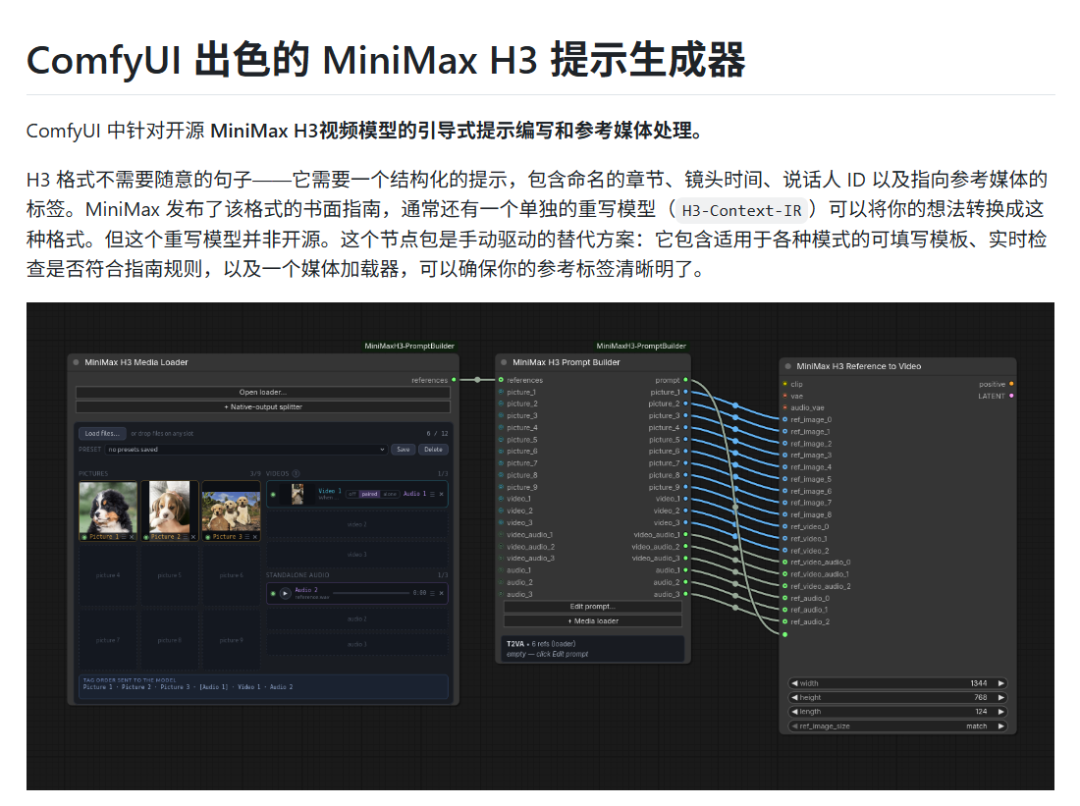
>
This plugin was designed around MiniMax H3's prompt-writing requirements.
It aims to help creators say goodbye to guesswork and trial and error by structurally generating professional prompts that comply with MiniMax H3's formatting requirements in the way that best matches how video models understand instructions.

>
With this tool, creators no longer need to struggle with those annoying parameter formats.
For example,
if you simply enter “a girl walking in the city” in the prompt input box, the result generated by Minimax H3 will be full of uncertainty (see my previous testing article).
After being standardized by PromptBuilder, the prompt will be automatically completed and restructured as:
“A city street crisscrossed by neon lights at night, a young woman walking alone, the camera slowly tracking forward behind her, the wet ground reflecting the neon streetlights, cool-toned cinematic lighting, creating an overall quiet and melancholic emotional atmosphere.”
Most importantly, it outputs prompts according to Minimax H3's formatting requirements.
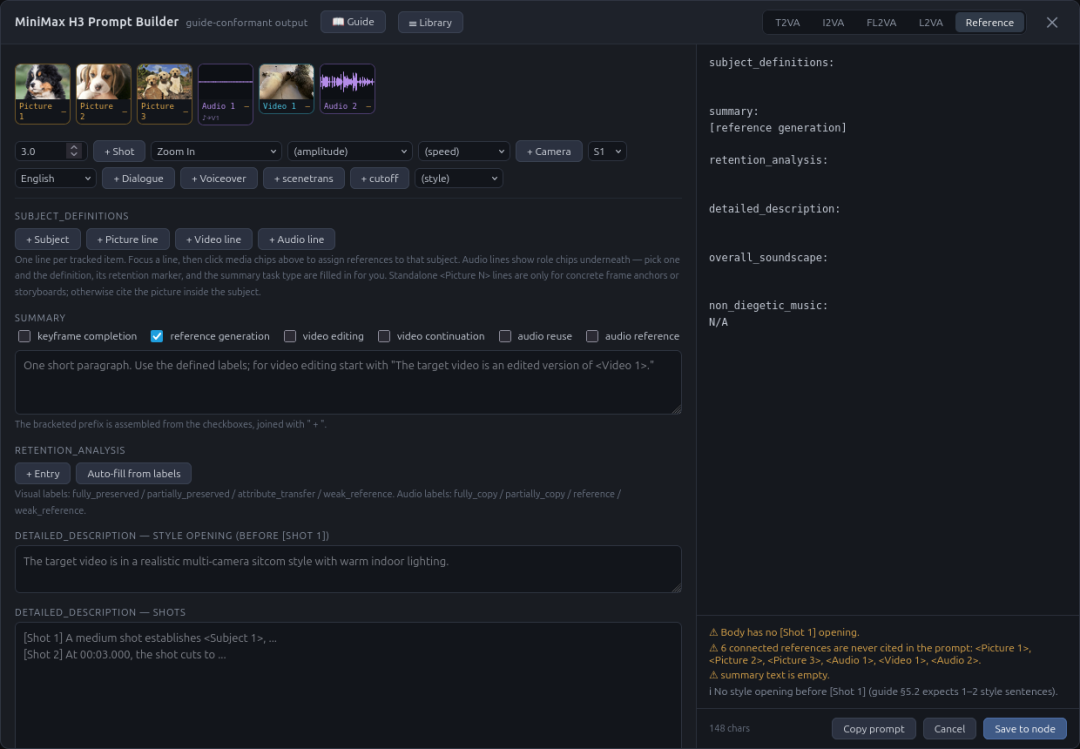
>
Project URL: https://github.com/Adudeguyman/ComfyUI-Fantastic-MiniMaxH3-PromptBuilder
Isn't that great?
After all, there are currently only two major obstacles to using Minimax H3: hardware and prompts.
Hardware has already been taken care of by cloud computers.
A 4090 with 48G of VRAM runs it without any pressure at all, taking around 2 and a half minutes for a 5-second video. If you use an optimized quantized version together with an accelerator, you can easily get it down to under 1 minute.
And it's extremely affordable. At Xiangongyun, a 4090 with 48G of VRAM costs only 2.59 yuan per hour. Including the image fee (generally 0.2 yuan per hour), it still comes to less than 3 yuan.
In theory, you can generate at least 30 five-second videos in an hour, at a maximum cost of 2 cents per second. At that cost, even cabbage vendors would report you for starting a price war.

>
If you're a new user, you can also register through my invitation link to receive free trial credit and get started at zero cost.
Invitation link: https://www.xiangongyun.com/register/KBAYTG
And that's not even all—Minimax H3 has only just been open-sourced.
The experts' impressive tricks are still to come.
Still, I hope Flux3 won't follow Minimax H3 and introduce such complicated prompt rules after it is open-sourced. For users, they're simply too torturous.