

What is saas-motion-kit?
saas-motion-kit is a creative production system for making promotional and motion videos for software products with HyperFrames and Claude Code. It combines planning guidance, visual references, storyboard templates, automation tools, and review gates in one repository.
The project is built around one rule: no two films should feel like the same film. Instead of repeatedly applying familiar entrances, transitions, and layouts, you define the message and tone first, then develop a visual language suited to that specific film.
The kit includes 100 themes across 10 visual families, a 24-transition atlas, a seven-stage playbook, a component strategy, complete examples, and a variety audit that detects repetition before production begins.
Key features
- Seven-stage production playbook: Move through brief, components, theme, storyboard, build, sound, and delivery, with a human review gate after every stage.
- 100 visual themes: Explore directions based on product UI, typography, 3D materials, optics, metaphors, data storytelling, characters, art movements, and camera grammar.
- Transition atlas: Review 24 narrative transitions, including match cuts, carries, camera moves, masks, material transitions, and time-based techniques.
- Variety audit: Check storyboards for repeated transitions, entrances, easing curves, movement directions, uniform shot lengths, accent overuse, missing surprises, tone mismatches, and missing original components.
- Theme picker: Shortlist themes according to an audience and tone while excluding recently used themes.
- Motion history: Record creative decisions across films and generate reports showing overused and unexplored techniques.
- Component strategy: Rebuild clean product UI in HTML or create simplified imaginary components when the real interface is unsuitable.
- Claude Code skill: Use the
/saas-motion-videocommand to work through the full process interactively. - GitHub Action: Audit every
STORYBOARD.mdfile on pushes and pull requests. - Production utilities: Downscale delivery renders, inspect loop seams, synthesize warm UI sound effects, and build galleries.
Understand the seven-stage workflow
The workflow separates production work from creative approval:
1 Brief → 2 Components → 3 Theme → 4 Storyboard → 5 Build → 6 Sound → 7 Deliver
   gate       gate          gate         gate           gate      gate       gate
The agent can perform much of the production work, but each stage ends with a human decision. These gates are where you confirm the message, judge whether the visual direction fits, and reject generic or repetitive choices.
- Brief: Define the audience, message, platform, duration, tone, and delivery requirements.
- Components: Decide whether to animate clean product UI or design truthful imaginary components.
- Theme: Choose a visual language that supports the desired tone.
- Storyboard: Plan each shot, complete the creative ledger, and run the variety audit.
- Build: Implement the film as deterministic, seek-safe animation.
- Sound: Add appropriate music and sound design when required.
- Deliver: Render at high resolution, create final output sizes, and verify technical details such as loop seams.
Installation and setup
Requirements
Before installing the kit, make sure your environment includes:
- Node.js 22 or newer
ffmpeg- Claude Code
HyperFrames downloads its own headless Chrome, so you do not need to install that browser separately for rendering.
Option 1: use the repository template
Open the saas-motion-kit repository and select Use this template. This creates a film repository containing the creative rules, tools, templates, and preconfigured variety-audit GitHub Action.
Option 2: clone the repository
git clone https://github.com/tugrawork-creator/saas-motion-kit
cd saas-motion-kit
Install the HyperFrames skills for Claude Code. They are not vendored inside the kit:
npx skills add heygen-com/hyperframesPreview the included example
The repository includes a complete HyperFrames project for a silent, seamless 40-second 3D booth loop. Open its directory and launch the Studio preview:
cd examples/acme-suite-loop
npx hyperframes preview
To render a delivery-quality 4K landscape version, run:
npx hyperframes render --quality delivery --resolution landscape-4k --output renders/loop-2160.mp4Create your first software promo
Step 1: write a focused brief
Start with the template in templates/BRIEF.md. Identify what the viewer should understand, who the film is for, where it will appear, and how it should feel.
A useful creative sentence follows this pattern:
I want to say [message] in a [tone] tone.
This decision should come before effects or transitions. The tone matrix in creative/tone-matrix.md maps tone to speed, easing, camera behavior, color, typography, transitions, and sound.
Step 2: choose a component strategy
Software films depend on credible UI. Use the kit’s clean-or-imaginary rule:
- If the product has consistent, uncluttered, current UI, capture it as a reference and rebuild the necessary cards, tables, charts, and notifications in HTML using the product’s design tokens.
- If the interface is outdated, overly dense, or not yet designed, create simplified imaginary components in the brand’s visual language.
- Keep every component truthful. It may simplify a real capability, but it must not invent capabilities, customers, or performance numbers.
The project also asks every film to invent at least one original component. The component forge in creative/component-forge.md provides a process for developing one quickly.
Step 3: select a visual theme
Browse the 100-theme gallery and shortlist two or three options for the brief. Each theme sheet includes four key moments—Hook, Reveal, Proof, and CTA—plus suggested components, timed motion techniques, risks, adaptation guidance, and references.
You can also shortlist themes from the command line. For example, this command searches for playful themes aimed at developers and excludes themes recorded in recent history:
python tools/pick_themes.py --tone playful --audience "developers" --history ~/.motion-ledger.jsonThe themes are organized into 10 families:
- Product UI as the stage
- Typography and graphic systems
- Material and 3D
- Light, optics, and texture
- Metaphor concepts
- Signature directions
- Data storytelling
- Characters and mascots
- Art movements and eras
- Camera and edit grammar
Step 4: build and audit the storyboard
Create STORYBOARD.md from the supplied template. Begin with the message-and-tone sentence, then complete the one-row-per-shot creative ledger. Record choices such as transitions, entrances, easing, motion direction, timing, accents, surprises, and original components.
Run the mandatory creative audit before building:
python tools/variety_audit.py STORYBOARD.mdFix repeated choices flagged by the audit. If repetition is intentional and narratively meaningful, identify it as a deliberate motif: rather than leaving it unexplained.
The audit can also work with motion history, helping you avoid techniques used in recent films. When appending a result, the --theme NNN option records the selected theme as part of that history.
Step 5: start production with Claude Code
Open Claude Code at the repository root and invoke the included skill with a specific request. For example:
/saas-motion-video Make a 45 s LinkedIn promo for https://your-product.com — theme 055 (Bento Grid), music-driven, no voiceover.The skill guides you through all seven stages and pauses at every review gate. Do not treat these stops as formalities: use them to evaluate whether the work communicates the brief and whether its visual choices feel specific rather than generic.
Step 6: preview and render
Use HyperFrames Studio while building:
npx hyperframes previewFor final delivery, render at 4K even if the target is 1080p or 2K:
npx hyperframes render --quality delivery --resolution landscape-4k --output renders/final-2160.mp4Then use tools/deliver.sh to downscale with Lanczos. According to the project guidance, this produces cleaner text, edges, and 3D imagery than rendering natively at 1080p.
Use the variety system across multiple films
Track your creative history
A film can avoid internal repetition and still resemble your previous work. The history tools address this broader pattern by recording themes and motion decisions across projects.
Generate a one-page report with tools/history_report.py. It shows transitions, entrances, and easing styles you frequently use, along with atlas transitions and themes you have not yet explored.
Audit storyboards in continuous integration
The repository includes .github/workflows/variety-audit.yml. On every push and pull request, the workflow audits each STORYBOARD.md. A storyboard that repeats itself fails the check, moving creative review earlier in the production process.
Starting with the GitHub template is the easiest way to inherit this workflow. If you clone the kit into an existing project, retain the workflow and ensure your storyboard follows the expected ledger structure.
Learn from the six-film comparison
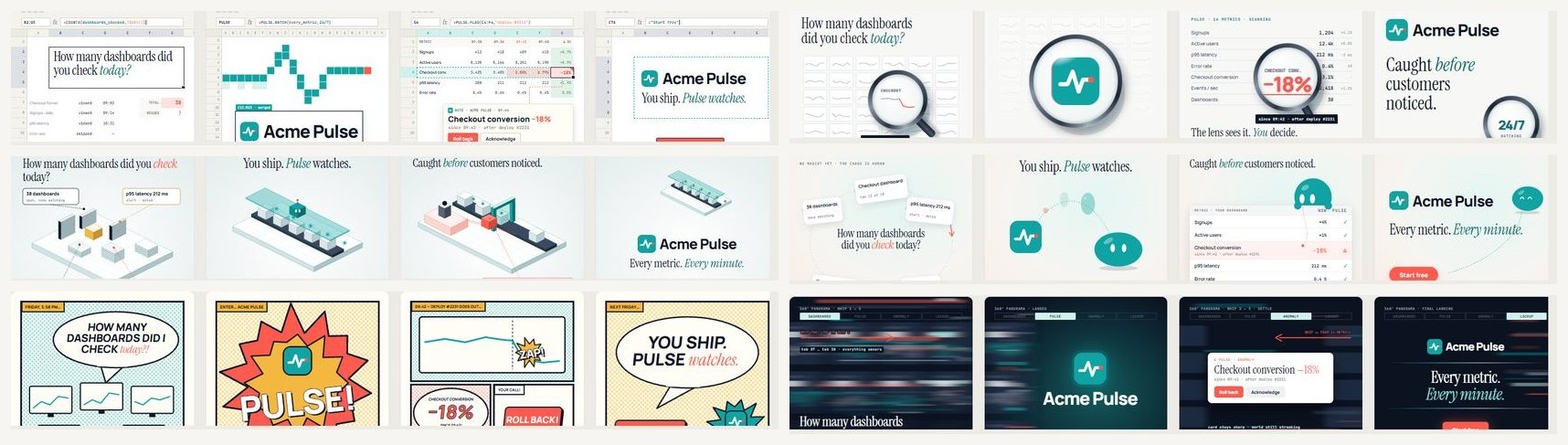
The examples/six-films directory uses one 12-second script in six themes. Each version preserves the same story while changing its visual language and introducing a unique component. The directory also includes the shared brief, allowing you to give the same constraints to an agent and attempt a seventh interpretation.
The examples/acme-suite-loop project provides another useful lesson. Its first storyboard repeated the same turn, title entrance, easing, and shot duration. The revised version varies entrances, turns, pacing, and camera behavior, while adding a deliberate visual surprise.
Advanced production tips
Make every frame seek-safe
HyperFrames must be able to render any requested frame consistently. Treat each frame as a pure function of time. The README recommends one paused GSAP timeline and driving Three.js from hf-seek.
Avoid Date.now() and unseeded randomness. Those inputs can produce different results when the renderer seeks directly to a frame.
Design seamless loops mathematically
For a looping film, give each ambient movement a whole number of cycles within the loop duration. The project expresses this principle as:
sin(2π·n·t/LOOP)After rendering, verify the seam with tools/loop_check.py rather than relying only on visual inspection.
Handle multilingual typography carefully
When a film includes non-Latin characters, package local latin-ext font subsets. Built-in fallback fonts may silently drop glyphs such as ş, ğ, and İ.
Do not assume CSS uppercase conversion behaves consistently across languages. For Turkish, for example, transforming a lowercase i produces İ. Enter display copy in its intended uppercase form and set the appropriate lang value per word.
Keep sound warm and intentional
Pure sine-wave interface sounds can feel thin or unsettling. The kit includes tools/warm_sfx.py for warmer tuned timbres such as marimba or wood block in one key with short room reverb.
If you generate music with Meta’s MusicGen, remember that its weights are licensed under CC-BY-NC 4.0 and are not intended for commercial use. Choose properly licensed music for commercial films.
Reduce on-screen text
Let motion and composition carry the story. Keep text to labels and approximately one line per beat. If viewers must read paragraphs to understand the film, the visuals are not doing enough narrative work.
Avoid adding a progress bar at the bottom. The project warns that this treatment makes a brand film resemble a screen recording.
Use transitions narratively
Consult the transition atlas rather than selecting transitions as decoration. Each of its 24 entries explains the tone it supports and which combinations to avoid. Choose transitions that clarify relationships between ideas, carry an object between shots, or reinforce the film’s material and camera language.
Recommended first-project checklist
- Install Node.js 22+,
ffmpeg, Claude Code, and the HyperFrames skills. - Preview the Acme example to verify the rendering environment.
- Write a brief with one clear message-and-tone sentence.
- Decide whether to rebuild real UI or create truthful imaginary components.
- Shortlist two or three gallery themes, then approve one at the theme gate.
- Write the storyboard and complete its creative ledger.
- Run
tools/variety_audit.pyand resolve repeated choices. - Build with deterministic, seek-safe animation.
- Add restrained, appropriately licensed sound.
- Render at 4K, downscale for delivery, and inspect loop seams when applicable.
- Append the film’s choices to motion history so the next project starts from different ideas.
Conclusion
saas-motion-kit is not a collection of effects to apply mechanically. It is a structured method for making software films that communicate clearly while remaining visually distinct. By defining tone before technique, inventing project-specific components, reviewing decisions at each gate, and auditing repetition before production, you can build a repeatable workflow without making repetitive work.