

Understand the Project and Usage Boundaries First
Autonomous Pentest Agent is an autonomous penetration testing system powered by multiple LLM agents, using a Go backend, Next.js frontend, and PostgreSQL. The project can manage tasks, assets, exploration paths, findings, traffic records, tool approvals, and human-in-the-loop conversations.
Important security and compliance notice: The README clearly states that this project is intended only for personal learning, source code research, and technical validation in locally isolated environments. It must not be used on any website, online service, internet-connected system, production environment, or for actual penetration testing. Use it only in local labs that you control, and comply with applicable cybersecurity, data protection, and computer crime laws and regulations in your jurisdiction.
The project provides an online Demo for exploring the interface, but actual deployment and validation must be strictly limited to a locally isolated environment.
Core Features and Interface
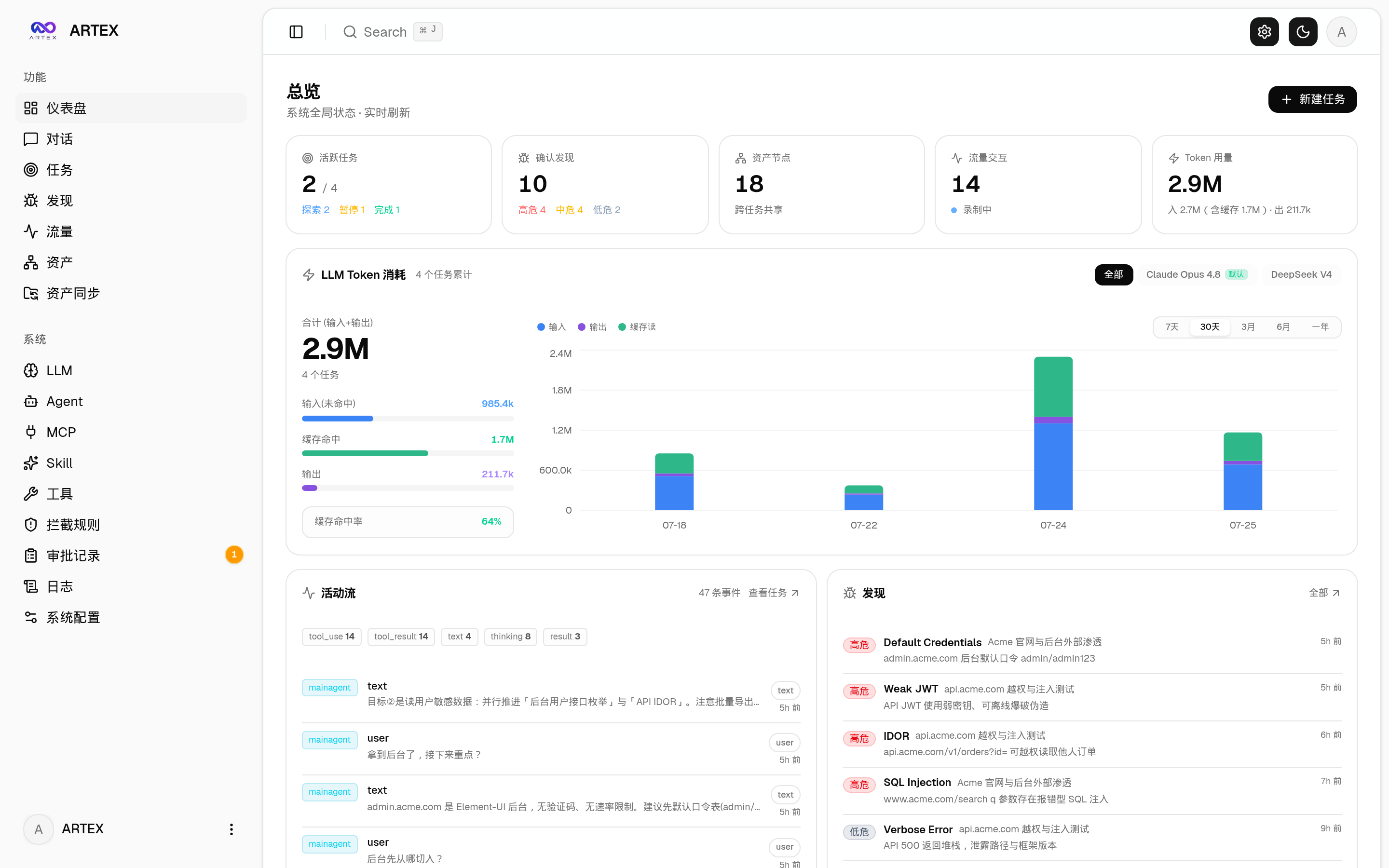
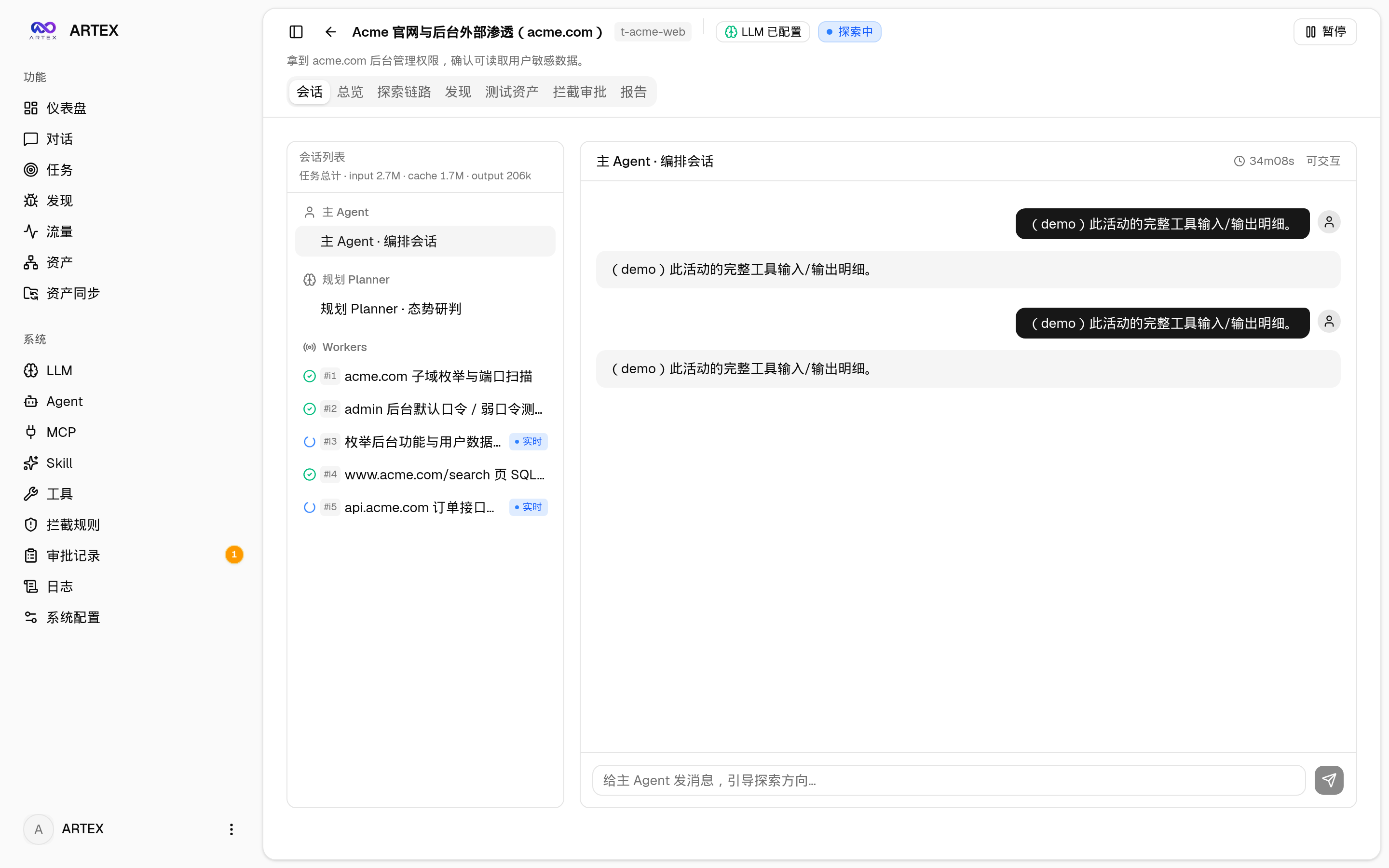
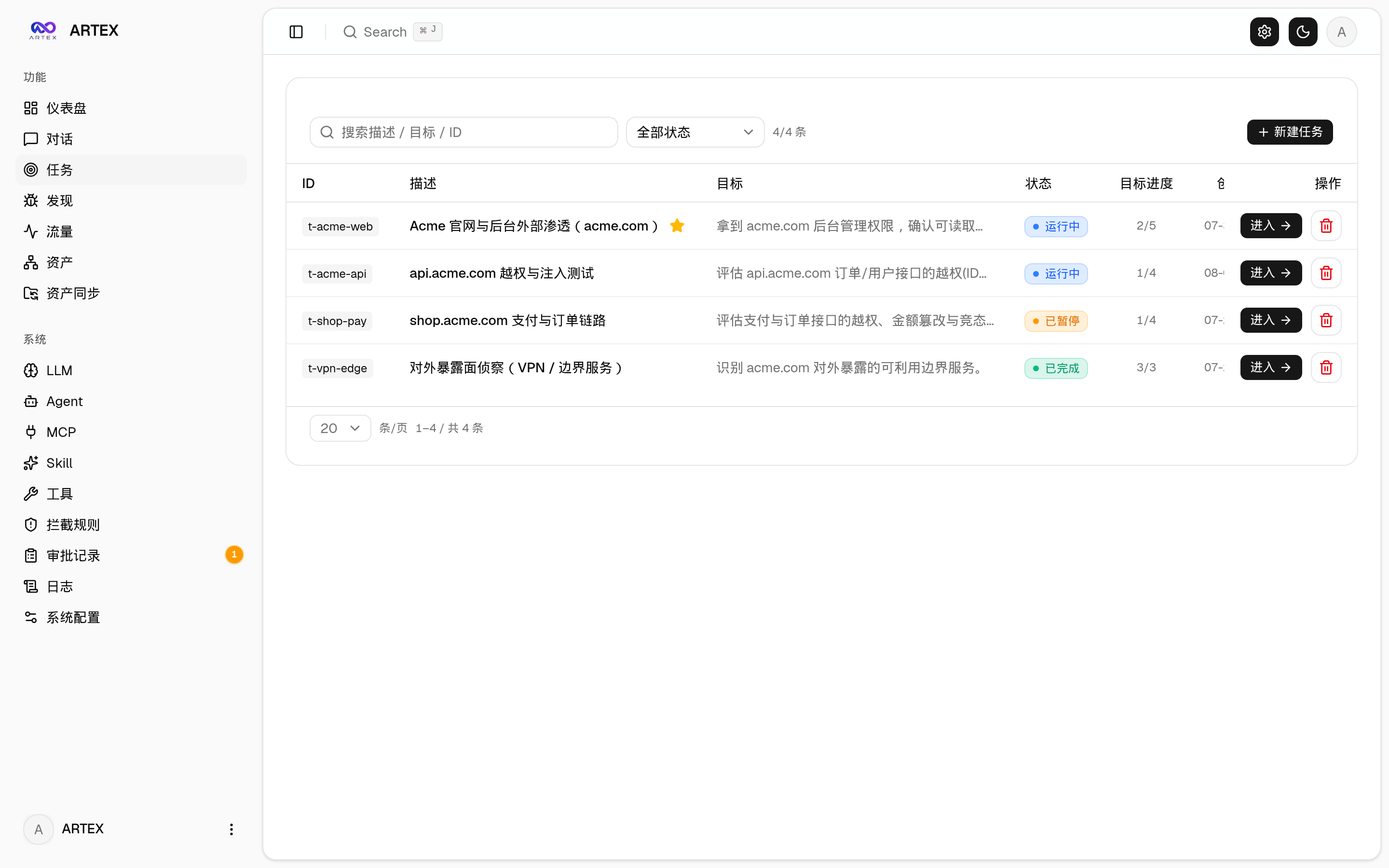
The frontend provides pages for the dashboard, task list, execution sessions, exploration paths, findings, assets, asset coverage graph, traffic recording, Agent management, LLM configuration, interception approvals, backend logs, and more.
The dashboard shows overall status, token usage, and the activity stream. The task and session pages display task execution, including Agent sessions and tool calls.
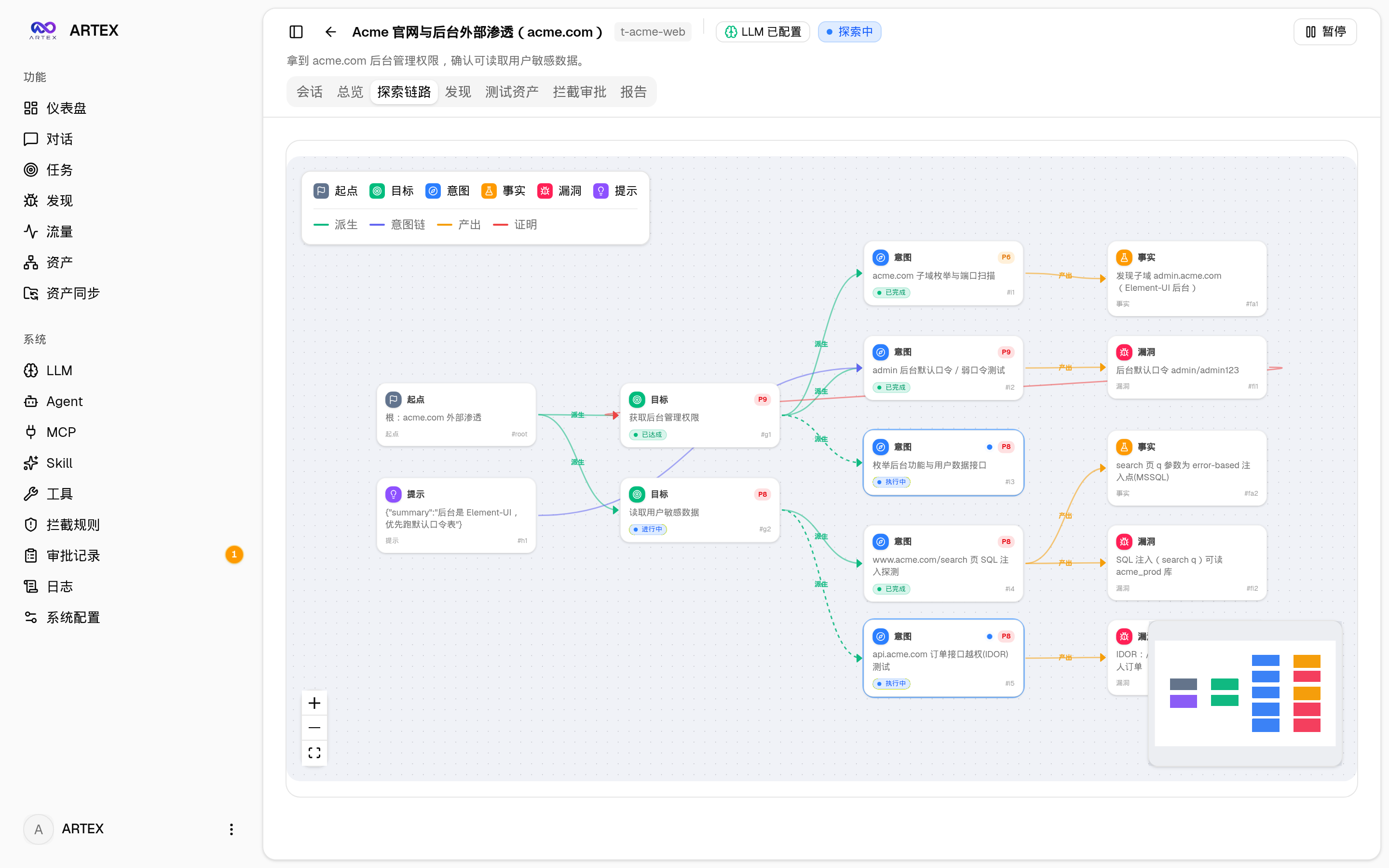
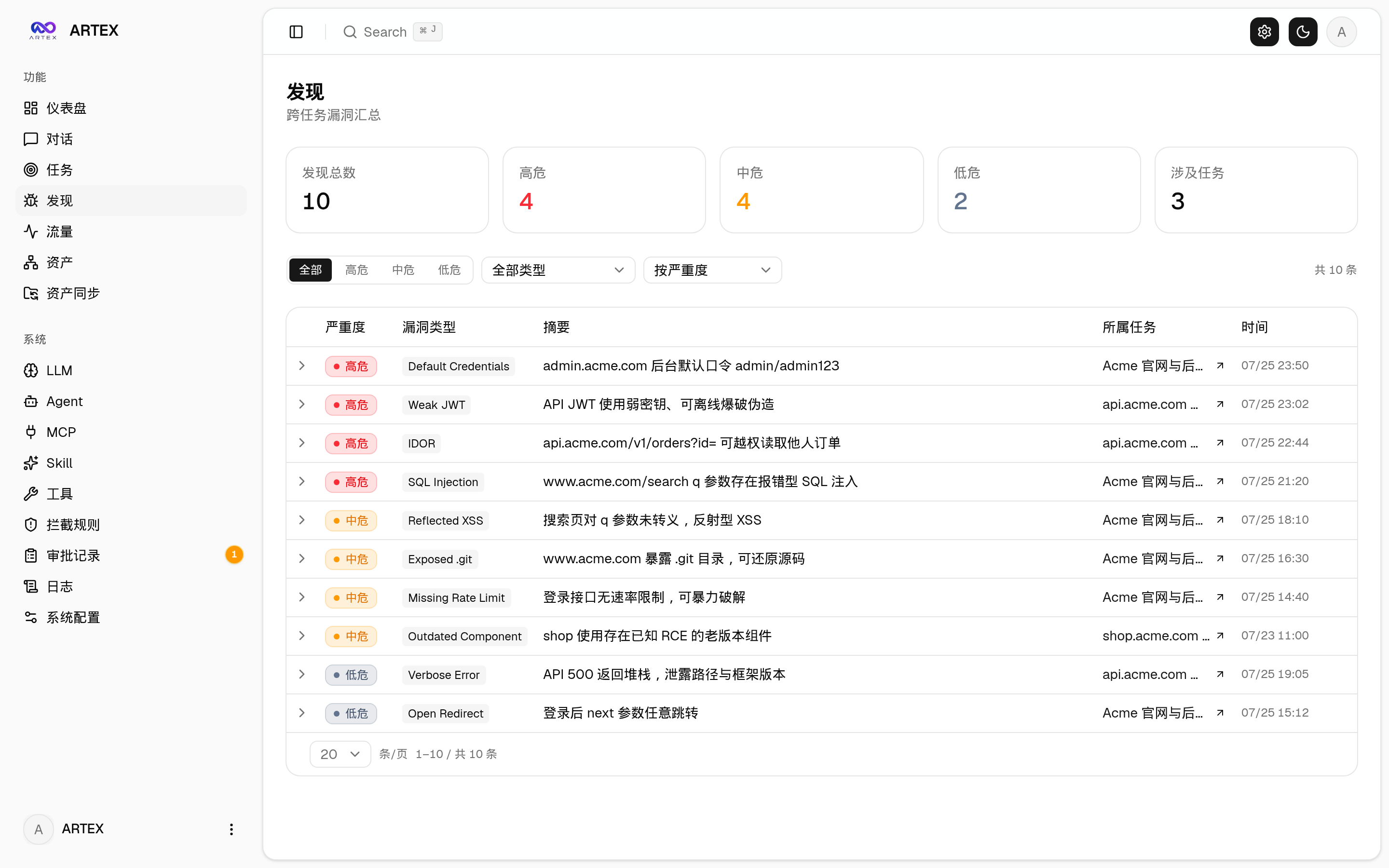
The exploration path shows the lineage between targets, intents, facts, and findings. The findings page displays vulnerabilities and their evidence, while the assets page lists target assets collected and consolidated by the system.
System Architecture Overview
The system consists of a Go monolithic backend with an embedded Next.js static frontend, PostgreSQL, an Agent engine, and several supporting subsystems. The backend serves the frontend through REST APIs, JWT authentication, and SSE, while the task engine schedules the planner and multiple workers.
The project uses a dual-graph architecture:
- Asset graph: A cross-task shared source of truth for assets, containing nodes such as root domains, subdomains, IPs, services, applications, and endpoints.
- Exploration graph: Records targets, intents, facts, prompts, and findings by task, and describes the exploration process through lineage relationships.
- Anchor relationships: Link exploration nodes to specific assets, allowing you to view asset test coverage and exploration scope.
The Planner reads the exploration state and dispatches intents. Workers claim intents, use tools to execute them, and write back facts, assets, and findings. When the graph changes, the Planner is awakened again, forming an event-driven closed loop. Multiple Workers can also retrieve the execution history of other Workers, while the shared todolist helps multi-step planning advance through dependent steps.
Preparation Before Installation
Running the project requires PostgreSQL at a minimum. To perform exploration, you must also configure an LLM using ANTHROPIC_API_KEY or OPENAI_API_KEY, or enter the credentials later on the “LLM Configuration” page in the web interface.
Docker is recommended for quickly starting the database and application. Regardless of the deployment method, first create an isolated local test network, back up important data, and confirm that the test targets belong to a local lab environment.
Method 1: Use the One-Click Installation Script
This is the installation method recommended by the README. The script detects or installs Docker and lets you choose between a complete Docker deployment and local compilation and execution.
git clone https://github.com/kutukam/autonomous-pentest-agent.git
cd autonomous-pentest-agent
./install.sh
For a complete Docker deployment, the script asks you to enter a PostgreSQL password. You can also press Enter to generate a random password, which is then written to .env before docker compose up -d is executed. For local execution, you can connect to an existing database or use Docker to start one. The script generates config.json, compiles the Go single binary with the frontend embedded, and starts the service.
After installation, visit http://localhost:8787. On the first visit, open /setup to set the administrator password.
Method 2: Use Docker Compose
If you want to control the environment manually, use Compose directly:
git clone https://github.com/kutukam/autonomous-pentest-agent.git
cd autonomous-pentest-agent
cp .env.example .env
docker compose up -d
Edit .env to set POSTGRES_PASSWORD, and configure ANTHROPIC_API_KEY as needed. After startup, visit http://localhost:8787.
The Docker image includes common tools, while ./skills and ./data use bind mounts to persist data. Remote MCP can be configured in system settings by selecting Streamable HTTP or legacy SSE. When using legacy SSE, the URL is typically /sse, and the request header should be set as required by the service: Authorization=Bearer <token>.
Method 3: Use a Precompiled Binary
You can also download a platform-specific archive from Releases. After extraction, it usually contains apagent, start.sh or start.bat on Windows, skills/, and config.example.json.
cp config.example.json config.json
./start.sh
Use start.sh or start.bat to start the application instead of running ./apagent directly. The startup script decides whether to relaunch the program after it exits based on the exit code. The one-click update feature in the interface also depends on this mechanism. To run it in the background:
nohup ./start.sh >apagent.log 2>&1 &Method 4: Build from Source
When building from source, first build the frontend static files, then copy them to the backend’s embedded directory, and finally compile the Go program with the embedui tag.
cd web && npm ci && npm run build:static && cd ..
cp -r web/out server/webui/dist
CGO_ENABLED=0 go build -tags embedui -o apagent ./cmd/apagent
./start.sh
To build cross-platform release packages, run:
./build.sh --releaseBy default, this generates multiple packages for Linux, macOS, and Windows. You can also customize the targets through APAGENT_TARGETS. UPX is disabled by default because compressed self-extracting binaries may be incompatible with some Linux kernels, virtualization environments, or security policies.
Configure the Database and LLM
When running a local build or binary, configure PostgreSQL in config.json:
{
  "database": {
    "host": "127.0.0.1",
    "port": 5432,
    "user": "apagent",
    "password": "yourpass",
    "dbname": "apagent",
    "sslmode": "disable"
  }
}
You can also use APAGENT_PG_DSN to override the database connection settings. Configure the LLM through environment variables:
export ANTHROPIC_API_KEY=sk-...
# or
export OPENAI_API_KEY=...
Optional parameters include APAGENT_LLM_PROVIDER, APAGENT_LLM_MODEL, APAGENT_LLM_BASE_URL, and APAGENT_LLM_PROXY. If you do not want to use environment variables, enter the settings on the “LLM Configuration” page in the UI. The number of Workers for each task can be adjusted in “System Settings”; the default is 3.
Basic Usage Flow
- Complete initialization: Visit the local service, set the administrator password at
/setup, and check the database connection. - Configure the LLM: Set the available model and required parameters through system environment variables or the “LLM Configuration” page.
- Prepare local targets: Add only assets that you control in an isolated lab environment, and confirm that no online systems or production services will be accessed.
- Create and monitor tasks: Manage tasks from the task page, and view their status on the dashboard and activity stream.
- Review exploration results: Use the exploration path to understand relationships between intents, facts, and findings, and use the asset graph to view consolidated assets.
- Check execution evidence: Review process records on the session, tool call, and traffic pages. When an operation requires human confirmation, handle it on the interception approval page.
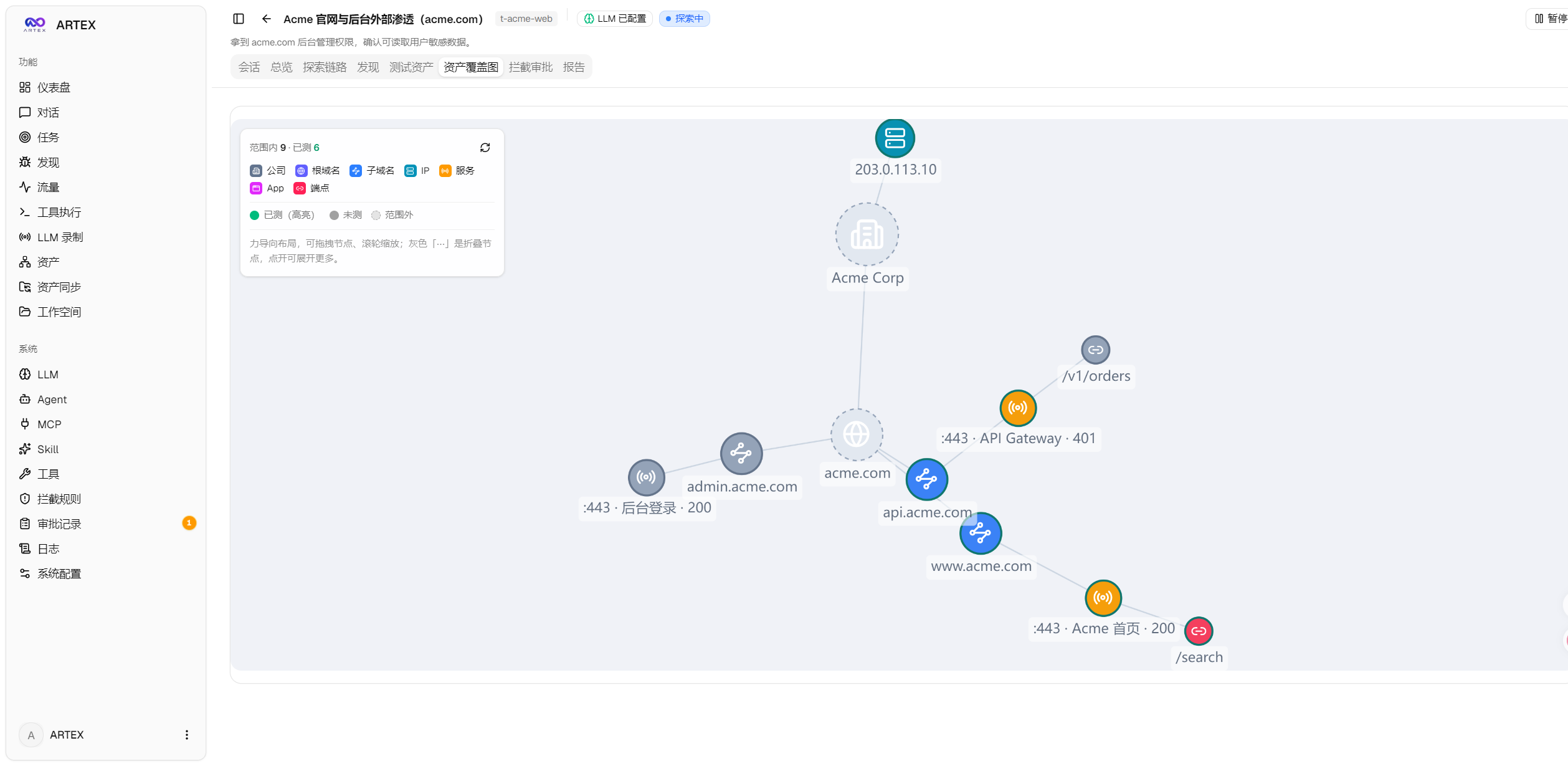
The asset coverage graph uses a force-directed layout to display assets within the scope and tested nodes, and supports collapsing and expanding nodes. It is useful for quickly determining which assets in the local lab scope have already been explored.
Sync Assets from ScopeSentry
The project supports syncing assets from ScopeSentry to reduce duplicate collection. Open the “Asset Sync” page, enter the ScopeSentry address and API Key, then select the targets and asset types to sync by project or task.
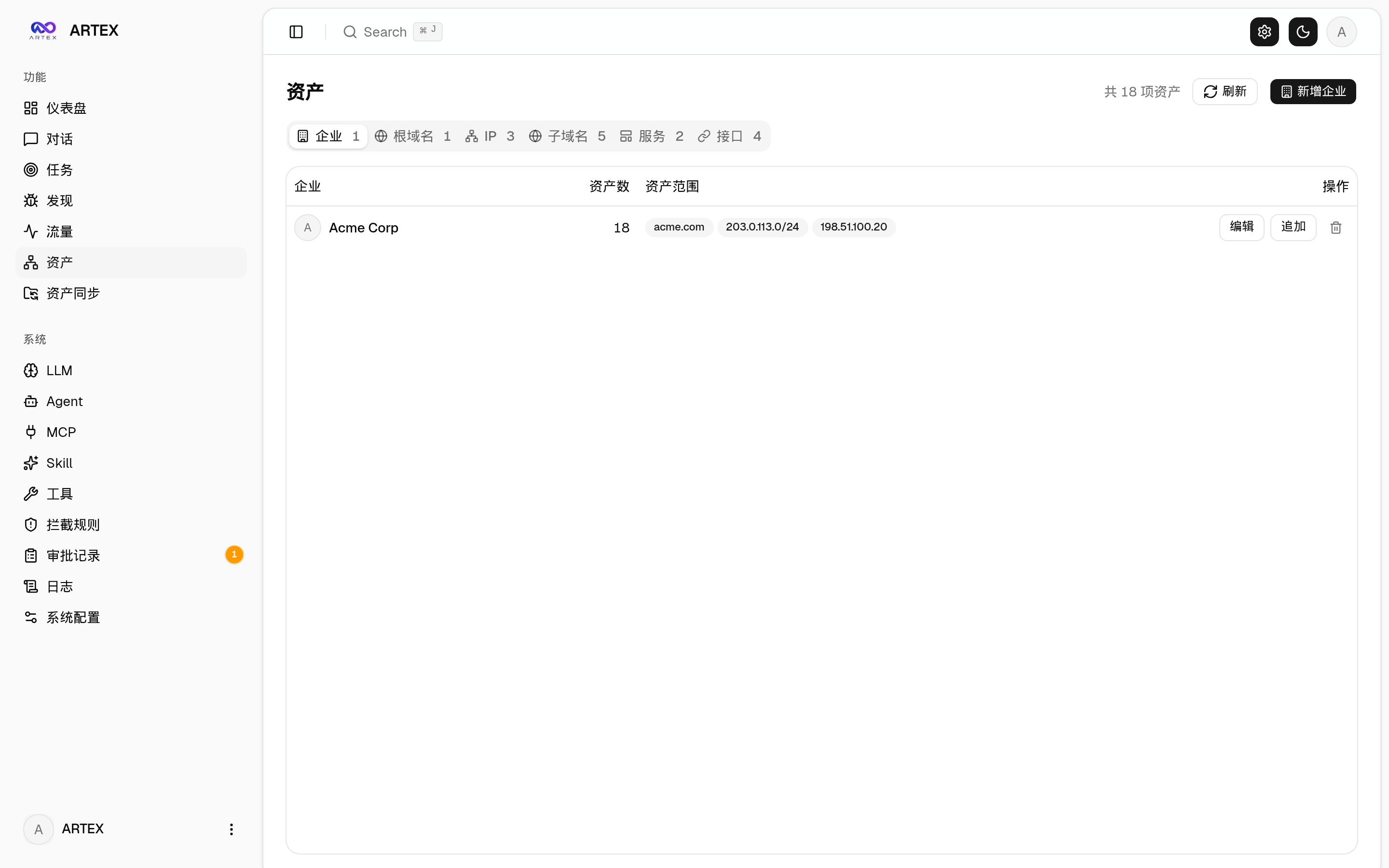
- Supports selecting asset types by scope, including domains, subdomains, IPs, ports, sites, and endpoints.
- After import, assets are grouped according to the company asset scope.
- Synchronization results are added to the Autonomous Pentest Agent asset graph for subsequent local lab tasks.
Traffic Recording and Approval
The system provides a traffic-recording proxy. You can specify the frontend and API address and the traffic proxy address with a command such as ./start.sh -addr :8787 -proxy :8788. Worker tool executions leave activity records, while the interception approval mechanism allows a human in the loop to confirm tool operations when necessary.
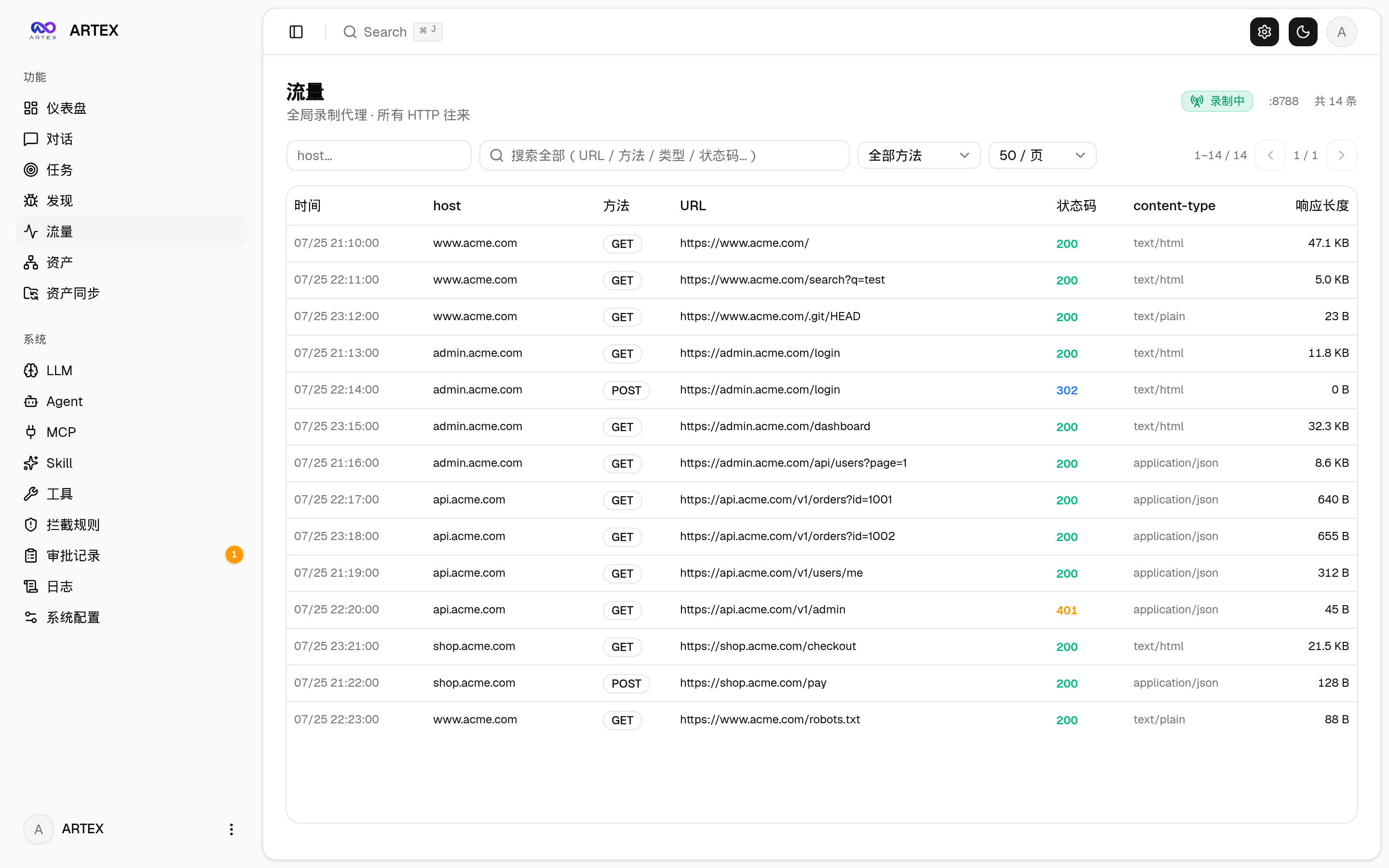
Approval records can be expanded to view details in the global approval log, task-level interception approvals, and approval cards in conversations. Carefully verify the operation targets and parameters, and always restrict targets to isolated lab environments.
Vulnerability Retesting
The “Retest” tab in task details supports paginated vulnerability selection, viewing historical conclusions and evidence, and starting an independent retest Agent session. Retest entry points are also available in the vulnerability list, vulnerability details, and asset views.
Retest conclusions include “Still Reproducible,” “Fixed,” and “Unable to Confirm.” The conclusion, evidence, and session link for each retest are saved in the vulnerability details. When a retest succeeds with a “Fixed” conclusion, the system automatically updates the vulnerability remediation status; executions that are in progress, fail, stop, or have other conclusions do not automatically change the original status.
On its first startup, the backend preconfigures an editable “Vulnerability Retest” Agent, namely retester. Its prompt, LLM, run budget, and tools can be configured in Agent Management. If the same vulnerability is already being retested, the system reuses the existing session; a new retest can be started after it is stopped, fails, or the service restarts. The README also states that historical retest records are not yet included in vulnerability report exports or task archive packages, and are not automatically linked to traffic packages.
Reverse Proxy Deployment
The frontend, API, and SSE are served by the same backend port by default, so NEXT_PUBLIC_SSE_BASE usually does not need to be configured. If HTTPS is exposed through Nginx, disable SSE buffering and set a sufficiently long read timeout:
server {
    listen 443 ssl;
    server_name your.domain.com;

    location / {
        proxy_pass http://127.0.0.1:8787;
        proxy_set_header Host $host;
        proxy_set_header X-Forwarded-Proto $scheme;
        proxy_buffering off;
        proxy_cache off;
        proxy_read_timeout 3600s;
        proxy_http_version 1.1;
        proxy_set_header Connection "";
    }
}
Only when SSE uses a different origin from the page do you need to set NEXT_PUBLIC_SSE_BASE during the build. This variable is embedded into the static package during next build; setting it at container runtime will not take effect.
Upgrades and Data Protection
When upgrading the project, only the program is replaced; the PostgreSQL data volume, ./data, and ./skills are not actively deleted. When the application starts, it idempotently initializes and migrates the database schema, so migration scripts usually do not need to be run manually. However, ./data and the database should still be backed up before upgrading.
It is recommended to perform updates from the “Version and Updates” card on the system settings page. The program downloads the release package for the current platform, verifies its SHA256, performs a smoke test, and then replaces the installation through the startup script. If verification fails, staged files are discarded; if the new version fails to start consecutively, it automatically rolls back. Updates restart the service and interrupt running tasks, so they should be performed during idle periods.
For Docker deployments, page updates only replace the program and do not update toolchains such as Playwright and nmap in the image. To update the image, run:
docker compose pull apagent
docker compose up -d apagent
You can also use the update script in the repository:
./update.shLocal Development and Testing
Development mode can start the backend, traffic proxy, and Next.js development server simultaneously:
./dev.shThe default address is http://localhost:5173. You can also run them separately:
go run ./cmd/apagent
cd web && npm run dev
go test ./...
Without -tags embedui, the backend does not embed the frontend. To preview only the frontend without starting the backend, use:
cd web && NEXT_PUBLIC_MOCK=1 npm run devCommon Notes
- Confirm that PostgreSQL is running, and check the username, password, database name, and port.
- If the activity stream connects successfully but has no events, check whether the reverse proxy has buffering disabled and confirm that the long-connection timeout is sufficiently long.
- When using a precompiled version, do not bypass
start.shorstart.bat; otherwise, the automatic replacement and restart mechanism after page updates may not work correctly. - After modifying frontend static resources, you must run
npm run build:staticagain, copy the output toserver/webui/dist, and recompile. - Back up the database,
./data, and./skillsbefore upgrading. The database schema can be migrated automatically, but it will not roll back automatically. - Do not import real production assets, production credentials, or sensitive data into the local lab system.
Summary
Autonomous Pentest Agent combines a Go service, Next.js interface, PostgreSQL dual-graph data model, and LLM multi-Agent orchestration to provide task management, exploration workflows, asset coverage, traffic traceability, approvals, and vulnerability retesting. You can first start it in an isolated local environment using Docker or an installation script, then configure the database and LLM, and finally understand the system behavior step by step through tasks, the asset graph, and execution sessions. During use, strictly follow the project's stated local learning purpose and all legal and compliance requirements.
The project is licensed under AGPL-3.0. If you modify it and provide services to users over a network, you must make the corresponding complete source code available as required by the license. For more implementation details, refer to the source code in the repository, the norma SDK, and the project's LICENSE file.