


ff-tracking is a code-generated short film in which a virtual camera follows an AI agent typing in a terminal. A computer-vision-style overlay locks onto individual glyphs, while perspective, depth of field, color processing, bloom, scanline tears, grain, and sound are produced by code.
The project is built with Rust, fframes, Skia Metal, SkSL, FFmpeg, and Python. It renders a six-second video through two coordinated passes, with both visual effects and audio driven by shared tracking data.
What the project produces
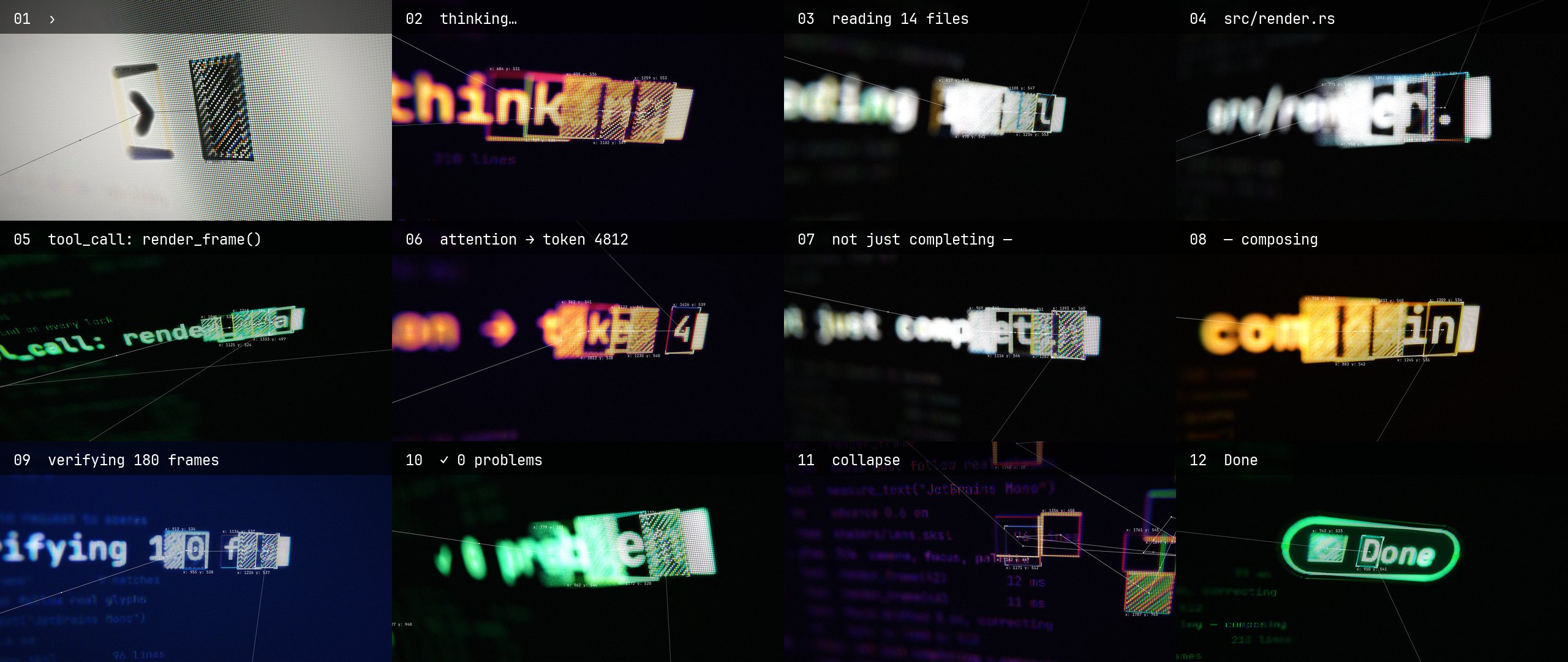
The film presents a sequence of terminal messages such as thinking…, reading 14 files, tool_call: render_frame(), and ✓ 0 problems. A tracker follows the newest characters and displays their real pixel coordinates, target brackets, labels, and links between boxes.
- Real coordinates: tracker labels use the actual position of each box in the output frame.
- Moving focus: the depth-of-field target follows the tracked box as the agent types.
- Animated tracking: links connect boxes in reading order, with a dot traveling along each link.
- Lock effects: the newest word turns red for two frames, receives a scanline tear, and triggers a spatially panned beep.
- Multiple looks: twelve shots use Paper, Thermal, Mono, Phosphor, Amber, Navy, and Neon palettes.
- Final collapse: fourteen boxes combine into one box that becomes a
Donepill before the fade to black.
Understand the two-pass pipeline
The project separates terminal layout from the camera and lens effects. This makes every glyph position deterministic while allowing the second pass to treat the rendered terminal as a shader input.
- HUD data: the
hudcrate defines scenes, tracker boxes, camera movement, and projection data. - Flat pass: the
flatbinary renders the terminal as SVG at 3840×2160. It places one<text>element per glyph so positions are known exactly. - Lens pass: the
lensbinary samples the flat video asiChannel0and applies the virtual camera and SkSL effects. - Audio pass:
tools/sfx.pyreadsout/tracks.jsonand synthesizes sound events that match typing, cuts, locks, and the final landing. - Encoding: FFmpeg combines the processed video and audio into
out/tracking.mp4.
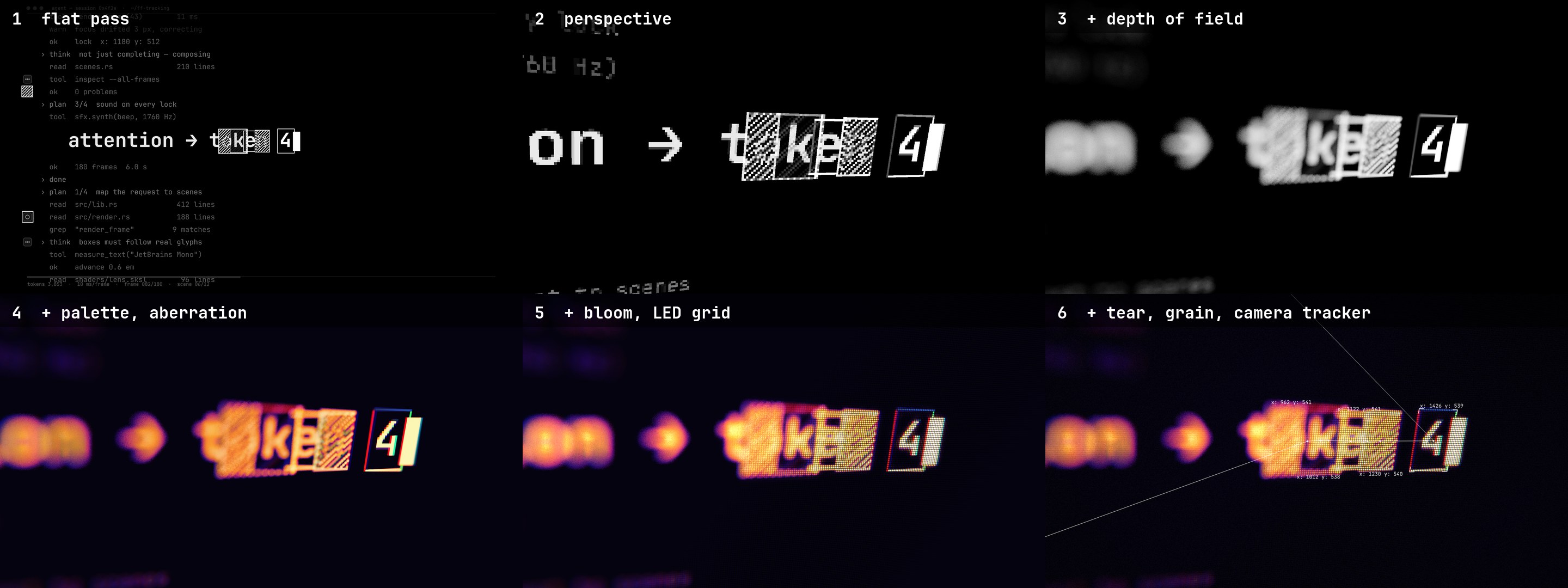
The lens shader handles perspective, depth of field, palette mapping, chromatic aberration, bloom, an LED grid, tears, grain, and the camera-space tracker overlay. The depth-of-field effect uses 36 golden-angle samples, while highlights receive bokeh-style weighting.
Install the prerequisites
Rendering requires a Mac with Apple silicon because the project uses Skia on Metal. Install the following tools before building:
- Rust with support for the 2024 edition
- FFmpeg
- Python 3
- Python packages
numpyandscipy - Pillow and
img2webpif you want to rebuild the README media
Clone the repository and enter its directory:
git clone https://github.com/mrsarac/ff-tracking
cd ff-tracking
Render the default film
The main script builds the Rust workspace, exports tracking data, renders the flat pass, synthesizes sound, and renders the lens pass:
tools/render.shThe completed video is written to out/tracking.mp4. On an M3 Pro, the render takes approximately 40 seconds after the initial build.
The generated data includes out/tracks.json, which describes tracking events and drives the default sound design. The optional camera binary also writes out/camera.json, containing per-frame zoom, tilt, roll, tracked-box position, and screen-center information.
Inspect frames, audio, and shader stages
Because each pass is an fframes CLI, you can inspect the output with the usual commands:
target/release/lens strip all -n 12
target/release/lens frame 81 -o frames
target/release/lens preview
target/release/lens audio analyze
Use strip to create a contact sheet, frame to export a full-size frame, and preview to open a real-time preview with sound. The audio analysis command reports loudness and true peak information.
To stop the shader after a particular stage, set LENS_STAGE. The supported stages are numbered from 0 through 3:
LENS_STAGE=1 target/release/lens frame 81This is useful when debugging the transition from the source image to the final lens treatment.
Customize the scenes
Each shot is an entry in SCENE_LIST inside hud/src/lib.rs. A scene defines its kind, text, palette, camera, starting position, and font size:
SceneDef {
    kind: Kind::Typing,
    text: "thinking…",
    palette: Palette::Thermal,
    cam: cam(0.38, -0.22, 0.04, 2.5, 2.8, 50.0, 0.0, 1.2),
    hero: (560.0, 540.0),
    size: 104.0,
},
Change the text, select another palette, or adjust the camera values, then render again:
tools/render.shThe tracker, focus target, labels, and lock beeps follow the updated scene data automatically. Available palette names include Paper, Thermal, Mono, Phosphor, Amber, Navy, and Neon.
Run the HUD tests after editing scenes:
cargo test -p hudThese tests check that each line fits on the screen and that the camera keeps every target in frame.
Use the default or optional soundtrack
The default soundtrack is generated by tools/sfx.py. It combines a screen hum, bit-crushed glitches on cuts, clicks for keystrokes, and pentatonic lock beeps panned toward the tracked box. It also adds a riser for the collapse and a chime with a sub hit when the Done pill appears. Loudness is measured with FFmpeg's ebur128 and set to -14 LUFS.
The repository also includes an optional darker Slab score at 120 BPM. It follows the same tracking and camera data, so lock blips, keystrokes, pads, risers, glitches, bass filtering, and bass tears respond to the animation.
Use the committed score render with:
tools/score.shTo render the score again, provide a Slab checkout built with zig build -Doptimize=ReleaseFast:
SLAB=/path/to/slab tools/score.sh
The score script writes score/ff_tracking.slab, and the rendered audio is available as score/score.wav. The score pipeline extends beyond the picture for the reverb tail, then cuts the result to six seconds and fades it with the video.
Note that score/score.py imports slabkit, which is distributed with Slab under GPL-3.0. Slab is only needed to re-render the score; the committed score files are offered under the repository's MIT license according to the README.
Rebuild the documentation media
The repository includes a script for regenerating the README images. Run it with Python after installing the image dependencies:
python3 -I tools/readme_media.pyProject layout
hud/: scenes, tracker boxes, camera data, and projection logic.flat/: the first terminal-rendering pass at 3840×2160.lens/: the second pass, includinglens/shaders/lens.sksland the camera-space tracker.tools/: the main render script, sound generator, README media generator, and Slab pipeline.score/: the optional Slab score, project, and rendered WAV file.docs/: design specifications, prompts, decisions, and fframes contributions.
Advanced implementation notes
The two-pass design is important because the shader cannot currently sample an SVG subtree from the same frame. Instead, the completed flat frame is synchronized and passed to the shader as an image input:
.image("iChannel0", &frame.get_synced_video_frame(..)?.into_image())The README also documents several practical constraints:
flatis reserved in SkSL, so avoid using it as a helper name.- At the
Videolevel, return a root<svg>rather thanSvgr::empty(); an empty root can surface as a late rendering error. - The CPU projection function
hud::projectkeeps the tracker overlay aligned with the shader's camera. - Both visual passes and the sound generator read the same HUD tracking information, preventing focus and audio events from drifting away from the glyphs.
Conclusion
ff-tracking demonstrates how a short cinematic sequence can be generated entirely from structured scene data, SVG, Rust, SkSL, GPU rendering, and synthesized audio. Start with tools/render.sh, inspect the intermediate frames, then edit SCENE_LIST to create your own terminal messages, palettes, camera moves, and tracked compositions. Use the optional Slab pipeline when you want a score that follows the same timing and camera motion.