


What Is Procedura?
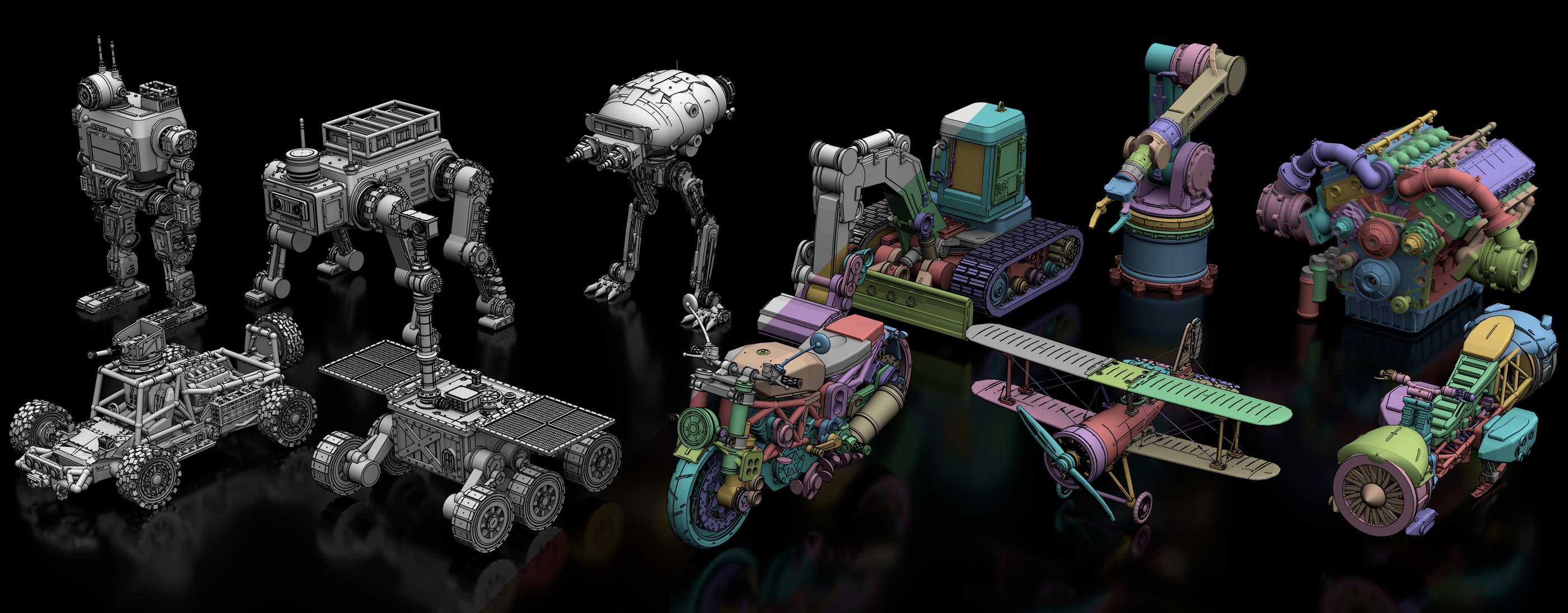
Procedura is an agentic 3D modeling pipeline that converts a text prompt into an editable procedural assembly. Instead of producing only a point cloud or triangle mesh, it writes a parametric OpenSCAD program whose named parts are connected through typed mates. You can inspect the source, edit it, and compile it again.
The system uses a frozen large language model and requires no specialized 3D training. A run can begin with text alone, reconstruct an existing reference image, or generate a reference through a separately configured image model.
Procedura can also assign per-part PBR materials with --paint and export articulated objects to OpenUSD and URDF with --motion and --motion-urdf.
Key Features
- Editable procedural output: Produces OpenSCAD source code as well as compiled geometry.
- Part-by-part generation: Plans an object and builds its named components incrementally.
- Reference-image reconstruction: Accepts an existing image for a substantial fidelity improvement.
- 3D feedback: Can render the current build before generating each new part.
- Assembly-aware modeling: Supports mating features such as shared-nominal pegs, sockets, bolt patterns, and snaps.
- Iterative refinement: Uses render, critique, patch, and gate cycles to improve the draft.
- Materials: A vision-based pass can assign color, metalness, and roughness per part.
- Articulation: Can plan motion, export OpenUSD and URDF files, and optionally validate physics in NVIDIA Isaac Sim.
- Traceable runs: Saves prompts, responses, tool calls, gate decisions, intermediate renders, and edits.
- Web Studio: Provides a browser interface for composing runs and inspecting their artifacts.
Prerequisites and Installation
Clone the repository and run its dependency installer:
git clone git@github.com:SpatiaOS/Procedura.git
cd Procedura
bash scripts/install-deps.sh
The installer sets up Bun 1.3 or newer, project packages, a Manifold-capable OpenSCAD snapshot, Blender, and a starter .env file. By default, Bun is placed under ~/.bun, OpenSCAD under ~/opt/openscad, and Blender under ~/opt/blender/.
The script is safe to run repeatedly. Existing working components are left alone. Use its optional modes to inspect dependencies, skip Blender, or choose another installation prefix:
bash scripts/install-deps.sh --check
bash scripts/install-deps.sh --no-blender
PREFIX=/opt bash scripts/install-deps.sh
--check reports missing requirements without installing anything. --no-blender skips the approximately 350 MB Blender download, although Blender is needed for several rendering and feedback features.
OpenSCAD must support the Manifold backend. Older distribution packages may fall back to CGAL and become orders of magnitude slower. Procedura checks for
--backendat startup and normally refuses to use an incompatible build. SetPROCEDURA_ALLOW_CGAL_OPENSCAD=1only if you intentionally accept that slowdown.
The installer does not install NVIDIA Isaac Sim. Isaac Sim is only required for physics validation associated with motion workflows; the rest of Procedura works without it. The installer also preserves an existing .env file.
Configure an LLM Endpoint
Procedura includes neither API keys nor a hosted inference backend. Open the generated .env file and provide an endpoint and key:
OPENAI_API_KEY=sk-...
OPENAI_BASE_URL=https://api.openai.com/v1
PROCEDURA_MODEL=gpt-5.2
The endpoint must support POST {base}/chat/completions with server-sent events. Compatible choices can include the OpenAI API, OpenRouter, a corporate gateway, or local servers based on vLLM, Ollama, or LM Studio.
Model selection is a string, so you may use any model identifier served by the configured endpoint. The known-good presets and model-resolution rules are documented in src/config/models.ts.
Use the Native Gemini Transport
For Gemini through its native GenAI path, set GEMINI_API_KEY and GEMINI_BASE_URL, then prefix the model identifier with gemini::
PROCEDURA_MODEL=gemini:gemini-3-pro-previewThis path exposes native features such as thinkingConfig and first-class thought parts.
Optional Image Generation
Procedura does not call an image API unless you explicitly configure or request one. To enable generated reference images, add an image model:
PROCEDURA_IMAGE_MODEL=gpt-image-1The image model reuses OPENAI_BASE_URL and OPENAI_API_KEY. Without --image or a configured image model, runs remain text-only and do not silently incur image-generation charges.
Create Your First Model
The output directory is required. Supply it with -o or --output, then provide a text prompt:
bun run scripts/procedura.ts -o outputs/daybed \
  --prompt "a brutalist brass daybed with tapered legs"
This default workflow plans the components, builds them one at a time, and refines the complete shape. It is text-only, does not use an image API, and does not place Blender in the per-part draft loop. It is the least expensive useful configuration.
To see all supported options, run:
bun run scripts/procedura.ts --helpImprove Fidelity with a Reference Image
Supplying a reference image is the largest individual fidelity improvement identified by the project. Pass an image you already have alongside a descriptive prompt:
bun run scripts/procedura.ts -o outputs/daybed \
  --image ref.png \
  --prompt "a brass daybed with tapered legs"
Alternatively, generate the reference during this run by naming an image model:
bun run scripts/procedura.ts -o outputs/daybed \
  --image-model gpt-image-1 \
  --prompt "a brass daybed with tapered legs"
For long descriptions that are awkward to quote in a shell, save the prompt to a file:
bun run scripts/procedura.ts -o outputs/daybed \
  --prompt-file my_prompt.txt
Run the Full Quality Pipeline
A full run can combine reference reconstruction, visual feedback, assembly features, materials, motion, and a longer refinement budget. Large plans can require longer LLM limits, so raise both timeout variables first:
export PROCEDURA_LLM_TIMEOUT_MS=1800000
export PROCEDURA_LLM_DEADLINE_MS=1800000

bun run scripts/procedura.ts -o outputs/gripper \
  --image gripper_ref.png \
  --3d-feedback \
  --assembly \
  --paint \
  --motion --motion-urdf \
  --max-steps 12 \
  --prompt "a two-finger parallel robot gripper"
Each option has a distinct role:
--3d-feedbackgives the generator a rendered view of the current assembly before it creates each part. This adds one Blender pass per part.--assemblyadds real mating interfaces instead of relying only on overlapping geometry.--paintuses a vision call to assign PBR material properties to named parts.--motionplans articulation and exports OpenUSD data.--motion-urdfadditionally creates URDF files and per-link meshes.--max-steps 12allows up to 12 refinement cycles. Every cycle performs render, critique, patch, and gate operations and consumes two LLM calls.
Long planning calls can indicate that the pipeline is doing substantive work. The README recommends raising timeouts instead of restricting PROCEDURA_MAX_PARTS, because limiting the part count trades model quality for speed.
Resume, Redraft, or Skip Refinement
Procedura can continue the refinement loop in an existing output directory. Omit the prompt and specify a new step budget:
bun run scripts/procedura.ts -o outputs/daybed --max-steps 12To discard the existing draft and create it again, add --redo:
bun run scripts/procedura.ts -o outputs/daybed \
  --prompt "a brutalist brass daybed" \
  --redo
Use --no-refine when you only want the draft. Procedura promotes that draft to the final output files. For the older monolithic workflow, --one-shot makes one generation call without a planning stage and requires a reference image:
bun run scripts/procedura.ts -o outputs/daybed \
  --one-shot \
  --image ref.png \
  --prompt "a brutalist brass daybed"
Understand the Output Directory
A completed run can contain the following artifacts:
image.png: The supplied or generated reference image.plan.json: The planned part structure._parts/NN_name/: Per-part artifacts for incremental generation.draft.scadanddraft.obj: The initial procedural source and compiled mesh.final.scadandfinal.obj: The refined deliverables.final_summary.txt: The finishing verdict and shipped connectivity information.preview_final/: A Blender ambient-occlusion render of the final mesh.final_materials.json: Per-part color, metalness, and roughness generated by--paint.final_painted.scad,final_painted.obj, andfinal_painted.mtl: Painted model assets.preview_painted/: A PBR Cycles render of the painted model.motion/final_motion.usda: The OpenUSD articulation output.motion/urdf/andmotion/links/: URDF data and per-link meshes when requested._trajectory/procedura-id.jsonl: Prompts, responses, tool calls, and gate decisions._refine_steps/step_NNN/: The render, diagnosis, edit, and compilation data for each refinement cycle.
Every OBJ file written by Procedura is normalized to a unit bounding box. STL export is optional and can be enabled with --export-stl.
Rerun Materials or Motion Independently
Painting and motion operate on a finished run directory, so you can repeat either stage with another model or after a failure without regenerating the geometry:
bun run scripts/paint.ts RUN_DIRECTORY --model MODEL_KEY --refine-steps 2
bun run scripts/motion.ts RUN_DIRECTORY --model MODEL_KEY --urdf --no-validate
The optional --no-validate flag skips motion validation. This is useful when Isaac Sim is unavailable or when you only need exported articulation files.
Process a Dataset
For multiple cases, use the batch script with a JSON Lines prompt file:
bun run scripts/batch.ts \
  --prompts cases.jsonl --images \
  --incremental \
  --motion --validate --urdf \
  --max-steps 3 \
  --parallel 2 \
  --out-root outputs/batch_v1
The paper workflow generates shape and articulation together, then paints each completed case separately. This prevents a painting failure from invalidating completed geometry:
bun run scripts/paint.ts outputs/batch_v1/CASE_IDKeep parallelism near two when using --motion --validate, because multiple headless Isaac Sim instances can exhaust GPU memory. Refinement-only batches may tolerate approximately 8 to 12 workers, but each cycle launches Blender, so memory can become the limiting resource before API rate limits do.
Compare Run Artifacts
Procedura includes a local results server for viewing renders, source files, metrics, and trajectories from multiple configurations side by side:
bun run scripts/results-server.ts \
  --root a=outputs/run_a \
  --root b=outputs/run_b
This is useful when testing prompts, stage-specific models, refinement budgets, or options such as 3D feedback and assembly-aware generation.
Use the Procedura Studio
The Studio is a web front end for the same pipeline. It lets you compose a run with a prompt, optional reference image, presets, and per-stage controls. During execution, you can watch parts appear and inspect the plan, part artifacts, refinement history, final 3D mesh, materials, and articulation.
cd web
bun install
bun run start
Open http://localhost:8080. Studio starts the CLI from the repository root and reads the same .env, so it requires no separate API configuration.
Advanced Tips
- Start cheaply, then add quality features. Validate your endpoint and prompt with a default text-only run before enabling image generation, visual feedback, painting, or motion.
- Use a real reference when possible. The project identifies
--imageas the largest single fidelity improvement. - Override models by stage. Use
--agent-model,--scad-model,--paint-model, or--motion-modelto select different endpoint model keys for individual stages. - Preserve successful geometry. Run painting and motion as separate post-processing stages when failures should not force a full rebuild.
- Monitor memory during parallel runs. Blender and Isaac Sim can consume substantial memory even when your API endpoint can handle more concurrent requests.
- Inspect trajectories when debugging. The JSONL trajectory and per-step refinement directories reveal prompts, model responses, edits, compiler results, and gate decisions.
- Confirm OpenSCAD backend support. If generation appears stuck, verify that Procedura is using a Manifold-capable OpenSCAD rather than an old CGAL-only build.
Conclusion
Procedura combines language-model planning with procedural CAD, mesh compilation, visual refinement, materials, and optional articulation. Begin with a configured endpoint and a simple text prompt, then add a reference image, 3D feedback, assembly features, painting, and motion as your quality requirements grow. Because the main deliverable is editable source code, the resulting objects remain inspectable and reusable after generation.
Procedura is MIT-licensed. Project documentation, the paper, and additional details are available from the Procedura project page.