

Background
How it works
The WeChat ClawBot plugin (known in the community as the "Lobster plugin") is an official personal-account Bot API channel launched by Tencent WeChat in March 2026. It is built on the official iLink protocol.
It allows you to legally connect AI Agents such as OpenClaw, Codex, and Claude Code to a personal WeChat account. A "ClawBot" contact will appear in your chat list, and you can communicate with it directly.
What exactly is it?
In essence:
An official plugin built into WeChat plus a cloud-based iLink message relay channel (domain: ilinkai.weixin.qq.com), not a third-party reverse-engineered protocol.
Function:
It only relays messages—forwarding the text, images, and files you send to ClawBot through the iLink protocol to your local AI program (OpenClaw/Codex/Claude code, etc.), then sending the AI's responses back to WeChat. The AI capabilities are provided by your backend; ClawBot itself does not include a model.
Entry: WeChat App (iOS/Android ≥ v8.0.70, gradual rollout) → Me → Settings → Plugins → ClawBot
Purpose:
This tutorial does not use OpenClaw as an intermediary. Instead, it directly binds Codex to WeChat through the ClawBot plugin.
Prerequisites
- Node.js
- Codex
- codex-acp
- weixin-acp
Installation Steps
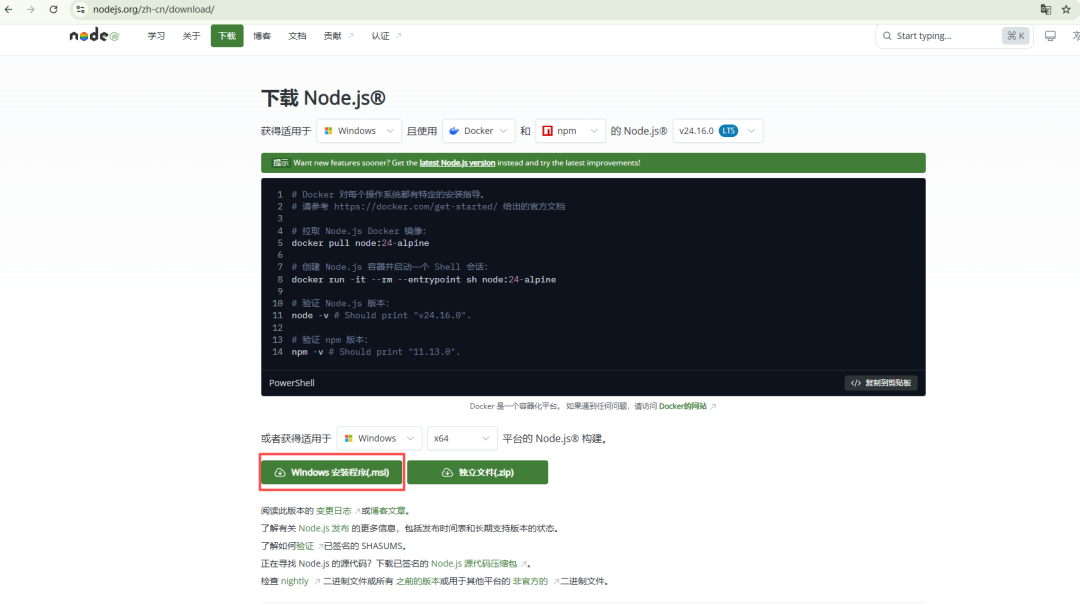
1. Install Node.js
Download Node.js from: https://nodejs.org/zh-cn/download/
2. Install Codex
Open a CMD command-line window, enter the following command, and press Enter to install Codex automatically.
# Official download
npm install -g @openai/codex
For a detailed tutorial, see the article: “”.
3. Install codex-acp
Open a CMD command-line window, enter the following command, and press Enter to install codex-acp.
codex-acp wraps the Codex CLI as an ACP (Agent Client Protocol) standard process for communication with weixin-acp.
# 1. Install the Codex ACP adapter globally
npm install -g @zed-industries/codex-acp
4. Start the weixin-acp bridge
Open a CMD command-line window, enter the following command, and press Enter to start the weixin-acp bridge.
# 2. Start the WeChat ClawBot bridge (automatically launches the codex-acp child process)
npx weixin-acp start -- codex-acp
5. Scan the QR code in WeChat to bind ClawBot
The terminal will display a WeChat QR code → scan it with WeChat on your phone → confirm authorization.
D:\tools>npx weixin-acp start -- codex-acp
Need to install the following packages:
weixin-acp@0.6.0
Ok to proceed? (y) y
npm warn deprecated @zed-industries/claude-agent-acp@0.23.1: This package has been renamed to @agentclientprotocol/claude-agent-acp. Please migrate to continue receiving updates.
No login information detected. Please scan the QR code to log in to WeChat first.

Starting WeChat QR-code login...

Scan the following QR code with WeChat to complete the connection:

▄▄▄▄▄▄▄▄▄▄▄▄▄▄▄▄▄▄▄▄▄▄▄▄▄▄▄▄▄▄▄▄▄▄▄▄▄▄▄
█ ▄▄▄▄▄ █▀ █▀▀█▀▀▄▀ ▄▄▄▀▄█▀ ▀▀█ ▄▄▄▄▄ █
█ █   █ █▀ ▄ █▀▄ ▀▀▀▄▄▄▀█▄█ █▄█ █   █ █
█ █▄▄▄█ █▀█ █▄▄ ▀ ▀█▄ ▄█▄▄▀▀▀▀█ █▄▄▄█ █
█▄▄▄▄▄▄▄█▄█▄█ █ ▀▄█ █ ▀ ▀ █ ▀▄█▄▄▄▄▄▄▄█
█▄   ▄█▄▄▄▄▄█▄▄▀█ ▄▄▀▄▀▄▀▄ ▄▄ ▄█ █ ▀ ██
█ ▄██▀█▄ ███ ▄▄▀ ▀█▄█▄▀▀█▀█▀▄ ▀▀ █ ▄▀▄█
█ ▄▀ ▄▄▄▄█  ▄▀▀█▄ ▄▄▀▄▀▀▀▀█ ██ ▄▀▄▄ ▀▄█
██▀▄█▀▀▄█▄▀██▀ ▄▄ ▄▀▀▀  ███▀  █▀ ▄▀▄▄ █
█ ▄█▄▄▀▄▀█ ██▄█▄▀ ▄▀▀▀▀▄▀▀▄ █▀▄▄ ▄▄ ▀▄█
█▄ █ ▀▄▄▀ ▄▀ ▄█▀ ▀▄ █▀▀▄███ ▄ ▀▀▀ █▄▄ █
█    ██▄▀▀▀▀▄▀▀▀▄ ▄▀▀▀▀▀ ▀▄▀█▀▄▄█▄▄  ▄█
█   ▀█ ▄ ▀▄██▀ ▄▄ ▄ ▀▄ ▀███▀▄▄▄███▄█▄ █
█▀ █▄█ ▄▀█▀ █▄█▄█▀▄▀▀▀▀▀▀▄ ▀▄▀█▄ ▄   ▄█
█ ████▀▄▀ ▄  ▄█▀▄██▄█ ▀ █▄▄ ▄▀▄█████▄ █
█▄█████▄█ █ ▄▀▀▀▄▀▄▀▀▄▀▀▀▄▄ ▀ ▄▄▄ █▄███
█ ▄▄▄▄▄ █▄  █▀ ▄▄▀▄▄▀▀ █▀██▀▀ █▄█ ▄█  █
█ █   █ █ ▄██▄█▄▄█▄▄▀▀▀▄ ▄▄ ▄▄    ▄▄▀▀█
█ █▄▄▄█ █  ▄ ▄█▀ ▀▄███  ▀▀▄█▄▀▄▀ ███▄ █
█▄▄▄▄▄▄▄█▄▄█▄███▄▄▄▄▄▄███▄▄▄██▄▄██▄▄▄▄█


Waiting for scan...


✅ Connected to WeChat successfully!
[weixin] Bot started, account=b0a5baab53cc-im-bot
[weixin] monitor started (https://ilinkai.weixin.qq.com, account=b0a5baab53cc-im-bot)
[weixin] no previous sync buf, starting fresh
[weixin] config cached for o8cq904eE-n35QmeWzLBueMLWaoQ@im.wechat
[acp] spawning: codex-acp
[acp] initializing connection...
[acp] connection initialized
After the binding succeeds, a ClawBot / AI Agent contact will appear in your WeChat chat list. Messages will be processed and answered by the local Codex.
6. Verify that the AI assistant was installed successfully
In WeChat, tap the WeChat ClawBot (AI) avatar to enter the chat, then send a message such as "Who are you?". If it replies normally, the installation was successful.
The first conversation may take a little longer to respond; response times should return to normal afterward.