

Harp is an unofficial macOS fork of the open-source Warp terminal. It keeps Warp's terminal, AI, and cloud capabilities while replacing the traditional tab bar with a sidebar designed for long-running coding agents.
With Harp, you can run many Claude Code and Codex sessions side by side and quickly see which sessions are working, waiting for you, finished, running in the background, or set aside. Harp does not operate its own servers; upstream Warp features continue to communicate with Warp's servers as they do in Warp.
What Harp adds
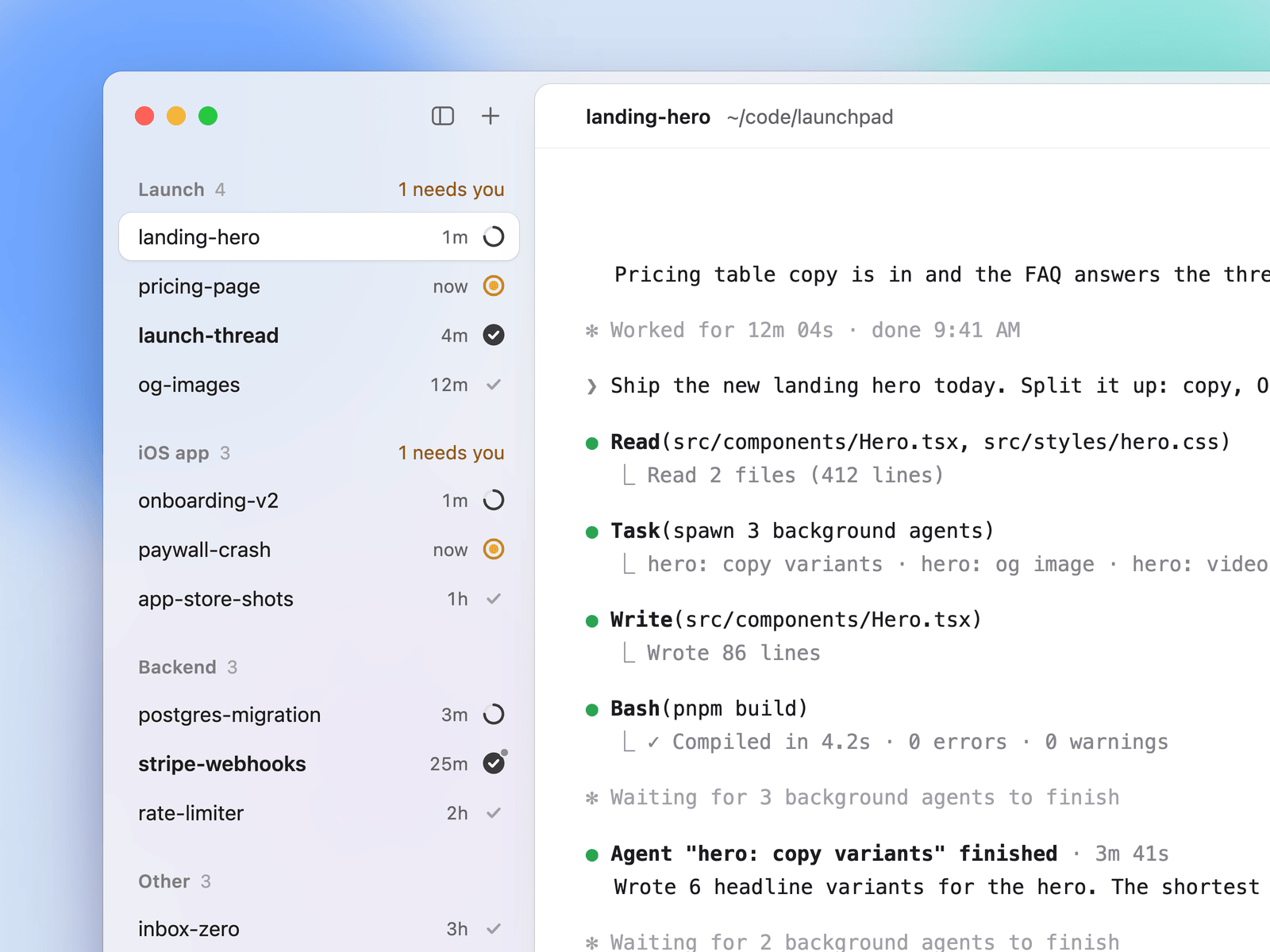
Agent status at a glance
Each sidebar row can show the state of a Claude Code or Codex session. An unread marker remains until you inspect the session, a dot indicates that background work is still running, and a moon identifies a tab you set aside. Use Cmd+R to rename a tab.
Persistent groups
You can place tabs into named groups to keep projects and agents organized. When tmux integration is enabled, Harp stores the group and ordering on tmux sessions. This allows the layout to survive a restart and lets other tmux clients see the same arrangement.
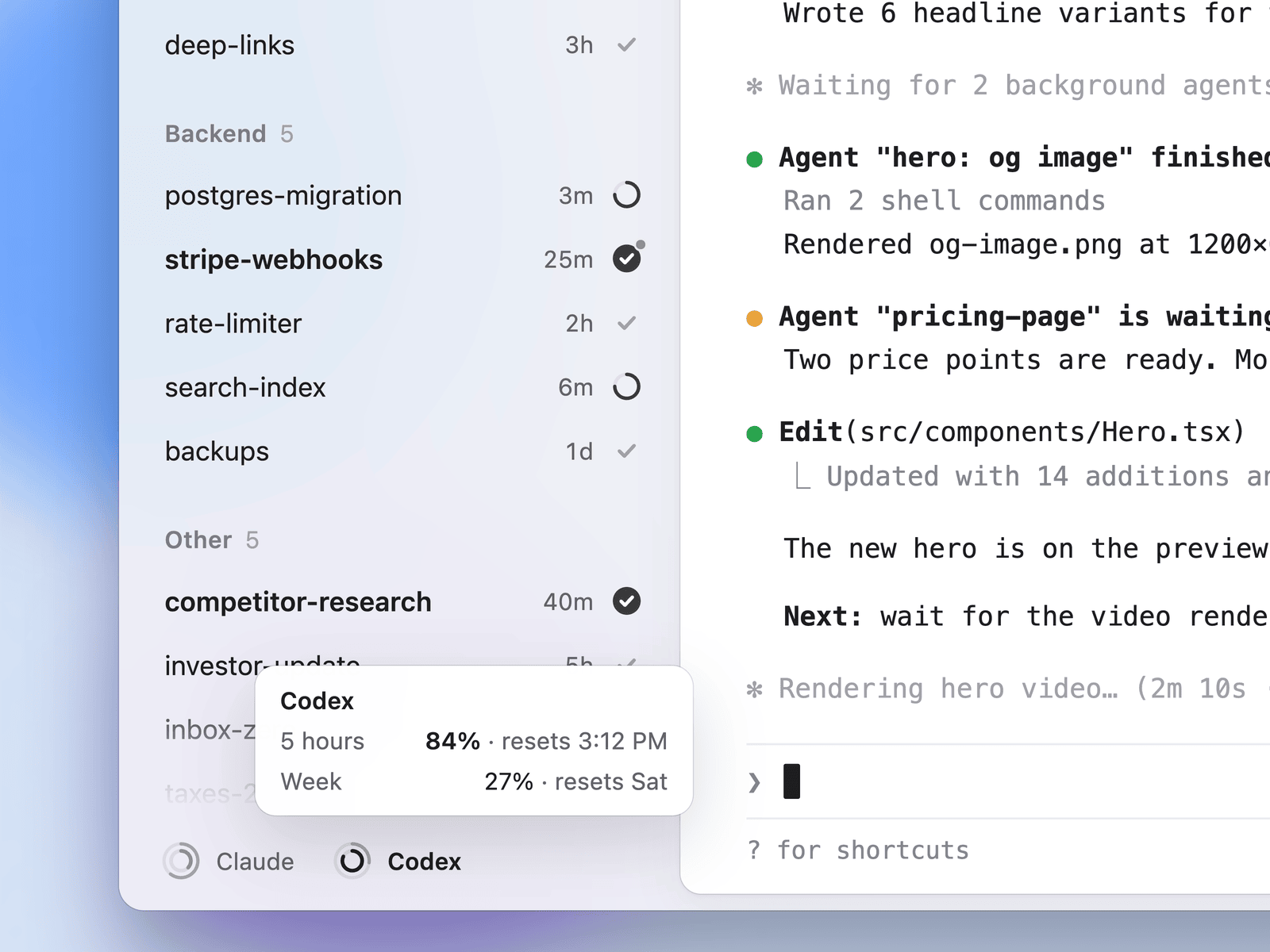
Usage-limit rings
The sidebar footer can display two rings for each provider: one for the five-hour window and one for the weekly limit. Harp reads these values from a local JSON file maintained by a tool of your choice. It does not fetch usage data itself. See the limit-rings format documentation for the expected file format.
Phone-friendly tmux sessions
Sessions attached to tmux can carry their name, group, read state, and inactive flag. A tmux session started elsewhere, such as from a phone over SSH, can request a Harp tab by setting the tmux option @warp_adopt to 1.
Install Harp
Install the latest macOS build
- Open the latest Harp release from the GitHub Releases page.
- Download the
Harp-<version>.dmgfile. - Open the disk image and drag Harp into the Applications folder.
Harp uses its own bundle identifier, com.dominikmartn.Harp, URL scheme, harp://, and settings directory, ~/.harp. This lets it run next to Warp without sharing those resources.
Build from source
To build Harp yourself, use macOS and the Rust toolchain specified in rust-toolchain.toml. From the repository root, run the bootstrap script once:
./script/bootstrapThen compile and launch the debug application:
./script/runThe build produces target/debug/bundle/osx/Harp.app and launches it. The macOS run script signs the application with the first Apple Development identity in your keychain, or falls back to an ad-hoc signature. For a signed and notarizable release DMG, use script/release_macos and consult its help output.
Configure Harp
Harp's additional integrations are disabled by default. Create or edit ~/.harp/settings.toml, then enable the features you need. Harp reloads the settings file when it changes.
[integrations.limit_rings]
enabled = true
file = "~/.cache/limit-rings.json"

[integrations.tmux]
enabled = true
Enable usage-limit rings
Set integrations.limit_rings.enabled to true and point integrations.limit_rings.file to the local JSON file that contains your provider usage values. The ~ character represents your home directory.
Enable tmux synchronization
Set integrations.tmux.enabled to true to enable tmux synchronization, session adoption, and agent detection inside tmux. Harp polls tmux every 10 seconds.
With tmux enabled, names, groups, ordering, read flags, inactive flags, and adopted sessions can be synchronized. If you need custom behavior, integrations.tmux.session_script can point to a script that handles renaming and regrouping. The script receives commands in these forms:
<script> rename <shell_pid> <group> <title>
<script> group <session_id> <old_group> <new_group>
Adjust the sidebar and agent toolbar
appearance.vertical_tabs.full_tab_menudefaults totrue. Set it tofalseto reduce tab and group menus to essential actions. The same option is available under Settings > Appearance > Tabs.agents.third_party.should_render_cli_agent_toolbardefaults tofalse. Set it totrueto restore the upstream toolbar below CLI agent sessions.
When the third-party CLI agent toolbar is disabled, update the Warp plugin for Claude Code through Claude Code's plugin marketplace, as described by the project.
Use Harp with coding agents
- Open Harp and create sessions for your Claude Code or Codex workflows.
- Rename tabs with
Cmd+Rso their purpose is clear. - Place related sessions into named groups, such as a group for each project.
- Watch the sidebar state indicators to identify sessions that need your attention, are still working, or have finished.
- Set aside sessions you do not need immediately; Harp marks them with a moon.
- Open unread sessions when you are ready to review their output.
New tabs can be created with Cmd+T, by double-clicking, or through the right-click menu on empty sidebar space. The project intentionally removes some tab-bar controls, including the search field, view options, and tab-configuration buttons.
Adopt a session started elsewhere
When a tmux session is created from another device or terminal, you can ask Harp to adopt it as a tab. In the relevant tmux session, run:
tmux set-option @warp_adopt 1After tmux integration is enabled, Harp can follow that session and reflect its name, group, and state in the sidebar. This is useful for continuing work started over SSH, including from a phone.
Connect Claude Code background-task reporting
The repository includes a Claude Code hook that reports background tasks to Harp. The integration instructions are available in integrations/claude-code. Use those instructions when you want background activity to appear in the sidebar.
Advanced development options
Trace status changes
For regression checks against an agent transcript, launch a debug build with WARPOSS_STATUS_TRACE=1. Harp writes status changes to ~/Library/Logs/harp.log as [status-check] lines.
Run without a real login
Set WARPOSS_SKIP_LOGIN=1 at launch to start with a test user and make authenticated requests fail. This is intended for automated runs that do not use a login.
Use an isolated debug data profile
For debug builds, set WARP_DATA_PROFILE=<name> to keep settings and data in ~/.harp-<name> instead of the default profile location.
Validate contributions
Before submitting changes, run the repository's presubmit checks:
./script/presubmitThis runs formatting, Clippy, and tests.
Conclusion
Harp turns the Warp terminal into a workspace for managing many long-running Claude Code and Codex sessions. Install the macOS app or build it from source, enable tmux and limit-ring integrations when needed, then use groups and status indicators to keep agent-driven development organized. Harp is an unofficial Warp fork, so report Harp-specific issues to its repository rather than to Warp.