

What Is three.js Procedural Animals?
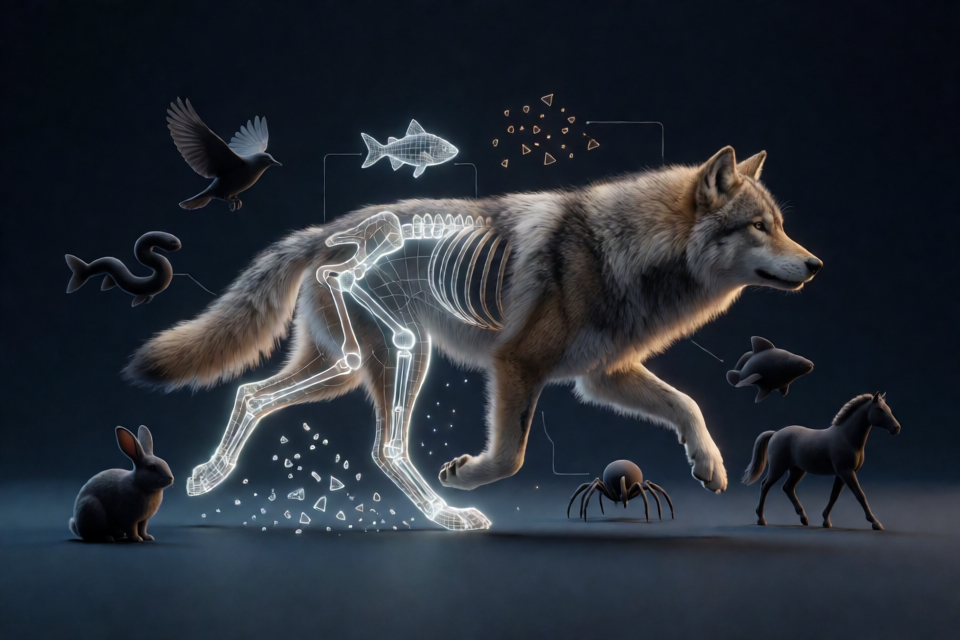
three.js Procedural Animals is a library containing 24 runtime-generated animals for three.js. Instead of downloading models, textures, rigs, or animation clips, you call createAnimal() and the library constructs a complete animated animal in code.
Each animal is sculpted from signed distance fields, meshed, rigged, skinned, covered with fur, feathers, or scales, and animated with inverse-kinematics gaits and actions. The available body plans include pawed animals, hoofed animals, birds, swimmers, snakes, spiders, and hoppers.
You can explore every species, variant, action, and debug view in the live showcase, or inspect the source in the GitHub repository.
Key Features
- 24 species: Options range from wolves, cats, horses, and rabbits to birds, fish, snakes, and spiders.
- Seeded individuals: A seed produces repeatable size, proportions, coat, sex, age, and variant choices unless you override them.
- Runtime animation: Animals automatically select suitable gaits and expose actions such as sitting, sleeping, eating, attacking, and jumping.
- Five quality tiers: Choose from
hero,high,medium,low, andcrowd. - Worker-based construction: Builds run in module Web Workers by default, with a fallback to the calling thread.
- Offline baking: Prebuild an individual as a
.animalfile for loading in approximately 20 milliseconds. - Game-oriented controls: Steer animals, move them to destinations, follow physics bodies, track targets, play actions, and receive gameplay events.
- TypeScript support: The package uses ES modules and includes TypeScript declarations.
Installation
The library requires three.js r160 or later as its only peer dependency. Install the package and three.js with npm:
npm install procedural-animals threeIf the package is not yet available from npm, install it directly from GitHub:
npm install github:majidmanzarpour/threejs-procedural-animals threeCreate Your First Animal
Start by importing three.js and createAnimal. The function is asynchronous because building the mesh, rig, coverings, and related data takes time.
import * as THREE from 'three';
import { createAnimal } from 'procedural-animals';

const renderer = new THREE.WebGLRenderer({ antialias: true });
renderer.setSize(innerWidth, innerHeight);
renderer.shadowMap.enabled = true;
document.body.appendChild(renderer.domElement);

const scene = new THREE.Scene();
scene.background = new THREE.Color(0xa9c1e0);

const camera = new THREE.PerspectiveCamera(
  40,
  innerWidth / innerHeight,
  0.1,
  500
);
camera.position.set(6, 3, 8);

const sun = new THREE.DirectionalLight(0xfff3e4, 2.7);
sun.position.set(6, 10, 4);
sun.castShadow = true;

scene.add(
  sun,
  new THREE.HemisphereLight(0xdde6f2, 0x5f5a52, 1.15)
);

const floor = new THREE.Mesh(
  new THREE.PlaneGeometry(200, 200).rotateX(-Math.PI / 2),
  new THREE.MeshStandardMaterial({ color: 0x77736a })
);
floor.receiveShadow = true;
scene.add(floor);

async function main() {
  const wolf = await createAnimal('wolf', {
    seed: 3,
    quality: 'high'
  });

  scene.add(wolf.object);

  let last = performance.now();

  renderer.setAnimationLoop((now) => {
    const dt = (now - last) / 1000;
    last = now;

    wolf.move({
      speed: wolf.gears.walk,
      heading: now / 1000 * 0.3
    });

    wolf.update(dt);
    camera.lookAt(wolf.position);
    renderer.render(scene, camera);
  });
}

main();
There are several important rules in this example:
- Create the animal inside an
asyncfunction and await the result. - Add
animal.objectto the scene, but keep that object's transform at identity. The animal manages its own movement. - Use methods such as
move(),moveTo(), orfollow()to steer it. - Call
update(dt)exactly once per frame, withdtmeasured in seconds. - Use speeds from
animal.gearsbecause available gear names can vary by species.
Avoid top-level
awaitin the entry module. According to the project documentation, it can deadlock a Vite production build.
Movement and Navigation
Direct Steering
The move() method takes a speed in metres per second and a heading in radians. A heading of 0 faces the positive Z axis.
wolf.move({
  speed: wolf.gears.walk,
  heading: Math.PI / 2
});
Call stop() when the animal should stop moving:
wolf.stop();Move to a Destination
Use moveTo() to send an animal toward a world-space point. It emits an arrive event after reaching the destination.
wolf.moveTo(
  new THREE.Vector3(10, 0, 4),
  { speed: 3 }
);

wolf.on('arrive', () => {
  console.log('The wolf arrived.');
});
Follow a Physics Body
If another system controls a body, pass its current position and velocity to follow() every frame:
wolf.follow(body.position, body.velocity);Track a Target
Make the animal turn its head toward a target with lookAt(). Pass null to stop tracking.
wolf.lookAt(player.position);

// Later:
wolf.lookAt(null);
Play Actions
Every species supports the common actions jump, sit, lie, sleep, eat, drink, attack, hit, death, and stand. Species can also provide specialized actions. For example, snakes can coil and strike, birds can take off and land, and rabbits can hop and thump.
The play() method returns a Promise whose result can be done, interrupted, stopped, or refused.
const result = await wolf.play('attack');
console.log(result);
Inspect animal.actions rather than assuming that a species supports a specialized action. You can stop a named action with stopAction():
wolf.stopAction('attack');Respond to Animal Events
The event API lets game systems react to animation and movement. Available events include footstep, attackHit, actionStart, actionEnd, arrive, takeoff, land, death, vocalize, and wingbeat.
const onFootstep = (event) => {
  sfx.play('step', event.position, event.strength);
};

wolf.on('footstep', onFootstep);

wolf.on('attackHit', (event) => {
  damage(event.position, event.direction);
});

// Remove a listener when it is no longer needed.
wolf.off('footstep', onFootstep);
Configure Terrain and Water
The ground option is a function that returns terrain height for an X and Z coordinate. Its coordinates must be in the space of animal.object.parent, and the returned height must match the terrain rendered in the scene.
const deer = await createAnimal('deer', {
  ground: (x, z) => terrainHeightAt(x, z),
  position: new THREE.Vector3(4, 0, 8),
  heading: Math.PI
});
Swimmers require a water function and a starting position below the surface. The function returns the water surface height or null where there is no water.
const fish = await createAnimal('fish', {
  water: (x, z) => 2,
  position: new THREE.Vector3(0, 1, 0)
});

scene.add(fish.object);
Land animals can also use the water definition for drinking and wading. Birds can receive a perches array containing THREE.Vector3 points they may fly to.
Choose Species, Variants, and Individuals
The library includes wolves, dogs, foxes, cats, lions, cheetahs, bears, rats, rabbits, horses, deer, cows, pigs, sheep, goats, boars, frogs, chickens, crows, eagles, fish, sharks, snakes, and spiders.
Use seed to create a repeatable individual. You may also explicitly select its variant, sex, or age:
const cat = await createAnimal('cat', {
  seed: 12,
  quality: 'high',
  variant: 'tuxedo',
  sex: 'female',
  age: 'adult'
});
String species identifiers are loaded on demand. If an application only needs one species, import that species directly to keep the bundle focused:
import wolfSpecies from 'procedural-animals/species/wolf';
import { createAnimal } from 'procedural-animals';

const wolf = await createAnimal(wolfSpecies, {
  seed: 3
});
Select the Right Quality Tier
- hero: Approximately 110,000 to 130,000 vertices for cinematic close-ups.
- high: Approximately 65,000 to 80,000 vertices for a player's animal. This is the default.
- medium: Approximately 25,000 to 32,000 vertices for mid-distance views and phones.
- low: Approximately 11,000 to 15,000 vertices for herds of roughly 10 to 20 animals.
- crowd: Approximately 5,000 to 8,000 vertices for crowds of around 100 animals, with one draw call.
You can change coat detail on an existing mesh with setQuality(). For large crowds, combine the crowd tier with setLod(2) to reduce motion detail:
const sheep = await createAnimal('sheep', {
  seed: 5,
  quality: 'crowd'
});

sheep.setLod(2);
Build results are cached by species, seed, quality, and variant. A herd of 100 animals using six seeds therefore requires only six distinct builds. The documented CPU cost is approximately 0.1 milliseconds per animal per frame.
Configure Web Workers
Animal builds take approximately 0.4 to 6 seconds. By default, construction runs in module Web Workers. If Worker is unavailable, the library falls back to the calling thread.
Vite Configuration
// vite.config.js
export default {
  worker: { format: 'es' },
  build: { target: 'es2022' },
  optimizeDeps: {
    exclude: ['procedural-animals']
  }
};
webpack 5 and Parcel 2 require no additional worker configuration.
Other Bundlers
For another bundler, bundle the worker manually:
npx esbuild node_modules/procedural-animals/src/worker.js --bundle --format=iife --minify --outfile=public/animal-worker.jsThen register a factory that creates the worker:
import { setWorkerFactory } from 'procedural-animals';

setWorkerFactory(
  () => new Worker('/animal-worker.js')
);
You can disable worker construction for a particular animal, but doing so blocks the calling thread for the duration of the build:
const wolf = await createAnimal('wolf', {
  worker: false
});
Bake Animals for Fast Loading
For a known individual, bake it ahead of time into a .animal file. This replaces the runtime build delay with loading that the README estimates at approximately 20 milliseconds.
npx procedural-animals-bake wolf --seed 3 --quality high -o public/wolf-3.animalFetch the generated file as an ArrayBuffer and pass it through the baked option:
const wolf = await createAnimal('wolf', {
  baked: fetch('/wolf-3.animal')
    .then((response) => response.arrayBuffer())
});
The baked individual should correspond to the species and configuration prepared by the command.
Advanced Tips
Use Read-Only Motion State
Read position, heading, speed, velocity, and state to coordinate cameras, gameplay, or interfaces. Do not manipulate the animal's root object to produce movement.
Attach Props to Named Points
The attachments collection provides points such as mouth, head, and back. Birds also expose foot attachments, while horses provide riding-related points including seat, stirrups, and bits. Parent props to these attachment objects rather than manually approximating their animated positions.
Use Debug and Covering Controls
The animal API includes setDebug(mode, on) with the modes albedo, weights, material, and bare. Use setCoverings(on) to toggle fur shells.
wolf.setDebug('weights', true);
wolf.setCoverings(false);
Calculate a Heading Toward a Point
Because heading zero faces positive Z, use Math.atan2(dx, dz) when calculating the direction toward a target:
const dx = target.x - wolf.position.x;
const dz = target.z - wolf.position.z;
const heading = Math.atan2(dx, dz);

wolf.move({
  speed: wolf.gears.walk,
  heading
});
Clean Up Resources
Call dispose() when an animal is permanently removed. This frees its GPU resources and removes it from the scene.
wolf.dispose();Useful Exports and Documentation
The main package also exports listSpecies, loadSpecies, setWorkerFactory, clearBuildCache, and QUALITY:
import {
  createAnimal,
  listSpecies,
  loadSpecies,
  setWorkerFactory,
  clearBuildCache,
  QUALITY
} from 'procedural-animals';
For every option, event payload, state field, and recipe, consult the repository's complete reference and TypeScript declarations.
Conclusion
three.js Procedural Animals provides a code-first way to add varied, rigged, and animated wildlife to a three.js application. Begin with createAnimal(), add the returned object to the scene, steer it through the animal API, and update it once per frame. Workers, baking, seeded caching, and multiple quality tiers let the same workflow support both detailed close-ups and large crowds.