


📌 Who Is This Article For?
• Information is scattered across different places during team collaboration, so you have to "find someone to ask" every time • New hires do not know where to start learning, and employees take their experience with them when they leave • General roles such as administration, operations, HR, marketing, and sales
After reading this, you can:
•✅ Use AI to build a framework for your team knowledge base •✅ Organize scattered experience into reusable documents •✅ Shorten new-hire ramp-up time from 2 weeks to 2 days
🤔 Have You Encountered Situations Like These?
Scenario 1: Answering the Same Questions Every Day
Colleague A: What is the reimbursement process again?
Colleague B: How do I reserve a meeting room?
Colleague C: Who needs to sign this approval form?
You have said the same things more than 20 times, and every time you have to stop what you are doing to answer.
Scenario 2: Repeating the Same Mistakes at Every Event
The marketing department held an offline event. The venue deposit turned out to be a bad deal, the materials supplier canceled at the last minute, and the check-in system crashed at the event. After barely making it through the whole event, the team held a 30-minute retrospective, and everyone said, "We’ll pay attention next time."
Three months later, it was time for the same type of event again. A new employee was put in charge and looked completely lost—no one had documented the problems from last time, so the new person repeated them all from scratch.
Scenario 3: A Key Employee Leaves = Experience Reset to Zero
An operations manager who had been with the team for 3 years resigned. She knew the follow-up cadence for nearly 20 clients, the SOPs for every major promotion, and the contact person in each department—all in her head. When she left, all of that knowledge left with her. The colleague taking over had to sort through a pile of unarchived information and figure everything out from scratch.
Why Do You Need a Team Knowledge Base?
A knowledge base is not about "organizing documents." It is about preserving the team’s shared experience.
Its value:
•✅ Faster onboarding—no need to teach everyone everything from scratch •✅ Knowledge transfer—when people leave, the lessons learned and solutions they developed stay with the team •✅ Consistent standards—one process for running events, following up with clients, and submitting reimbursements •✅ Less dependency—there is no need to ask "the person who knows it best" about everything
Scenario 1: Building an Operations SOP Knowledge Base
Pain Point
Operations teams do repetitive work every day—publishing posts, organizing events, writing weekly reports, and coordinating with suppliers. But the details of "how exactly to do it" exist only in senior employees’ heads. New hires ask one question at a time and complete one step at a time; if they do not ask, they make mistakes.
Solution
Prompt template:
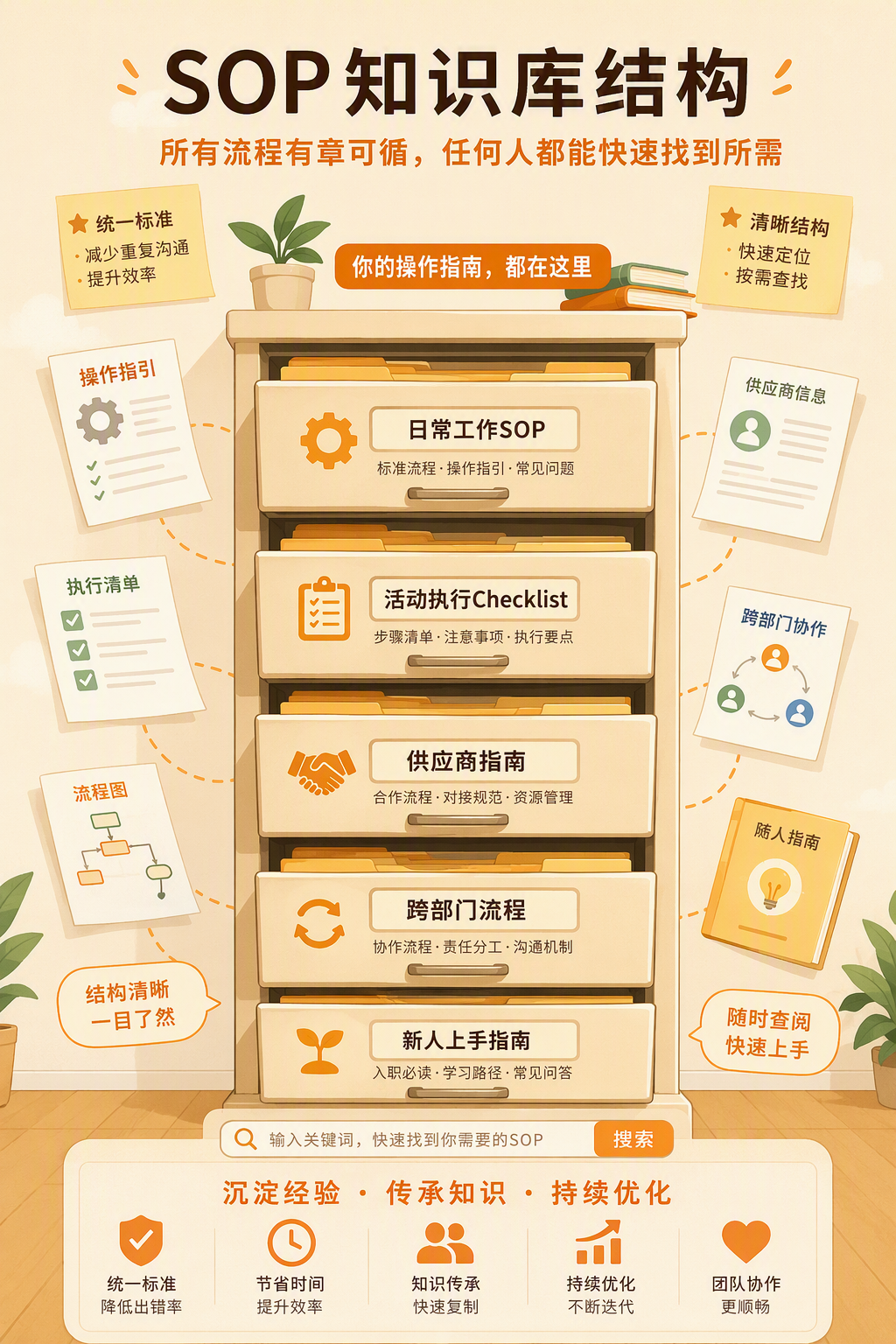
Please help me design an SOP knowledge base framework for an operations team:

Team: Content operations + event operations, 6 people in total

Please design the knowledge base structure. Include at least the following modules:
1. Daily work SOPs (official account post publishing process, weekly report template, daily data report format)
2. Event execution checklist (a complete checklist from project initiation to retrospective)
3. Supplier collaboration guide (frequently used supplier list, contact information, coordination notes, and historical lessons learned)
4. Cross-department collaboration processes (what process to follow when working with design, technology, or legal)
5. 30-day new-hire ramp-up plan (what to learn in the first week and what to master in the first month)

For each module, provide the directory structure and key content points so that a new hire can follow the steps and get started immediately.
Scenario 2: New-Hire Onboarding Knowledge Base
Pain Point
Whenever a new colleague joins, HR or the team lead has to explain everything verbally—the company’s business, how the team is organized, daily workflows, how to log in to commonly used systems, and where various account passwords are stored.
After a two-hour explanation, the new hire remembers 5 key points and forgets everything else. The next day, they ask again, "What was the URL for that system you mentioned yesterday?"
Solution
Prompt template:
Please help me design a new-hire onboarding guide:

Include:
1. What to do on the first day (account setup, system login, team introduction, workstation assignment)
2. First-week learning plan (understand the company’s business, become familiar with team processes, master core tools)
3. Common tools list (channel descriptions for Feishu/DingTalk/WeCom, OA system entry point, reimbursement system, meeting room booking method)
4. Team responsibilities overview (what each person is responsible for and who to contact for what)
5. "The 5 pitfalls new hires are most likely to encounter" (collect real experiences from long-time employees)

Requirements:
- Clearly explain "what to do" and "why to do it" for every step
- Keep the language concise and conversational, like a colleague talking to you; do not write it like an official manual
- If anything is unclear, mark it as "Team input needed here"

Scenario 3: Project Retrospective Template
Pain Point
After holding an event or completing a project, the team holds a retrospective meeting. Everyone spends 30 minutes saying things like "It went pretty well" and "Pay attention next time," without producing anything actionable.
The problem is not that people are careless; it is that the retrospective lacks structure. No one knows which dimensions to summarize or how to write conclusions that will actually help the next person working on a similar project.
Solution
Prompt template:
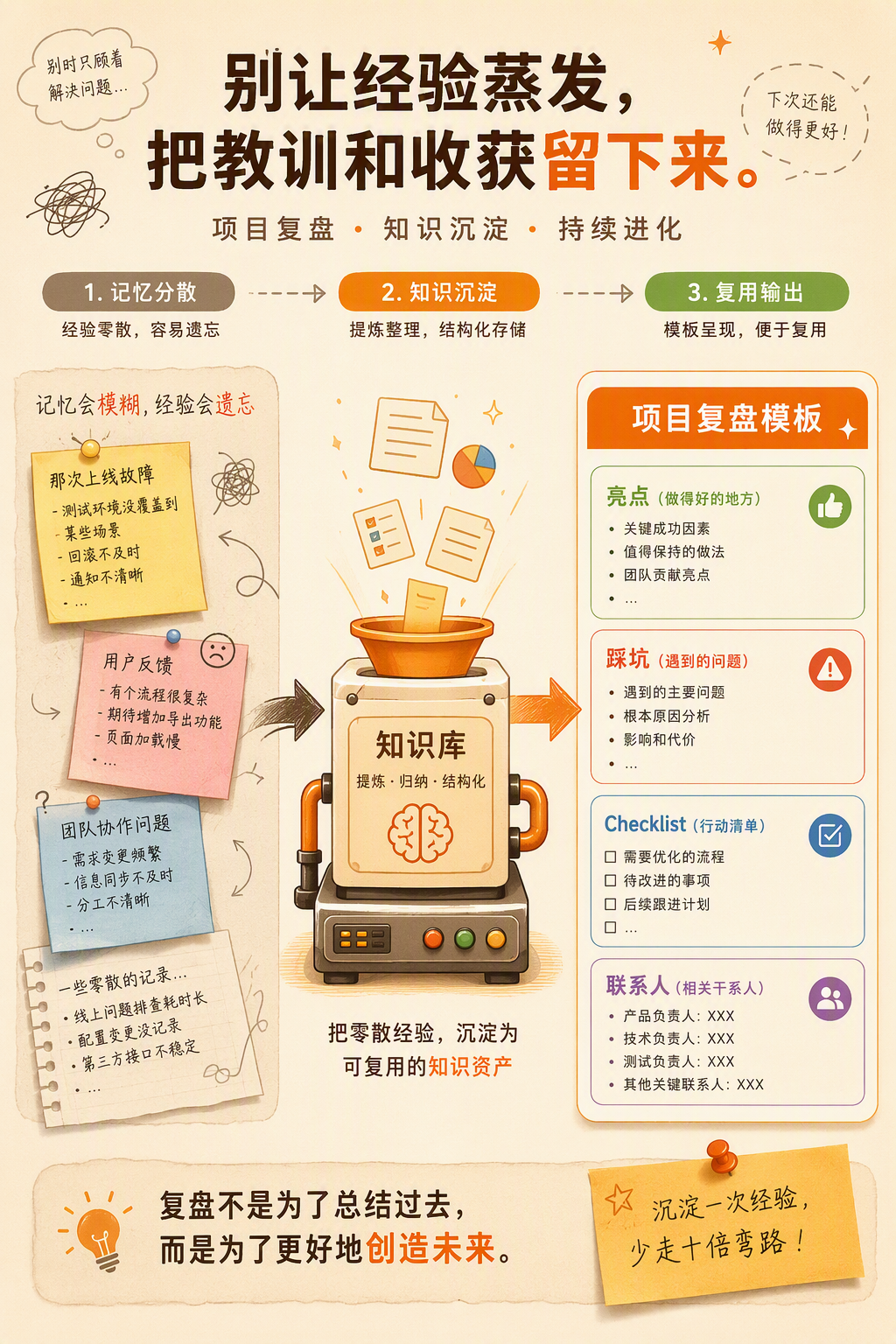
Please help me design a project retrospective template:

Applicable scenarios: [For example: offline event, major promotional campaign, product launch]

The template should include:
1. Basic information (project name, date, owner, budget, actual spending)
2. Goal review (what the original goals were, actual completion, and the size of the gap)
3. Highlights (what went particularly well, why it worked, and whether it can be replicated in other projects)
4. Lessons learned (what problems occurred, their causes, and how to avoid them next time)
5. Operational checklist (list everything that should be done from start to finish so the next person can use it directly)
6. Key contacts list (which internal and external people were involved and their contact information)

Requirement: Add a brief explanation of "what to fill in for this item" to every section so that anyone completing the form can understand it at a glance.
Scenario 4: Customer FAQ
Pain Point
Sales and customer success teams receive highly repetitive questions every day—"How do I get an invoice?" "Can the contract be modified?" and "What are the steps for using this feature?"
Everyone has to formulate their own response, and the answers vary. Some colleagues respond in great detail, while others send only one sentence, resulting in an inconsistent customer experience.
Solution
Prompt template:
Please help me compile a customer FAQ:

Our business is: [Explain it clearly in one sentence]
The 10 questions customers ask most often are:
1. [Question 1]
2. [Question 2]
...

For each question, provide:
1. Standard answer (1–2 paragraphs that can be copied and sent directly to the customer)
2. Supplementary materials (if there are related documents, screenshots, or links, indicate where to find them)
3. Common follow-up questions (what customers usually ask next and the answers to prepare in advance)

Requirements: Keep the tone consistent, professional, but not stiff. If anything is uncertain, mark it as "Needs confirmation."
Scenario 5: Keeping the Knowledge Base "Alive"
Pain Point
The knowledge base is built, but three months later, you open it and discover that some processes have changed, contact information for former colleagues is no longer valid, and some tool URLs have been updated.
The biggest risk for a knowledge base is not failing to build it—it is having no one maintain it afterward and turning it into a "distribution center for outdated information."
Solution
Have WorkBuddy regularly inspect your knowledge base:
Please review the following knowledge base document for outdated information:

Document: [Paste document content]
Document’s most recent update date: [Date]

Review dimensions:
1. Are the process steps still applicable? (If the document says something happens "once every quarter," is it still being carried out?)
2. Is the personnel information accurate? (If specific names are mentioned in the document, are those people still with the company?)
3. Have any tool/system URLs changed? (Test whether the links in the document still open.)
4. Is there any experience gained over the past three months that should be added?

Provide update recommendations and mark the urgency of each item (Urgent/Regular/Optional).
Recommended Knowledge Base Tools
Option | Tools | Best for | Features
Lightweight | Feishu Docs, Tencent Docs, Notion | Fewer than 10 people | Simple and easy to use, with no learning curve
Structured | Yuque, Confluence | 10–50 people | Clear categorization and comprehensive permission management
Minimalist | Pinned WeChat group messages + Shimo Docs | Fewer than 5 people | Fastest to get started and easy to update anytime
Principle for choosing a tool: Do not make the team learn another new tool just to build a knowledge base. Choose one everyone already uses.
The Universal Formula for Building a Knowledge Base
Step 1: Collect Pain Points First
Ask everyone on the team one question: "What are the three things you were asked about most repeatedly over the past month?" List them out, and start building the knowledge base by answering those questions.
Step 2: Build the Framework
Use the prompt from Scenario 1 and let AI design the framework for you. Do not aim for completeness at the beginning; start with 3–5 of the most commonly used modules.
Step 3: Fill in the Content
Have AI create a first draft for each module, then ask the colleague most familiar with that area of the business to spend 20 minutes revising it.
Step 4: Set Up a Maintenance Process
Assign someone to spend 30 minutes each month inspecting the knowledge base. Use the prompt from Scenario 5: AI helps you review it, while a person makes the decisions.
Frequently Asked Questions
Q: Our team is very small, with only 3–5 people. Do we need a knowledge base?
A: Yes. The smaller the team, the more it depends on "that one person"—the experienced employee who knows everything. If they take a day off, everyone else gets stuck. A small team’s knowledge base does not need to be elaborate; one online document is enough. The key is to write things down.
Q: No one wants to write documents. How can we encourage them?
A: Do not ask people to "write documents." Ask them to spend 5 minutes talking through their experience with AI—"What problems did I run into the last time I organized this event?"—and then have AI organize it into a document format. The painful part of writing a document is "organizing your thoughts from scratch." Let AI handle that part.
Q: What if no one reads the knowledge base after it is built?
A: There are two ways to address this. First, put the knowledge base link in the required reading list for new hires on their first day, building the habit from the start. Second, whenever someone asks, "How do I do XXX?" do not answer verbally. Send them the link to the relevant knowledge base document instead: "We have a document about that. Take a look, and ask me if anything is unclear."
Summary
Today, you learned how to use WorkBuddy to build a team knowledge base:
Module | Key point
Operations SOP | Turn repetitive daily work into processes that anyone can follow
New-hire guide | A complete learning path from the first day through the first month
Project retrospective | Turn "having a chat" into "filling out a form" so experience can be reused
Customer FAQ | Standard answers + common follow-up questions for consistent service
Inspection and maintenance | 30 minutes each month to keep the knowledge base from becoming outdated
Remember: A knowledge base is not finished once it is written. It is "write it → use it → keep it updated." AI helps you write and search; you are responsible for using and improving it.