


This Skill turns authorized photos, profile screenshots, bios, or existing character profiles into a set of minimalist hand-drawn diagram characters that can be reused over the long term. It then breaks down articles, courses, viewpoints, or scripts into shareable illustrations for long-form content, knowledge cards, method breakdown diagrams, mobile posters, or full-page PPT presentation slides.
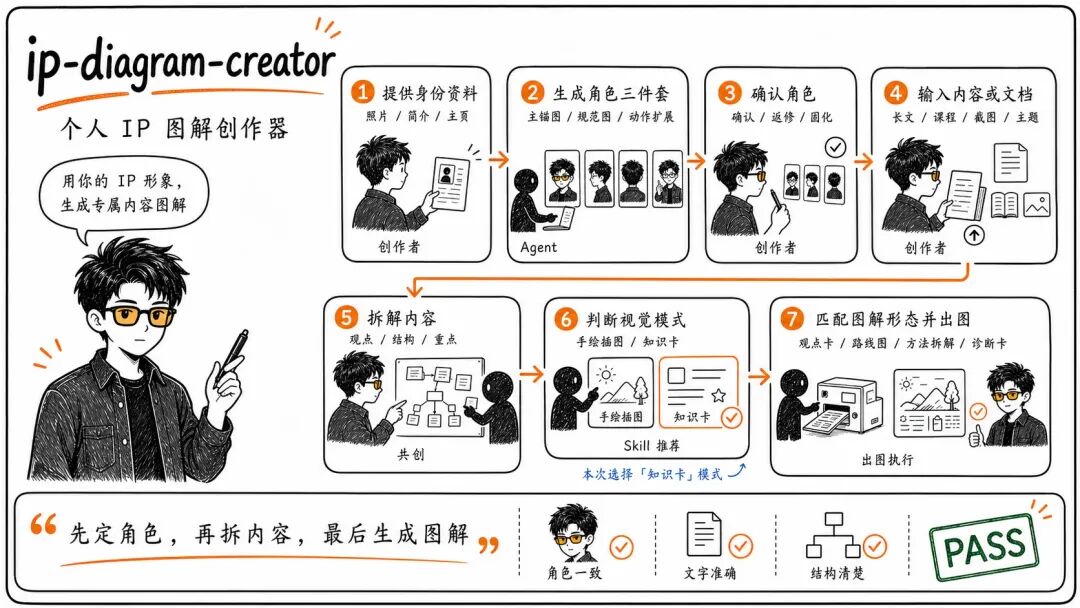
An open-source project on GitHub called ip-diagram-creator solves this problem completely. It is not just another AI image-generation tool, but a workflow that "defines the character first, breaks down the content next, and generates the visuals last." With it, you can turn "yourself" into a set of character assets that can be reused over the long term, so every illustration is "you" rather than another hastily improvised image.
Enough talk—here's how to install it
Install for the current project:
npx skills add https://github.com/haloshin/ip-diagram-creatorInstall globally:
npx skills add https://github.com/haloshin/ip-diagram-creator -gYou can also skip the installer: download this repository, place the entire directory in your Agent Skills directory, and then have the Agent read SKILL.md.
1. The essence of the illustration problem isn't "not being able to draw"—it's "not being able to draw consistently"
Many people think illustrations are difficult because they do not have time to draw, their drawings look bad, or AI cannot generate good images.
The real difficulty is: the protagonist is inconsistent.
Today, AI draws a man wearing glasses for you. Tomorrow, you change the prompt, and the glasses disappear, the face shape changes, and even the clothing color is different. Readers cannot tell that it is the same person.
The same is true of outsourced illustrators. In the hands of different artists, the same "you" can look ten years apart. Without a consistent style, the IP cannot take shape.
The underlying principle of this project is just one sentence:
Define the character first, break down the content next, and generate the visual explanation last.
These twelve words expose the illustration dilemma faced by most people.
2. The overlooked step: solidifying character assets
Most people finish writing an article and make "finding illustrations" their first step.
This project believes the first step should be "solidifying the character." It breaks this task into three fixed assets:
Character anchor image—establishes what "you" look like, locking in the hairstyle, facial proportions, clothing, color palette, and more.
Character specification sheet—defines the boundaries that prevent the character from "drifting": what actions are allowed, what expressions are not, and what settings should not appear.
Action/expression/small-scale scene expansion sheet—ensures that "even when reduced to the size of a grain of rice, readers can still recognize you."
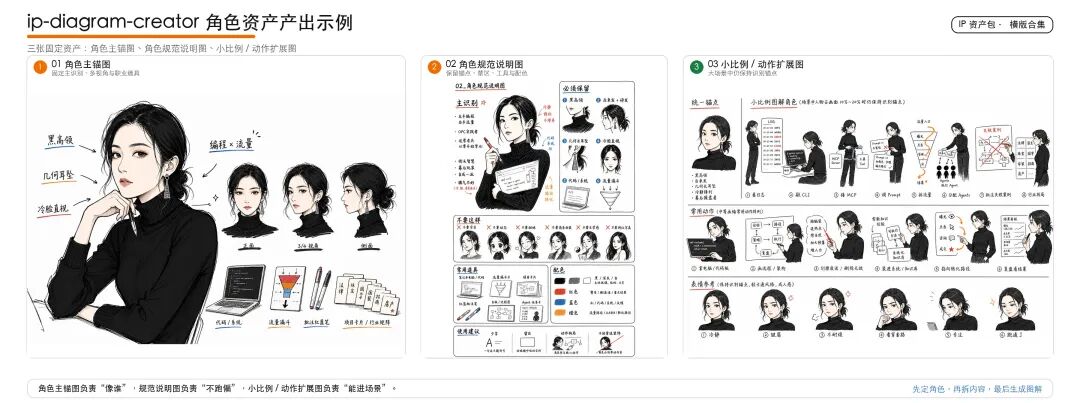
>The three-piece character asset set: anchor image, specification sheet, and action and scene expansions
Once these three images are finalized, all subsequent illustrations grow from this asset set instead of being regenerated from scratch each time.
This is the dividing line between "drawing images" and "building an IP."
The logic of the former is "Can this image be used?" The logic of the latter is "Is this image 'me'?"
3. Content breakdown: understand first, then draw
Only after the character is fixed is it time to work on the content.
Another common misconception about creating illustrations is to take an article and directly ask AI to "make a few illustrations."
The result is that the visuals and the text become disconnected. The article discusses a methodology, while the illustration shows a landscape; the article discusses a risk warning, while the illustration depicts a cozy scene.
This project's approach is to first have the Agent read the long-form article or script and output a "shot list"—determining how many images the content should have, what type each should be, and what informational role each image should serve.
It then generates visuals in different modes:
Hand-drawn illustrations—low information density, with one large scene serving as a metaphor for one core idea; suitable for emotional expression.
Knowledge cards—high information density, gathering methods, steps, risks, and actions into one saveable card; suitable for reviewing practical content.
Long-form shot list—for article illustrations, controlling pacing and visual weight.
PPT presentation mode—for course materials and livestream presentations: first create a complete "director's planning card," then generate the slides in batches.
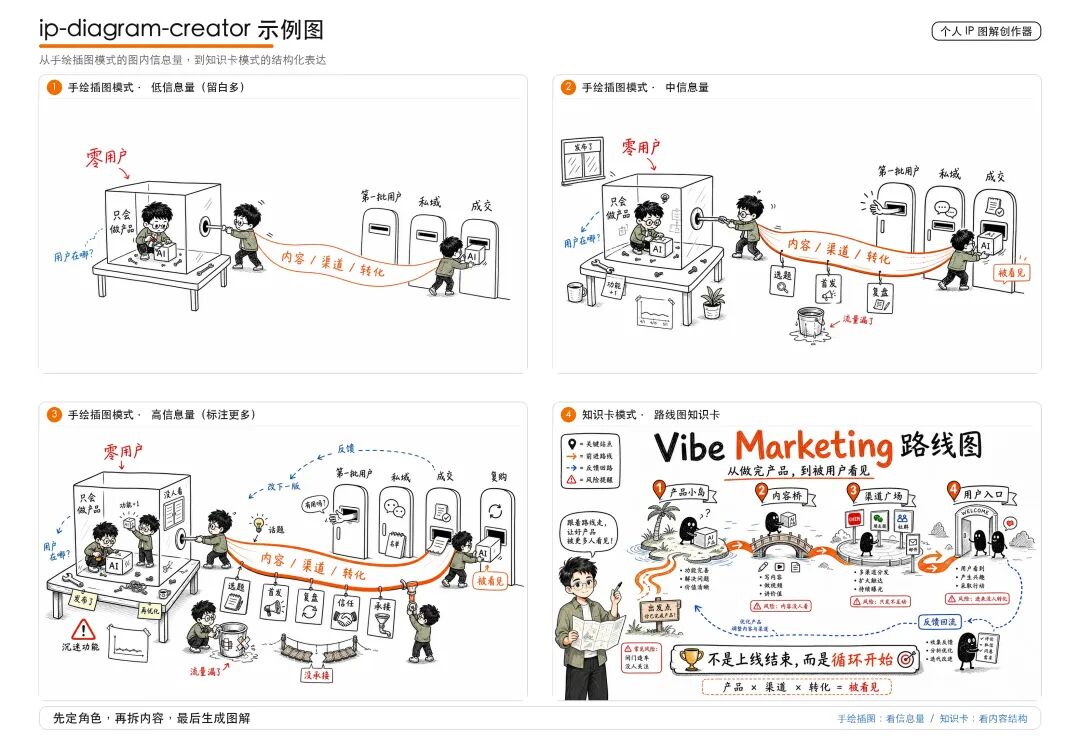
>Hand-drawn illustration → medium-density illustration → annotated diagram → knowledge card
The key to this logic is not "generating images quickly," but "figuring out what an image needs to do before generating it."
4. Why this is worth discussing now
AI image-generation tools have become extraordinarily competitive. GPT Image, 即梦, 可灵, and Midjourney can produce a beautiful image with ease. But the more this happens, the scarcer a "consistent protagonist" becomes.
When everyone can generate beautiful images, an image that makes people recognize "this is you" at a glance is the real asset.
The lesson from this project goes beyond illustrations.
It points to a more fundamental logic: the moat of a personal IP lies not in the content itself, but in the stable, recognizable "character" behind the content.
Content becomes outdated, trends cool off, and tools evolve. But once the image of "you" in other people's minds has taken shape, it generates long-term compounding returns. Unfortunately, most people keep consuming those returns with disposable illustrations.
Finally
If you are someone who takes content seriously but always throws together illustrations at the last minute; someone who has clearly spent three to five years cultivating your field, yet others say they "don't remember you," perhaps it is time to stop and first settle exactly "what you look like."
Not by drawing another profile picture, but by defining a set of character assets that can be reused over the long term.
Before creating your next illustration, ask yourself: Is this "me," or is it just another "image"?
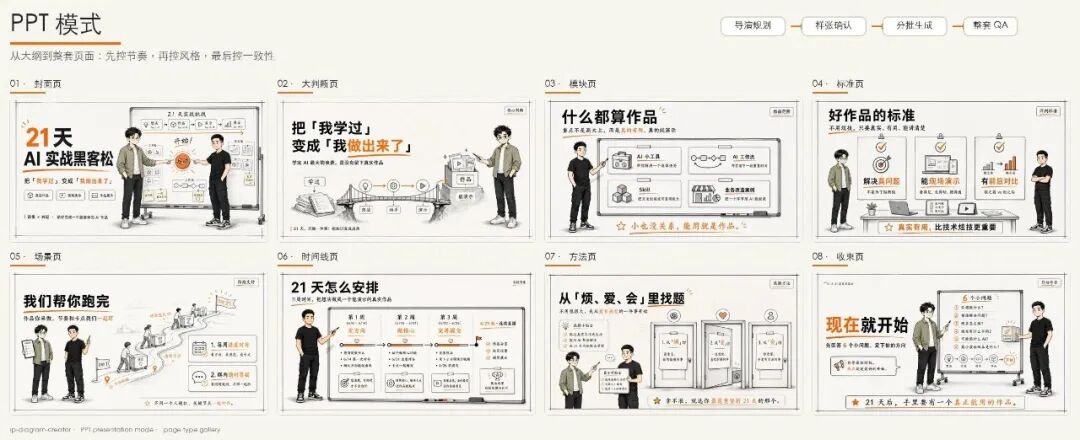
>PPT presentation mode example: the complete rhythm from the cover, modules, scenes, and timeline to the closing page
The open-source address for the ip-diagram-creator project introduced in this article is: github.com/haloshin/ip-diagram-creator, licensed under the MIT License.