

What Is Infinite Pokémon?
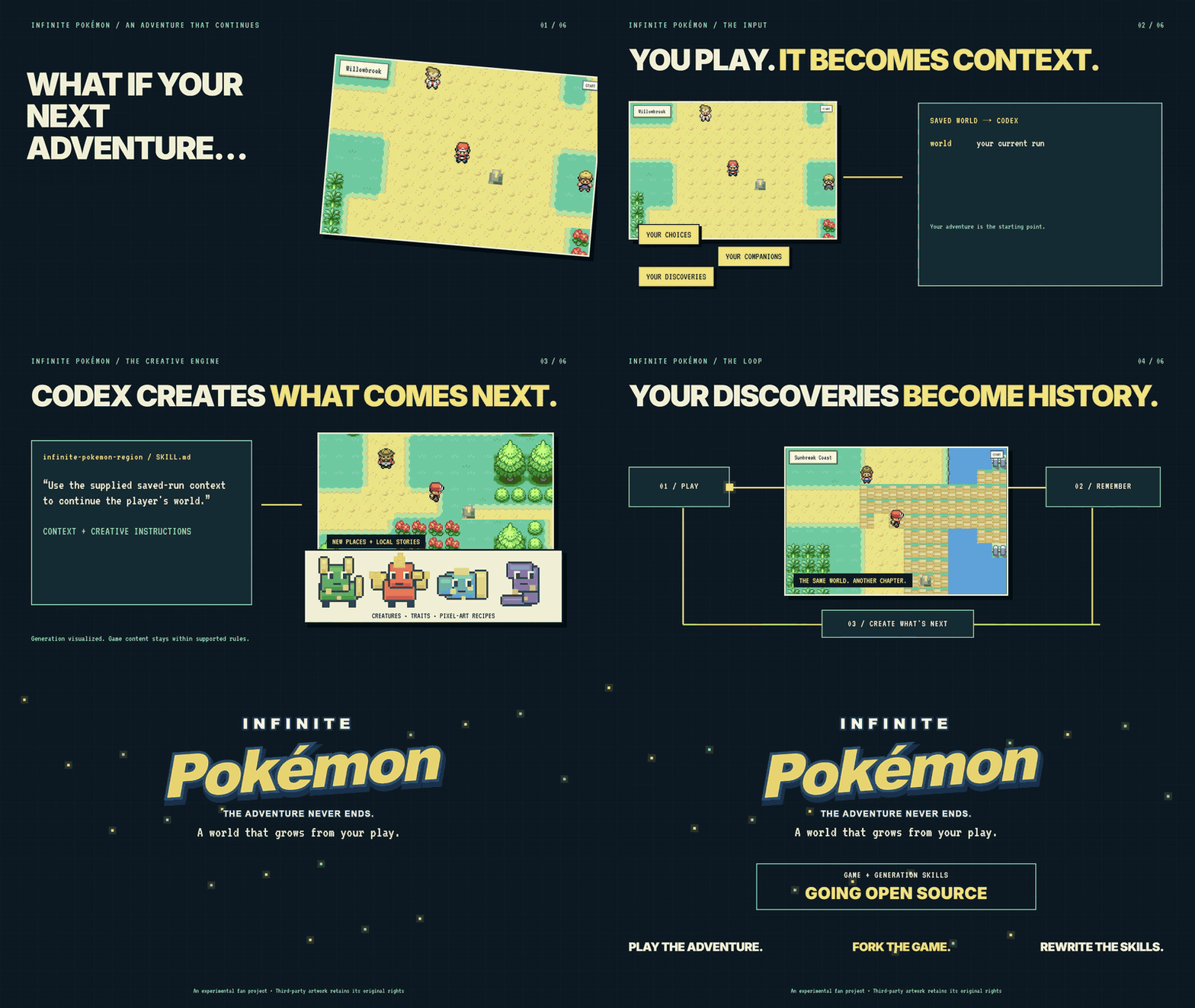
Infinite Pokémon is a playable TypeScript prototype of a persistent, Pokémon-style pixel-art creature-catching RPG. Its central experiment is a world that can continue being written as you play. A local AI harness uses the recorded history of your adventure to propose upcoming places, characters, conversations, biome choices, and story hooks.
The project does not allow the AI to control authoritative game state. Movement, collision, battles, inventory, progression, and other gameplay rules are enforced by the server. AI proposals must pass schemas, map validation, and dependency checks before they can enter the world. Visited locations remain stable, while new destinations can be generated and cached ahead of the player.
Important: Infinite Pokémon is an experimental fan project intended only for educational and non-commercial use. It is not an official Pokémon product and is not affiliated with Nintendo, Creatures, GAME FREAK, or The Pokémon Company.
How the Continuing World Works
- The server remains authoritative. AI suggestions cannot move a trainer, award victories, bypass collision, or directly alter progression.
- The world records actual events. Each run stores maps, choices, NPC memories, players, generation jobs, and event history in a local SQLite database.
- Codex proposes upcoming content. The host’s local Codex process reads an immutable snapshot and produces bounded proposals compatible with the current engine.
- Validation protects the runtime. Schemas and map checks determine whether proposed content can be accepted.
- Checkpoints support branching. Continuing from an older checkpoint creates a separate branch with its own database, memories, and generation context.
The system currently relies on validated, seeded map templates rather than arbitrary AI-authored executable gameplay. The harness can supply names, descriptions, NPC profiles, greetings, biome selections, story hooks, and bounded terrain features. New creature, item, and vehicle visuals can be rendered from validated pixel-art recipes, but importing externally generated images is not implemented.
Key Features
- Persistent run-scoped maps, events, story choices, and NPC memories.
- Server-authoritative movement, collision, battles, inventory, and progression.
- Single-player exploration using the host’s local Codex connection.
- A finite five-area tutorial preview that makes no model calls and spends no tokens.
- Host-and-join multiplayer for up to eight simultaneous connections and 64 saved trainers.
- Configurable map preparation depth from 0 to 3.
- Generation batches configurable from one to eight simultaneous blocks.
- Queue status, retry, and cancellation controls for unfinished destinations.
- Immutable checkpoints and isolated timeline branches.
- Shops, healing, wild encounters, route trainers, bicycles, nurseries, and hybrid eggs.
- Browser, source-run Electron desktop, and optional Linux Docker workflows.
Prerequisites
For the normal local workflow, install Node.js 22.13 or newer. Node.js versions 22.13 through 22.15 are supported, although database backups use a briefly blocking SQLite VACUUM INTO fallback when the newer online backup API is unavailable.
Docker is optional. You do not need a separate global Codex CLI installation because the runtime dependencies include Codex CLI 0.153.4. The bridge prefers the project-local CLI to prevent an older global executable from changing compatibility.
Option 1: Set Up with an AI Assistant
The shortest setup path is to install the repository’s entry skill with the Skills CLI:
npx skills add Shellishack/infinite-pokemon --skill infinite-pokemonThen ask Codex or a compatible AI assistant:
Use $infinite-pokemon to set up and start the game for me.
The entry skill guides the agent through cloning missing files, checking prerequisites, installing dependencies, building the project, and launching it. Installing the skill alone does not launch the software. The repository source is required; npx skills add infinite-pokemon is not a supported global alias.
You can inspect the entry skill on GitHub before using it.
Option 2: Install and Run Manually
Clone or download the repository, open a terminal in its root directory, and run:
npm install
npm run build
npm start
Open the private host console at http://127.0.0.1:8788. Node’s built-in SQLite support may print an experimental warning; that warning is expected by the project.
Connect Codex and enter the world
- Select Single player.
- Select Connect to Codex if the local connection has not already been verified.
- Review and authorize the displayed token-use notice.
- Complete provider sign-in if prompted.
- Wait for the short nonce verification. After it succeeds, the game enters the starting map automatically.
Verification does not load a skill or read files; it requests only a nonce confirmation and the response ok. Once connected, nearby maps are prepared in the background according to the configured generation depth. Verification, failed attempts, and background generation can consume provider allowance, and normal provider limits and billing still apply.
A valid connection is reused. After restarting an approved run, the game checks the local sign-in with another small confirmation prompt. If that check fails, the interface returns to the connection action.
Play Without Codex Using the Tutorial Preview
To try the mechanics without provider access or token use, select Single player, then Play tutorial preview from the Codex connection screen.
The preview contains five prepared outdoor areas and their indoor rooms:
- Willowbrook: a town square, gardens, Professor Fern’s lab, and a separate home.
- Whisperwood Trail: dense trees, winding paths, clearings, and a ranger cabin.
- Cloverbank River: flower meadows, a river, a timber bridge, and a rest house.
- Sunbreak Coast: open water, shore paths, boardwalks, and a coastal station.
- Waystone Terraces: zigzag routes, stone terraces, fallen pillars, and an archive shelter.
The preview makes no model calls and generates no new maps or NPC plans. At its boundary, you can connect Codex and continue the same save into full exploration. Your trainer, revealed maps, and tutorial progress are preserved. Preview saves are private and separate from the original world until promoted; multiplayer becomes available only after Codex is connected and verified.
Basic Controls and Gameplay
- Move with WASD or the arrow keys.
- Stand directly beside an NPC, sign, item, or room computer, face it, and press E or Space.
- Diagonal proximity does not count for interaction.
- Walk into a visible building door, or face it from the adjacent tile and press E.
- Press Escape or START to open the party, bag, trainer profile, journal, map, and save menu.
- Press Escape again to close the menu.
People, signs, fences, walls, and furniture block movement. Face an object when interacting instead of trying to walk through it. Tall grass can trigger wild encounters, trainers offer challenges, and guides provide beginner practice. Indoor caretakers can heal your team.
Shelters may contain a merchant and nursery keeper. You can buy supplies, purchase a Bicycle, or pair two level-5 companions for a hybrid egg. Additional menus such as CODEX, NURSERY, RIDES, and RECORDS are available from START.
Configure Map Generation
Open START → SESSION to adjust generation behavior. The map generation depth determines how far ahead the host prepares the world:
- Depth 0: generate on arrival.
- Depth 1: prepare the four surrounding maps; this is the default.
- Depth 2: prepare 12 maps.
- Depth 3: prepare 24 maps.
Queued work prioritizes maps nearest to players, and cached maps are reused. Destinations that are not ready display their actual queue or generation status rather than pretending to be complete. Retry and cancel controls are available.
The generation batch size defaults to three simultaneous blocks and can be set from one to eight. Choose one if you prefer sequential generation or want to limit concurrent work. Higher depth and concurrency can prepare more territory but may increase provider use and generation activity.
Create Saves, Checkpoints, and Branches
Open START → SAVES to manage runs and immutable checkpoints. Selecting SAVE creates a checkpoint. If you continue from an older checkpoint, the game creates a separate branch rather than rewriting the original timeline.
Each branch has its own world history, NPC memories, generation context, and autosave database. Events that occur later in the original run do not become memories in the new branch. This makes it possible to explore alternative outcomes while retaining the original adventure.
Browser saves are associated with an opaque session token stored for the current browser and origin. Changing the hostname, scheme, or port—or clearing browser storage—can cause a guest browser to lose its association with a trainer. The game does not provide a manual recovery-key interface.
Host a Multiplayer Session
- From the title screen, choose Multiplayer → Host session.
- Connect and verify the host’s Codex session if necessary.
- Open START → SESSION to find the guest address.
- Share only the guest game address with trusted players.
You can also begin alone and later select Enable multiplayer from the Session menu. Guests select Multiplayer → Join session and enter an address such as http://HOST_LAN_ADDRESS:8787 or the host’s HTTPS URL. A nickname is optional character text, not an account.
Only the host connects Codex and supplies the generation allowance. Guests share the host’s current run and history but never connect to Codex themselves. Selecting Return to single player closes current guest connections and prevents new public joins while preserving server-side saves.
Understand the two network ports
0.0.0.0:8787is the guest game service. Public admission opens only when multiplayer is enabled.127.0.0.1:8788is the private host console for Codex connection, generation settings, and backup controls.
Never expose or reverse-proxy port 8788. Do not expose the Codex process, credential directory, or host APIs to guests. If using a proxy or tunnel, forward only the guest service on port 8787.
For internet hosting, the repository includes an example Caddy configuration that proxies only port 8787 and supports WebSockets. The proxy must preserve the original Host header for same-origin checks. Automatic NAT traversal and a hosted relay are not included.
Run the Development or Desktop Version
For development, run the TypeScript server and Vite middleware together:
npm run devTo open the Electron host window, build the project first and then run:
npm run build
npm run desktop
The Electron mode is a source-run desktop shell, not a packaged installer. It requires Node.js on PATH, or an absolute path supplied through NODE_BINARY. Press F11 to toggle fullscreen, or start directly in fullscreen mode:
npm run desktop:fullscreenOptional Docker Setup for Linux
The supplied Compose configuration targets Docker Engine on Linux and uses host networking. It intentionally contains no port mappings so the loopback administration listener remains locally accessible without being placed on a bridge interface.
docker compose build
docker compose up -d
docker compose exec game node node_modules/@openai/codex/bin/codex.js login --device-auth
Complete authentication yourself as the server owner. The world-data volume stores the world under /app/data, while codex-private stores authentication and configuration under /home/node/.codex. Preserve both volumes and protect codex-private as account credentials.
Inspect server errors with:
docker compose logs gamedocker compose stop preserves the volumes. Do not run down --volumes if you want to retain the world. The README recommends native commands instead of this Compose configuration on Windows and macOS.
Back Up and Restore Your World
Native npm start stores data in ./data. Electron uses a world directory under its application user-data location. Set INFINITE_DATA_DIR to an absolute path if you want multiple launch methods to use the same world.
For a quick online database backup, open START → SESSION → World settings → Back up world. The backup is written under backups/. It includes database state but not every context file, generation log, or private Codex credential.
For a complete archive:
- Stop the server cleanly.
- Copy the entire data directory, including preview directories if needed.
- Restore the copy into a separate directory.
- Set
INFINITE_DATA_DIRto the restored directory. - Restart and reconnect Codex when required.
Never replace a live database or separate it from active SQLite WAL files. Keep the original archive until the restored world has been verified.
Useful Configuration Variables
INFINITE_DATA_DIR: world database, snapshots, logs, and backups.PORT: guest game port; default8787.ADMIN_PORT: loopback host-console port; default8788.CODEX_EXECUTABLE: optional executable orcodex.jsoverride; shell wrappers are rejected.CODEX_HOME: optional host-owned Codex authentication and configuration directory.NODE_BINARY: Node.js executable used by Electron.INFINITE_MAP_TIMEOUT_MS: per-map generation deadline; default180000and maximum600000.
Advanced Tips
Forward remote administration privately
On a remote host, authenticate Codex from the operator’s private shell:
node node_modules/@openai/codex/bin/codex.js login --device-authThen forward the loopback administration port from your own computer:
ssh -N -L 127.0.0.1:8788:127.0.0.1:8788 operator@your-serverOpen http://127.0.0.1:8788 locally. This SSH connection is an owner-only administration tunnel, not a public game proxy.
Use the test suites before changing the engine
npm test
npm run build
npm run test:movement
npm run test:gameplay
npm run test:preview
npm run test:saves
npm run test:streaming
npm run test:variety
npm run test:e2e
npm run test:desktop
Deterministic fixtures exercise game mechanics without provider calls. The movement and gameplay browser checks use the prepared preview and assert that no Codex calls occur.
Reset only when necessary
The home-screen Settings → Full game reset action is different from managing saves. After confirmation with RESET, it erases all runs, checkpoints, generated content, progress, and game settings. It also forgets the game’s Codex approval, although the Codex CLI remains signed in.
Current Limitations
Infinite Pokémon is a prototype rather than a finished release. Generation remains constrained by finite storage, provider limits, generation time, and the engine’s current vocabulary. Terrain uses validated templates, and the AI does not create arbitrary executable mechanics. Trading, complete service-center and Dojo systems, and external image-generation importing are described as future work rather than current features.
The multiplayer limits of eight simultaneous connections and 64 saved trainers are implementation limits, not evidence of internet-scale capacity. Internet hosting also requires the operator to configure firewalls, DNS, HTTPS, forwarding, or a private tunnel as appropriate.
Conclusion
Infinite Pokémon combines a dependable server-authoritative RPG core with bounded AI-assisted world continuation. Start with the token-free preview, connect Codex when you are ready for expanding exploration, and use checkpoints to test alternative futures. For multiplayer or remote deployment, keep the host console and credentials private, expose only the guest service, and maintain full data-directory backups.
Visit the Infinite Pokémon GitHub repository for the source code, documentation, implementation notes, skills, credits, and disclaimer.