

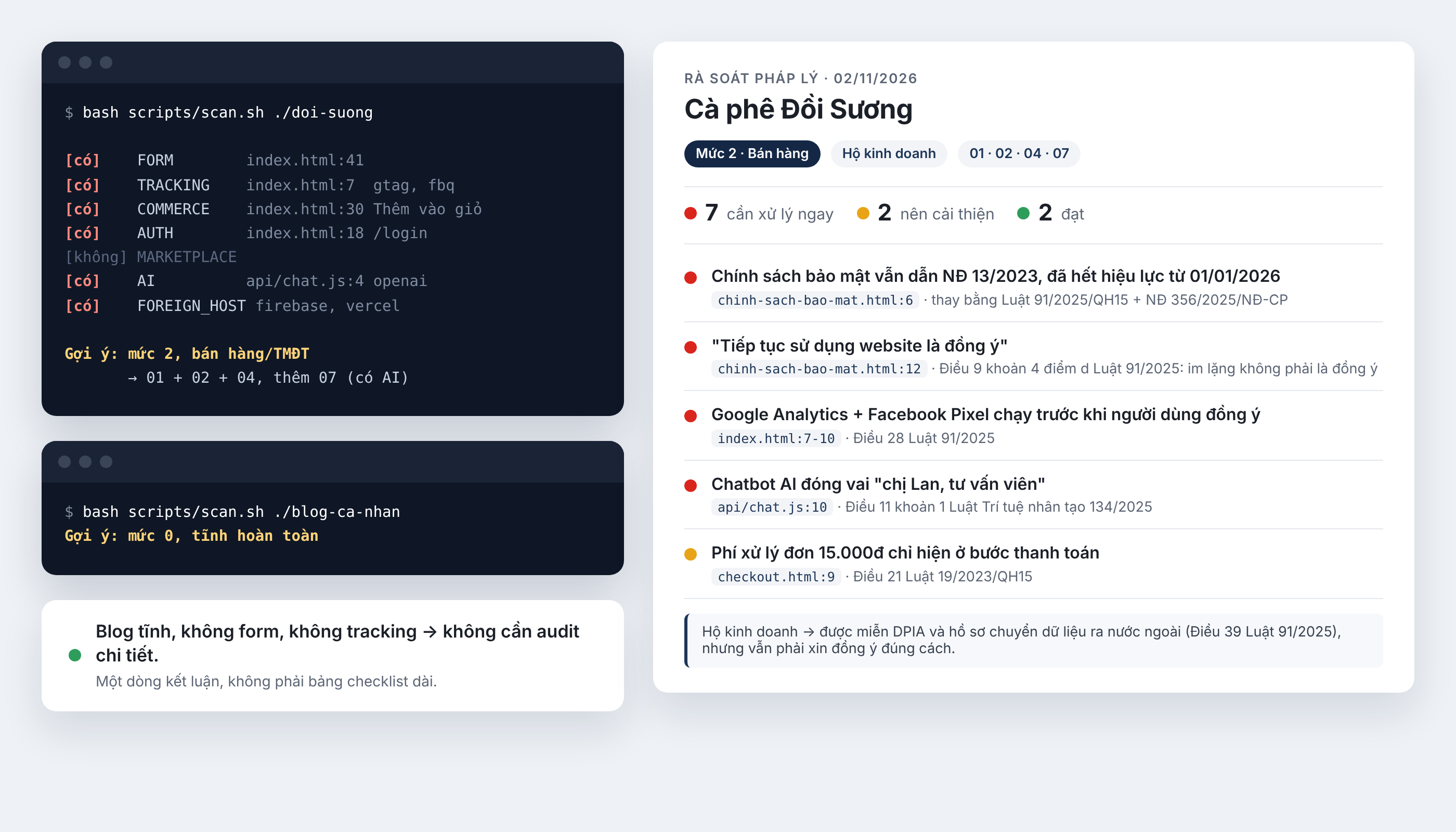
What is vn-law-check?
vn-law-check is a free set of instructions, checklists, references, and scanning scripts that helps AI coding agents review websites and mobile apps for potential compliance risks under Vietnamese law. It works with Claude Code, Cursor, GitHub Copilot, Windsurf, Cline, and Codex.
You can ask an agent to audit a project, and it will inspect the code for relevant features, identify possible issues by file and line, cite the applicable legal provision, and suggest changes. You can then ask the agent to address high-priority findings.
The project is relevant when an application collects names, email addresses, or phone numbers; uses services such as Google Analytics or Facebook Pixel; provides accounts, shopping carts, or payments; or includes an AI chatbot. It can also review simple static sites and report when no relevant data collection is found.
vn-law-check is an initial review tool, not a replacement for a lawyer. Its reports and generated policies may be incomplete or incorrect, and critical findings should be reviewed by a qualified legal professional.
Key features
- Source-code and URL audits: Review a local project or scan the publicly accessible pages of a website.
- File-level findings: Reports can identify the file, line, problematic text or implementation, legal basis, and a proposed correction.
- Prioritized results: Findings are classified as 🔴 requiring immediate attention, 🟡 recommended improvements, 🟢 compliant, or ⚪ not applicable.
- Privacy drafting: The agent can prepare a draft privacy policy based on data flows and third-party services detected in the code.
- Consent guidance: The checklists include guidance for consent forms and cookie banners.
- Mobile app coverage: The scanner can examine permissions, tracking or advertising SDKs, and account-deletion functionality.
- Multiple AI tools: Repository files are structured so supported agents can load the same core compliance guidance through their preferred instruction format.
Legal areas covered
The repository says its references include Vietnamese legal documents current through November 2026. The listed areas include personal data protection, e-commerce, cybersecurity, advertising, artificial intelligence, consumer protection, and electronic transactions. Full-text links and effective dates are maintained in sources/legal-references.md.
The README specifically highlights the Personal Data Protection Law 91/2025 and Decree 356/2025. It notes that, from January 1, 2026, organizations must clearly disclose why personal data is collected and obtain consent appropriately. The repository also warns against outdated policies that still cite superseded rules.
Installation and setup
Option 1: Install in Claude Code
Enter the following commands inside Claude Code, not in a regular terminal:
/plugin marketplace add mhfed/vn-law-check
/plugin install vn-law-check
After installation, open the project you want to review in Claude Code.
Option 2: Install for Cursor, Windsurf, Copilot, Cline, or Codex
Open a terminal in the project directory and run:
curl -fsSL https://raw.githubusercontent.com/mhfed/vn-law-check/main/install.sh | bashThe installer places the checklist in .vn-law-check/ and does not overwrite your project files. If the project already contains an instruction file such as AGENTS.md or CLAUDE.md, the script only adds a short reference to the installed checklist. Running the installer again updates the integration without inserting duplicate references.
Option 3: Clone the skill manually
To install the skill globally for Claude without using the marketplace, run:
git clone --depth=1 https://github.com/mhfed/vn-law-check ~/.claude/skills/vn-law-checkFor a project-specific installation, clone it into .claude/skills/vn-law-check inside that project instead of using the home-directory path.
Run your first legal audit
Audit an open project
Open the project in your supported AI coding agent and enter the Vietnamese prompt recommended by the repository:
audit pháp lý website này theo luật Việt NamThis means “audit this website under Vietnamese law.” The agent first classifies the type of site and then applies the relevant checklists. Depending on the project, it may look for forms, trackers, account systems, shopping features, payments, AI integrations, hosting details, and related disclosures.
Audit a public URL
If you do not have the source code, provide the public website address:
audit pháp lý https://ten-mien-cua-ban.vnFor a URL audit, the repository’s fetch-site.sh script downloads public pages from the specified site so that scan.sh can inspect them. According to the README, this process is limited to 15 pages and 20 JavaScript files from the same domain. It does not send the collected site data elsewhere.
A URL-only scan cannot inspect private server code or configuration that is not exposed publicly. Treat its results as a review of the accessible site rather than a complete assessment of the underlying system.
Understand the report
Each result receives one of four classifications:
- 🔴 Immediate attention: A potentially serious issue that should be investigated and corrected promptly.
- 🟡 Improvement recommended: A weakness or incomplete implementation that should be improved.
- 🟢 Satisfactory: The reviewed item appears to meet the relevant checklist.
- ⚪ Not applicable: The requirement does not apply to the reviewed project or feature.
A finding may identify problematic text, its source location, the cited legal basis, and a recommended change. One example from the demo flags a privacy policy that treats continued use of a website as consent. The report cites Article 9, Clause 4, Point d of Law 91/2025/QH15, under which silence or failure to respond cannot be treated as consent, and recommends requesting explicit consent where data is collected.
A blog or static site that does not collect relevant information may receive only a short conclusion rather than a long list of findings.
Ask the agent to fix critical findings
After reviewing the report, ask the agent to address the red items:
sửa giúp các mục 🔴This means “fix the 🔴 items.” Before accepting the edits, review the proposed changes, test affected forms and tracking behavior, and confirm that the implementation matches the actual business process. A code change cannot verify organizational facts that are absent from the repository.
Generate a draft privacy policy
If the project lacks a privacy policy, or currently uses a generic copied policy, request a project-specific draft:
soạn chính sách bảo mật cho dự án nàyThe agent can inspect the code to determine what data the application appears to collect and which services may receive it, including integrations such as Google Analytics, Firebase, or OpenAI. It can then draft policy language and suggest updates to consent forms and cookie banners.
Information that cannot be established from the code, such as the organization’s legal name or tax identification number, is left blank for you to complete. Verify every field, data purpose, recipient, retention practice, and contact detail before publishing the draft.
Advanced usage tips
Prefer source-code audits when possible
A local source audit can inspect implementation details that a public URL may not reveal. The repository states that scan.sh reads only local files when scanning a code directory. This makes a source audit the better option for detecting embedded SDKs, conditional trackers, mobile permissions, account-deletion logic, and integrations that are not obvious from rendered pages.
Check tracking before consent
Pay particular attention to analytics and advertising scripts that load before a visitor has made a consent choice. Also verify that privacy notices accurately describe the services found in the project and do not rely on continued browsing, silence, or inactivity as consent.
Separate technical facts from business facts
The agent can infer many implementation details, but it cannot reliably discover every operational practice from code. Confirm facts such as the data controller’s identity, retention periods, internal access rules, cross-border processing, contractual relationships, and customer support procedures with the responsible people in your organization.
Use the checklists without an AI agent
The automated workflow currently requires one of the supported AI tools. If you do not use an AI coding agent, you can still read the files in the repository’s references directory and use them as manual self-review checklists.
Handle third-party audits responsibly
If you scan a site that you do not own, keep the results private and send them directly to the site owner. The project explicitly advises against publicly shaming organizations based on scan results.
Review unverified references carefully
The maintainer identifies as a developer rather than a lawyer and marks references that have not been checked against full legal texts as CHƯA XÁC MINH, meaning “not yet verified.” The README says several dozen such items remain, primarily in the penalties reference and Decree 356/2025 material. Treat these entries with extra caution.
Contributing corrections
Legal citations and checklists can change, so community review is important. You can open a GitHub issue to report an incorrect article number, outdated document, inaccurate penalty, missing law, common issue not covered by the checklist, or incorrect site classification. Including a link to the original legal text helps the maintainer verify the correction.
Developers submitting a pull request should edit the source files listed by the repository, run tools/sync.sh to regenerate tool-specific copies, and run tests/run.sh after changing scripts/scan.sh. Continuous integration reports an error when generated copies have not been synchronized.
Cost, licensing, and limitations
The repository is free. Your only usage cost is the AI consumption charged by your existing coding tool. The code and repository structure are available under the MIT License, while referenced Vietnamese legal texts are public government documents and are not covered by that software license.
Most importantly, an audit does not guarantee complete legal compliance. Use vn-law-check to discover likely gaps, organize remediation work, and create a first draft. Have a qualified legal professional review critical findings and policy documents before relying on them in production.
Conclusion
vn-law-check provides a practical bridge between Vietnamese compliance checklists and AI-assisted software development. Install it in a supported agent, audit your source code or public URL, review the prioritized report, and request focused fixes or a privacy policy draft. The workflow can accelerate an initial review, but final legal decisions still require verified facts, current source texts, and professional judgment.