

What Is McButler?
McButler (McDonald's self-service butler) is an ordering assistant project based on McDonald's official MCP. Rather than simply recommending meals by price, it attempts to handle constraints including budget, health, time, dietary restrictions, and personal preferences at the same time.
The project can be used as a WorkBuddy Skill or run locally through the built-in demo data using the CLI. Developers can also reuse its data parsing and scoring modules to connect data returned by McDonald's MCP to their own clients.
The project repository is hosted on GitHub, and the McDonald's Mini Theater also provides an online demo page. Note that McButler is an independently submitted project, not an official McDonald's product.
Six Core Capabilities
1. Daily Recommendations
recommend supports three modes: savings, healthy, and popular. They use different ranking logic rather than simply switching one sort field.
- Savings mode: Combines normalized price, discount strength, and price per 100 kcal to prevent small items from ranking first solely because of their low total price.
- Healthy mode: Combines health scores with energy fit and gives priority to candidates with measured nutrition data.
- Popular mode: Combines best-seller tags, historical ordering frequency, and discounts.
2. Health Check
health is the project's technical core. Because the nutrition interface provides data for individual items, McButler first reads the meal details, breaks the meal into its default components, matches each item against the nutrition table, and aggregates data such as calories, protein, fat, sodium, and calcium.
Meal details
→ Read default components
→ Match nutrition data for each item
→ Aggregate nutrition values
→ Calculate health score and deductions
The health score uses a 100-point scale and considers the energy range, protein, percentage of energy from fat, sodium, sugar and oil burden, and fruit and vegetable bonuses. See references/model-spec.md in the repository for the detailed formula.
3. Full-Cost Store Comparison
stores can select stores by proximity, lowest price, or combined full cost. The balanced mode considers more than product prices: it converts round-trip distance, walking time, and queue time into costs.
Full cost = Product price
          + Distance cost (round trip at 0.5 yuan/km)
          + Time cost (round-trip walking time + queue time) × 0.30 yuan/minute
Therefore, the nearest store may not be the best value. Queue time is not currently provided directly by the MCP interface and must be entered or estimated by the user.
4. Group Meal Planning
bulk is designed for meal orders for administrative teams, HR departments, classes, and other groups. It can divide diners into groups and plan meals according to conditions such as headcount, per-person budget, no beef, and no spicy food. It outputs orderItems that can be passed to the price calculation process.
Results include group sizes, meal quantities, total price, per-person price, savings, and per-person calories. However, the “no beef” rule currently relies on keyword filtering in dish names and cannot guarantee the identification of items whose ingredients are not explicitly marked on the menu.
5. McRisk Score
credit borrows from consumer credit scorecards to calculate a McRisk score from 300 to 950 for an account and individual orders. Its six dimensions are payment reliability, consumption rhythm, budget discipline, discount utilization, account assets, and taste diversity.
The score displays the results and data sources for each dimension instead of outputting an unexplained total score. This is an entertainment-oriented spending analysis feature and does not represent an actual financial credit assessment.
6. McDonald's Mini Theater
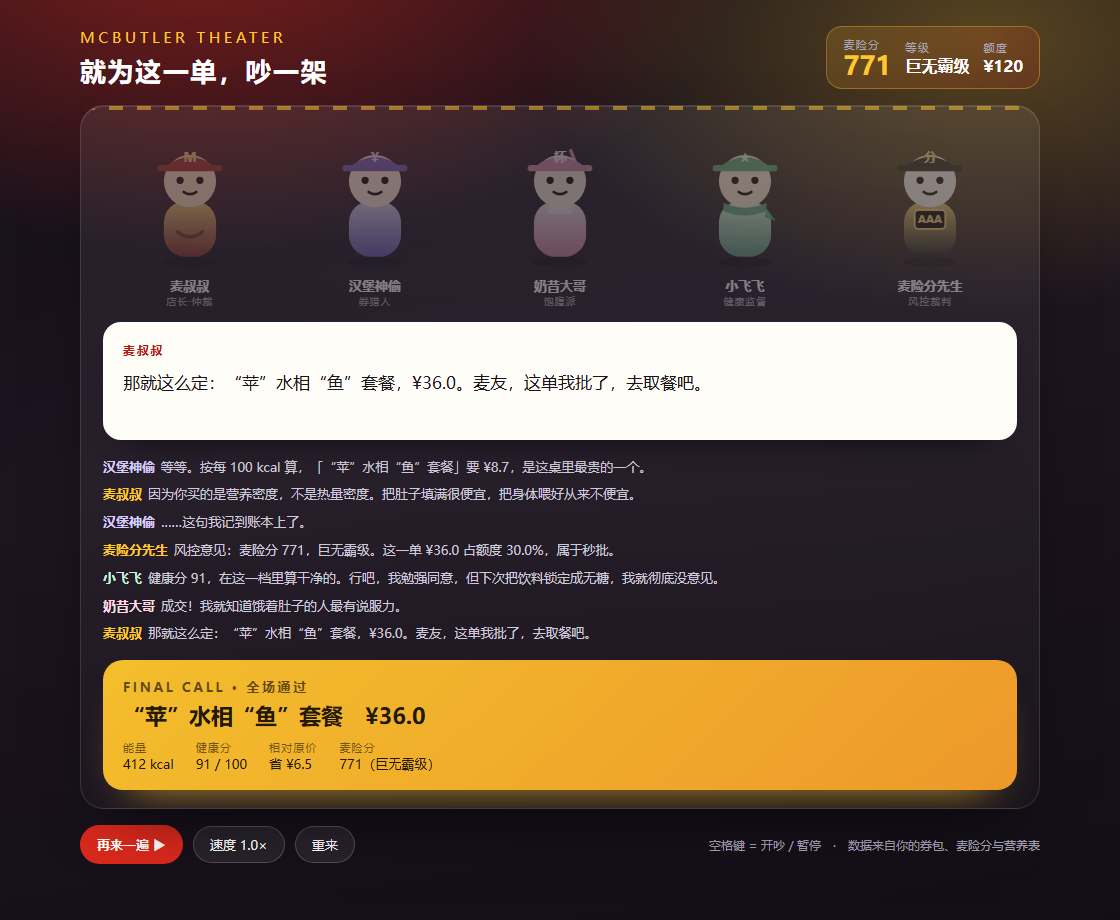
theater uses coupon, McRisk score, and calorie data to generate an ordering argument between five characters and outputs a single-file HTML page. The generated page has no additional dependencies and can be opened directly in a browser.
Prepare the Runtime Environment
Local mode only requires Python 3.8 or later and uses only the Python standard library, so no third-party packages are needed. Online MCP mode requires a valid MCP Token.
Clone the Repository and Run the Self-Test
git clone https://github.com/jouaaaaaa/mcd-self-butler.git
cd mcd-self-butler
python scripts/selftest.py
The self-test contains 9 offline cases covering health checks, the three recommendation modes, account and order McRisk scores, group meals, store comparisons, and a plain-text mini theater. Once all tests pass, the local environment and demo data should be working correctly.
Method 1: Install as a Skill in WorkBuddy
Place
SKILL.md,scripts/, andreferences/from the repository in the following directory:~/.workbuddy/skills/mcd-self-butler/In WorkBuddy, open “Experts · Skills · Connectors,” then select “Connectors,” “Custom Connectors,” and “Configure MCP” in sequence.
Enter the Streamable HTTP configuration for McDonald's MCP and replace the placeholder with your own Token:
{
  "mcpServers": {
    "mcd-mcp": {
      "type": "streamablehttp",
      "url": "https://mcp.mcd.cn",
      "headers": {
        "Authorization": "Bearer YOUR_MCP_TOKEN"
      }
    }
  }
}
Enable the
mcd-mcpconnector, then describe your requirements in natural language.
You can start with one of these requests:
- “I’m on Nanjing West Road. Which nearby McDonald’s offers the best value for a Big Mac three-item set?”
- “How many calories are in this meal, and are there healthier substitutions?”
- “A group meal for 30 people in my department, with a budget of 30 yuan per person. Five people don’t eat beef.”
- “What is my McRisk score?”
- “Waiting for food is boring. Make them have an argument.”
Method 2: Use the Local CLI
The local CLI uses demo snapshots in the repository and does not require a Token or an internet connection. All six capabilities are called through scripts/mcd_butler.py.
Check Meal Nutrition
python scripts/mcd_butler.py health \
  --nutrition demo/nutrition.txt \
  --combo demo/combo_9900011128.json
This command breaks down the meal, matches it against the nutrition table, and generates an aggregate result. The output includes nutrition data for each component, the meal total, the health score, and specific deduction reasons.
Get Healthy Recommendations
python scripts/mcd_butler.py recommend \
  --menu demo/menu_1450118.json \
  --nutrition demo/nutrition.txt \
  --mode healthy \
  --meal lunch \
  --budget 45 \
  --top 5 \
  --details demo/details.json
--mode healthy selects healthy mode, --meal lunch specifies the lunch scenario, --budget 45 limits the budget to 45 yuan, and --top 5 returns the top five results.
To explore other strategies, switch to the savings or popular logic supported by the CLI. Results may differ significantly between modes because they use different value functions.
Calculate the McRisk Score
python scripts/mcd_butler.py credit \
  --orders demo/orders.json \
  --account demo/account.json \
  --coupons demo/coupons.md \
  --nutrition demo/nutrition.txt
This command combines historical orders, account information, coupons, and nutrition data to output the total score, rating, and details for all six dimensions. The example result in the demo data is 771 points, rated Big Mac level, but the actual score depends on the input data.
Plan a Meal for 30 People
python scripts/mcd_butler.py bulk \
  --menu demo/menu_1450118.json \
  --nutrition demo/nutrition.txt \
  --headcount 30 \
  --budget 30 \
  --no-beef 5 \
  --no-spicy 4
This sets 30 diners, a per-person budget of 30 yuan, 5 people who do not eat beef, and 4 people who do not eat spicy food. The program groups diners, selects meals, and generates order items with calculable quantities.
Compare Full Store Costs
python scripts/mcd_butler.py stores \
  --stores demo/stores.json \
  --mode balanced
balanced mode combines distance, time, and price. When using your own data, provide or estimate queue time explicitly rather than treating the example value as real-time data.
Generate the McDonald's Mini Theater
python scripts/mcd_butler.py theater \
  --context demo/theater_context.json \
  --out theater.html
After running the command, theater.html will be generated in the current directory. Open it directly in a browser to view the character dialogue, word-by-word speech bubbles, and final verdict.
Method 3: Connect Your Own MCP Client
Developers can use two integration methods.
- Save raw responses: Call tools for stores, menus, details, nutrition, orders, or coupons in an MCP client. Save the raw responses in files serving the same purposes as the examples in
demo/, then pass them to the CLI. - Call modules directly: Import functions from
scripts/lib/and pass the Pythondictreturned by MCP directly to them.
The data loading layer mcdata.py accepts both raw MCP responses in the form {"success": true, "data": ...} and manually simplified formats. In most cases, you can save tool responses directly without manually cleaning them first.
Understand the Project Architecture
McButler’s processing flow can be summarized in four layers:
- Client layer: WorkBuddy Agent or another MCP client initiates requests.
- MCP service layer: Retrieves data for stores, menus, details, nutrition, price calculations, coupons, points, and orders.
- Data loading layer:
mcdata.pyhandles unpacking, normalization, and fuzzy name matching. - Business model layer:
health.py,credit.py,bulk.py,recommend.py, andtheater.pyperform scoring, meal planning, recommendations, and script generation, respectively.
mcd_butler.py is the unified CLI entry point. It can output Markdown or JSON, making it suitable for manual inspection and for integration with subsequent programs.
Advanced Usage Tips
Provide Meal Details First
The nutrition interface only provides data for individual items. When analyzing a meal, it is best to provide the meal details as well, so the program can look up each component based on the default composition. If no nutrition data matches, the project displays the health score as “—” rather than fabricating a result.
Choose the Recommendation Mode for the Scenario
- When the budget is strict, use savings mode and pay attention to the price per 100 kcal.
- For weight loss or fitness scenarios, use healthy mode and review the deductions for protein, fat, and sodium.
- When you want to combine popular items with your personal ordering history and preferences, use popular mode.
Save Raw MCP Data for Reproduction
When debugging recommendation results, it is recommended to save the raw MCP response from that run. This allows you to reproduce the calculation process with the same data even if the menu, prices, or availability change later.
Distinguish Data Quality
McButler uses three data labels:
- Measured: Data obtained by breaking down a meal and totaling each item.
- Official: Data taken directly from the nutrition table for individual items.
- Estimated: A rough estimate used when complete data is unavailable, clearly labeled as such.
These labels should not be removed when displaying results through automation. They remind users to distinguish between data sources and levels of reliability.
Check Business Boundaries
The current group-meal feature does not yet support optimization that combines corporate group-meal discount rules; the “no beef” preference is determined mainly by dish-name keywords; and the queue time must also be entered explicitly. Before using the project for actual orders, confirm prices, availability, and dish ingredients again through official McDonald's channels.
Nutritional analysis is for reference only and does not constitute medical, nutritional, or other professional advice. When diet involves illness, pregnancy, or children, consult a qualified professional.
Conclusion
McButler demonstrates how raw MCP data can be transformed into explainable purchasing decisions: from meal breakdown, nutrition scoring, and the full cost of a restaurant visit to group-meal segmentation, fun scoring, and interactive content, all accessible through a unified CLI or WorkBuddy Skill.
For a first experience, run python scripts/selftest.py first, then try health, recommend, and stores in sequence. After confirming the offline workflow, configure an MCP Token to connect to real-time data.