

What is HEXIS?
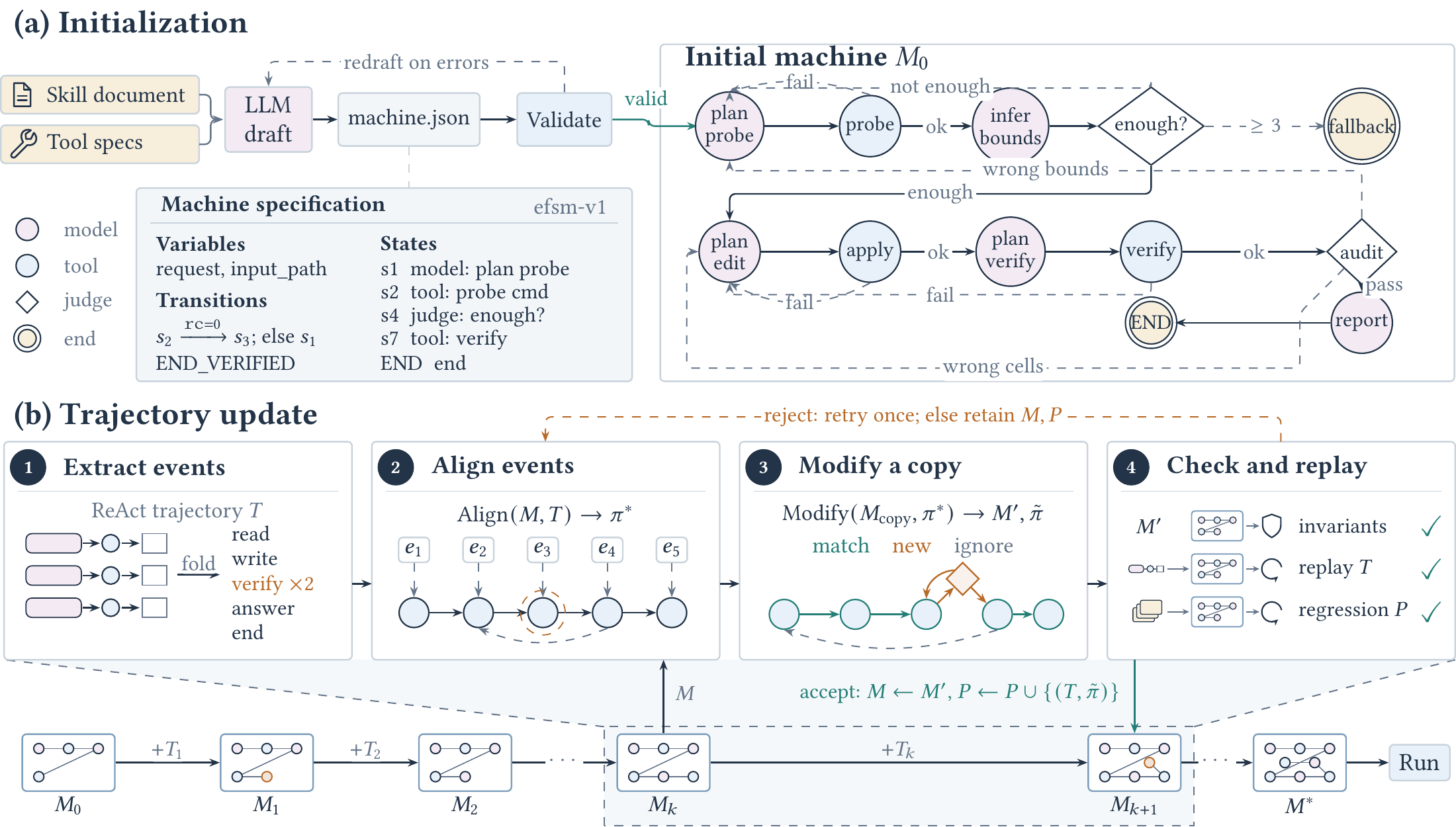
HEXIS is a Python package and command-line tool that compiles an agent skill, represented by a SKILL.md document, into an extended finite state machine. Instead of asking a language model to interpret the entire skill and choose every next step, HEXIS uses programmatic states, variables, guards, and transitions to enforce the order of operations.
Language models still perform reasoning and generation inside relevant states. However, the machine determines which operation runs next, which variables are available, when loops must stop, and which terminal outcome is reached. This design reduces the risk that an agent will skip, reorder, or incorrectly apply requirements written in the skill.
HEXIS is released under the MIT license and is currently marked as alpha software. It accompanies the paper Compiling Agent Skills into Extended Finite State Machines.
Core workflow
A typical HEXIS workflow has three stages:
- Compile: A model reads the skill document, task inputs, tool definitions, and skill rules, then drafts an
efsm-v1machine. HEXIS checks its schema, guards, reachability, termination, clause coverage, and tool references. Invalid drafts are returned to the model for revision. - Update: New execution traces are normalized into events. For each trace step, a model, decisions file, or deterministic aligner decides whether to match an existing state, create a state, ignore noise, or exclude the trace.
- Execute: The runtime performs the action associated with the current state, records declared outputs, and takes the first transition whose guard evaluates to true.
An updated machine is accepted only when it passes the required checks and can replay the new trace as well as every previously accepted trace. If validation fails, the existing machine remains unchanged.
Key features
- OpenAI-compatible compilation: Select a model, endpoint, and API-key environment variable from the command line.
- Trace-based updates: Incorporate successful execution behavior one decision at a time without invalidating previously accepted traces.
- Readable JSON machines: Machines use the plain JSON
efsm-v1format with typed variables and explicit transitions. - Multiple action types: States can perform
tool,model,judge,user, orendactions. - Bounded control flow: Ordered guards and loop counters support branching and retry limits.
- Generated documentation: Every normal build includes
GUIDE.mdandPROMPT.md. - Fallback behavior: The fallback state retries from the most recent tool step and can hand the task to interpreted execution of the original skill.
- Tool backends: Machines can use OpenCode tools, a local Bash executor, or registry-defined tools realized by a model.
- Hermetic testing: The repository contains more than 350 tests that do not require an API key, model endpoint, or network connection.
Installation and prerequisites
Install from PyPI
HEXIS requires Python 3.11 or 3.12. Install the package with pip:
pip install hexis-agentThe package is imported in Python as hexis, while its command-line executable is named hexis-agent.
Install from a checkout
pip install .For development dependencies such as pytest, Ruff, build, and Twine, use an editable installation:
pip install -e ".[dev]"Runtime requirements
Compiling and running model-backed machines requires an OpenAI-compatible chat endpoint. The default execution backend also expects OpenCode on PATH. If a machine only needs Bash, select --executor local to run commands in a local subprocess without OpenCode.
Try the offline quick start
The package includes a small hermetic example named table_clean. It uses a scripted model, scripted tools, and an in-memory file system, so it can run without network access.
from hexis.execution import runtime
from hexis.examples import table_clean as tc

machine = tc.reference_machine()
task = tc.gen_tasks(1, seed=0)[0]

result = runtime.run_task(
    machine,
    task,
    model=tc.build_model(),
    tools=tc.build_registry(tc.MemFS(task["files"])),
    doc=tc.skill_doc(),
)

print(
    result.stopped,
    " -> ".join(result.path()),
    tc.verify(task, result.trace),
)
The example should finish with a terminal result, print the state path, and report whether the produced trace passes the example verifier. It is a useful way to confirm that installation succeeded before configuring an external endpoint.
Configure a model endpoint
HEXIS reads the model identifier, base URL, and API key from command-line options or environment variables. A basic shell configuration looks like this:
export API_KEY=your-key
export MODEL=qwen3.6-flash
export BASE_URL=https://your-endpoint/v1
You can also place MODEL, BASE_URL, and API_KEY in a .env file. HEXIS searches upward from the working directory, and variables already present in the environment take precedence.
To keep reusable endpoint arguments in a shell variable:
M="--model qwen3.6-flash --base-url https://your-endpoint/v1"The --api-key-env NAME option selects a different environment variable for the key. API keys are not passed on the command line or stored in the build manifest.
Compile a skill into a machine
Point the compiler at a skill path and choose an output directory:
hexis-agent compile \
  --skill path/to/skill \
  --out build/ \
  $M
The skill directory should contain SKILL.md. It may also contain compile.json, which can declare terminals, derived event labels, requirements, and terminal conditions. Each rule in that file quotes the sentence from which it was derived.
If compile.json is absent, the compiler asks the model to extract rules from the skill and checks the quoted text against the document. The effective configuration is then saved as rules.json.
What the build directory contains
machine.jsonstores the current machine.machine_init.jsonpreserves the initial compiled machine.build.jsonrecords source information, command settings, model details, outcomes, and token usage, but never the API key.skill/SKILL.md,tools.json, andrules.jsonpreserve compilation inputs.traces/contains hashed copies of traces used by the build.progress.jsonrecords trace outcomes and the accepted traces protecting the machine.decisions.jsonlcaches update questions and answers.report.md,context.json, and log files provide diagnostic information.GUIDE.mdexplains inputs, tools, states, transitions, loops, and fallback behavior.PROMPT.mdprovides a system prompt for a tool-using agent to execute the machine state by state.
Understand the machine model
A HEXIS machine is a JSON document using the efsm-v1 format. Its main elements are variables, states, actions, transitions, terminals, and a fallback state.
Variables
Variables can be initialized from task input fields with init_from or from constant values with init. Actions write their results only to declared variables.
Actions
- Model: Generates declared variables from a state-specific prompt and selected input variables.
- Tool: Invokes a named tool. References such as
${command}are substituted at runtime. - Judge: Chooses a label from a fixed set or returns the
abstainlabel. - User: Requests user input.
- End: Stops execution with a terminal result.
Transitions and guards
Transitions are evaluated in order after a state's action finishes. The runtime takes the first transition whose guard holds. An empty guard is unconditional and should appear last. A transition can also increment a counter through inc, enabling bounded retry loops.
Guards use a restricted expression language implemented by hexis.machine.cond. It supports static analysis of properties such as mutual exclusion and loop bounds, and it does not use Python's eval.
Update a machine from traces
Execution traces are JSON Lines files. They begin with task metadata and a verdict, followed by one event per line. A trace can contain tool calls, model output, and an ending event.
First preview pending traces without making model calls or writing changes:
hexis-agent update \
  --build build/ \
  --traces traces/ \
  --show 3
Then perform the update:
hexis-agent update \
  --build build/ \
  --traces traces/ \
  $M
For every trace step, the decider selects one of four outcomes:
matchreuses an existing state and adds a transition if necessary.newcreates a state based on the stated purpose.ignoreremoves harness noise from consideration.excludeomits the entire trace.
The model's answer also identifies a candidate state, describes the step's purpose, and may associate it with a skill clause. HEXIS validates the resulting candidate machine and replays all protected traces before accepting it.
Resume and control update costs
Model answers are cached in decisions.jsonl. Repeating the same command reuses those answers, while an interrupted run with exit status 3 can resume from saved progress. Use --no-cache only when you intentionally want the model to answer again.
An update generally costs about one model call per trace step. Use --max-traces N to limit a run. For model-free alternatives, supply human or external decisions through --decisions FILE, or choose deterministic alignment with --decider align.
Before processing new traces, HEXIS checks the current machine and replays every accepted trace. If a manual edit or changed tool definition has broken the build, the command exits with status 2 without modifying it.
Run the compiled machine
Inspect build/GUIDE.md before execution. It documents required task inputs, available tools, state actions, transition order, retry limits, and fallback behavior.
Run the machine with key-value task inputs:
hexis-agent run \
  --machine build/ \
  --input request="Process this task" \
  --workdir work/ \
  --executor local \
  $M
Pass additional --input KEY=VALUE options for every input expected by the machine. To save the execution as a reusable JSON Lines trace, add:
--json run-trace.jsonlThe default executor uses OpenCode tools. The local executor runs Bash commands in a subprocess. At runtime, a machine may use only tools supplied by its backend or defined in a tool registry; HEXIS does not silently replace missing tools.
Use a machine from Python
The core runtime entry point is hexis.execution.runtime.run_task. Supply a loaded machine, a task with an input object, a model adapter, a tool registry, and the skill document when fallback execution may need it.
from hexis.execution import runtime

result = runtime.run_task(
    machine,
    {"input": {
        "request": "Answer the question",
        "output_path": "answer.txt",
    }},
    model=model,
    tools=tools,
    doc=skill_document,
)

print(result.stopped)
print(result.path())
print(result.trace)
Related APIs include hexis.machine.schema.load_machine for loading machines, hexis.llm.llm_client.client_from_env for endpoint configuration, and hexis.guide functions for rendering guides, prompts, and Mermaid diagrams.
Work with the supplied example machines
The repository includes four compiled machines under examples/machines/:
- dabench: Answers a data-analysis question about a data file using a computation.
- livemath: Answers a theorem-grounded multiple-choice mathematics question.
- sealqa: Answers a question from a local corpus and includes evidence.
- spreadsheet: Edits a workbook without changing its structure.
These machines commonly use a model state to write a shell command, a tool state to execute it, guarded retries based on returncode, a tool step that reads the answer back, and a judge state that selects either a verified or unverified terminal.
For example, run the LiveMath machine with:
hexis-agent run \
  --machine examples/machines/livemath \
  --input request="..." \
  --input output_path=answer.txt \
  --workdir work/ \
  --executor local \
  $M
The example machines can be loaded and structurally checked without a model, but running them requires a configured model endpoint.
Advanced tips
Regenerate documentation
Compilation and updates generate documentation automatically unless --no-guide is used. Regenerate it manually with:
hexis-agent guide --build build/You can also point the command directly at machine.json. Add --embed-skill when you want the generated agent prompt to include the original skill, allowing interpreted execution after fallback.
Provide explicit tool definitions
Pass --tools registry.json when the machine uses custom tools. Tool names are treated as opaque identifiers during compilation. At runtime, registry-defined tools can be realized as shell commands by the model, while native tools must be supplied by the selected backend.
Tune model requests
Compilation and updates support options including --temperature, --max-tokens, --llm-timeout, --llm-retries, --stream, and --extra-body JSON. For Qwen-compatible endpoints, runtime reasoning can be controlled with --no-think, --think-budget, and --judge-think-budget.
Use provider-specific environment variables
The --provider NAME option reads NAME_MODEL, NAME_BASE_URL, and NAME_API_KEY. Built-in defaults are available for the MiniMax and DeepSeek provider names.
Know the exit statuses
0indicates success.2indicates a usage, configuration, or build problem.3indicates a model endpoint failure or interruption; progress is saved for resumption.
Run development checks
pytest
ruff check src tests
python -m build && twine check --strict dist/*
The test suite is hermetic. OpenCode-specific tests are skipped when the opencode executable is unavailable.
Security and privacy
HEXIS can execute tool arguments generated by language models, including shell commands. Run untrusted workloads in an isolated environment, and use only machines, skills, registries, and task files that you trust.
The update process sends trace steps, shortened tool results, and skill clauses to the configured model endpoint. Build directories retain trace copies and model questions. In addition, PROMPT.md contains the complete machine and prompts derived from the skill. Review these artifacts before sharing them.
The runtime limits each model call to the prompt of the state currently being executed, rather than exposing the entire machine to every call.
Conclusion
HEXIS turns natural-language agent instructions into explicit, validated workflows. By combining model reasoning inside states with programmatic transitions, trace replay, bounded retries, tool restrictions, generated guides, and fallback handling, it offers a structured way to make skill execution more predictable. Start with the offline example, compile a small trusted skill, inspect the generated guide, and then introduce traces incrementally while monitoring validation results.