

What cc-stretch does
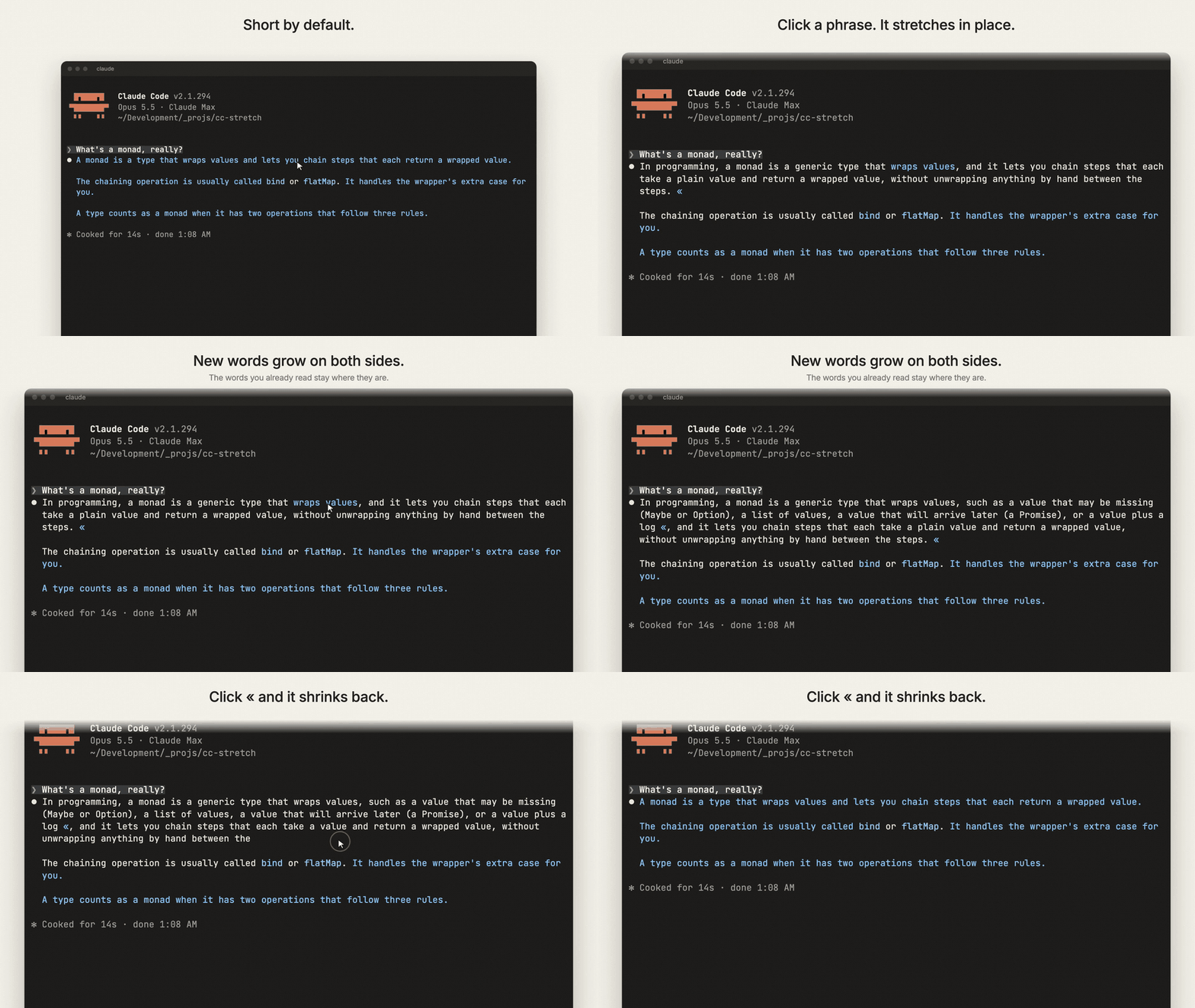
cc-stretch is a Claude Code plugin that makes long replies easier to scan. Claude initially shows a short version of its answer. When you click a linked phrase, that phrase expands in place with additional explanation. Click « to collapse it again.
The text you already read stays in the same position. Additional words appear around it, so you can progressively explore an answer without losing your place.
Install the plugin
Install cc-stretch from inside a Claude Code session with the following commands:
/plugin install cc-stretch --marketplace pro-vi/cc-stretch
/tui fullscreen
In the terminal, the second command switches Claude Code to its fullscreen renderer. This is required for clickable stretches to work correctly. The command restarts and resumes the session.
In the Claude desktop app, stretches behave as links automatically. Click a stretch to expand it and click « to close it; no additional setting is required.
Use cc-stretch to read a reply
1. Start with the short form
When Claude sends a reply, cc-stretch displays the short version first. The README calls this a skim: a reply with every stretch closed.
2. Expand a phrase
Click a linked phrase that needs more context. The phrase grows in place, adding detail without replacing the words you already read.
For example, a short explanation might begin like this:
A monad is a type that wraps values and lets you chain steps that each return a wrapped value.
After expanding the sentence, it can provide more detail while preserving the original wording:
In programming, a monad is a generic type that wraps values, and it lets you chain steps that each take a plain value and return a wrapped value, without unwrapping anything by hand between the steps.
3. Collapse the detail
Click « to shrink an expanded phrase back to its short form. This lets you move between a quick overview and deeper explanations as your attention changes.
Understand the three reading levels
cc-stretch describes a reply using three terms:
- Skim: the reply with every stretch closed. This is what you read by default.
- Full: the same reply with every stretch open. This contains everything Claude wrote.
- Read: the skim combined with the stretches you opened.
The plugin is designed around the space between the skim and full versions. You decide which details deserve your attention, one phrase at a time. This is progressive disclosure controlled by the reader rather than only by the interface.
Key features
- Nested stretches: a longer expanded section can contain additional stretches for further detail.
- Clean streaming: while Claude is still generating a reply, stretches that are already available appear in their short forms.
- Quieter tool calls: completed groups of tool calls fold to Claude Code's own one-line summary, such as
Ran 3 shell commands ▸ show. - Visible failures and active work: running tool calls and calls that produced errors remain open instead of being folded away.
Terminal and desktop behavior
Clicks work in Claude Code's terminal fullscreen layout and in the Claude desktop app. In other environments, every stretch remains open because the interface cannot hide or update the text. The terminal's main screen has the same limitation because a printed reply cannot change after it appears.
If the first reply appears fully expanded, check that Claude Code is running in fullscreen mode. As of Claude Code 2.1.300, some configurations can start on the main screen even when fullscreen is configured, including tmux -CC, SSH connections from Windows, or machines where an earlier fullscreen start failed. In those cases, start Claude Code with:
CLAUDE_CODE_NO_FLICKER=1Windows users should also note that clicks have been reported as not working yet. Track the status in issue #1.
Important limitations
- Claude writes all levels of the reply up front. You read fewer words, but the response still costs approximately as many tokens as it would without the plugin.
- The
{{short|long}}markup appears as raw text wherever cc-stretch is not loaded. - The plugin is built on Claude Code's early-access function-hook plugin API, which can change between releases.
- In the Claude desktop app, cc-stretch's tool-call folding is not drawn; the app displays its own tool-call presentation.
- If a terminal session is also attached to the desktop app, the markup may be visible while a reply streams because the desktop app builds its links from that markup.
What to expect from the reading reduction
In the project's measurement of 69 real replies from four coding projects, the version shown before clicking contained 17% of the words Claude produced without the plugin. It included approximately two out of every three most important points, with the remaining details available through expansion.
Your results depend on how long Claude's replies normally are. If your replies are already short, cc-stretch will save less reading time. The repository's benchmark directory explains how the measurement was made and how to run it on your own transcripts.
Development commands
If you are working on the project, install its dependencies according to the repository setup and use these commands:
npm test            # claude plugin validate . && claude plugin test .
npm run typecheck   # the benchmark scripts
The project also includes a film workflow. The script film/take.mjs drives Claude Code in a WezTerm pane and records the screen, while film/compose.mjs renders the film. Source and licensing details for archive images used in the film are listed in film/CREDITS.md.
Conclusion
cc-stretch brings Ted Nelson's stretchtext idea to Claude Code: start with a compact answer, open only the explanations you need, and collapse them without losing your reading position. Install the plugin, switch the terminal to fullscreen when necessary, and use linked phrases to control how much of each Claude reply you read.
For more background and implementation details, visit the cc-stretch repository.