

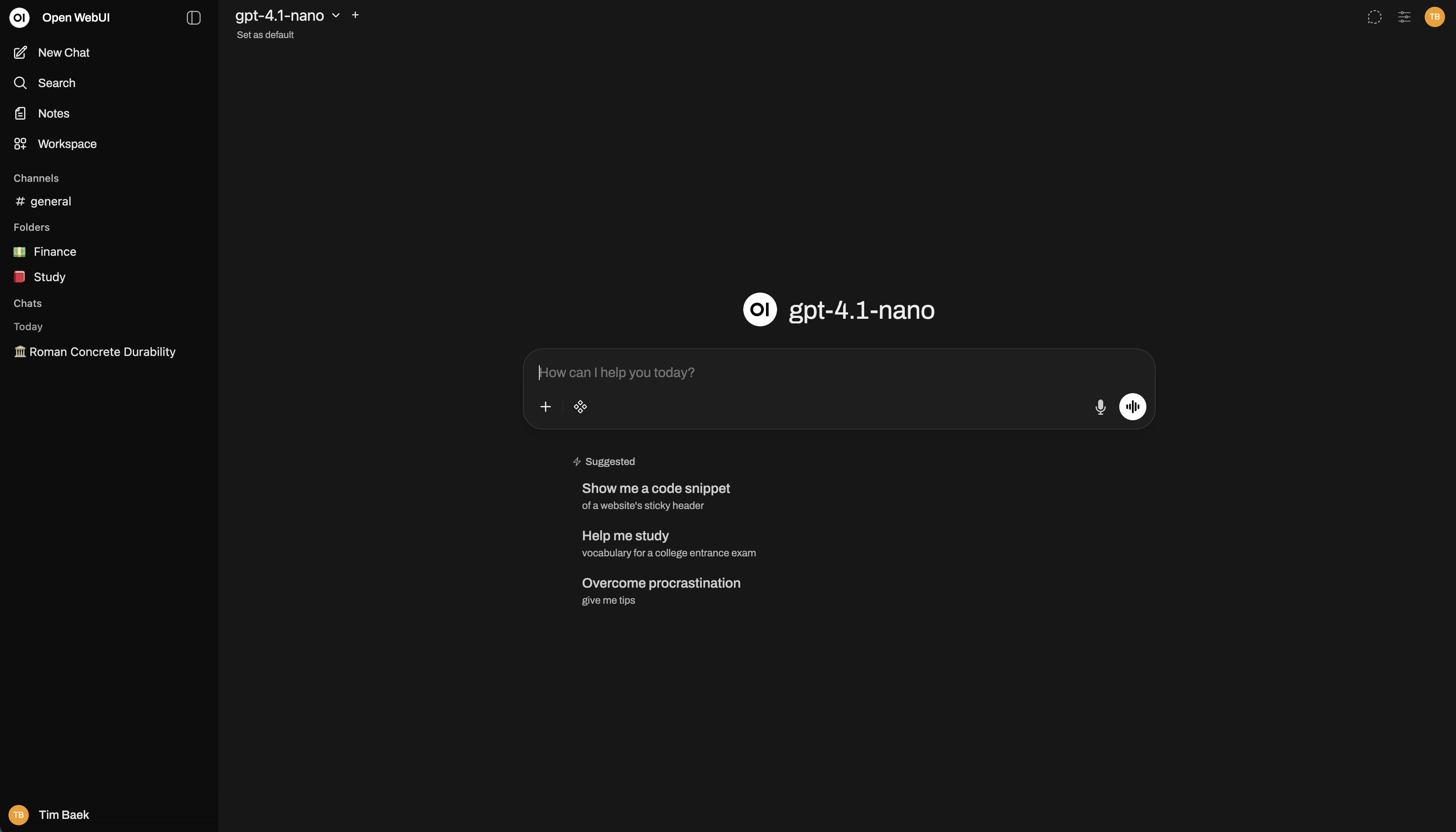
What Is Open WebUI?
Open WebUI is an extensible, self-hosted AI platform designed to work entirely offline when configured with local resources. It provides a browser-based interface for local Ollama models, OpenAI-compatible APIs, and a built-in inference engine for retrieval-augmented generation, commonly called RAG.
You can use it as a personal AI workspace or deploy it for a team. In addition to conversations, the platform includes notes, shared channels, persistent memory, calendars, scheduled automations, image generation integrations, voice and video calls, analytics, model evaluation, and granular access control.
Key Features
- Flexible model connections: Use local Ollama models alongside OpenAI-compatible services such as LMStudio, GroqCloud, Mistral, OpenRouter, and vLLM.
- Local RAG: Add documents to chats or retrieve files from a knowledge library with the
#command. The platform supports hybrid search, reranking, multiple extraction engines, and nine vector databases. - Models and agents: Wrap a base model with custom instructions, knowledge, tools, dynamic variables, and user or group access rules.
- Extensibility: Add Filters, Actions, Pipes, Tools, and Skills, or connect MCP, MCPO, and OpenAPI tool servers.
- Collaboration: Use notes, real-time channels, threads, reactions, pins, shared calendars, and AI-assisted scheduling.
- Multiple modalities: Configure speech-to-text, text-to-speech, voice and video calls, and image generation or editing engines.
- Administration: Manage roles, groups, permissions, authentication, usage analytics, model evaluations, storage, and observability.
- Deployment flexibility: Install through pip, uv, Docker, Docker Compose, Kubernetes, Kustomize, or Helm.
- Responsive interface: Use Open WebUI on desktop and mobile, or install it as a Progressive Web App.
Choose an Installation Method
For a quick local test, use pip or Docker. Pip serves Open WebUI directly from Python, while Docker provides an isolated deployment and makes it easy to select standard, CUDA-enabled, or Ollama-bundled images.
Important: Every Docker command should mount
open-webui:/app/backend/data. This persistent volume protects the database and other application data when the container is replaced or removed.
Option 1: Install with Python pip
Open WebUI requires Python 3.11 for the pip installation described by the project. Confirm that your environment uses the correct Python version before proceeding.
Install the package:
pip install open-webuiStart the server:
open-webui serveOpen http://localhost:8080 in your browser.
Option 2: Run Open WebUI with Docker
Connect to Ollama on the host computer
If Ollama is already running on the same computer as Docker, start the standard Open WebUI image and add a host mapping so the container can reach the host:
docker run -d -p 3000:8080 --add-host=host.docker.internal:host-gateway -v open-webui:/app/backend/data --name open-webui --restart always ghcr.io/open-webui/open-webui:mainAfter the container starts, visit http://localhost:3000.
Connect to Ollama on another server
Set OLLAMA_BASE_URL to the address of the remote Ollama service:
docker run -d -p 3000:8080 -e OLLAMA_BASE_URL=https://example.com -v open-webui:/app/backend/data --name open-webui --restart always ghcr.io/open-webui/open-webui:mainReplace https://example.com with the actual Ollama server URL.
Enable Nvidia GPU support
Open WebUI provides a CUDA-tagged image. Install the Nvidia CUDA container toolkit on Linux or WSL before running it:
docker run -d -p 3000:8080 --gpus all --add-host=host.docker.internal:host-gateway -v open-webui:/app/backend/data --name open-webui --restart always ghcr.io/open-webui/open-webui:cudaUse only an OpenAI API
If you do not need Ollama, pass your OpenAI API key to the standard image:
docker run -d -p 3000:8080 -e OPENAI_API_KEY=your_secret_key -v open-webui:/app/backend/data --name open-webui --restart always ghcr.io/open-webui/open-webui:mainReplace your_secret_key with the appropriate credential. Open WebUI can also connect to other OpenAI-compatible APIs, with provider-specific configuration documented by the project.
Run Open WebUI and Ollama in One Container
The :ollama image bundles Open WebUI and Ollama. It uses one volume for Ollama models and another for Open WebUI application data.
Bundled Ollama with a GPU
docker run -d -p 3000:8080 --gpus=all -v ollama:/root/.ollama -v open-webui:/app/backend/data --name open-webui --restart always ghcr.io/open-webui/open-webui:ollamaBundled Ollama with CPU only
docker run -d -p 3000:8080 -v ollama:/root/.ollama -v open-webui:/app/backend/data --name open-webui --restart always ghcr.io/open-webui/open-webui:ollamaOpen http://localhost:3000 after the container starts.
Basic Usage
Open the interface: Use port
8080for the pip setup or port3000for the standard Docker commands above.Use an available model: Start a conversation with a model exposed by your configured Ollama or OpenAI-compatible connection.
Write richer prompts: Responses support Markdown and LaTeX, making the interface suitable for structured explanations, code, tables, and mathematical notation.
Continue across devices: The responsive interface works on desktop and mobile, and Progressive Web App support provides an app-like experience.
Use documents with RAG
Add documents directly to a conversation or retrieve them from your library with the # command. Open WebUI can extract and index content, retrieve relevant passages, and inject them into the model context. Its RAG stack supports BM25 and vector hybrid search, reranking, and full-context mode.
For larger deployments, supported vector database options include ChromaDB, PGVector, Qdrant, Milvus, Elasticsearch, OpenSearch, Pinecone, S3Vector, and Oracle 23ai.
Bring a website into a chat
Use the # command followed by a URL to pull website content into a conversation. Open WebUI can also be configured to let models fetch web content when needed.
Compare several models
Multi-model conversations let you engage multiple models in parallel. This is useful when you want to compare reasoning, writing style, or provider behavior. Administrators can also use the built-in arena, A/B testing, and ELO-based leaderboards for model evaluation.
Advanced Configuration Tips
Create specialized models and agents
Combine a base model with custom instructions, tools, and knowledge to create a specialized agent. Dynamic variables and per-user or per-group access controls make it possible to tailor an agent to different teams. Community presets can also be imported from Open WebUI Community.
Extend the platform
Open WebUI supports Filters, Actions, Pipes, Tools, and Skills. External services can be connected through MCP, MCPO, and OpenAPI tool servers. These extension points can support custom integrations, approval flows, rate limits, and additional data connections.
Plan team and enterprise deployments
For multi-user environments, use roles, groups, and permissions to control access. Open WebUI supports LDAP and Active Directory integration, trusted-header and OAuth-based single sign-on, and SCIM 2.0 provisioning for identity providers such as Okta, Azure AD, and Google Workspace.
Storage can use SQLite, optionally with encryption, or PostgreSQL. Files can be stored locally or in S3, Google Cloud Storage, or Azure Blob Storage. Redis-backed sessions and WebSocket support enable multi-worker and multi-node deployments behind load balancers, while OpenTelemetry provides traces, metrics, and logs.
Operate completely offline
When running Open WebUI in an offline environment, set HF_HUB_OFFLINE to 1 to prevent attempts to download models from the internet:
export HF_HUB_OFFLINE=1An offline deployment still requires all necessary models, dependencies, and local services to be available in the environment.
Try the development image carefully
The :dev image contains unstable, bleeding-edge changes that may have bugs or incomplete features. Use it only when you accept that risk:
docker run -d -p 3000:8080 -v open-webui:/app/backend/data --name open-webui --add-host=host.docker.internal:host-gateway --restart always ghcr.io/open-webui/open-webui:devTroubleshoot Ollama Connection Errors
A common Docker problem occurs when Open WebUI cannot reach Ollama at 127.0.0.1:11434 or host.docker.internal:11434 from inside the container. One documented workaround on supported systems is to use host networking:
docker run -d --network=host -v open-webui:/app/backend/data -e OLLAMA_BASE_URL=http://127.0.0.1:11434 --name open-webui --restart always ghcr.io/open-webui/open-webui:mainWith this command, access Open WebUI at http://localhost:8080 rather than port 3000.
If the connection still fails, confirm that Ollama is running, verify its address, and consult the Open WebUI troubleshooting documentation. Docker environments can require additional networking configuration.
Maintenance and Security
Follow the official updating guide when replacing or upgrading a deployment.
Keep the persistent Docker volume attached during upgrades to avoid losing application data.
Review the project license and license history because the codebase contains components under multiple licenses, including branding requirements for current Open WebUI-licensed code.
Report suspected vulnerabilities confidentially through the project’s GitHub responsible disclosure program, not through public community channels.
Conclusion
Open WebUI provides a flexible interface for running local and hosted AI models through infrastructure you control. Start with Python 3.11 or a persistent Docker deployment, connect Ollama or an OpenAI-compatible API, and then expand into RAG, agents, plugins, collaboration, analytics, and scalable production services. For more deployment options, consult the official getting-started documentation.