

What Is Headcount?
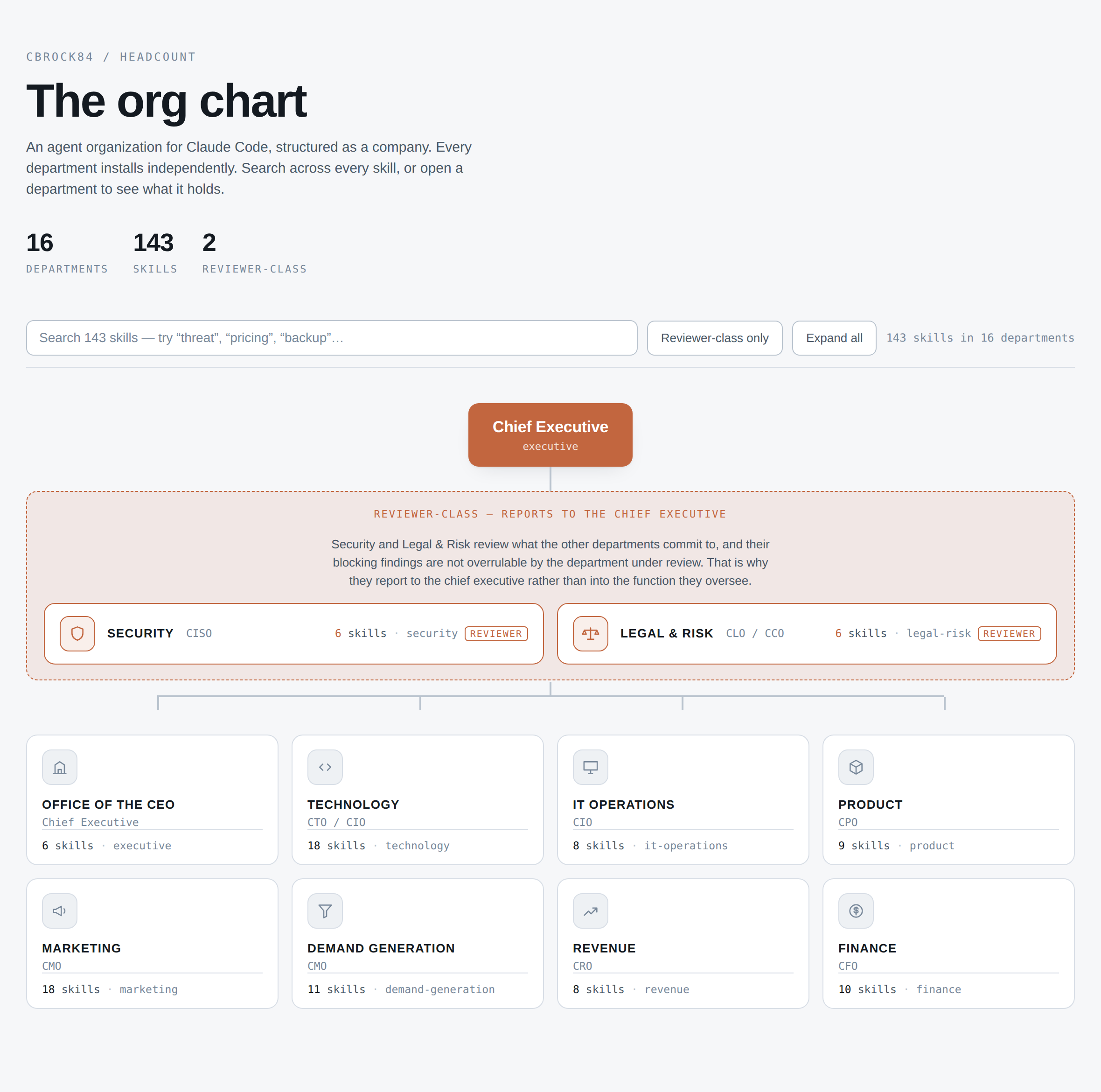
Headcount is an agent organization built for Claude Code. It structures AI capabilities like a company, placing a chief executive over 16 specialized departments with 143 skills in total.
Instead of loading one large collection of instructions into every project, you install only the departments the project needs. Each department is an independent Claude Code plugin covering a business or technical function such as Technology, Security, Product, Marketing, Finance, Operations, Revenue, or Customer Experience.
The project also provides an interactive organization chart for searching skills, opening departments, and jumping to their source definitions.
Key Features
- Modular departments: Install only the functions relevant to a project rather than loading all 143 skills.
- Automatic skill selection: Skills load when a request matches their area of responsibility.
- Direct invocation: Call a particular specialist when you need a specific analytical lens.
- Namespaced skills: Every skill uses the
department:skillformat, preventing name collisions. - Agent charters: Departments include charters in
.claude/agents/, allowing work to be delegated to subagents with exclusive write surfaces. - Cross-department workflows: Documented use cases show how multiple departments can address situations such as security incidents, stalled funnels, and SOC 2 requests.
- Reviewer-class authority: A reviewer-class department such as Security can stop work that creates unacceptable risk instead of merely adding another opinion.
Install Headcount
Prerequisites
Headcount is designed for Claude Code, so begin with a working Claude Code environment. Installation uses Claude Code’s plugin commands.
Step 1: Add the Marketplace
Add the Headcount repository as a plugin marketplace:
/plugin marketplace add cbrock84/headcountStep 2: Install a Department
Install the department needed by your project. For example, add the Security department with:
/plugin install security@headcountYou can install additional departments in the same way. This modular approach keeps the active toolset focused rather than loading the entire organization into every project.
Step 3: Identify the Skills You Need
Skills are addressed with a department namespace:
department:skillExamples include:
security:threat-modelingfinance:unit-economicstechnology:systematic-debuggingdemand-generation:landing-page-cro-expert
Use the interactive organization chart to find the department and exact skill name for your task.
Basic Usage
Let Headcount Select a Specialist
In normal use, describe the problem naturally. When the request falls within an installed department’s territory, the matching specialist loads automatically.
For example, ask:
Why isn't this landing page converting?This request matches demand-generation:landing-page-cro-expert, which focuses on diagnosing and improving landing-page conversion.
Other examples from the project include:
- Request: Review this design before we build it.
Skill:security:threat-modeling - Request: Can we afford this hire?
Skill:finance:unit-economics - Request: Our growth has stalled.
Skill:executive:business-growth-consultant
Invoke a Skill Directly
Automatic routing is useful when you want Headcount to choose the relevant specialist. If you already know which lens you need, invoke the skill directly by name:
/finance:financial-modelingDirect invocation makes the intended function explicit. For example, use financial modeling for forecasting and scenario analysis, while finance:unit-economics focuses on contribution margin, acquisition cost, payback period, lifetime value, and cohort behavior.
Choosing Departments for a Project
Start from the project’s actual responsibilities rather than installing every available department. A software delivery project might use Technology for architecture, testing, debugging, code review, and deployment. Security can then provide threat modeling and architecture review.
A go-to-market project could combine Marketing, Demand Generation, Revenue, and Finance. Relevant skills include positioning and messaging, landing-page conversion optimization, pricing and packaging, marketing analytics, and unit economics.
Headcount’s central design principle is to add the required department, not to solve every problem with one oversized prompt.
Advanced Tips
Combine Automatic Routing with Direct Calls
Begin with a natural-language request when you want the system to determine the appropriate specialist. Switch to direct invocation when you need a known discipline, a repeatable workflow, or a clearly defined review step.
For example, you might explore an implementation with technology:solution-exploration, create a plan with technology:implementation-planning, and verify the result with technology:completion-verification.
Use Independent Reviewers
Do not treat every department as a source of optional commentary. Security is identified as reviewer-class and may stop unsafe work. For a sensitive design, use threat modeling or security architecture review before implementation rather than waiting until deployment.
A review sequence could be expressed as:
- Explore the proposed solution and its trade-offs.
- Create an implementation plan.
- Run
security:threat-modelingorsecurity:security-architecture-review. - Address blocking risks before continuing.
- Implement and verify the completed work.
Delegate Through Agent Charters
Each department ships an agent charter in .claude/agents/. These charters allow a department to operate as a subagent with its own exclusive write surface.
Exclusive write surfaces are particularly useful for parallel work because they reduce overlap between agents. The Technology department also includes skills for agent hierarchy design and parallel-agent delivery, covering orchestrator-and-subagent structures and disjoint work surfaces.
Use Namespaces Consistently
Always retain the full department:skill name in documentation, repeatable procedures, and direct calls. Namespacing makes the owning department clear and ensures that similarly named capabilities do not collide.
Study Cross-Department Scenarios
The repository’s use-case documentation walks through seven situations that cross departmental boundaries. These include an enterprise prospect requesting SOC 2, a security incident, and a stalled funnel. The examples also demonstrate where reviewer-class authority can halt work.
Keep the Installation Focused
Install departments as project needs emerge. A narrow installation reduces unnecessary functions while preserving access to specialists relevant to the current work. Add another department when the project gains a genuinely new responsibility, such as financial analysis, operational planning, or marketing measurement.
Example Workflow
Suppose a team is preparing a new product experience. A structured Headcount workflow could look like this:
- Use Product skills to audit or refine the interface and design system.
- Ask Technology to explore the solution architecture and create an implementation plan.
- Have Security threat-model the design before it is built.
- Use Technology’s test-driven development, code review, and completion verification skills during delivery.
- Bring in Demand Generation for landing-page conversion and Marketing for positioning or campaign planning.
- Use Finance to test unit economics or build financial scenarios where needed.
The exact sequence depends on the installed departments and the project’s needs. The important distinction is that each specialist has a defined remit instead of sharing one undifferentiated prompt.
Conclusion
Headcount turns Claude Code into a modular agent organization with 16 departments and 143 namespaced skills. Add its marketplace, install only the departments your project requires, describe tasks naturally for automatic routing, and invoke specific skills when you need a precise lens. For complex work, combine department charters, independent review, and documented cross-functional workflows.