

What Tiny Classifiers Does
tiny-classifiers is a practical recipe for training small, task-specific text classifiers. It uses the 17-million-parameter Ettin-17M encoder, fine-tunes all of its weights, and saves the result as a standard Hugging Face model.
The project is designed for classification tasks such as routing bank messages, categorizing news, recognizing user intent, detecting sentiment, or assigning legal documents to predefined categories. If you do not have enough labeled examples, a larger language model can act as a teacher and label the training set.
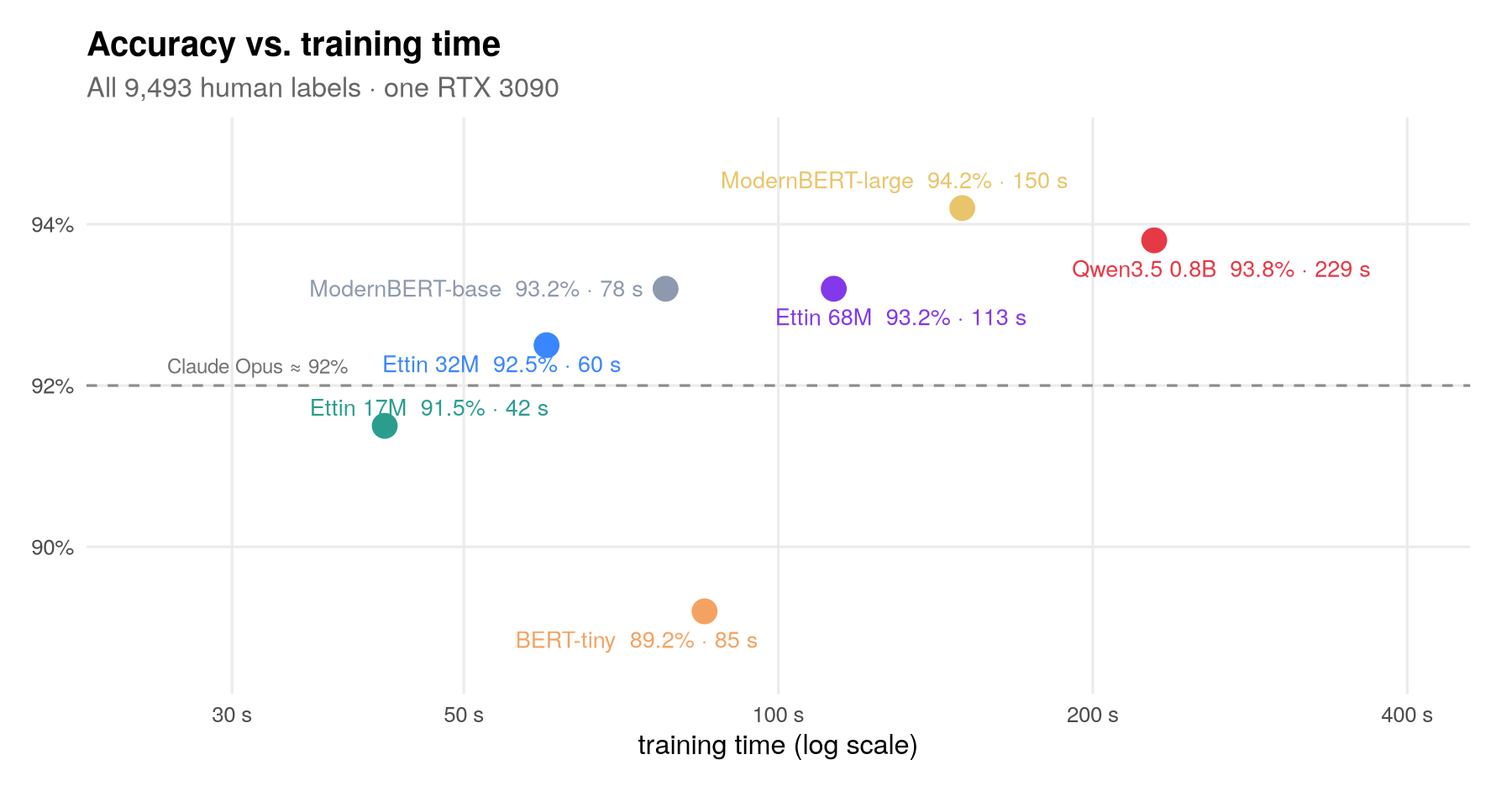
In the repository's Banking77 experiment, Ettin-17M reached 91.5% accuracy, compared with 92% for Claude Opus. Training took 42 seconds on one gaming GPU, while inference took about 5 milliseconds per message. Training also worked on a laptop CPU in approximately 11 minutes and on a phone GPU in approximately 21 minutes.
Banking77 accuracy compared with training time.
Key Features
- Small local model: Ettin-17M has 17 million parameters and produces one score for each category.
- Human or teacher labels: Train with verified labels or ask Kimi K3 to label otherwise unlabeled messages.
- GPU and CPU training: The training script supports both environments.
- Standard model output: Trained classifiers can be loaded through the Hugging Face
transformerspipeline. - Resumable labeling: The labeling script supports retries, adaptive concurrency, slow-request hedging, and provider budgets.
- Built-in evaluation: Training reports test accuracy, while teacher labeling can measure the teacher's accuracy on a labeled test set.
- Cost analysis: A break-even script estimates when labeling and training become cheaper than paying for classification through an API.
- Reusable data preparation: The project can prepare ten public classification datasets using one consistent structure.
How the Training Recipe Works
Ettin-17M is an open encoder from Johns Hopkins and is related to BERT-style models. Unlike a generative model that produces text token by token, it reads the complete input and assigns a score to every available category.
The repository adds one output for each category and fine-tunes every model weight. Its default recipe uses a batch size of 32, AdamW with a learning rate of 1e-4, weight decay of 0.01, 5% warm-up followed by cosine decay, gradient clipping at 1.0, and cross-entropy loss.
For approximately 9,500 messages, training runs for six passes. With only 2,000 examples, it uses the same number of optimization steps, which corresponds to approximately 28 passes. The README emphasizes that these settings are not tuned separately for each task.
Installation and Setup
1. Install uv
The scripts use uv to create the required environment and install dependencies automatically on the first run. Install uv using the instructions for your operating system, then open a terminal in the repository's root directory.
2. Prepare the public datasets
Run the preparation script:
uv run recipe/prepare.pyThis downloads Banking77, CLINC150, MASSIVE in English and French, TREC, AG News, SST-5, Financial PhraseBank, LEDGAR, and a tweet hate-speech dataset from the Hugging Face Hub.
For each task, the script creates a directory under data/tasks/. It builds a task definition, 2,000 training messages, a larger training split containing up to 150 examples per category, and a test set.
3. Configure a labeling provider
If you want a teacher model to generate labels, set an API key for one or more supported providers:
export OPENROUTER_API_KEY=...The recipe also recognizes provider keys associated with Fireworks, Together, DeepInfra, and Parasail. Check the relevant provider's current pricing, usage policies, and model terms before sending data or using generated answers for training.
Basic Tutorial: Train an AG News Classifier
Step 1: Generate labels with Kimi K3
After preparing the datasets, label the 2,000 AG News training messages:
uv run recipe/label.py data/tasks/agnewsIn the reported run, Kimi K3 labeled 2,000 examples in about 20 seconds for approximately $1. Actual time and cost can vary by provider. The script is resumable, so interrupted labeling work does not need to start from the beginning.
Step 2: Fine-tune Ettin-17M on teacher labels
Pass the generated label file to the training script and choose an output directory:
uv run recipe/train.py data/tasks/agnews --labels labels/agnews-train.jsonl --save models/agnewsThe script fine-tunes the classifier, evaluates it on the test set, prints test accuracy, and saves a Hugging Face-compatible model under models/agnews.
Step 3: Train a human-label baseline
Run the same training script without the teacher-label argument to train on the dataset's original human labels:
uv run recipe/train.py data/tasks/agnewsThis comparison helps reveal how much performance was lost during knowledge distillation. In the repository's tutorial run, human labels produced 89.2% accuracy, Kimi K3 labels produced 85.1%, and Qwen3.8-27B labels produced 81.8%.
Step 4: Classify new text
Load the saved model with the Hugging Face pipeline:
from transformers import pipeline

classify = pipeline(
    "text-classification",
    model="models/agnews",
    device="cpu"
)

result = classify(
    "NASA's new telescope finds water vapour on a distant planet"
)
print(result)
The result is a list containing the predicted label and its score. For this example, the expected category is Sci/Tech. The reported AG News model processed a message in about 6 milliseconds on a CPU.
Use Tiny Classifiers with Your Own Data
1. Create a task directory
Create a folder following the same layout as data/tasks/agnews/. Each custom task requires a task.json, train.jsonl, and test.jsonl file.
2. Define the categories
The task.json file must contain a name, one instruction sentence, and the complete list of labels:
{"name":"support-routing","instruction":"Assign each support message to the correct team.","labels":["billing","technical","account"]}Use label names that are distinct and meaningful. The instruction should clearly describe the classification decision the model or teacher must make.
3. Add training and test records
Store one JSON object per line. A labeled record has this structure:
{"id":"msg-001","text":"I was charged twice for my subscription.","label":"billing"}If a teacher model will label the training data, records in train.jsonl may omit the label field:
{"id":"msg-002","text":"The application closes whenever I upload a file."}Test records should have checked labels so that you can measure both teacher and student accuracy. The project recommends manually checking a few hundred test messages before trusting a model in production.
4. Label, train, and evaluate
Substitute your directory in the standard commands:
uv run recipe/label.py data/tasks/support-routing
uv run recipe/train.py data/tasks/support-routing \
  --labels labels/support-routing-train.jsonl \
  --save models/support-routing
You can also train directly on human labels by omitting --labels. To use another encoder instead of Ettin-17M, pass the model through the training script's --model option.
Measure When Fine-Tuning Pays Off
Run the break-even analysis after preparing the tasks:
uv run recipe/breakeven.pyThis script estimates how many messages must be classified before the upfront costs of labeling and training are recovered, considering both money and time. Compared with the Jev zero-shot classification API, the repository found break-even points of roughly 50,000 to 500,000 messages, depending on the task.
If your volume is small or uncertain, an API may be the simpler choice. Fine-tuning becomes more attractive when the task is stable, evaluation data exists, and classification volume is high.
Advanced Tips
Prioritize label quality
The experiments found that labels matter more than model size. Learning curves continued improving as more labeled examples were added. A teacher-trained student generally remained a few accuracy points below its teacher, while human labels could break that ceiling.
Review ambiguous categories, correct systematic labeling errors, and add representative examples before changing the architecture or tuning many hyperparameters.
Evaluate the teacher separately
A student cannot reliably compensate for a teacher that performs poorly on the task. The ten-task results showed that teacher-labeled models lost ground where the teacher itself was weaker. Keep a human-checked test set and measure teacher accuracy before paying to label a much larger collection.
Account for experimental variation
The README reports variation of approximately ±0.5 percentage points from random seeds and ±1.5 to 2 points from test-set size. Published tables use the mean of three runs. Use repeated runs and sufficiently large test sets when small accuracy differences influence deployment decisions.
Respect licenses and provider terms
Only train on generated answers when the teacher model's license and provider terms permit it. The repository used Kimi K3, but some models and APIs prohibit using their outputs to train another model. Public datasets also retain their own licenses; the repository downloads them rather than redistributing them.
Explore alternative hardware
The main training script supports CPU and GPU execution. The repository also includes a separate phone implementation that trains through Chrome using WebGPU and jax-js. Treat the phone workflow as a dedicated implementation and follow the instructions in the project's phone/ directory.
Work around the documented NixOS issue
If training on NixOS fails because /sbin/ldconfig cannot be found, set the CUDA library path before running training:
export TRITON_LIBCUDA_PATH=/run/opengl-driver/libConclusion
tiny-classifiers provides a compact workflow for converting labeled text into a fast local classifier: prepare the task, obtain human or teacher labels, fine-tune Ettin-17M, evaluate against checked examples, and estimate whether local inference beats an API economically.
The most important lesson is to invest in reliable labels and evaluation data. Once those exist, a 17-million-parameter encoder can offer strong classification accuracy, millisecond-level inference, and predictable local operating costs without calling a large model for every message.