

What is stack-diagram?
stack-diagram is an AI agent skill that converts a plain-English description of a technology stack into an architecture diagram. Instead of positioning icons and drawing connections manually, you describe the services, relationships, protocols, and deployment flow in a sentence or short paragraph.
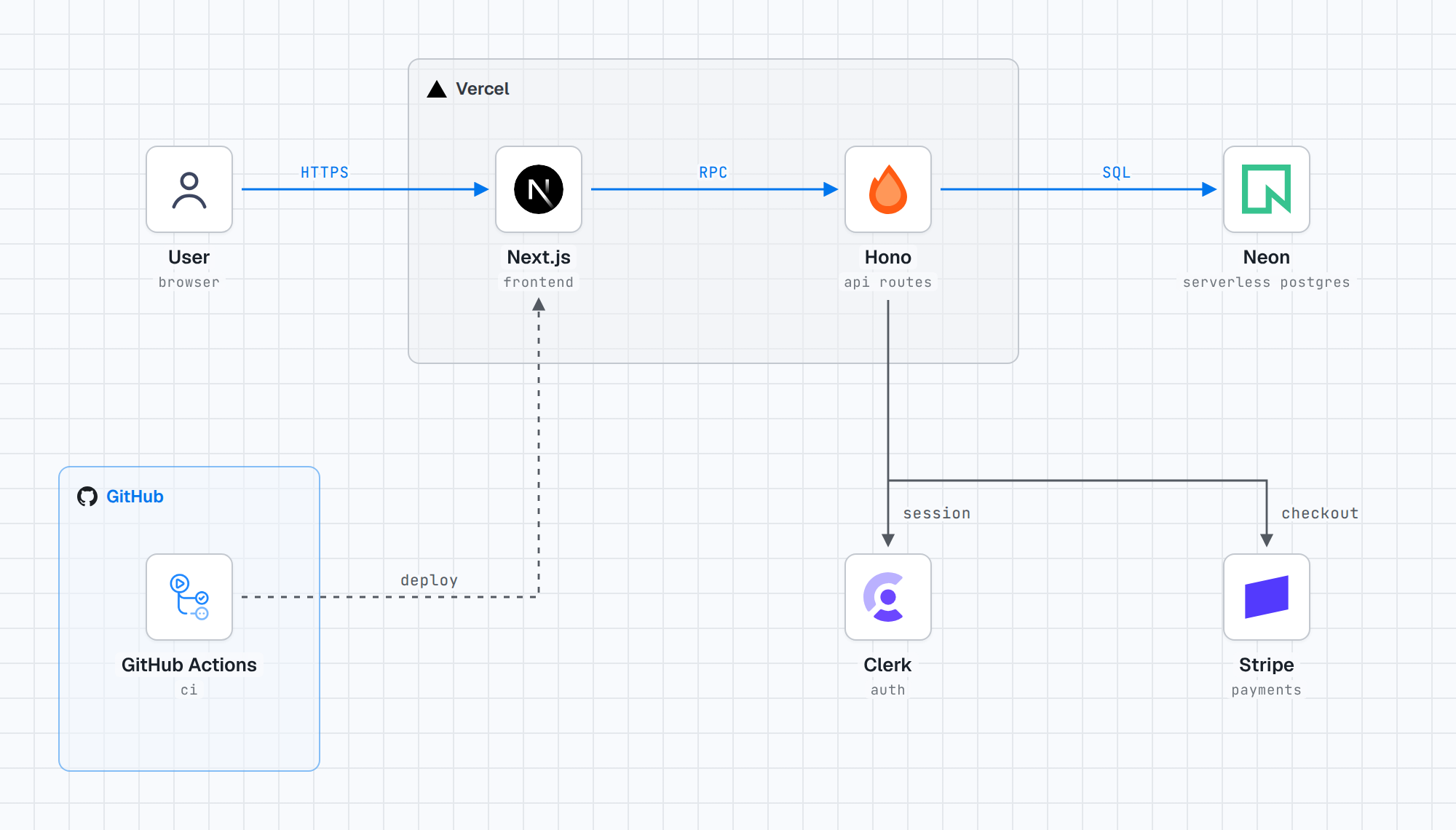
For example, the following prompt describes a web application, its API, data services, and deployment pipeline:
Diagram our stack: Next.js and a Hono API on Vercel.
Postgres on Neon, auth with Clerk, payments with Stripe.
GitHub Actions deploys.
The skill works with Claude Code, Codex, Cursor, and other agents that support the Agent Skills format.
Key features
- Plain-language input: Describe an architecture without writing diagram syntax.
- Official logos: Logos are retrieved from sources such as SVGL, Devicon, gilbarbara/logos, official brand repositories, and the AWS Architecture Icons package.
- Careful connector routing: Lines are routed around labels so arrows do not run through text.
- Light and dark themes: Every diagram is rendered in both themes. Logo tiles remain white to preserve original brand colors.
- Multiple output formats: Generate a self-contained HTML file, PNG image, dependency-free React component, or shareable Artifact.
- Portable HTML: Fonts and logos are inlined, allowing the resulting HTML file to render without network access.
Requirements
Before using the skill, make sure your environment provides:
- Python 3.9 or newer.
- Network access while logos are being fetched.
- Playwright with Chromium when exporting diagrams as PNG files.
- An AI coding agent or application that supports skills.
Although the finished HTML output works offline, network access is needed during generation because logos are downloaded at build time rather than bundled with the skill.
Install stack-diagram
Install in a supported coding agent
Run the following command from your terminal:
npx skills add caru-ini/stack-diagramThis installs the skill for agents that support the skills ecosystem, including Claude Code, Codex, and Cursor.
Install in a Claude app
For a Claude app that accepts uploaded skills, open the project’s latest release, download stack-diagram.zip, and upload that ZIP file as a skill.
Create your first architecture diagram
After installation, ask your agent to draw the stack. A useful prompt identifies the main technologies, where they run, and how they interact.
Diagram our stack: Next.js and a Hono API on Vercel.
Postgres on Neon, auth with Clerk, payments with Stripe.
GitHub Actions deploys.This description gives the agent enough information to represent the frontend, API, database, authentication provider, payment provider, and deployment workflow.
Make relationships explicit
For more precise results, include protocols or interaction types when they matter. You can state that a browser reaches an application over HTTPS, an API queries a database over SQL, or one service performs an RPC call.
Draw a user reaching Next.js on Vercel over HTTPS.
Next.js calls the Hono API over RPC.
The API queries Neon over SQL and uses Clerk for sessions.
GitHub Actions deploys the application.
The project renders the result and checks the diagram before returning it, helping prevent connectors from crossing labels.
Diagram development tooling
stack-diagram is not limited to cloud infrastructure. It can also visualize monorepos, local tooling, test runners, commit hooks, continuous integration, and package publishing.
Draw our monorepo tooling: a pnpm workspace with Turborepo, Biome, Vitest and Lefthook. GitHub Actions runs CI and publishes to npm.
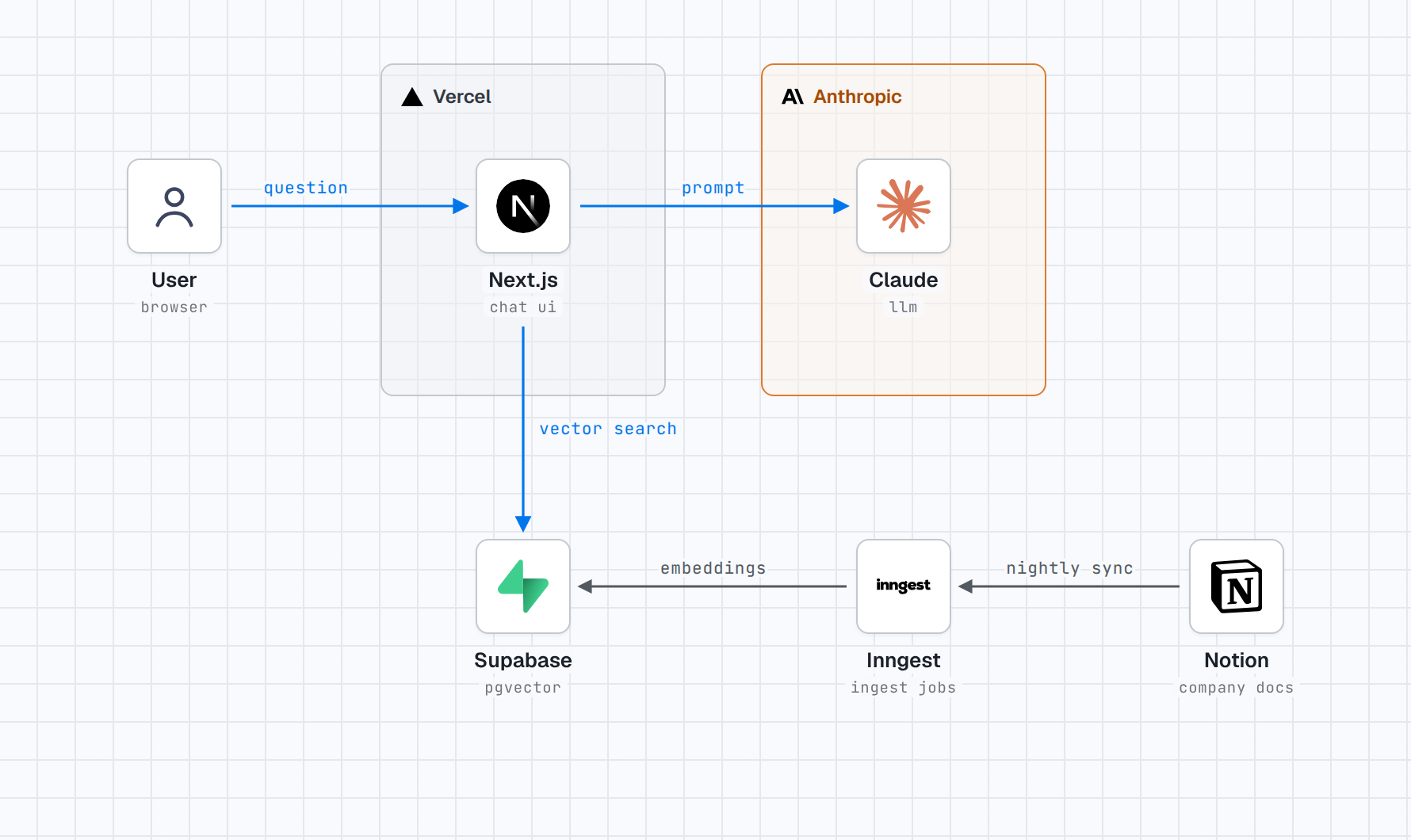
This type of prompt identifies the workspace boundary, tools operating inside it, and the external automation responsible for CI and publishing.
Diagram an AI application
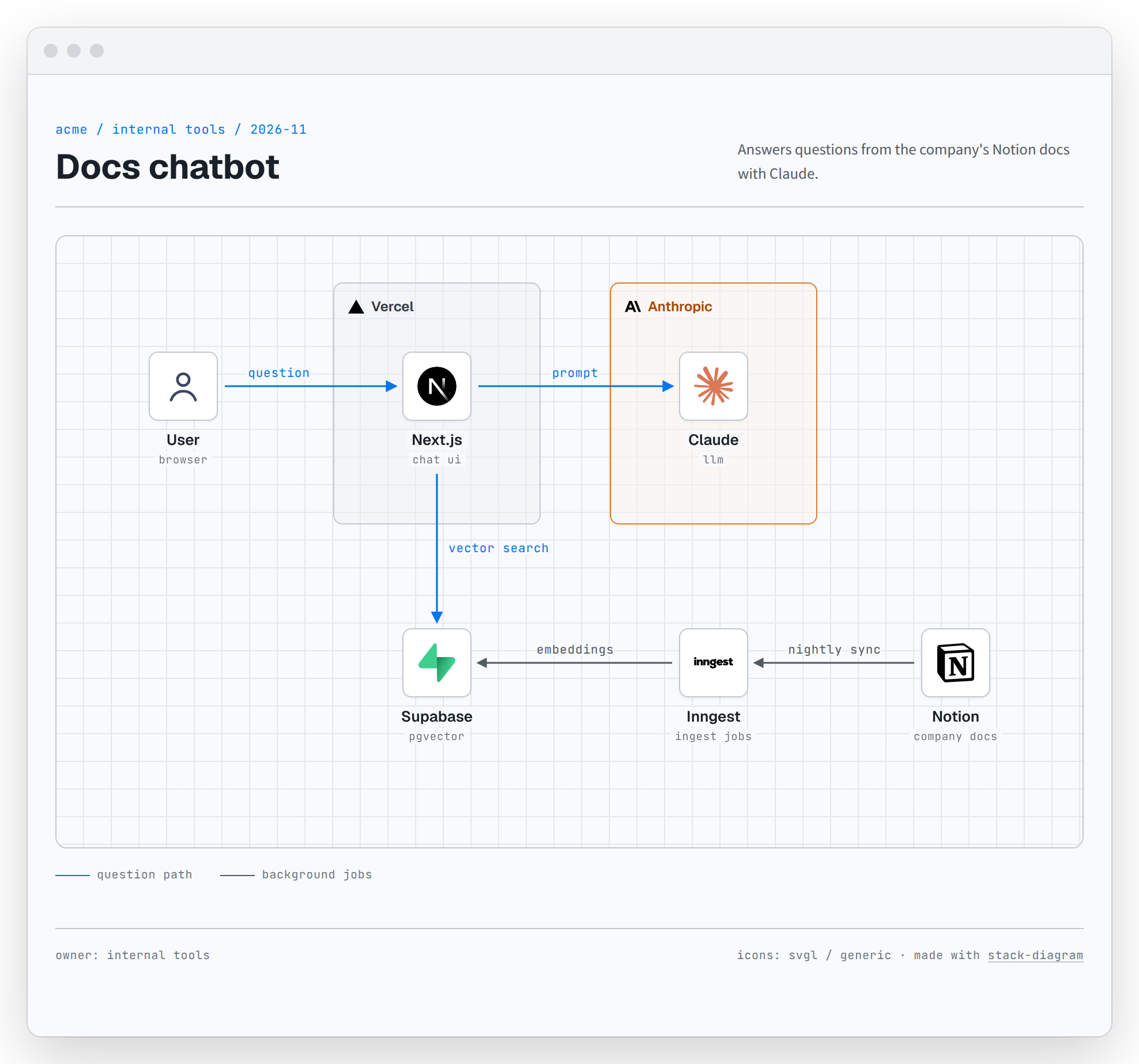
AI application diagrams can combine web frameworks, model providers, vector databases, background jobs, and content sources. Describe both the interactive request path and any scheduled ingestion process.
Draw our docs chatbot: Next.js on Vercel searches Supabase pgvector and answers with Claude. Inngest syncs Notion every night.
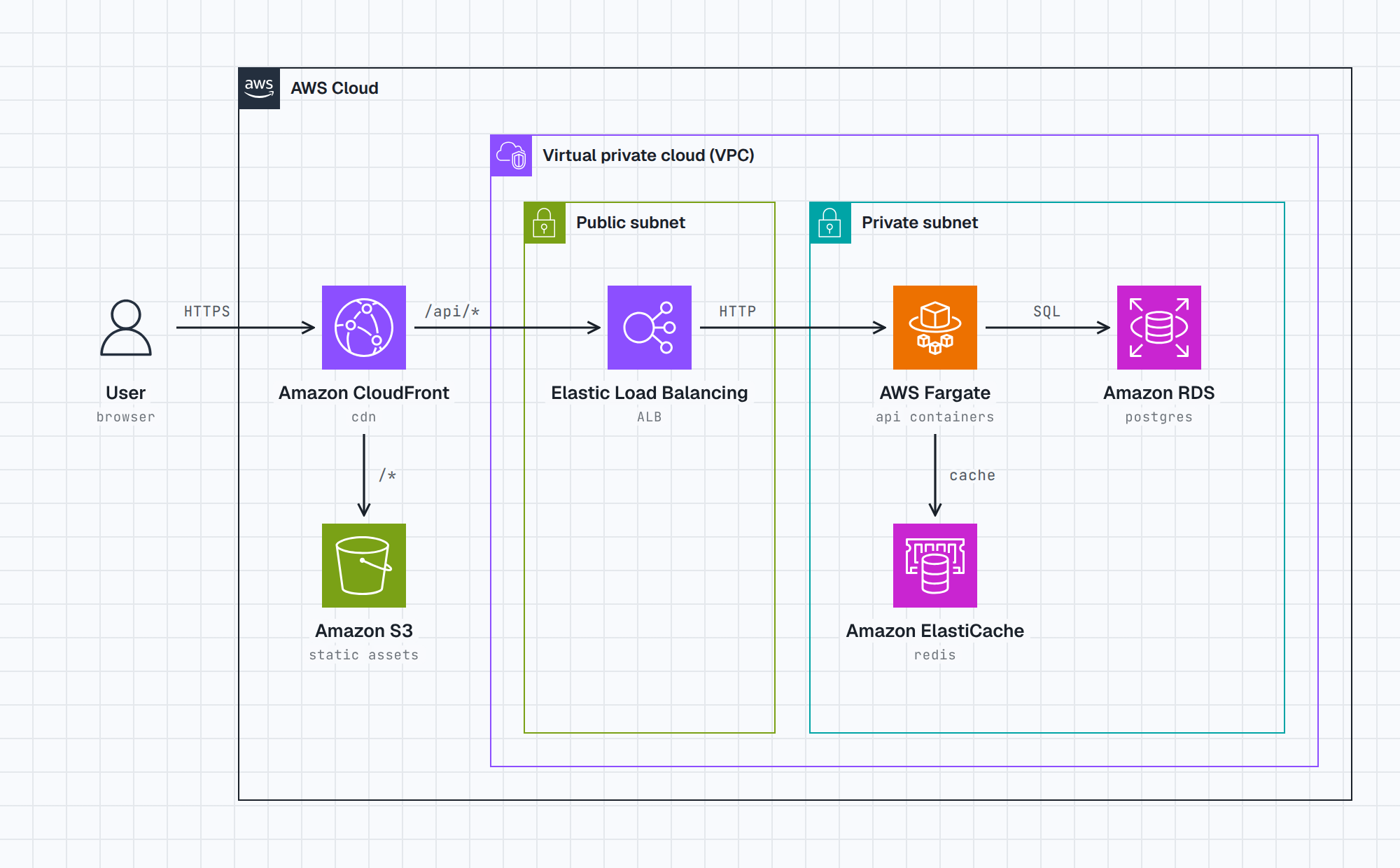
Here, the prompt distinguishes the user-facing question-and-answer flow from the nightly synchronization process.
Diagram AWS infrastructure
For AWS architectures, name services and network boundaries directly. stack-diagram uses AWS’s official architecture icons.
Draw our app on AWS: CloudFront in front of S3 and an ALB in a public subnet. Fargate, RDS and ElastiCache sit in a private subnet.
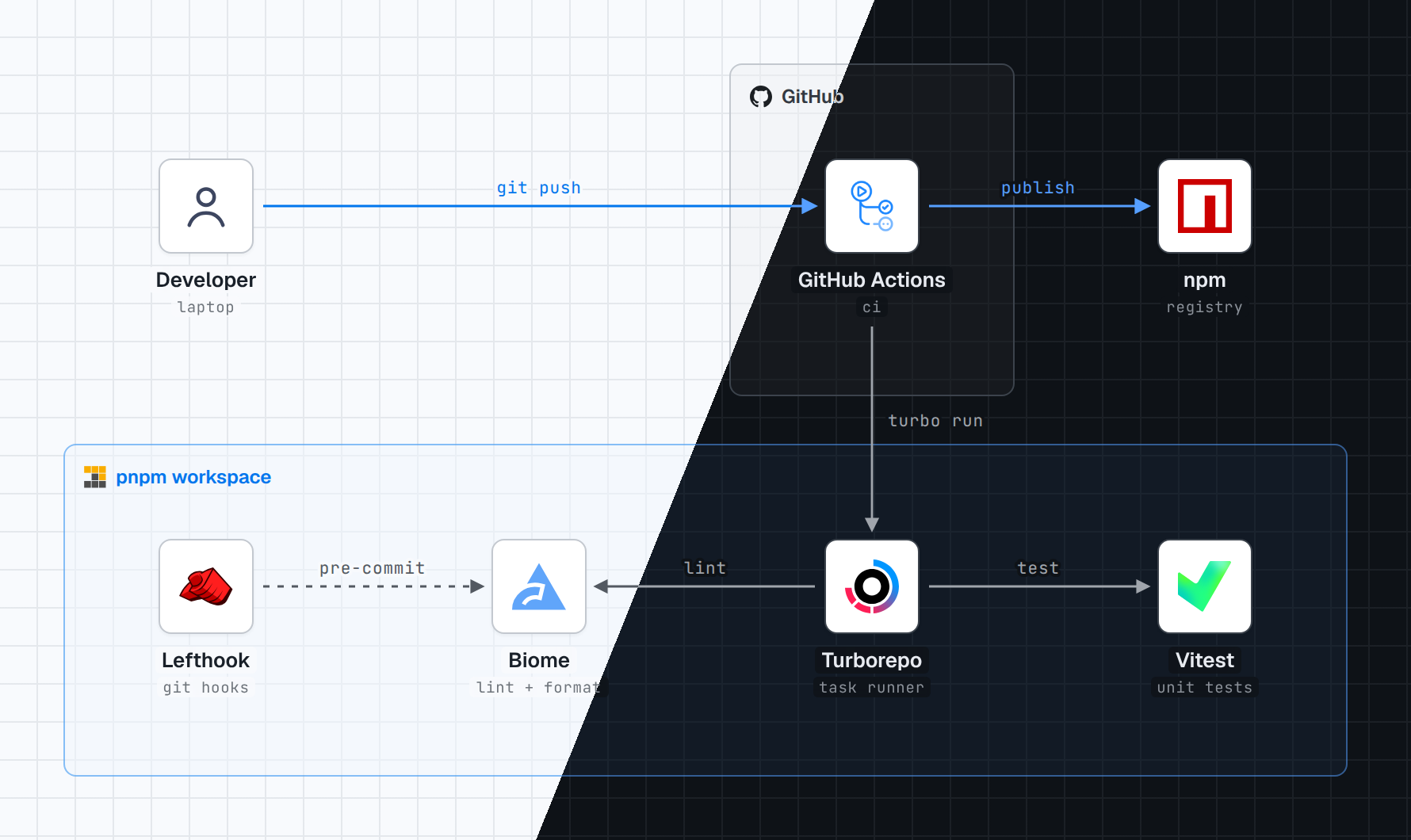
This description communicates the routing layer, static storage, load balancer, and separation between public and private subnets.
Choose an output format
The default result is a self-contained HTML file. You can also request another supported format directly in your prompt:
- HTML: Best for repositories, internal documentation, and wikis. Fonts and logos are embedded in one file.
- PNG: Useful for presentations and documents. PNG export requires Playwright with Chromium.
- React component: A dependency-free component suitable for integration into a React project.
- Artifact: Suitable for publishing and sharing through Claude.
Create a diagram of this stack as a self-contained HTML file:
Next.js on Vercel calls a Hono API, which stores data in Neon.
The PNG files and React component are rendered from the same underlying HTML file, helping keep output formats consistent.
Use light and dark themes
Each diagram is rendered in light and dark themes. Technology tiles remain white so official logos keep their original colors, while group labels can switch to an appropriate dark-theme brand logo.
When publishing the output in a repository or wiki, keep both themes available if readers may use different interface color schemes.
Advanced prompting tips
Describe the direction of traffic
A list of products explains what the stack contains, but directional language explains how it works. Use verbs such as calls, queries, serves, publishes, deploys, and syncs.
Name boundaries and locations
State whether components share a deployment, belong to a workspace, or sit in public and private subnets. These details help the diagram group related components correctly.
Include schedules and automation
If a process runs nightly, on every commit, or during deployment, include that information. It helps distinguish background workflows from the main request path.
Request the required deliverable
Specify HTML, PNG, React, or Artifact output when the default HTML format is not what you need. For a shareable, offline-friendly result, request a self-contained HTML file.
Keep brand assets unchanged
The project does not recolor or redraw logos. Brand names and logos remain the trademarks of their respective owners, and their presence in a diagram does not imply endorsement.
Licensing considerations
The project’s code and documentation use the MIT License. Bundled fonts use the SIL Open Font License 1.1. Logos are not bundled; they are downloaded during generation from supported logo collections, AWS, Lucide, or official brand sources and repositories.
Conclusion
stack-diagram provides a quick way to turn a concise architecture description into a polished visual with official logos, readable routing, theme support, and several export options. Install the skill, describe components and relationships clearly, and request the output format that fits your documentation or sharing workflow.