

What Papermorph Does
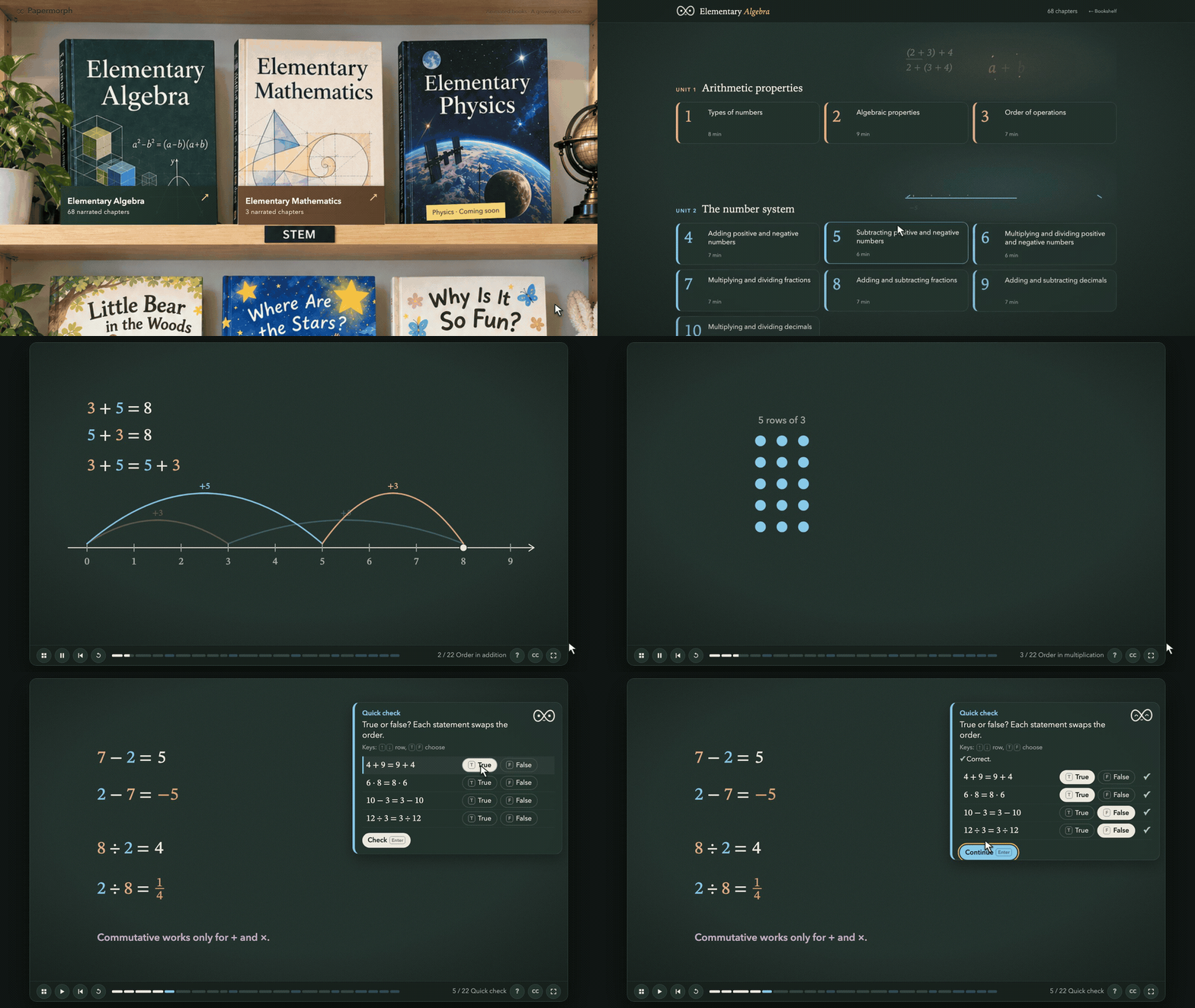
Papermorph is a Skill for Claude Code that turns PDFs into animated, interactive web books. Instead of producing a static document or a conventional video, it creates an experience readers can explore, listen to, and interact with.
The project follows this workflow:
PDF -> Book plan -> Storyboards -> Narration -> Animation & quizzes -> Web bookThe generated result is designed for web-based reading, with animated lessons, narration, and interactive quizzes. You can also explore the project’s live bookshelf to see the concept in action.
Key Features
- PDF transformation: Start with a book or chapter in PDF format.
- Book planning: Papermorph creates a plan before producing the interactive experience.
- Storyboards: The workflow includes storyboarding before animation.
- Narration: Generated books can be listened to as well as read.
- Animation and quizzes: Lessons become more interactive through animated content and quizzes.
- Web delivery: The result is an interactive web book that can be viewed in a browser.
The README currently describes Papermorph as an Opus 5.5-only project. Image models, multilingual support, and background music are not available yet.
Install Papermorph
Install the Skill from your project directory with the Skills command:
npx skills add DozenTwelve/Papermorph --skill papermorph --agent claude-codeThis adds the papermorph Skill for use with the claude-code agent.
Create Your First Web Book
After installation, open Claude Code with Opus 5.5 and provide a request that identifies the source PDF, the intended audience, and the scope of the first review.
/papermorph Turn /path/to/book.pdf into
an animated interactive web book.

Target readers: [your audience].
Start with one English chapter for review.
Replace /path/to/book.pdf with the path to your own PDF and describe your target readers. Starting with one English chapter gives you a focused version to review before working with a larger book.
Why Start with One Chapter?
A chapter-sized first pass makes it easier to evaluate the book plan, storyboards, narration, animations, and quizzes. You can review the direction with a smaller scope before asking Papermorph to process more of the source material.
Run the Included Examples Locally
The repository includes a site directory that you can serve locally. First, clone the project and move into its directory:
git clone https://github.com/DozenTwelve/Papermorph.git
cd Papermorph
Start a local Python HTTP server for the site:
python3 -m http.server 8765 -d siteThen open http://localhost:8765/ in your browser to view the local examples.
Practical Tips for Better Reviews
- Define the audience clearly: Replace the audience placeholder with a specific description of your intended readers.
- Review an English chapter first: The documented workflow recommends beginning with one English chapter.
- Inspect the full workflow: Review the plan, storyboards, narration, animations, and quizzes rather than evaluating only the final page.
- Use the local site: Run the included site locally when you want to inspect the examples from the repository.
- Keep current limitations in mind: The README lists Opus 5.5 as the current supported model and does not yet provide image models, multilingual support, or background music.
What Comes Next
Papermorph’s planned direction includes image models and storyboarding for interactive picture books and humanities documentaries. Its stated milestones also include expanding the bookshelf beyond STEM textbooks to picture books and social science titles, along with releasing new Skills.
Conclusion
Papermorph provides a focused workflow for converting PDF material into animated, narrated, interactive web books. Install the Skill, run it in Claude Code with Opus 5.5, begin with one English chapter, and use the local example site to explore the resulting web experience.
The project is available under the MIT License.