

What Is Motion Video Production?
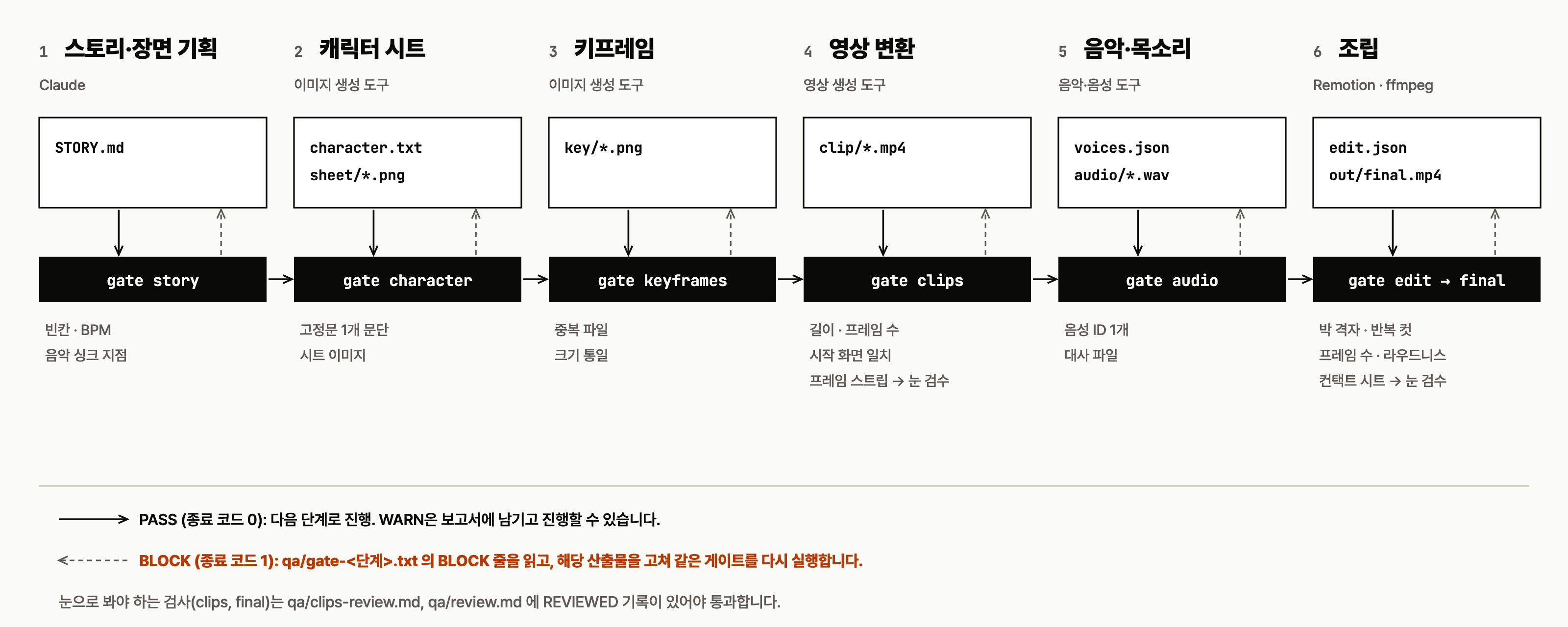
Motion Video Production is a Claude Code skill that guides the creation of 30–90 second motion graphics and videos from initial planning through final assembly. Instead of treating video generation as a single prompt, it divides production into six stages and validates the output of each stage before work continues.
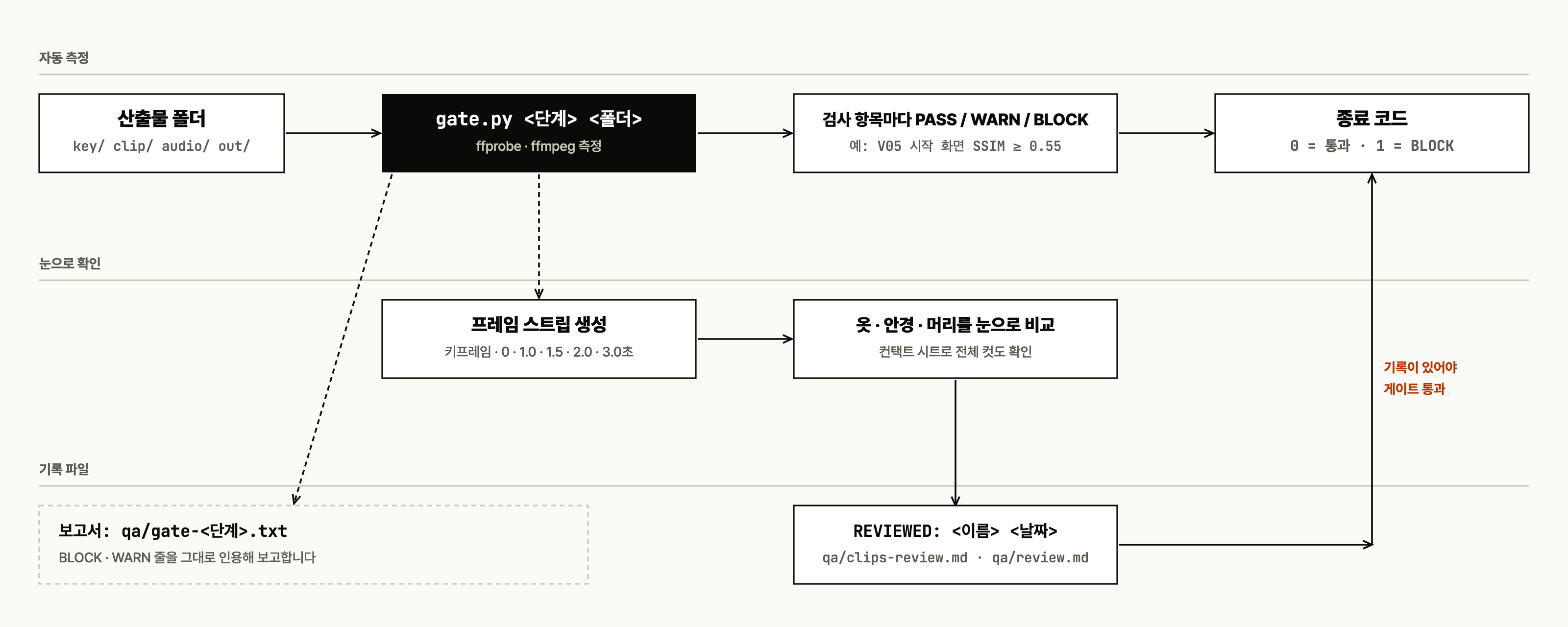
The repository includes a gate script at harness/gate.py. Each gate measures the relevant artifacts and returns an exit code: 0 means the stage passed, while 1 means the result is blocked and must be corrected. The project also documents 29 recurring production problems in references/gotchas.md.
Key Features
- Six-stage production workflow: story planning, character design, keyframes, video clips, audio, and final assembly.
- Measurable quality gates: scripts check files, timing, frame counts, aspect ratios, audio properties, and other stage-specific requirements.
- Human review checkpoints: visual issues that cannot be judged reliably by a numeric metric must be reviewed and documented by a person.
- Character consistency guidance: seven criteria help preserve appearance, voice, lip synchronization, musical timing, and overall quality across scene boundaries.
- Frame-strip generation: the clips gate creates image strips that reveal character changes occurring after the opening frame.
- Known-problem reference: 29 gotchas describe symptoms, causes, preventive steps, and related harness check IDs.
- Reusable templates and scripts: the repository includes planning templates and utilities for duplicate detection, beat grids, clip sheets, audio mixing, muxing, and verification.
Prerequisites
You need Claude Code, Python 3, ffmpeg, and ffprobe
Remotion composition code is not included in this repository. Install Remotion separately and create the composition required by your own project.
Optional generation tools mentioned by the project include ChatGPT or Grok Imagine for images and video, Suno for music, ElevenLabs or Fish Audio for voices, and Whisper for transcription-based review. The README notes that Whisper integration in verify.sh is unverified.
Install the Claude Code Skill
Claude Code discovers skills in ~/.claude/skills/<skill-name>/SKILL.md. Clone the repository, create the skills directory, and copy the complete skill folder into it:
git clone https://github.com/unclejobs-ai/motion-video-skill.git
mkdir -p ~/.claude/skills
cp -r motion-video-skill/skills/motion-video-production ~/.claude/skills/
The entire motion-video-production directory must be copied because its harness, references, scripts, and templates work together.
Install It for One Project Only
If the skill should be available only inside a particular project, copy the same folder into that project's .claude/skills/ directory instead of the global directory.
mkdir -p your-video-project/.claude/skills
cp -r motion-video-skill/skills/motion-video-production \
  your-video-project/.claude/skills/
Restart Claude Code after copying the skill so that it can discover the new SKILL.md.
Verify the Harness
From the cloned repository, run the harness self-test:
bash skills/motion-video-production/harness/selftest.shAn exit code of 0 confirms that the gate harness works on the current computer. If the test fails, first verify that Python 3, ffmpeg, and ffprobe are installed and available on your command path.
Start a Video Project
Open Claude Code and describe the video you want to produce. For example:
I'd like to make a 30-second opening video featuring a character.
Before production starts, Claude asks about four constraints:
- How the video will be published or distributed.
- The intended duration and aspect ratio.
- The tools available for production.
- Elements that must not appear in the result.
After these questions are answered, the skill begins with STORY.md and proceeds through the stages in order.
Understand the Six-Stage Workflow
The workflow creates artifacts such as STORY.md, character.txt, key/, clip/, voices.json, and edit.json. Each artifact becomes an input to a later stage, so a stage should not be skipped merely because its output appears acceptable at first glance.
1. Story and Scene Planning
The story gate checks for incomplete fields, BPM information, numeric times in the music synchronization table, and the scene table. Run it with the project directory as the second argument:
python3 harness/gate.py story /path/to/video-projectResolve planning errors before generating expensive media. In particular, establish musical timing and scene structure early enough for later cuts to follow the beat grid.
2. Character Sheet
The character gate checks that character.txt is a single paragraph of plain text, includes color descriptions, and is accompanied by the required character-sheet image.
python3 harness/gate.py character /path/to/video-projectThe fixed appearance description and character sheet provide a common visual reference for later keyframes and clips.
3. Keyframes
The keyframes gate detects duplicate files and checks the aspect ratio expected by the clips.
python3 harness/gate.py keyframes /path/to/video-projectKeyframes are not only planning images. They also serve as the expected starting frame for generated video clips.
4. Video Clips
The clips gate checks duration, frame count, and whether a clip begins with the expected keyframe. It also generates frame strips and requires a recorded decision for each clip.
python3 harness/gate.py clips /path/to/video-projectA clip may match its keyframe at the start and still change the character's clothing, glasses, hair, or face one or two seconds later. For this reason, the gate creates qa/strip-<clip>.png files containing the keyframe and frames at 0, 1.0, 1.5, 2.0, and 3.0 seconds.
Open the strips, inspect the later frames, and record the results in qa/clips-review.md. Similarity metrics such as SSIM cannot reliably distinguish intended character motion from unwanted character deformation, so the later frames require human judgment.
5. Music and Voice
The audio gate checks that the project uses one voice ID and has the required dialogue files.
python3 harness/gate.py audio /path/to/video-projectMeasure dialogue duration before finalizing cut lengths. Otherwise, a line may not fit naturally within its assigned scene.
6. Assembly and Final Review
The last stage uses both edit and final gates. These checks cover the beat grid, cut connections, repeated cuts, dialogue duration, frame count, audio presence, loudness, true peak, and the required review record.
python3 harness/gate.py edit /path/to/video-project
python3 harness/gate.py final /path/to/video-project
Visual review results for the completed work must be recorded in qa/review.md. Automated measurements do not replace this review.
How to Respond to a Blocked Gate
Use the same correction loop at every stage:
- Run
python3 harness/gate.py <stage> <project-directory>. - Check the process exit code.
- If the code is
0, continue to the next stage. - If the code is
1, openqa/gate-<stage>.txt. - Find the lines marked
BLOCK. - Correct the corresponding artifact.
- Run the same gate again until it passes.
Do not hide the command behind a pipeline such as python3 harness/gate.py clips project | tail. A pipeline can replace the gate's exit status with the status of the final command, making a failed gate appear successful.
Advanced Production Tips
Keep Character Identity Stable at Every Seam
The project defines seven consistency criteria: the character sheet, a fixed appearance description, the keyframe starting image, a fixed voice, dialogue and lip movement, musical beat alignment, and quality review. Consult references/consistency-7.md to see where each criterion belongs in the six-stage workflow.
Build Cuts from Beats, Not Arbitrary Seconds
Choose cut lengths as multiples of musical beats. When converting accumulated timing to frames, round the starting frame once from the cumulative time rather than repeatedly rounding every individual segment. This reduces timing drift and follows the guidance associated with gotchas G11 and G12.
Measure Speech Before Locking the Edit
Generate or measure dialogue before deciding the final cut duration. This ordering prevents speech from being squeezed into a scene that is too short and addresses gotcha G13.
Use Reliable ffprobe Output
Videos containing ICC profiles can cause ffprobe -of csv=p=0 to print a frame count such as 30,. The project recommends default output without wrappers or keys:
ffprobe -of default=nw=1:nk=1 ...Preserve Audio Delay During Filtering
When using ffmpeg, applying apad and atrim after adelay can remove the intended delay. The project's gotcha guidance calls for asetpts=N/SR/TB in this situation.
Use the Included References Before Troubleshooting Blindly
Open skills/motion-video-production/references/gotchas.md when a stage repeatedly fails or generated media changes unexpectedly. Each of its 29 entries records a symptom, likely cause, preventive action, and relevant harness check ID.
Repository Components Worth Knowing
SKILL.mdcontains the Claude Code skill instructions.harness/gate.pyperforms stage-specific pass or block checks.harness/selftest.shvalidates the harness installation.scripts/includes duplicate checking, clip-sheet generation, key plates, beat-grid generation, mixing, muxing, and verification utilities.templates/includes templates for stories, character sheets, prompts, and scene audits.references/contains consistency guidance, beat-grid information, cost rules, tool notes, licensing information, and production gotchas.NOTICE.mdsummarizes external-tool considerations.
Licensing and Responsibility
The repository itself uses the MIT license, but external generation tools have their own pricing, usage, and commercial licensing conditions. Review NOTICE.md and references/licensing.md, then verify the current terms directly before production because pricing and policies can change. Responsibility for generated assets remains subject to those notices and external terms.
Conclusion
Motion Video Production turns short-form video creation into a repeatable, testable workflow. Its main value is not a single generation tool, but the disciplined sequence connecting plans, character references, keyframes, clips, sound, and the final edit. By treating a gate failure as a correction task rather than skipping it—and by completing the required visual reviews—you can catch continuity, timing, and delivery problems before they reach the finished video.