

BigBanana AI Director × Infinite Canvas: When a Short-Drama Director Meets an Infinite Canvas
Break creative boundaries and build an industrial-grade AI short-drama production line with a “director’s workstation + infinitely generative canvas.”
I. Two Tools, One Mission
🎬 BigBanana AI Director — AI Short-Drama Director’s Workstation
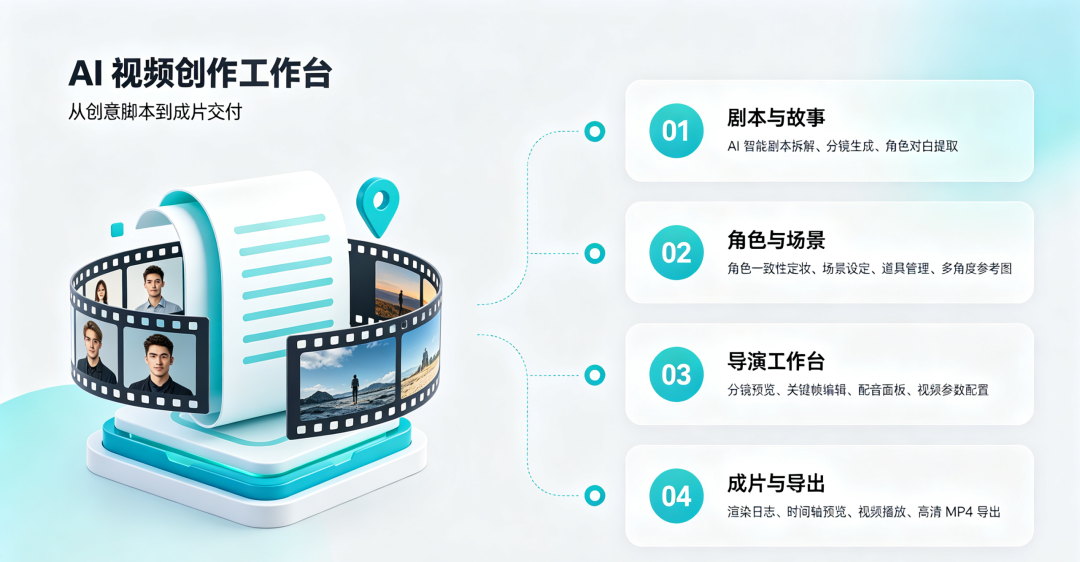
BigBanana is an industrial-grade AI animation and short-video generation platform. It uses a four-stage Script → Asset → Keyframe → Video production pipeline, breaking short-drama creation into manageable, iterative professional processes:
| Stage | Functions |
|---|---|
| 01 Script & Story | AI script breakdown, shot generation, and character dialogue extraction |
| 02 Characters & Scenes | Consistent character look development, scene setup, prop management, and multi-angle reference images |
| 03 Director’s Workstation | Shot preview, keyframe editing, voice-over panel, and video parameter configuration |
| 04 Final Video & Export | Render logs, timeline preview, video playback, and HD MP4 export |
It is like a professional director’s command center—you control the creative direction while AI handles the heavy execution details.
🎨 Infinite Canvas — AI Image/Video Generation Canvas
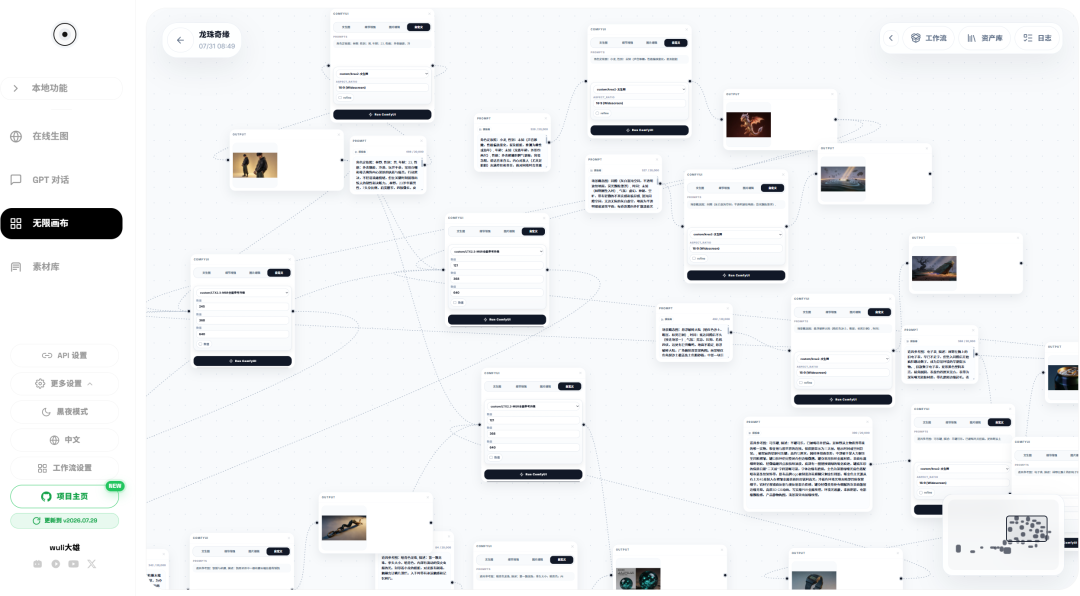
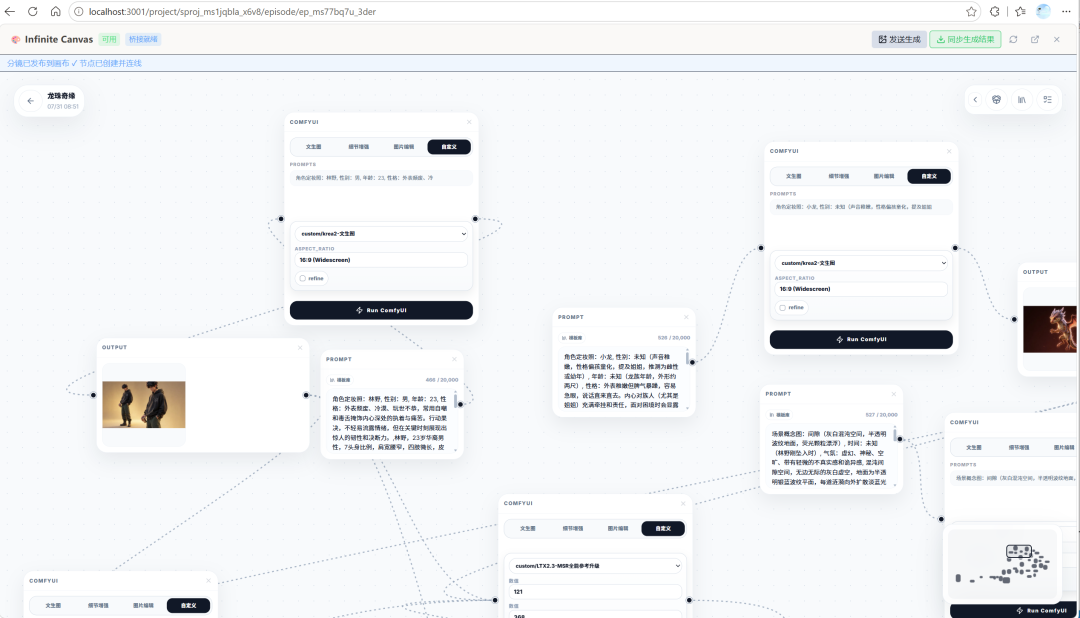
Infinite Canvas is a node-based AI generation editor inspired by ComfyUI’s visual workflow concept. It provides:
- Node-based generation pipeline Image card → Prompt → LLM → Model generation → Output node, freely connected
- Multi-engine support ComfyUI, ModelScope, RunningHub, Veo, Sora, and more
- Smart canvas mode Free dragging, group management, and history navigation
- Full media coverage Integrated generation of images, video, audio, and text
- Asset management Built-in asset library, categorized search, and AI tagging
It is like an ever-expanding artist’s canvas—each node is a creative unit, and connecting them creates a complete creative chain.
II. Integrated Architecture: Seamless Bridge from Director’s Workstation to Canvas
2.1 Communication Mechanism
BigBanana establishes two-way communication with Infinite Canvas through an iframe + postMessage bridge protocol:
┌─────────────────────────────────────────────────────────┐
│  BigBanana AI Director (React App)                      │
│                                                         │
│  ┌─────────────┐    postMessage     ┌────────────────┐  │
│  │ Director's  │ ◄────────────────► │ Infinite Canvas │  │
│  │ workstation │  publish-shot     │  (iframe)       │  │
│  │             │ ─────────────────►│ · Receive prompts│  │
│  │ · Shot select│                   │ · Generate images│  │
│  │ · Scene info │                   │   /videos        │  │
│  │ · Character  │  image-generated  │ · Return results │  │
│  │   data       │ ◄─────────────────│                 │  │
│  │ · Prop desc. │                   │                 │  │
│  └─────────────┘                    └────────────────┘  │
└─────────────────────────────────────────────────────────┘
2.2 Data Sent to the Canvas
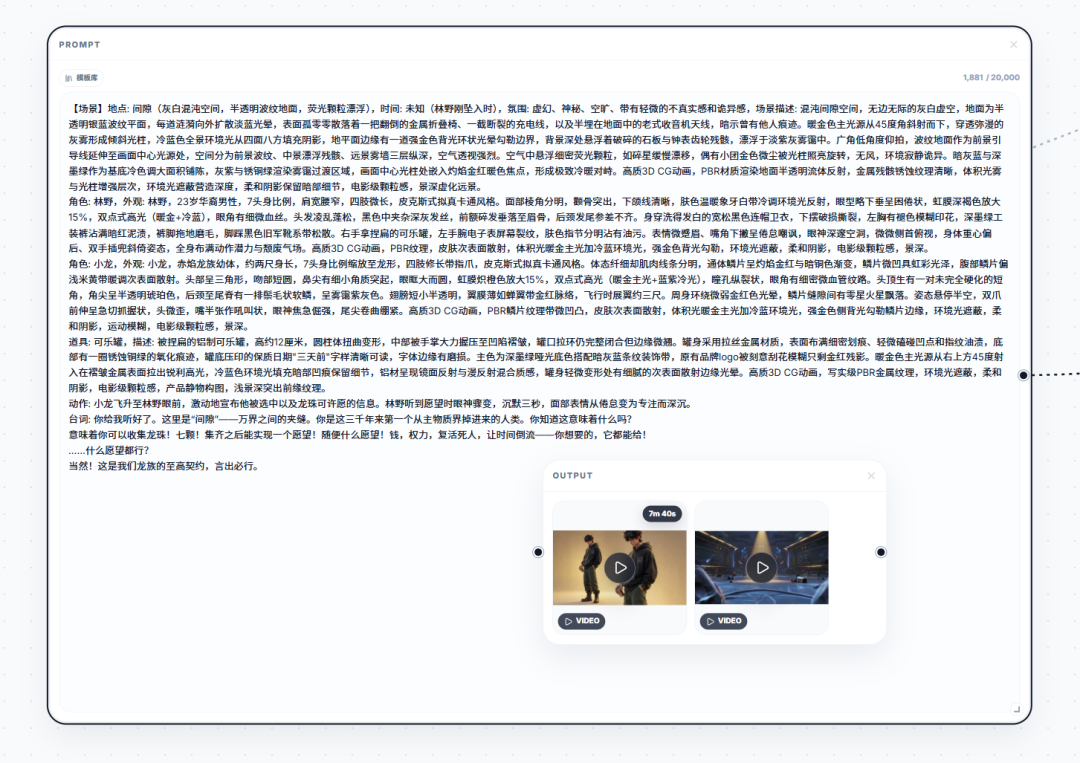
When you click “Publish to Canvas for Generation” in the director’s workstation, the following complete context is automatically packaged and sent:
[Scene] Location: Autumn park, Time: Dusk, Mood: Warm and romantic, Scene description: Golden fallen leaves cover the path
Character: Lin Xiao, Appearance: 25-year-old woman, shoulder-length hair, beige trench coat, gentle and refined
Character: Chen Yu, Appearance: 28-year-old man, short hair, dark-blue jacket, sunny and handsome
Prop: Coffee cup, Description: White ceramic coffee cup, steaming
Action: Chen Yu hands the coffee to Lin Xiao
Dialogue: "It's cold. Have a hot drink."
Voice-over: It's cold. Have a hot drink.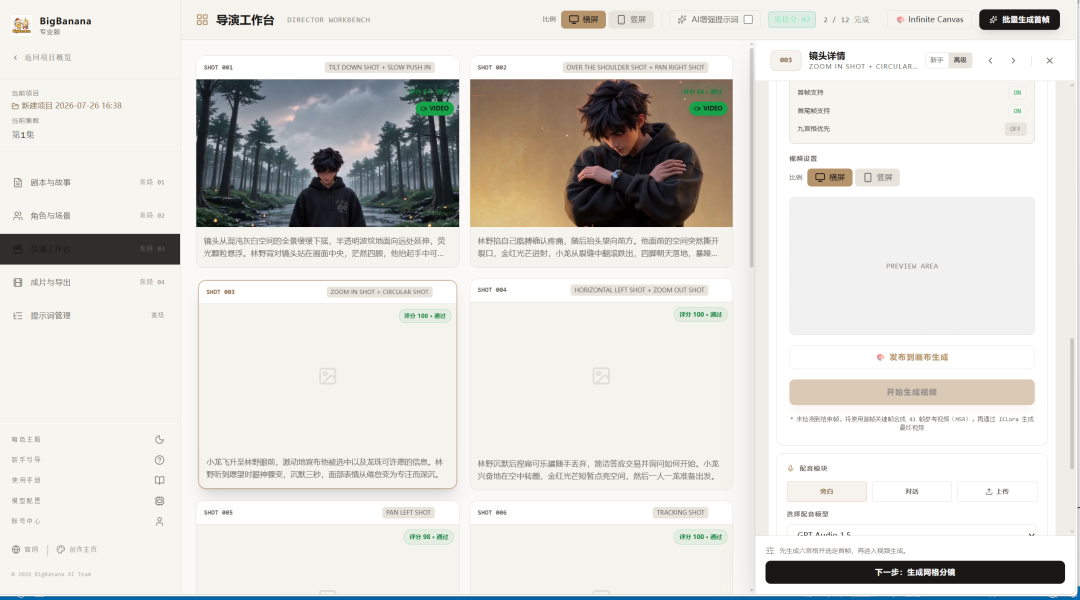
This means AI does not generate content out of thin air; it creates with complete scene, character, prop, and plot context.
2.3 Automatic Write-Back of Results
Images and videos generated by Infinite Canvas are automatically sent back to BigBanana:
- Image generation → Automatically filled as the current shot’s starting keyframe
- Video generation → Automatically filled as the shot’s video clip, while also extracting the first and last frames
- Multi-result synchronization → Supports synchronizing all generated results on the canvas at once
III. Core Advantages of the Integration
3.1 🎯 From “Disconnected Tools” to an “Integrated Production Line”
Before integration: You had to manually build a workflow in ComfyUI → export images → open editing software → import assets → align shots → assemble the final video… Every step was manual, with a high error rate and costly iteration.
After integration:
- Write the script in BigBanana, where AI automatically breaks it into shots
- Set the scene, characters, and props for each shot
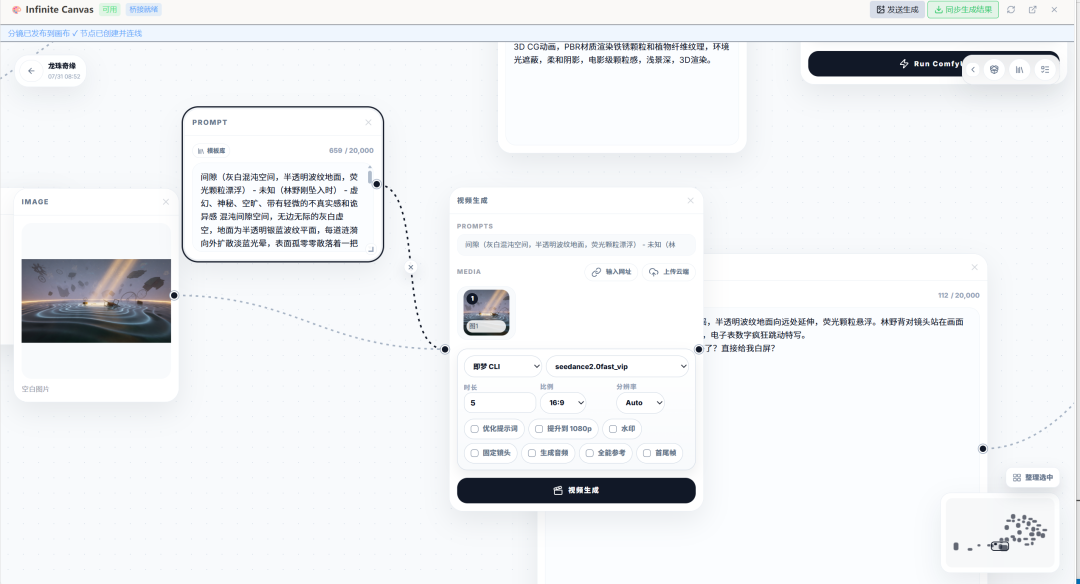
- Send them to Infinite Canvas with one click for prompt enhancement + AI generation
- Generated images/videos are automatically filled back into the shots
- Preview, reorder, and export the final video on the timeline
80% of the intermediate asset-transfer work is eliminated.
3.2 👁️ Industrial-Grade Character Consistency
The biggest pain point in AI short dramas is inconsistent characters—the same character’s facial features, clothing, and hairstyle may change from shot to shot.
BigBanana × Infinite Canvas provides the following solution:
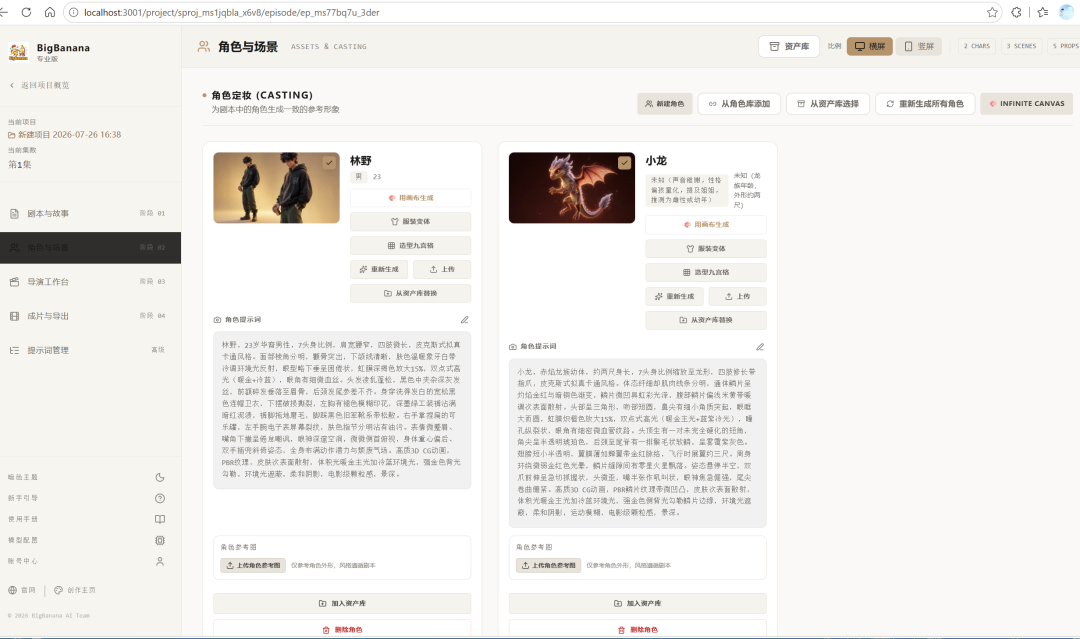
- Character look-development system Set
visualPrompt(appearance description) +referenceImage(reference image) +turnaround(multi-angle turnaround) for each character - Automatic context injection Each time a shot is sent to the canvas, the character’s appearance description and reference image are automatically appended
- Reference locking on the canvas Infinite Canvas uses the reference image as ControlNet/IP-Adapter input to ensure generated results match the character design
- The same applies to props Prop descriptions and reference images are sent together to maintain visual consistency
3.3 ⚡ Rapid Iteration: From “Waiting Half an Hour” to “Five Minutes of Adjustments”
In traditional AI generation workflows, you modify a prompt → wait for generation → dislike the result → revise it → wait again… The iteration cycle is extremely long.
The integrated iteration path:
Not satisfied → Adjust the shot in BigBanana → Resend to the canvas → Generate multiple variants in parallel
                → Select the best version → Automatically sync it back to the shot → Continue to the next one
Infinite Canvas supports batch generation and variant comparison. You can generate 4–8 variants on the canvas at once and sync the best one back.
3.4 🔧 “Deep Mode” for Professional Users
For advanced users, the integration provides two creative paths:
| Path | Use Case | How It Works |
|---|---|---|
| Quick Mode | Standard short dramas and everyday content | One-click send from BigBanana → automatic canvas generation → automatic write-back |
| Deep Mode | High-precision shots and special styles | Send context from BigBanana → manually build ComfyUI nodes on the canvas → fine-tune parameters → manually sync results |
You can switch between the two modes at any time without being limited by the tools.
IV. Practical Use Cases
Use Case 1: Daily Short-Video Publishing
- Import the script outline into BigBanana in the morning; AI breaks it into 8 shots in 10 minutes
- Select scenes and character templates for each shot
- Batch-send them to Infinite Canvas and generate all keyframes in parallel during lunch
- Review the results and fine-tune unsatisfactory shots in the afternoon
- Export an MP4 in the evening and publish it to short-video platforms
The pressure of daily publishing goes from “impossible” to “manageable.”
Use Case 2: Industrialized Production for Animation Studios
- The screenwriter completes script breakdown and character design in BigBanana
- The art team completes character turnaround designs in StageAssets
- The storyboard artist creates rough storyboards in the director’s workstation
- Each shot is sent to Infinite Canvas for high-precision generation with ComfyUI workflows
- The post-production compositor receives a standardized asset package and moves directly into editing
Character consistency + parallel production = doubled output.
Use Case 3: The Independent Creator as a “One-Person Army”
One person + BigBanana + Infinite Canvas = a complete short-drama team:
- Screenwriter → AI script analysis
- Artist → Character look development + scene setup
- Director → Storyboard workstation
- Cinematographer → Inifinite Canvas generation engine
- Editor → Timeline + export
One person’s capacity, a team’s output.
V. Future Plans
Phase 1: Currently Implemented ✅
- BigBanana → Infinite Canvas postMessage bridge communication
- One-click publishing of shot data (scene + characters + props + action + dialogue)
- Automatic write-back of canvas generation results to shot keyframes
- Support for both image and video modes
- Reference-image binding on the canvas (scene + character + prop reference images)
- Custom uploads through the Output node (supplementary image/video assets)
- A unified design language with Infinite Canvas (blue-gray dark theme, softly rounded corners, glassmorphism)
Phase 2: Near-Term Plans 🚧
- Batch shot generation Select multiple shots, send them to the canvas at once, and generate all keyframes in parallel
- ComfyUI workflow templates Preset ComfyUI workflows in BigBanana and automatically match them when sending shots
- IP-Adapter character locking Automatically load character reference images as IP-Adapter inputs on the canvas for stronger consistency
- Generation history management Keep all generated versions for each shot, with support for rollback and comparison
- Prompt enhancement on the canvas Use LLM nodes to automatically optimize user-entered prompts
Phase 3: Mid-Term Vision 🔮
- Multi-canvas collaboration Connect one BigBanana instance to multiple Infinite Canvas instances for truly distributed parallel generation
- AI quality control Automatically score generated results (composition, consistency, and action plausibility) and retry failed results
- Video keyframe interpolation After generating the first and last frames, AI automatically completes the transitional frames in between
- Audio-visual synchronized generation Generate voice-over and visuals together and align them automatically
- Cloud canvas Deploy Infinite Canvas to a cloud server so teams can share the same canvas instance
Phase 4: Long-Term Outlook 🌟
- Real-time collaboration Multiple people edit scripts simultaneously in BigBanana and collaborate on generation through a shared canvas
- AI director assistant LLM-based shot recommendations, cinematographic language analysis, and pacing suggestions
- Fully automated short-drama factory Story outline → AI automatically completes the script → character design → storyboards → generation → editing → music → final video
- Open plugin ecosystem Third-party developers can create canvas plugins, model adapters, and style presets for BigBanana
VI. Quick Start
System Requirements
- Node.js 18+ (to run the BigBanana frontend)
- Python 3.10+ (to run the Infinite Canvas backend)
- At least one CUDA-capable NVIDIA GPU (8GB+ VRAM recommended)
Launch Steps
# 1. Start the Infinite Canvas backend
cd Infinite-Canvas
python main.py
# 2. Start the BigBanana frontend development server
cd BigBanana-AI-Director-main
npm install
npm run dev
# 3. Open the browser and visit
# BigBanana: http://localhost:5173
# Infinite Canvas: http://127.0.0.1:3000
# 4. Click “Canvas Infinite Canvas” in BigBanana’s director’s workstation
# Wait for the iframe bridge connection to succeed (status shows "Available")
# Click “Publish to Canvas for Generation” or “Send for Generation”
Configure Comfyui
Upload custom text-to-image, image-to-image, and all-purpose reference-video workflows in Infinite-Canvas. If you do not have a workflow, follow the account and leave the message “素材” to receive one automatically.
VII. Conclusion
The integration of BigBanana AI Director and Infinite Canvas is not merely a simple connection between two tools, but an upgrade to the creative paradigm:
From “people operating tools” to “people directing systems.”
From “generating one at a time” to “parallel production on a pipeline.”
From “individual creator” to “one-person team.”
We believe AI will not replace creators’ judgment and aesthetic sense, but it can replace repetitive, time-consuming, low-creativity execution work. Write the script, refine the characters, finalize the storyboards—and leave the rest to the canvas.
Keep creating, keep iterating. 🚀
BigBanana AI Director × Infinite Canvas — Turn every storyline into an infinitely expanding canvas.
Follow GC随笔 for more cutting-edge AI knowledge.