

What Is Aurelio?
Aurelio is a self-hosted wealth-management and financial-planning application. It runs on your own computer, keeps your financial records locally, and provides dashboards for portfolios, cash flow, goals, plans, homes, and debts.
The optional AI advisor lets you ask questions about your records, search the web, and receive proposed changes as cards that you can confirm or reject. AI requests use your own OpenRouter account and API key.
Aurelio is designed for personal use on your computer. Your records are stored locally in
backend/data.db.
Key Features
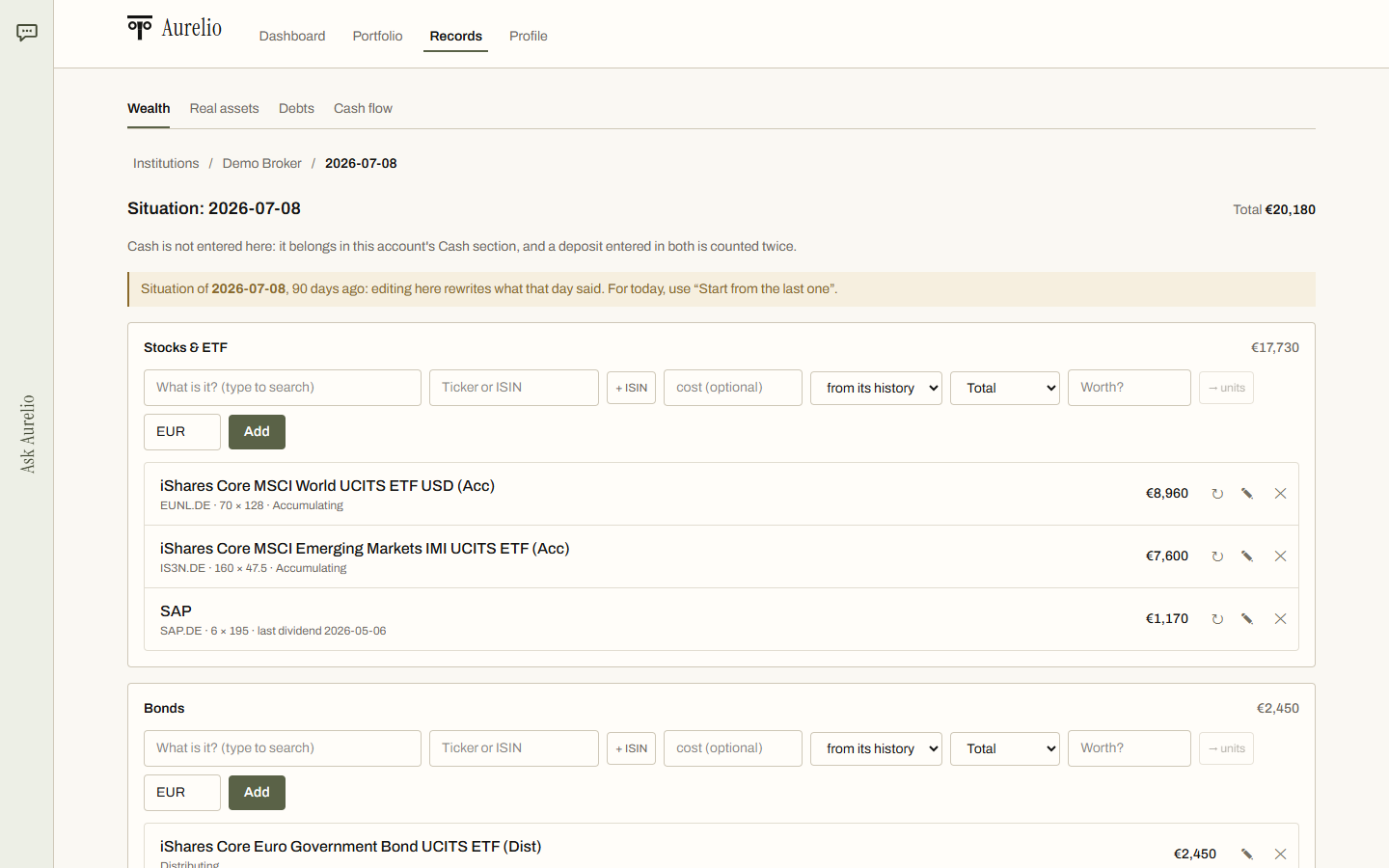
- Wealth tracking: Manage banks, brokers, cash, and dated situations describing what you hold.
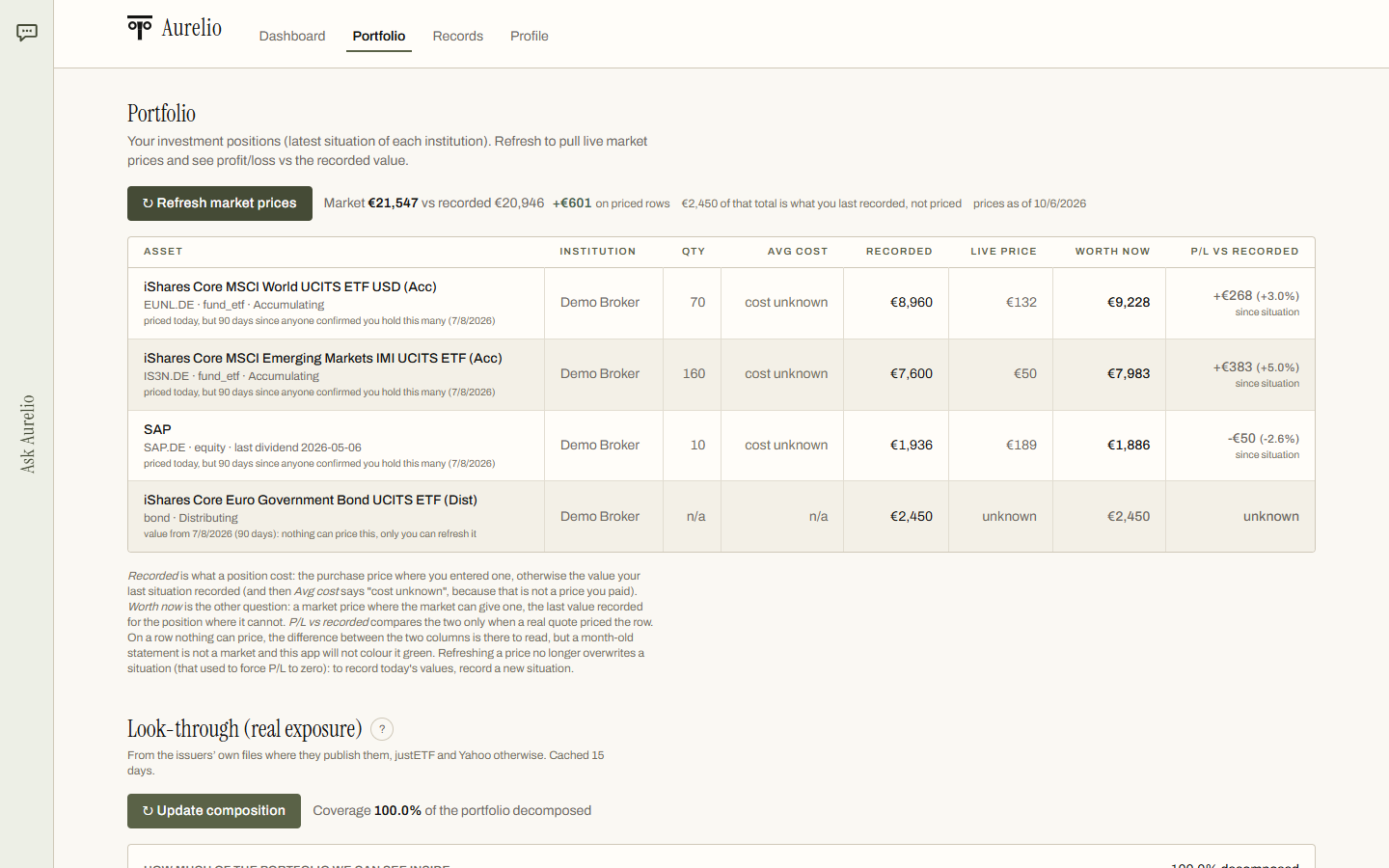
- Portfolio analysis: View positions priced from the market, including cost, gains, and dividends.
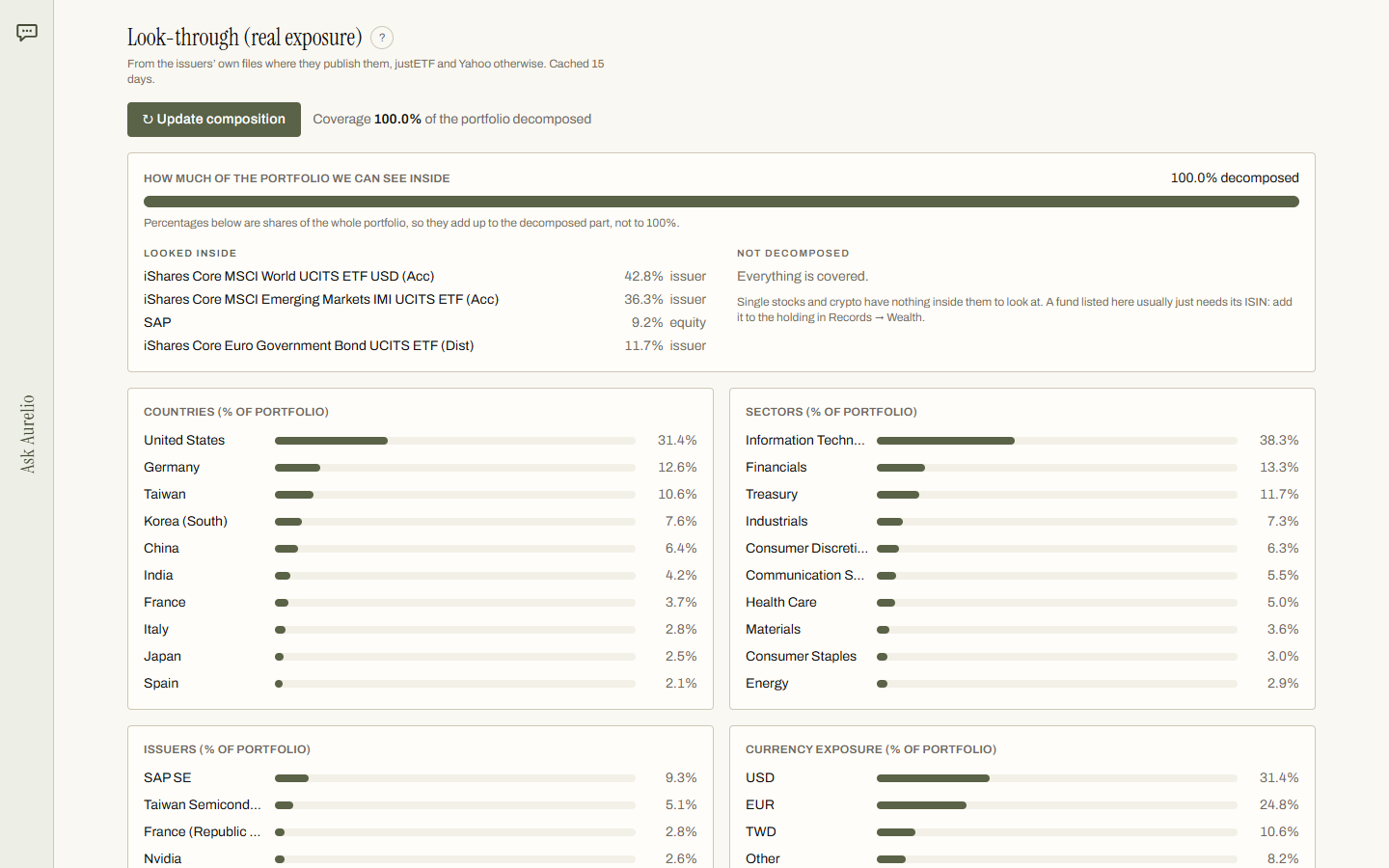
- Fund look-through: Examine fund holdings by country, sector, company, and currency.
- Plans, homes, and debts: Track recurring investments, real assets, and the loans that finance them.
- Cash flow and goals: Review income, expenses, savings rate, and the return each goal requires.
- Ask Aurelio: Chat with an AI advisor that uses your records, can search the web, and proposes changes for your approval.
- The analysis: Compare perspectives from an analyst and a confidant, followed by a synthesis of what to examine first.
For the concepts behind the application, read How Aurelio reasons.
Prerequisites
Before installing Aurelio, make sure you have the following tools:
The included startup script installs the dependencies it needs inside the project folder during the first launch.
Install and Try the Demo
The safest way to begin is with Aurelio's invented household. This lets you explore the interface without entering your own financial information.
macOS and Linux
git clone https://github.com/LosaLosSantos/aurelio-finance.git
cd aurelio-finance
./start.sh --demo
Windows PowerShell
git clone https://github.com/LosaLosSantos/aurelio-finance.git
cd aurelio-finance
./start.ps1 -Demo
If PowerShell reports that running scripts is disabled, run the script with an execution-policy override:
powershell -ExecutionPolicy Bypass -File .\start.ps1 -DemoAfter the first startup, Aurelio opens at http://localhost:8000. The demo household is kept in a separate file, so you can explore it without affecting your own data.
Explore the Portfolio and Records
The Portfolio view shows positions priced from the market, along with their cost, gains, and dividends.
The look-through view provides more detail about what funds hold. You can examine exposure by country, sector, company, and currency.
Records can include dated situations for individual accounts. This makes it possible to represent what you held at a particular point in time.
Use Aurelio with Your Own Data
Once you are comfortable with the demo, stop the application and start it without the demo option.
macOS and Linux
./start.shWindows PowerShell
./start.ps1Your records are stored in backend/data.db. When an update is expected to change the database format, Aurelio saves a copy next to the database before applying the change.
Because this application handles financial information, protect the computer and folder where Aurelio runs. The README describes local storage, but it does not provide a hosted synchronization service or a backup service.
Enable the Optional AI Advisor
The AI functionality is optional. You can use the local financial-management features without configuring an AI provider.
- Create an account at OpenRouter and add credit.
- Create an API key at OpenRouter Keys.
- From the repository root, copy
backend/.env.exampletobackend/.env. - Set the
OPENROUTER_API_KEYvalue inbackend/.env.
OPENROUTER_API_KEY=your_openrouter_keyRestart Aurelio after changing the environment file so the application can read the new configuration.
The default model is Claude Opus 5.5, and you can choose another model in the chat. The README reports example costs measured in October 2026: approximately $0.11 for a first question answered in one round, $0.017 for a follow-up answered in one round, $0.16 for advice with one web search, and $0.33 to $0.51 for an analysis. Actual costs can vary, so check your OpenRouter account and selected model.
Ask Questions and Review Proposed Changes
With the API key configured, use the chat to ask questions grounded in your own records. Aurelio can also search the web when a request calls for outside information.
When the assistant proposes a change, review it before applying it. The application presents the proposal as a card that you can confirm or reject rather than silently modifying your records.

This confirmation step is especially important for financial data: verify that the proposed account, date, amount, or other details match your intention before accepting it.
Development and Testing
If you want to work on Aurelio itself, the project includes separate backend and frontend workflows.
Run Backend Tests
From the backend/ directory, run:
uv run pytest
Run Frontend Tests
From the frontend/ directory, run:
npm testEnable Hot Reload
For backend hot reload, run the following command inside backend/:
uv run uvicorn app.main:app --port 8000For the frontend development server, run this command inside frontend/:
npm run devPractical Tips
- Start with demo mode: Use
--demoor-Demobefore entering personal records. - Keep AI optional: Configure OpenRouter only if you want chat, web-assisted answers, or analysis.
- Review every proposal: Confirm or reject chat cards carefully before changing your records.
- Watch model costs: The selected model and request type affect OpenRouter usage.
- Preserve your database: Keep track of
backend/data.dband the copies Aurelio creates during format updates. - Use the reasoning guide: Read the project's explanation of how its analysis works to understand the intended workflow.
Conclusion
Aurelio combines local financial record keeping with optional AI assistance. Clone the repository, launch the invented demo household, inspect the portfolio and look-through views, and then run the application without demo mode for your own data. If you want conversational guidance, add an OpenRouter key and review each proposed change before accepting it. Aurelio is released under the MIT License.