

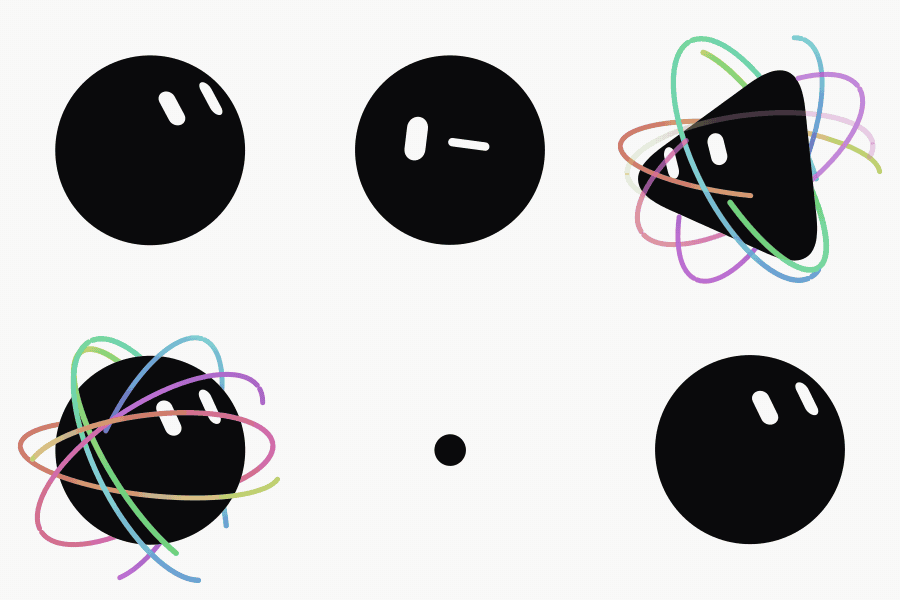
What Is Bloub?
Bloub is an SVG recreation of the x.ai bot avatar. It uses one filled black body shape that morphs between 14 states and two independent white eye shapes, all presented on a plain background. The animation is implemented without an animation library.
The project combines a framework-free animation engine with a Vue 3 interface. Its engine is also clock-free: calling engine.sample(t) produces a frame purely from the supplied time. This makes pausing, seeking, frozen previews, and DOM-less tests deterministic.
Key Features
- Fourteen measured states: The avatar includes states such as idle, wink, orbit, and burst.
- Avatar customization: Choose from 8 body shapes, 12 colors, and 16 rest expressions. Choices are retained between visits.
- Timeline editor: Arrange states, configure how long each state is held, and save the resulting animation.
- Multiple export formats: Export the avatar as SVG, PNG, or animated GIF, or export a complete timeline as GIF or MP4.
- On-demand video encoding: The video encoder is fetched only when it is first needed.
- Three languages: The interface supports French, English, and Chinese.
- Deterministic rendering: A given time always produces the same image, supporting exact frozen frames and repeatable tests.
Prerequisites
Bloub uses Vue 3, Vite, TypeScript, Tailwind CSS 4, and pnpm. Install a Node.js environment and pnpm before continuing.
Install and Run Bloub
Clone or download the repository and open its directory in a terminal.
Install the dependencies:
pnpm installStart the Vite development server:
pnpm devOpen http://localhost:5190 in a browser.
Run Tests and Create a Production Build
Run the Vitest test suite with:
pnpm testCheck the TypeScript code and build the application with:
pnpm buildThe build command runs vue-tsc --noEmit before vite build. The repository intentionally has no ESLint or Prettier configuration, so vue-tsc is its primary code-quality gate. Run pnpm build before considering a change complete.
Explore the Application
The rail on the left switches between three main views.
Customize the Avatar
Open Customise to select one of 8 body shapes, 12 colors, and 16 rest expressions. The application preserves these choices between visits.
Create an Animation Timeline
Open Animations to arrange avatar states into a timeline. Set how long each state should be held, preview the sequence, and save it. The playback cursor tracks timeline positions rather than only state names, allowing the same state to appear more than once in a montage.
Change Language and View Credits
Open Settings to choose French, English, or Chinese and to view the project credits.
Inspect All 14 States
Add #planche to the local URL to display all 14 states side by side as frozen frames:
http://localhost:5190/#planche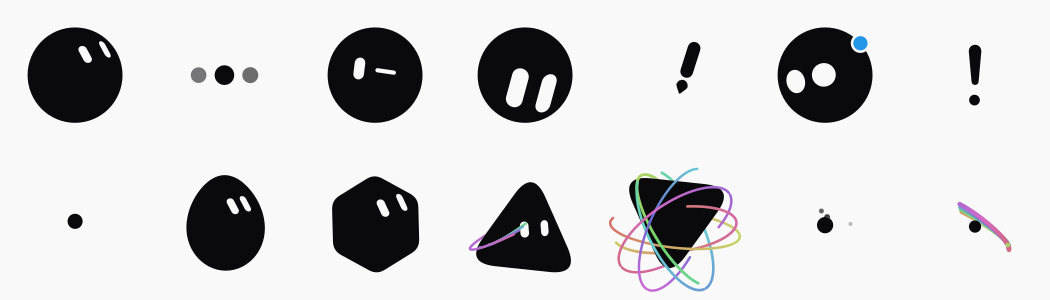
This view is useful for quickly checking whether changes have altered any state unexpectedly.
To open a specific state with playback paused, use the etat and stop hash parameters. For example:
http://localhost:5190/#etat=orbit&stopUse the BloubBot Vue Component
The BloubBot component supports both controlled playback and exact frozen frames. A basic controlled instance can bind the current timeline block, state, and playback status:
<BloubBot
  v-model:block="block"
  v-model:state="state"
  v-model:playing="playing"
/>
The block model is the playback cursor. This distinction matters because a timeline can contain the same state multiple times. The block index identifies the exact timeline position, while state follows that cursor as an output.
Render a Frozen Frame
Pass a state, size, and frozen-at value to render one exact frame without starting an animation loop:
<BloubBot state="orbit" :size="120" :frozen-at="1.2" />Frozen rendering is how Bloub creates thumbnails and the complete state board. It is also useful when you need a stable preview or a frame at a precise point in time.
Available Component Inputs
The component exposes the following props:
sizeshapecolorexpressionpaperfrozenAtcyclefollowgaze
Its models are block, state, playing, and elapsed. Consult BloubBot.vue for the exact types and component details.
Export Avatars and Timelines
Anything shown on screen can be exported. For a single avatar, choose SVG, PNG, or animated GIF. For an entire timeline, choose GIF or MP4.
SVG and PNG export require no additional library. The video encoder needed for animated output is loaded only the first time it is requested, so it does not need to be fetched during normal editing. More implementation details are available in the export documentation.
Advanced Tips
Use the Pure Engine for Deterministic Frames
The code under src/bot/ is framework-free and clock-free. Use engine.sample(t) when you need the image for an exact time. Because the result depends on the supplied time rather than a live clock, pausing, resuming, seeking, testing, and thumbnail generation remain consistent.
Do Not Simplify the Measured Constants
Many values may look arbitrary, but they were measured from reference footage cut at 10 frames per second. Silhouettes were extracted with sub-pixel ray casting, eyes were fitted as capsules, and colors and stroke widths were directly sampled.
Rounding the constants to friendlier values can reduce the visual resemblance that the project is designed to preserve.
Keep these measured characteristics in mind when modifying the animation:
- The eyes lean in the backslash direction, about 26 degrees from vertical.
- The body is effectively a perfect circle, with radial deviation below 0.7%, rather than a squircle.
- Transitions use exponential ease-outs, and the body does not overshoot.
- During the comet effect, the dot stays still while the trail orbits it.
- The resting avatar does not float; its sense of life comes from gaze drift and blinking.
See the measurement documentation before changing profiles or regenerating profiles.ts.
Review the Architecture Before Extending the Engine
The project documentation explains the engine, radial-profile morphing, and the use of eye shapes as mask holes. Read the architecture guide before adding states or changing morphing behavior. The interface, arrival sequence, and internationalization layer are documented separately in the interface guide, the introduction guide, and the internationalization guide.
Check Release History Before Debugging
The changelog contains one entry per release. Check it to determine whether your local copy includes a particular fix.
Conclusion
Bloub provides a carefully measured SVG avatar, a visual customization interface, a timeline editor, deterministic frame sampling, and several export formats without relying on an animation library. Start with the built-in state board and component examples, run the tests and production build after changes, and preserve the measured constants when extending the animation.
The code is available under the MIT license. The project is not affiliated with, endorsed by, or connected to x.ai. The license covers the repository code, not the design it recreates.