

What the Graduate Admissions Agent Benchmark Does
The Graduate Admissions Agent Benchmark evaluates agent configurations for graduate admissions advising. An agent configuration combines an execution system with a language model and is tested on application recommendations, planning, decision-making, and advice updates when new student information becomes available.
The benchmark currently includes 70 Chinese-language tasks, 23 cases, and 83 answer stages. Each task has evaluation rubrics and reference programs. The public dataset is available without access approval, but scoring materials should remain unavailable to the agents being evaluated so that results are not contaminated.
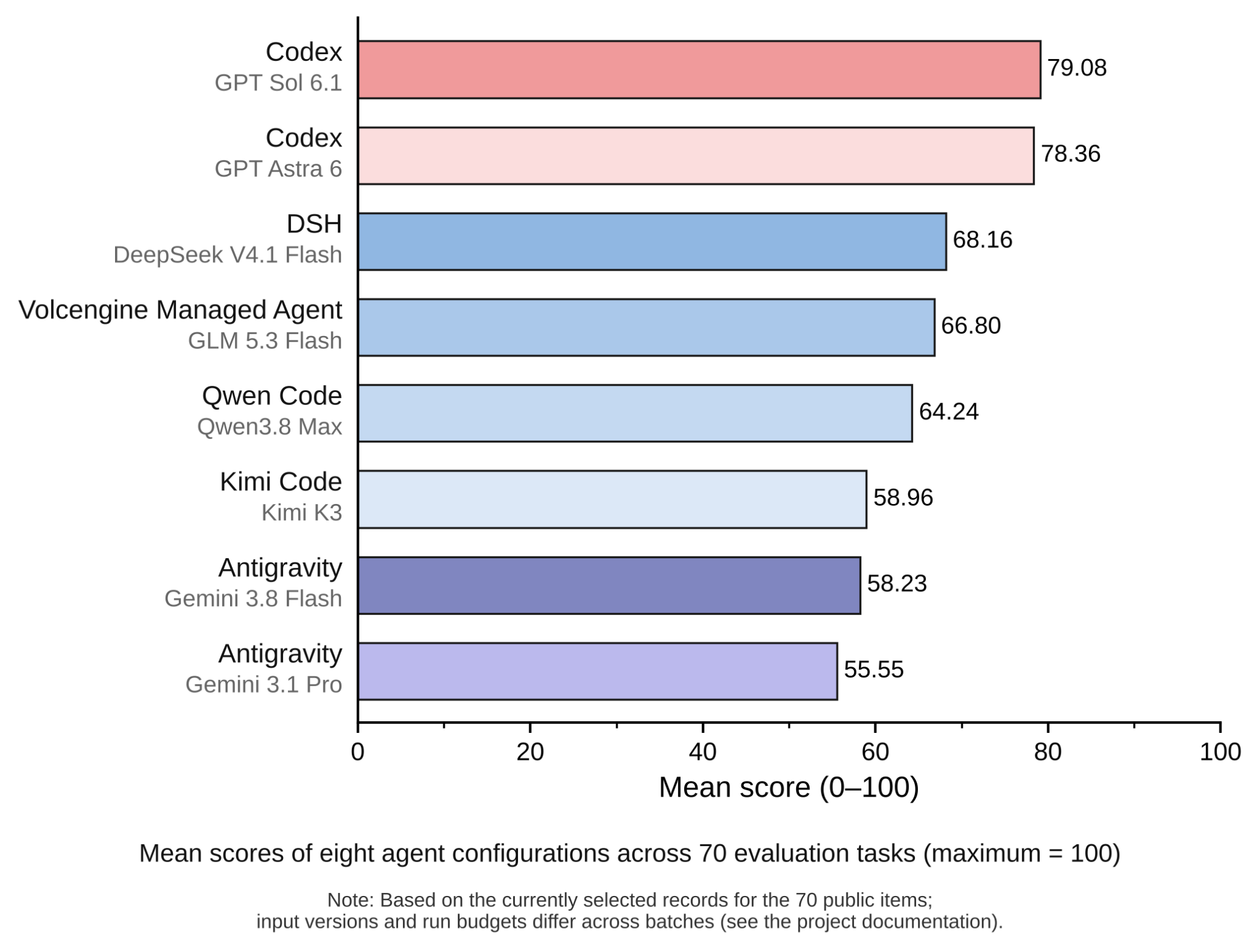
The repository also publishes evaluation records for eight configurations. Every configuration completed the current 70 tasks, although the project notes that runs used different input versions and budgets, so leaderboard results should not be treated as perfectly uniform experiments.
Understand the Evaluation Structure
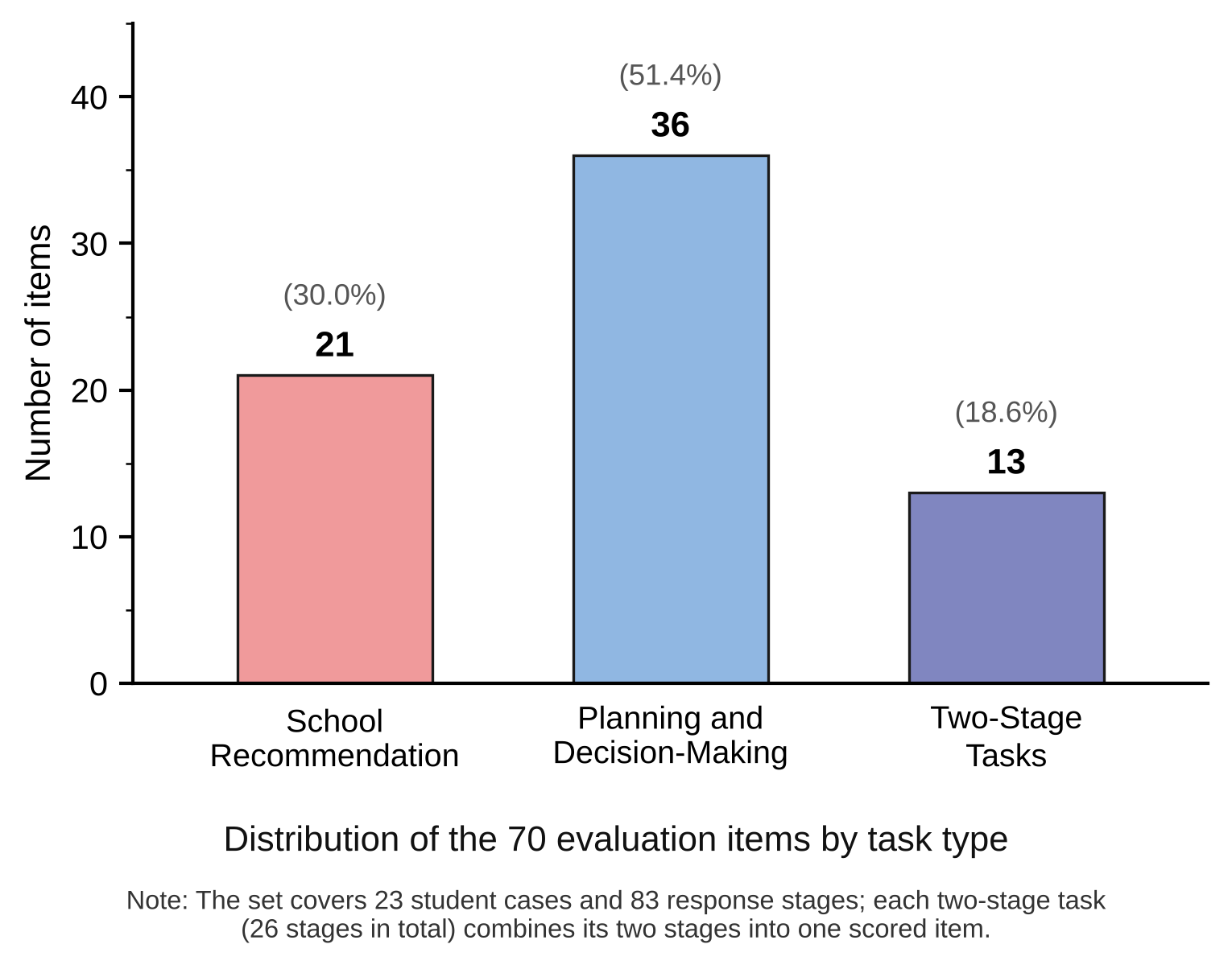
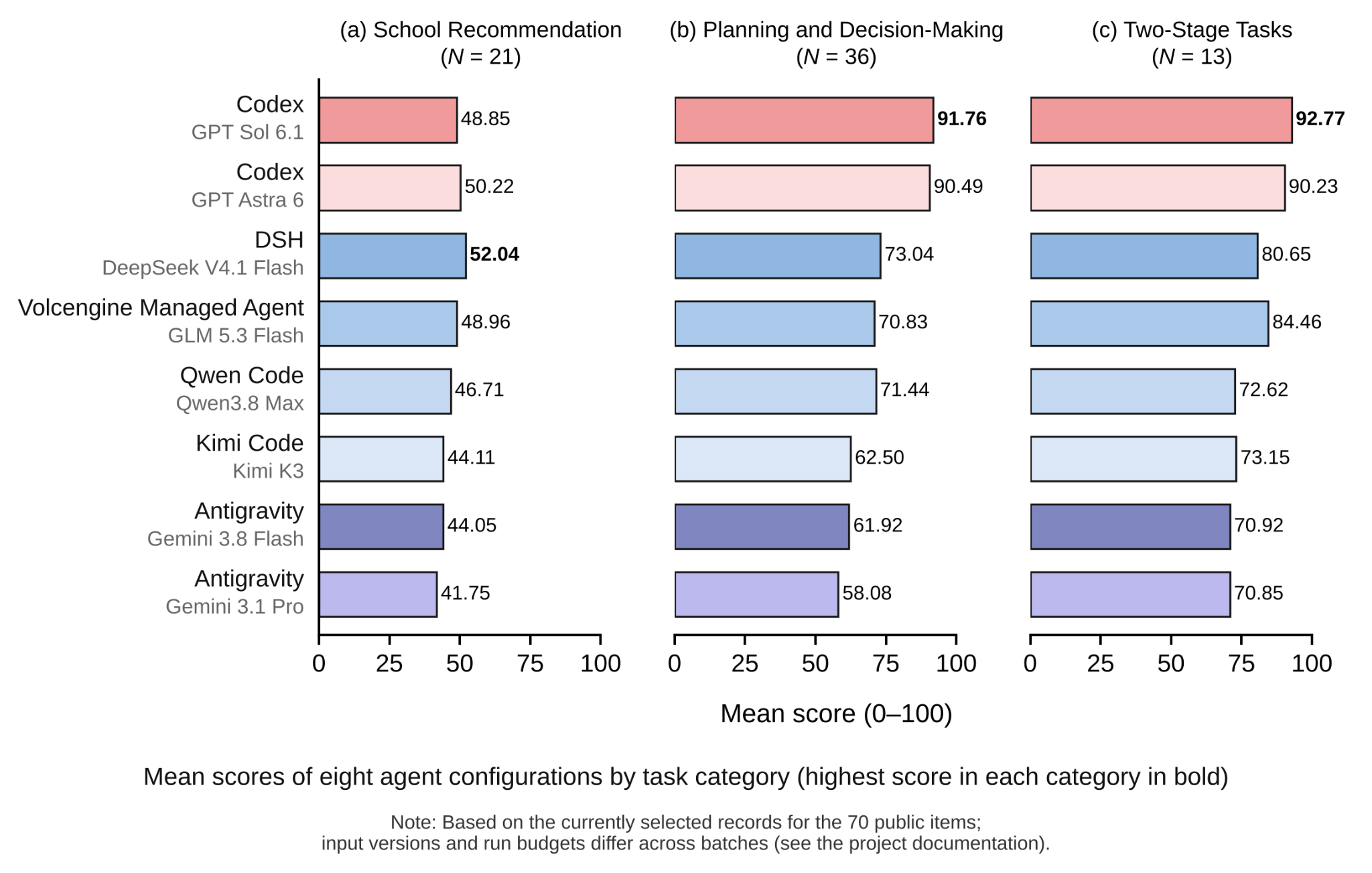
The task collection is divided into three categories:
- 21 recommendation tasks: assess how well suggested programs match a student's background and constraints.
- 36 planning and decision tasks: evaluate preparation plans, risk assessment, and actionable advice.
- 13 two-stage tasks: provide new information in the same session and test whether the agent revises its earlier advice.
Each task is worth 100 points. Recommendation tasks allocate 70 points to reference-program matching and 30 points to recommendation quality. A separate reviewer scores the complete answer, while the rubrics remain outside the answering process.
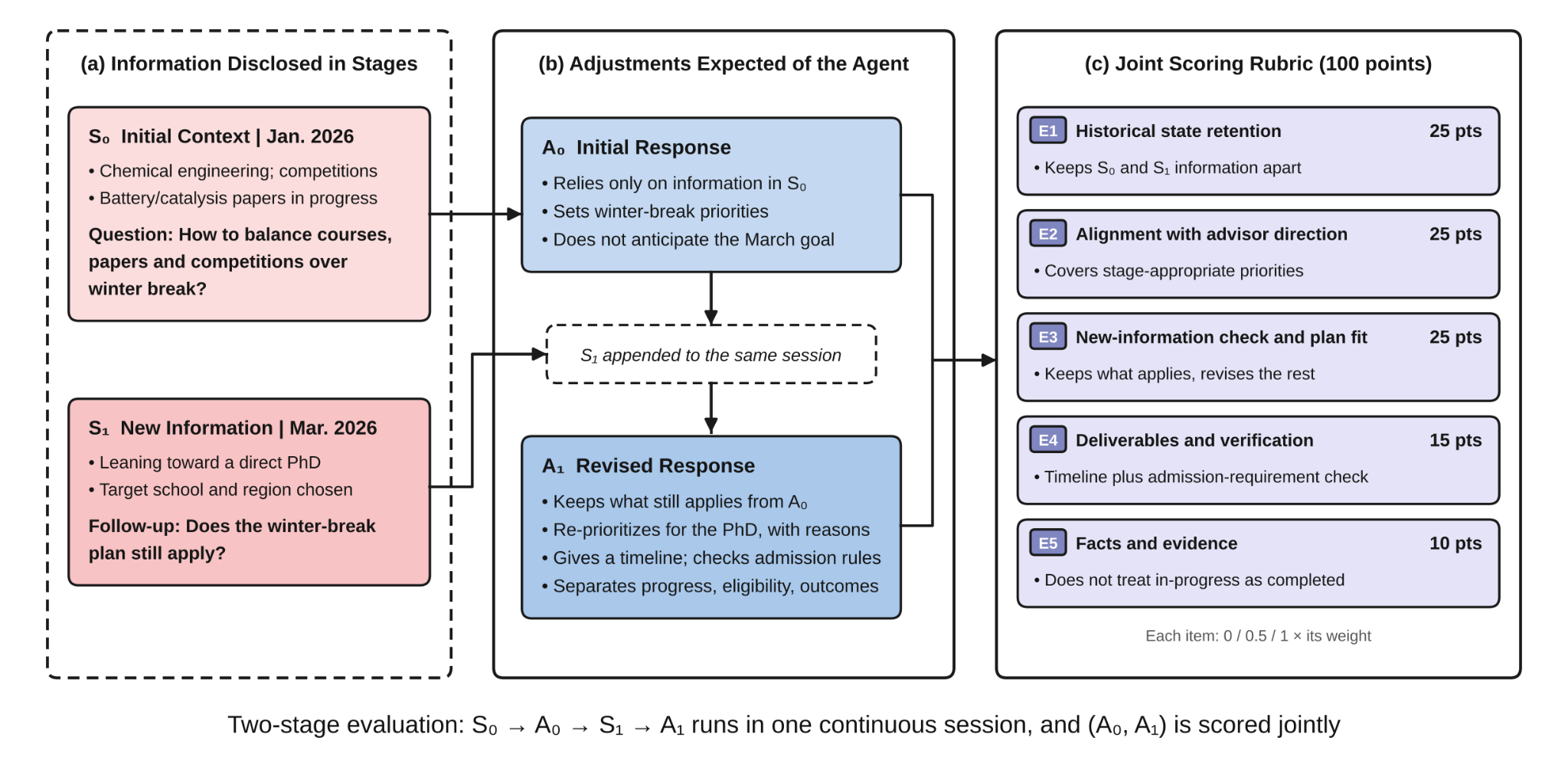
Two-stage tasks begin with an initial context, called S₀, and then provide updated information, called S₁. The agent produces an initial answer, A₀, and a revised answer, A₁, in one session. Both responses are jointly scored. The public O03-04 example demonstrates a January-to-March scenario in which the student changes direction toward direct PhD applications.
Prepare the Environment
Run commands from the repository root. Automated native execution requires macOS Seatbelt and Python 3.10 or newer. The Kimi subscription configuration requires Python 3.11 or newer.
The framework uses only Python's standard library, so the repository does not require a pip install step. You must, however, install the official client for the configuration you want to run and prepare its subscription login or API key.
Available clients include Codex, Claude Code, Antigravity, DeepSeek Harness, Qwen Code, and Kimi Code. Authentication differs by client: some configurations use subscriptions or OAuth, while DeepSeek and Qwen use API-based authentication as described by the project documentation.
Choose an Agent Configuration
Agent IDs come from the repository's current registry at config/agents-cli.example.json. These IDs are benchmark configuration identifiers, not direct model arguments.
gpt-6-astrafor Codex with GPT Astra 6gpt-6-1-solfor Codex with GPT Sol 6.1claude-opus-5-5for Claude Code with Claude Opusclaude-sonnet-5-5for Claude Code with Claude Sonnetantigravity-gemini-3-8-flash-highfor Antigravity with Gemini Flashdeepseek-v4-1-flashfor DeepSeek Harness with DeepSeek Flashqwen3-8-max-0902for Qwen Code with Qwen Maxkimi-k3for Kimi Code with Kimi K3
Run the Quick Start Workflow
The benchmark uses the same workflow for every configuration. First assign an agent ID to the AGENT shell variable:
AGENT=gpt-6-1-solNext, save the local configuration:
python3 -m benchmark setup --agent "$AGENT"
Check whether the selected client and authentication are ready:
python3 -m benchmark cli-check --agent "$AGENT"When the check returns ready_for_trial, run a batch using the current task selection:
python3 -m benchmark cli-batch \
  --selection config/selections/current.json \
  --agent "$AGENT" --out "./runs/current-$AGENT"
By default, batch execution previews the 70 tasks and 83 stages without making model calls. Add --execute when you are ready to use your account allowance:
python3 -m benchmark cli-batch \
  --selection config/selections/current.json \
  --agent "$AGENT" --out "./runs/current-$AGENT" \
  --execute
Start with one trial task after cli-check succeeds. This helps confirm that the client, authentication mode, sandbox, and output location work before launching the full batch.
Run Multiple Configurations
Configure and check each client separately, then pass multiple --agent options to a batch command. Use a new output directory so that results from different configurations do not overwrite one another.
python3 -m benchmark cli-batch \
  --selection config/selections/current.json \
  --agent gpt-6-1-sol \
  --agent claude-opus-5-5 \
  --out "./runs/comparison" \
  --execute
Keep each configuration's authentication mode consistent with the client listed in the registry. A subscription-based configuration should use its supported subscription login, while an API configuration should use the required API credentials.
Inspect Tasks and Results
The task index is available in config/selections/current.json. For the questions, criteria, and scoring definitions, consult Questions and scoring, the data format guide, and the scoring rules.
Published results are available in several forms:
- Score summary for aggregate results.
- Per-task results for detailed task-level records.
- Answers and scores by configuration for public answer text and evaluation information.
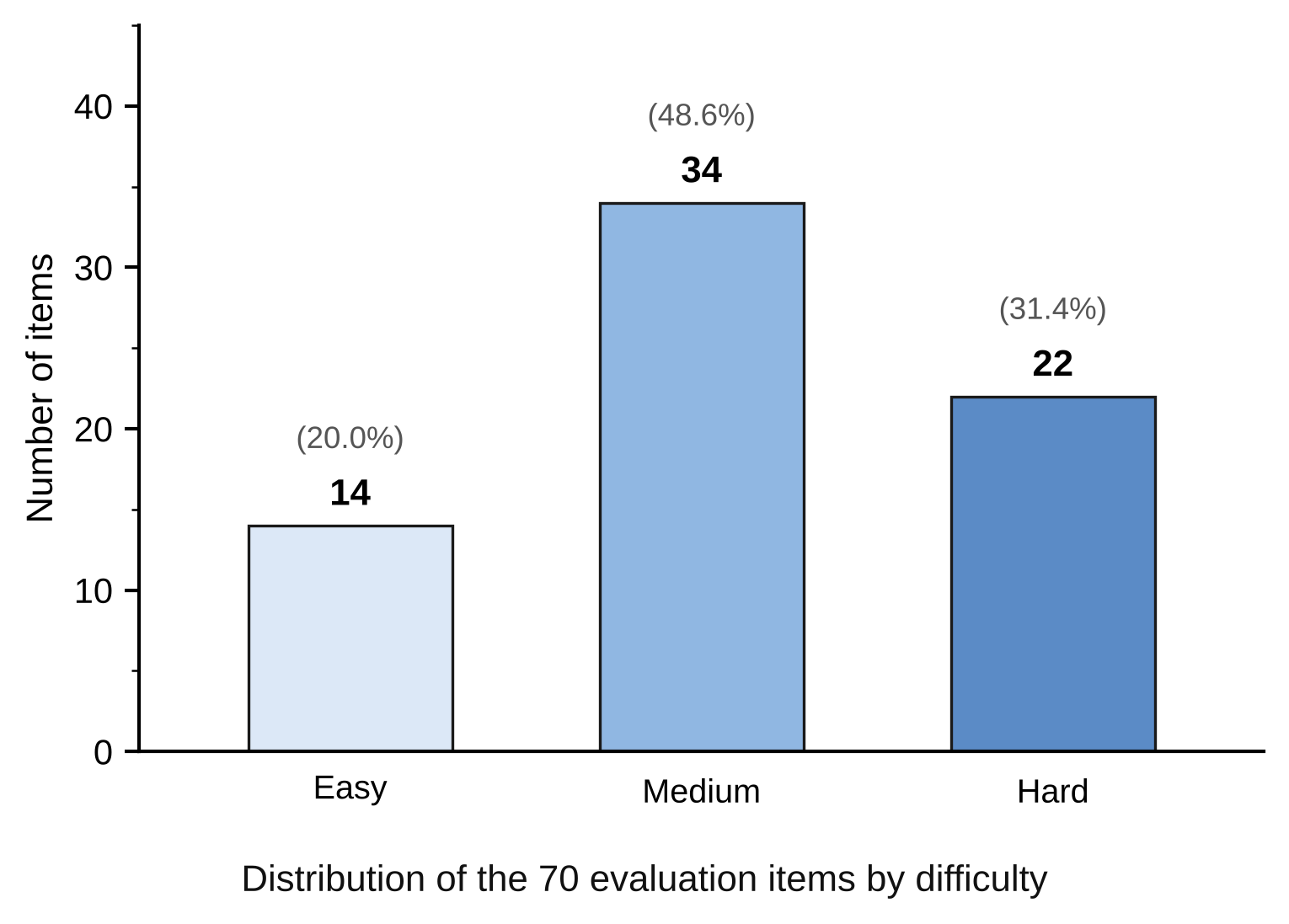
The published leaderboard reports mean scores and completion rates across the eight evaluated configurations. The repository also records difficulty labels for the current tasks: 14 easy, 34 medium, and 22 hard. These labels were owner-confirmed through teacher calibration and are not presented as an independent double review.
Scoring and Review Tips
Scoring may use a separate Codex subscription session to review exported materials. Optional API judging requires additional configuration. Keep the answering process separate from scoring materials, because exposing rubrics or reference programs to an evaluated agent can invalidate the comparison.
When comparing your own runs, record the agent ID, client version, input version, execution budget, output directory, and any relevant content hashes. The project warns that public leaderboard runs do not all share identical execution conditions, so compare results alongside their methodology and run records.
For reproducible experiments, follow the reproduction guide, which covers frozen inputs, submissions, and score verification. The methodology documentation explains evaluation settings and limitations, while the native CLI guide provides more detail on installation, authentication, and multiple stages.
Conclusion
The Graduate Admissions Agent Benchmark provides a structured way to test whether admissions agents give accurate recommendations, useful planning advice, and appropriate updates when student circumstances change. Set up the supported client, select an agent ID from the registry, verify it with cli-check, preview the batch, and then execute trials or full evaluations. Use the published task definitions, results, and methodology documents to interpret scores responsibly and reproduce comparisons.