

What Is MCode Stack?
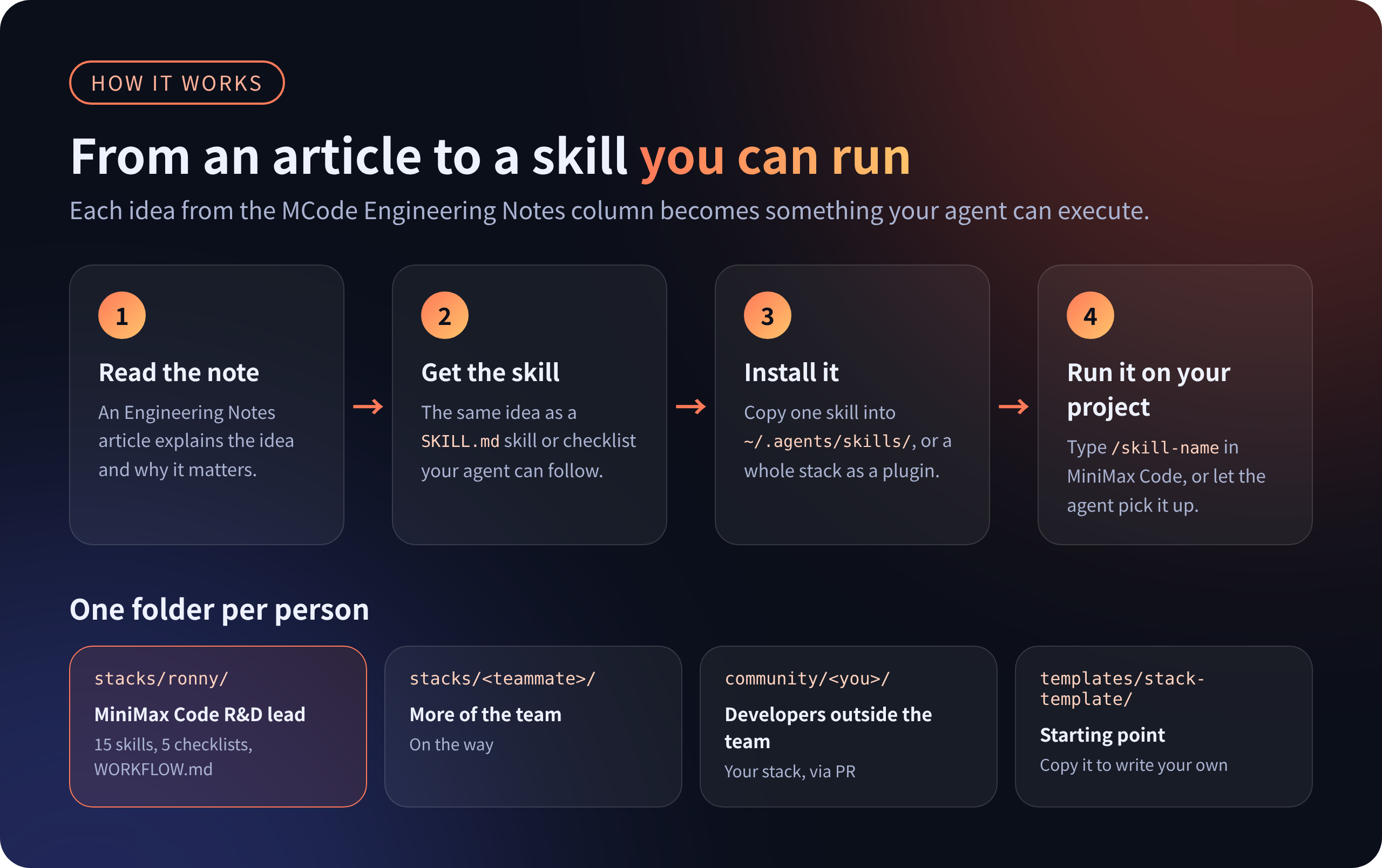
MCode Stack is an open-source collection of the workflows, skills, and checklists used by the MiniMax Code team. It turns practical engineering habits into runnable SKILL.md files that can be installed directly in MiniMax Code.
This repository is not a generic prompt library or a static list of best practices. Its resources address recurring decisions in real AI-assisted development: whether to delegate work to a subagent, how to manage context, how long commands should run, how to preserve state across sessions, and how to review AI-written code independently.
MCode Stack contains workflows and skills rather than the MiniMax Code source code itself.
Key Features
- Runnable skills: Invoke a skill by name or allow the agent to load it based on its description.
- Interactive checklists: Let the agent inspect a project item by item, or read the plain-text versions yourself.
- Documented workflows: Study how individual contributors use MiniMax Code in their daily work.
- Plugin packaging: Install an entire stack as one MiniMax Code plugin.
- Marketplace support: Add the repository as a marketplace and manage stacks as installable plugins where that feature is available.
- Portable format: The common
SKILL.mdformat allows many skills to work with other agents that support skills.
What the Ronny Stack Covers
The first and most complete stack is stacks/ronny. Its 15 skills are organized around common stages of engineering work.
- Planning and splitting: Decide when to use subagents, divide large changes into small pull requests, and write useful change descriptions.
- Context and tools: Audit tool costs and identify content injected into every request.
- Long sessions and commands: Manage compaction, memory, handoffs, shell commands, and background tasks.
- Review: Perform independent reviews, assess code health, write review comments, and respond to feedback.
- Experiments and hotfixes: Run controlled harness experiments, review agent trajectories, and handle emergency changes safely.
Install One Skill
Installing one skill is a good way to evaluate MCode Stack without enabling the complete collection. The following example installs long-command-check for all projects.
git clone https://github.com/MiniMax-AI/mcode-stack.git ~/mcode-stack
mkdir -p ~/.agents/skills
cp -R ~/mcode-stack/stacks/ronny/skills/long-command-check ~/.agents/skills/
Start a new MiniMax Code session and enter:
/skillsThe installed skill should appear in the list. Run it explicitly with:
/long-command-checkYou can also describe a relevant task and let the agent load the skill from its description.
Choose a Project or Global Skill Directory
MiniMax Code discovers skills from several locations. Each skill must have its own subdirectory containing a SKILL.md file.
Project-specific directories:
.minimax/skills/.claude/skills/.agents/skills/
Global directories:
~/.agents/skills/~/.claude/skills/~/.codex/skills/
Use a project directory when a skill should apply only to one repository. Use a global directory when you want it available in every project.
Install a Complete Stack as a Plugin
To use the entire Ronny stack locally, first locate MiniMax Code’s plugin directory:
mcode plugin marketplace listCopy the complete stacks/ronny directory into the local plugin directory shown by that command. Then open /plugins in MiniMax Code and press Ctrl+R to refresh the panel.
A local plugin is installed as soon as its directory is present. In the plugin panel, press Space to enable or disable it.
The
mcode plugin addcommand installs from the official catalog only. It does not accept a GitHub URL or local path.
Install Through the Marketplace
The repository can also act as a plugin marketplace. In MiniMax Code desktop, open Plugins, choose Add marketplace, and enter:
MiniMax-AI/mcode-stackEach stack will then appear as a plugin that can be installed, updated, or uninstalled. Marketplace support is being rolled out gradually, so this option may not yet appear in every MiniMax Code version.
Use the Catalog in Claude Code
The same plugin catalog can be added in Claude Code:
/plugin marketplace add MiniMax-AI/mcode-stack
/plugin install ronny@mcode-stack
Compatibility may vary by skill, but the shared SKILL.md format is designed to work across agents that support skills.
Basic Usage Examples
Audit a Long-Running Command
Before starting a potentially slow build, test, migration, or background task, invoke:
/long-command-checkThe skill applies a ten-point audit to long shell commands and background tasks. Use its findings to decide how the command should run and how its progress should be monitored.
Decide Whether to Use a Subagent
When a task could be parallelized but you are unsure whether delegation will help, run:
/subagent-split-checkThis skill helps decide whether work belongs in a subagent or should remain in the main loop. It supports the repository’s broader principle of managing context before adding more agents.
Prepare a Session Handoff
For work that must continue in a fresh session, invoke:
/handoff-docThe resulting handoff document helps another session resume the work with the necessary state. Pair it with /long-session-check when deciding whether to summarize, write information to a file, compact the current session, or start over.
Review from a Clean Context
Use:
/independent-reviewThis skill reviews a change using a clean context containing the diff, requirement, and test results. For a broader code-health assessment covering design, functionality, complexity, tests, and approval risk, use:
/engineering-code-reviewAdvanced Workflow Tips
Combine Skills by Development Stage
Rather than running every skill for every task, select skills based on the current stage of work.
- Plan: Start with
subagent-split-checkandengineering-small-prs. - Control context: Use
tool-budget-auditandcontext-tax-audit. - Maintain continuity: Apply
long-session-check,handoff-doc, andlong-command-check. - Review: Run
independent-reviewandengineering-code-review, then use the review comment and feedback skills as needed. - Evaluate changes: Use
harness-experimentandtrajectory-reviewto examine both results and the path the agent took.
Inspect the Workflow Files
A stack can contain skills, checklists, and a WORKFLOW.md file. Skills are executable resources, while WORKFLOW.md explains how the stack’s author works with the agent. Read the workflow before adopting a complete stack so you understand how its pieces fit together.
Keep Experiments Controlled
The harness-experiment skill emphasizes small evaluations, one change at a time, repeated runs, and inspection of tasks whose outcomes changed. Pair it with trajectory-review to examine how the agent reached its result instead of looking only at whether a test passed.
Adapt the Stack to Your Workflow
The project treats harness engineering as an evolving craft. You can copy skills into project-specific directories, modify them for your environment, or assemble a focused subset instead of installing everything. Keep changes grounded in actual use rather than turning the stack into a collection of hypothetical prompts.
Contribute Your Own Stack
The repository welcomes stacks based on real daily workflows with MiniMax Code or other agents.
- Copy
templates/stack-template/tocommunity/<your-id>/. - Write a
WORKFLOW.mdexplaining what you delegate to the agent and what you monitor yourself. - Add at least one skill or checklist that you genuinely use.
- Validate the contribution with:
node scripts/check.mjsOpen a pull request containing the validation output and a short record of real usage. Consult CONTRIBUTING.md for the full contribution requirements.
License Notes
MCode Stack is generally available under the MIT License unless a stack’s NOTICE.md says otherwise. The six engineering-* skills are adapted from Google Engineering Practices, and that adapted material remains under CC-BY 3.0.
Conclusion
MCode Stack makes proven AI-assisted engineering habits directly runnable. Begin with one skill, such as long-command-check, then adopt a full plugin stack if the workflow fits your needs. By combining planning, context control, session management, independent review, and controlled experiments, you can establish a more disciplined process around AI-written code.