

- Monthly visits
- 0
- Pricing
- Free & Paid
- Listed
- 2025-08-29
- Updated
- 2026-08-25
01Product Positioning
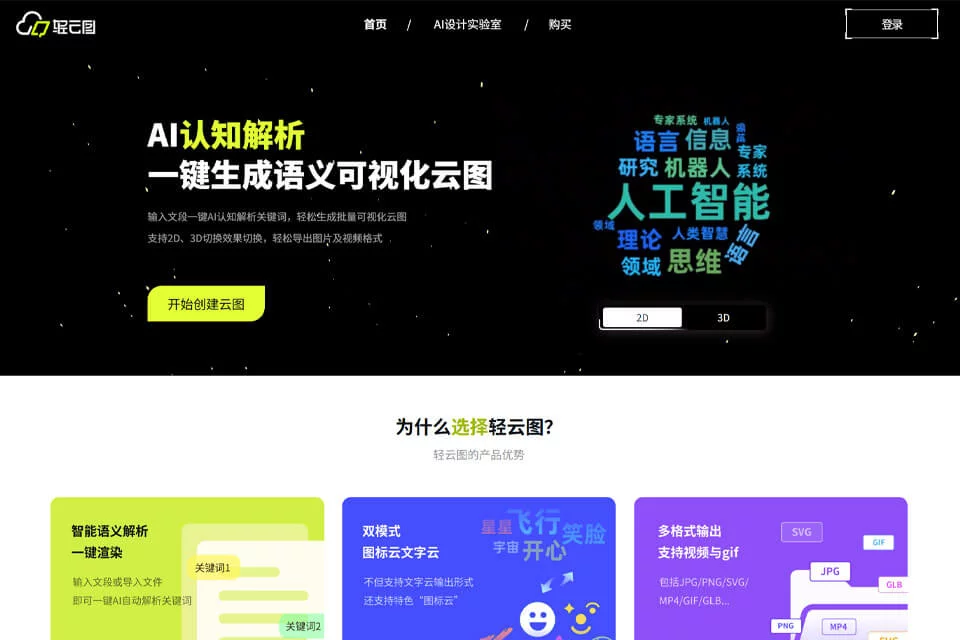
LightCloud Word Art is positioned as an AI creative tool that transforms text into visual clouds. By analyzing documents or text, it extracts keywords and generates word clouds, helping users turn lengthy content into visuals that are easy to present.
The product suits users who need to quickly organize and present key points from text, with output formats covering static images, animated content, and 3D models.
02Key Features
The tool supports the creation of text clouds, icon clouds, and 3D word clouds. Text clouds can highlight frequently used keywords and be customized with different colors, fonts, and layouts, while icon clouds use icons to represent content themes.
Generated results can be exported in formats such as JPG, GIF, MP4, and GLB, and can also be used for PowerPoint editing. For multiple documents, the product provides batch generation to facilitate the creation of content series.
03Use Cases
Data analysts can use it to organize frequently used words from research, reviews, or reports and create overview-style presentations. Teachers and students can turn lesson highlights, paper topics, or complex concepts into classroom or presentation materials.
Professionals can use word clouds in PowerPoint presentations, while social media operators can use animated word clouds as article illustrations, covers, or short-video backgrounds.
04Usage Considerations
Automatically extracted keywords and weights are not a substitute for manual proofreading. Professional terminology, contextual relationships, or less obvious points in the text may require users to filter and adjust the results before using them in formal presentations.
Different export formats suit different scenarios: JPG is suitable for static illustrations, GIF and MP4 for animated content, and GLB for 3D model use. Before use, confirm that the target platform supports the file format and content.
© Disclaimer: domains and linked content may change over time. AIEZZ does not control third-party websites. Review external content and risks independently.
User reviews0