

- Monthly visits
- 0
- Pricing
- Free & Paid
- Listed
- 2026-01-12
- Updated
- 2026-08-25
01Product Positioning
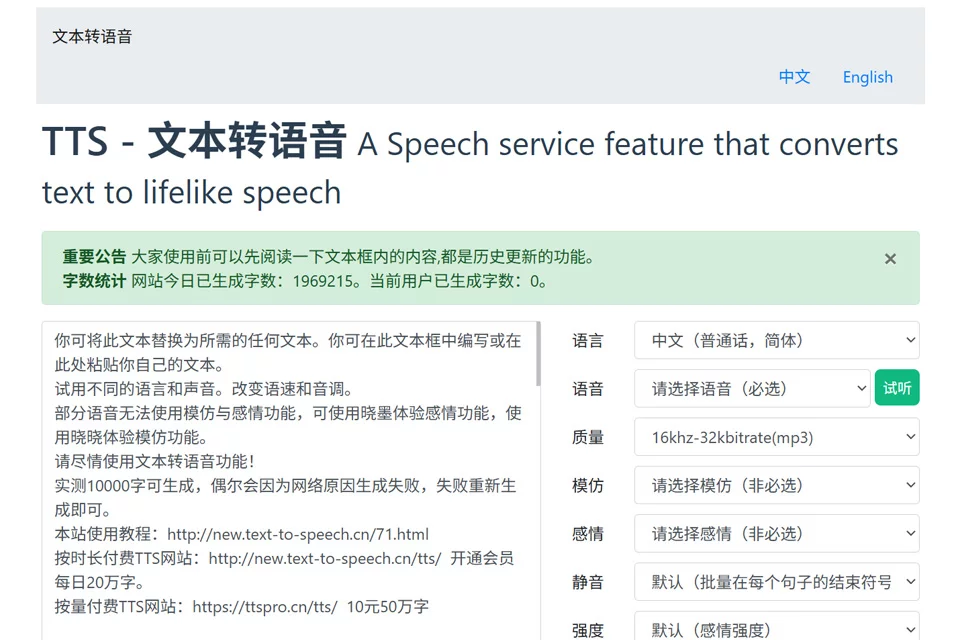
TTS - Text to Speech is a web-based text-to-speech tool. Its core workflow converts written content into speech while providing a degree of control over pronunciation and delivery. It uses Microsoft Azure Speech synthesis technology and is geared more toward voiceovers, reading, and listening-material production than audio editing or full-scale video production.
02Key Features
The tool supports Mandarin Chinese, Chinese dialects such as Henan and Shaanxi dialects, and speech synthesis in multiple foreign languages including English and Japanese. It can process up to approximately 10,000 Chinese characters at a time, and content can be organized into segments to make long projects easier to manage.
For voice adjustments, the tool offers multiple voice roles and emotional styles, with controls for speech rate, pitch, pauses, polyphonic character pronunciation, and connected-speech effects. Users familiar with SSML can also configure more detailed speech markup. Generated results can be exported in MP3 or WAV format.
03Use Cases
For film and TV narration and short-video voiceovers, it can be used to quickly create an initial narration draft. Marketing teams can use it to generate spoken versions of promotional copy. Foreign-language learners can convert text into listening materials and practice with different languages and voice roles.
Users who need to listen to long-form text can also use it to read articles, reference materials, and other content aloud. Text featuring multiple speakers or clearly differentiated characters can be separated by switching voices, but the final delivery should still be checked for naturalness and suitability for its intended use.
04Usage Notes
Before generating audio, check names, place names, abbreviations, numbers, and polyphonic characters in the text, then confirm pronunciation through listening review. Content combining dialects and foreign languages, or containing complex tones, may require manual adjustment of pauses, pronunciation, or emotional parameters.
Longer text is best generated in segments and reviewed one section at a time. Fine-grained control with SSML requires an understanding of the relevant markup syntax. Choose MP3 or WAV according to downstream editing or publishing needs. The final audio should still be checked manually for volume, pacing, and content accuracy.
© Disclaimer: domains and linked content may change over time. AIEZZ does not control third-party websites. Review external content and risks independently.
User reviews0