
- Monthly visits
- 0
- Pricing
- Free & Paid
- Listed
- 2026-08-10
- Updated
- 2026-08-10
01What Is SmartSub?
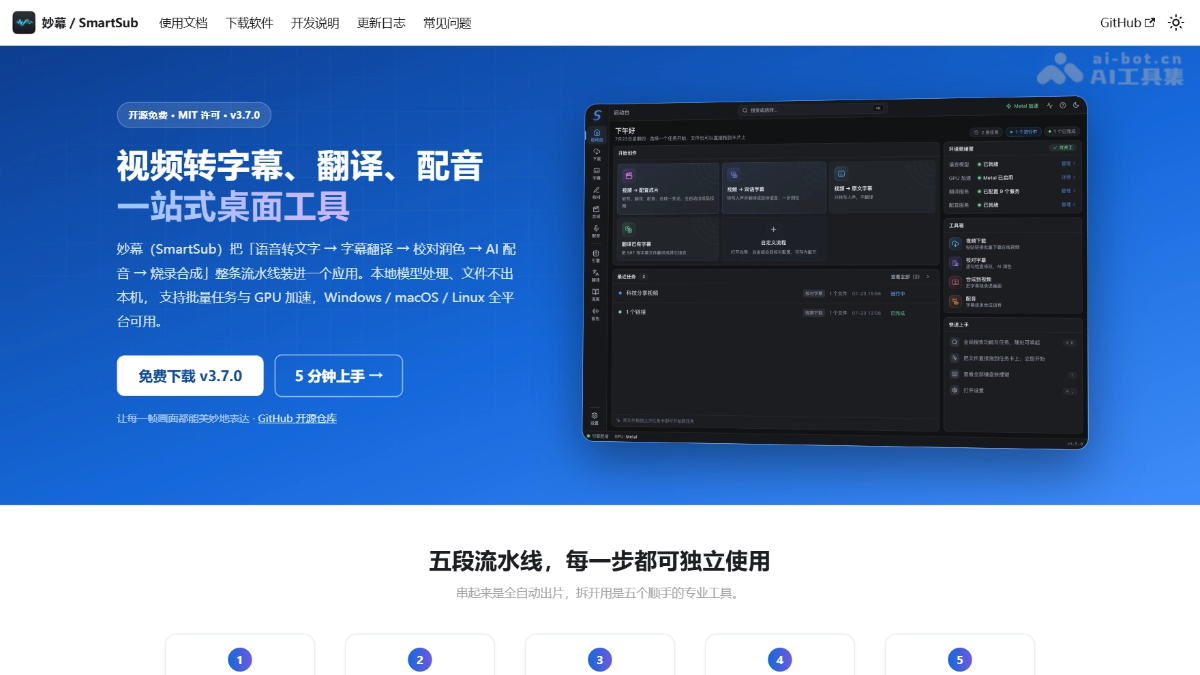
SmartSub (妙幕) is an open-source, all-in-one desktop tool for audio and video subtitle processing. It integrates the entire workflow into a single application, using local models such as Whisper, FunASR, and Qwen3-ASR for offline speech-to-text, supporting over 20 translation services and multi-role AI dubbing. SmartSub includes a built-in online video downloader compatible with platforms such as Bilibili and YouTube, supports hardware acceleration including NVIDIA CUDA and Apple Core ML, and runs locally across Windows, macOS, and Linux.
02Key Features of SmartSub
Follow us on WeChat and reply “开源” to join the AI open-source project community.
Speech-to-text: Offline recognition powered by 6 local engines, including whisper.cpp, FunASR, and Qwen3-ASR, with automatic multilingual detection and batch processing.
Subtitle translation: Integrates 20+ translation services, including DeepSeek, Ollama, and Qwen, and outputs either translated-only or original-plus-translated bilingual subtitles.
AI proofreading: Includes a visual proofreading panel that automatically synchronizes subtitle positioning during video playback, with support for sentence-by-sentence editing, one-click AI polishing, and alignment with reference scripts.
TTS dubbing: Provides offline synthesis with local Kokoro/VITS, supports zero-shot voice cloning with ZipVoice, multi-role voice assignment, and speaker recognition.
Subtitle burning: Hard subtitles are rendered directly into the video, while soft subtitles are losslessly muxed into MKV files. Font, color, position, and other styles can be previewed in real time.
Online downloads: Includes dual yt-dlp / lux engines. Paste links from Bilibili, YouTube, and other platforms to batch-download videos and official subtitles.
Custom workflows: Freely combine transcription, translation, proofreading, dubbing, synthesis, and other steps, then save them as recipes for one-click reuse.
03How to Use SmartSub
Download and install: Choose the version for your system (Windows/macOS/Linux) from GitHub Releases. On macOS, you can use brew install --cask smartsub.
Download models: On first launch, select and download a speech recognition model on the “Engines & Models” page.
Configure translation: Go to “Settings → Translation Services,” select an engine, and enter the API Key.
Create a task: On the launchpad, select a preset card such as Video → Dubbed Video, or create a custom workflow to combine your desired steps.
Drag in files: Drag local video/audio files onto a task card, or paste a Bilibili/YouTube link to download automatically.
Adjust parameters: Select the transcription engine, target language, whether to use bilingual subtitles, dubbing voice, and subtitle style.
Start processing: Click “Start Task.” The app will automatically execute the transcription → translation → proofreading → dubbing → synthesis pipeline.
Proofread and export: Check and edit the subtitles sentence by sentence in the proofreading panel, then export the finished video with subtitles or dubbing.
04Core Advantages of SmartSub
Fully local end-to-end workflow: Transcription, translation (Ollama), dubbing, and burning can all be completed offline.
Flexible engine selection: Supports 6 transcription engines + 20+ translation services + 5 types of dubbing solutions, which can be combined according to language scenarios and hardware conditions.
Comprehensive hardware acceleration: Supports NVIDIA CUDA, AMD/Intel Vulkan, and Apple Core ML/Metal, with one-click installation of acceleration packages in the app.
Zero-cost workflow: Local models + built-in free translation + local TTS allow the entire pipeline to run without paid APIs.
Multi-role dubbing: v3.7.0 supports speaker recognition and batch voice assignment by role, with per-sentence overrides available.
05SmartSub Project Links
Official website: https://smartsub.linxiaodong.com/
GitHub repository: https://github.com/buxuku/SmartSub
06SmartSub Use Cases
Foreign-language video localization: Transcribe and translate subtitled public courses and documentaries into bilingual subtitles, or generate Chinese/foreign-language audio tracks through dubbing for international distribution.
Podcast and meeting organization: Batch-transcribe long audio files into SRT text for content search, editing materials, or text archiving.
Content creator subtitle production: Quickly generate precisely proofread subtitles for Bilibili/YouTube videos and burn them in, with style presets for multiple platforms.
Online educational materials: Add multilingual dubbing and bilingual subtitles to instructional videos, using voice cloning to maintain consistent instructor voices.
Film and video re-editing and translation: Automatically pair downloaded online videos with official subtitles, then publish them with refined translations as hard-burned or soft-muxed subtitles.
© Disclaimer: domains and linked content may change over time. AIEZZ does not control third-party websites. Review external content and risks independently.
User reviews0