

What Answer me with HTML Does
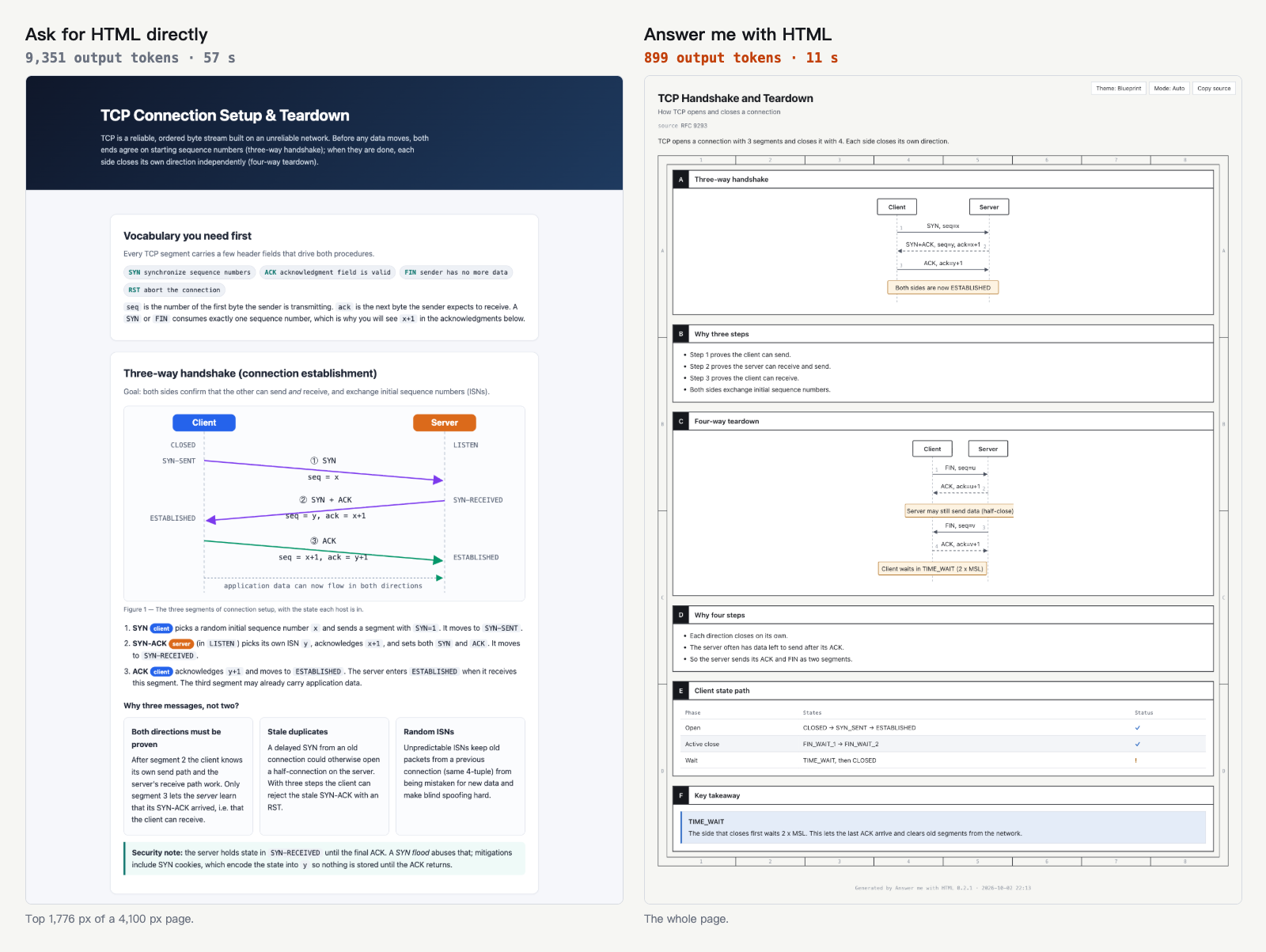
Answer me with HTML is an agent skill that turns complex answers into readable, self-contained HTML pages. Instead of asking a model to write every HTML element, CSS rule, and SVG coordinate, the skill has the model produce a short Markdown draft. Its bundled CLI then handles layout, styling, and diagram rendering.
This division of work reduces generated output and waiting time. In the project benchmark, the skill used a median of 923 output tokens instead of 6,873 and completed answers in 13 seconds instead of 46 seconds. The measured cost remained about the same because the extra agent turns reread the conversation context.
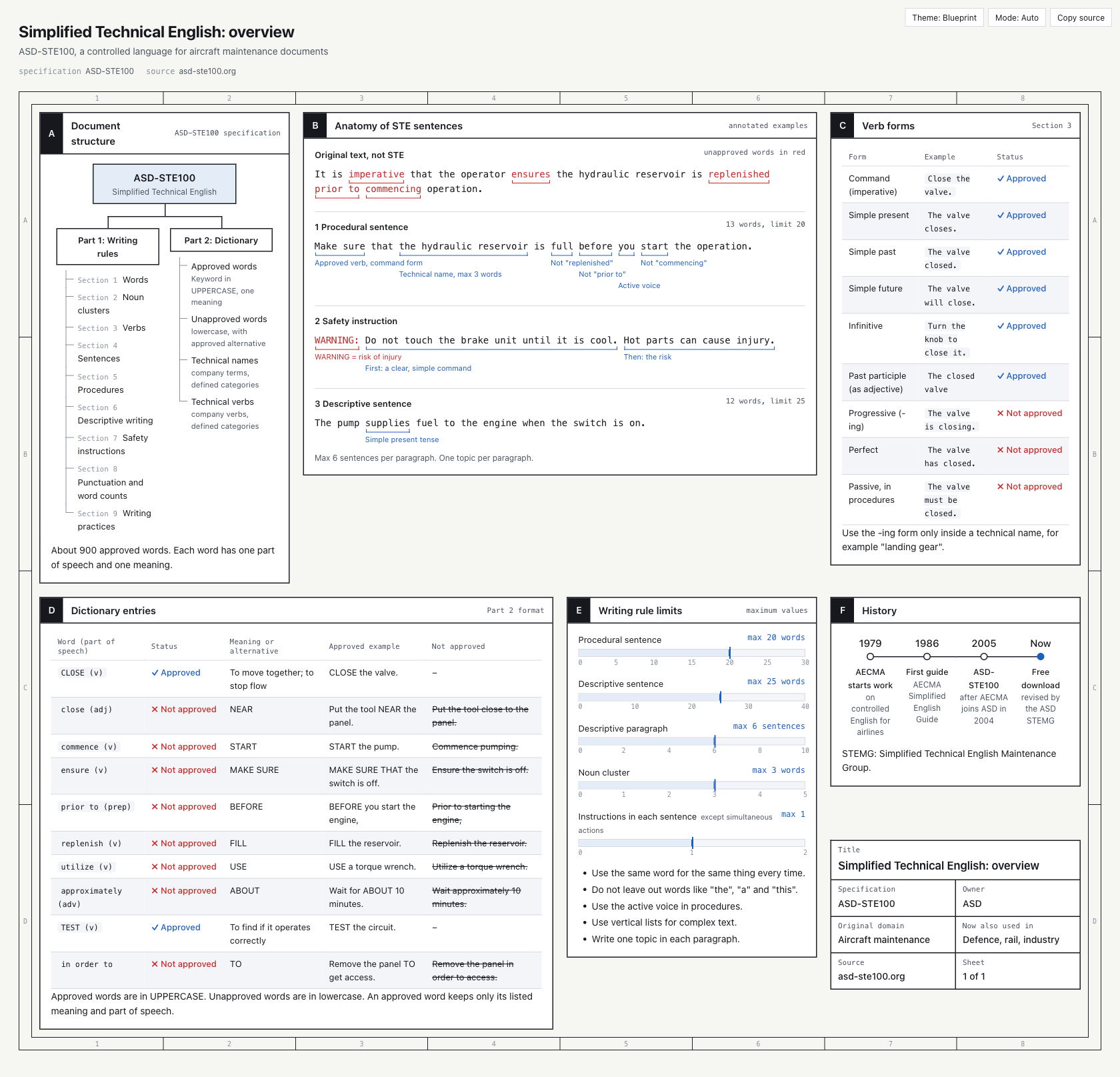
The tool is useful for information that benefits from structure, including architecture explanations, multi-step processes, comparisons, timelines, module trees, and annotated writing reviews. A simple question can still receive a simple text answer; the agent decides when a page is worthwhile unless you explicitly request one.
Key Features
- Compact model output: The model writes content rather than hundreds of lines of repetitive HTML, CSS, and SVG.
- Code-driven layout: The CLI calculates panel placement and diagram coordinates, reducing clipped labels and uneven gaps.
- Helpful validation: If a draft contains an error, the CLI reports the line, component, and a correct example so the agent can repair it.
- Visual components: Drafts can contain flow charts, sequence diagrams, trees, timelines, limits, annotations, key-value blocks, callouts, and comparison tables.
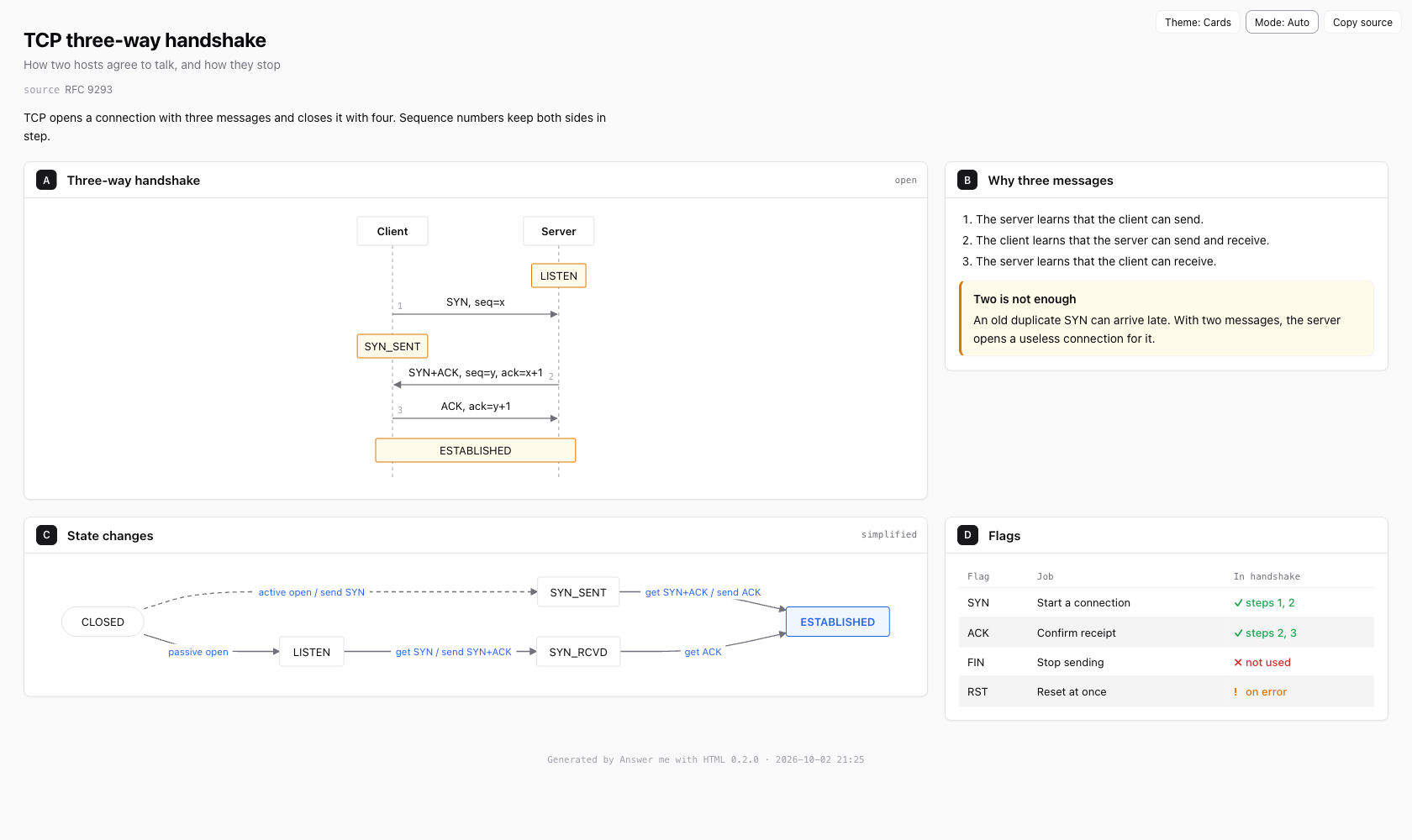
- Two themes: Choose the engineering-style
blueprinttheme or the card-basedshadcntheme. Both support light and dark modes. - Portable output: Each result is one HTML file with no CDN links or web fonts, so it can be opened offline and shared easily.
- Embedded source: Every page retains the Markdown used to create it. The page's Copy source control retrieves that draft.
- Writing checks: English and Chinese drafts are checked for long sentences, wordy phrases, passive voice, and related style problems.
Requirements and Installation
You need Node.js 20 or newer. A normal skill installation does not require a separate npm install because the CLI and its runtime dependencies are bundled with the skill.
Option 1: Let Your Agent Install It
The recommended approach is to give your coding agent an installation request. The installer supports Claude Code, Codex, Cursor, OpenCode, and many other agents.
Install the Answer me with HTML skill by running
npx -y skills add QingYunA/answer-me-with-html -g -y. Pass-awith the appropriate agent name, such as-a claude-code. Then read its SKILL.md and create a page explaining the TCP three-way handshake.
Option 2: Use the Interactive Installer
Run the following command and select the agents into which the skill should be installed:
npx skills add QingYunA/answer-me-with-htmlThe command uses the vercel-labs/skills installer, which supports more than 70 agents.
Option 3: Install the Claude Code Plugin
Inside Claude Code, add the marketplace and install the plugin:
/plugin marketplace add QingYunA/answer-me-with-html
/plugin install answer-me-with-html@answer-me-with-html
Option 4: Install Manually
Clone the repository and copy the skill directory into your agent's skill folder. For Claude Code, use:
git clone --depth 1 https://github.com/QingYunA/answer-me-with-html.git /tmp/answer-me-with-html
cp -R /tmp/answer-me-with-html/skills/answer-me-with-html ~/.claude/skills/answer-me-with-html
Other documented locations include ~/.codex/skills/ for Codex, ~/.cursor/skills/ for Cursor, and ~/.config/opencode/skill/ for OpenCode. No additional setup is required after installation.
Generate Your First Page
- Ask a substantial question. Try
Explain the TCP three-way handshake,Map out how the modules in this repository fit together, orRedis or Memcached for our cache?. - Let the agent choose the presentation. It writes a short Markdown draft and passes it to the bundled CLI.
- Open the result. By default, the generated page opens in your browser.
- Find the saved file. Generated pages are stored under
~/.answer-me-with-html/pages/. - Use the page controls. Controls in the top-right corner switch the theme or color mode and copy the source Markdown.
If the agent does not select the skill automatically, add a direct instruction such as Explain it in HTML.
How the Tool Selects Components
The agent matches the shape of the information to an appropriate component:
flowrepresents architecture, call chains, decisions, and grouped systems.sequenceshows messages exchanged by several participants over time.treepresents folders, modules, and taxonomies.timelineorganizes history, releases, or phases.limitscompares a value with its limit.annotadds word-level notes to a sentence.kvdisplays metadata or title-block information.callouthighlights a conclusion, warning, or tip.- Markdown tables support comparisons; cells containing
ok,no, orwarnbecome visual status marks.
Write and Render a Draft Yourself
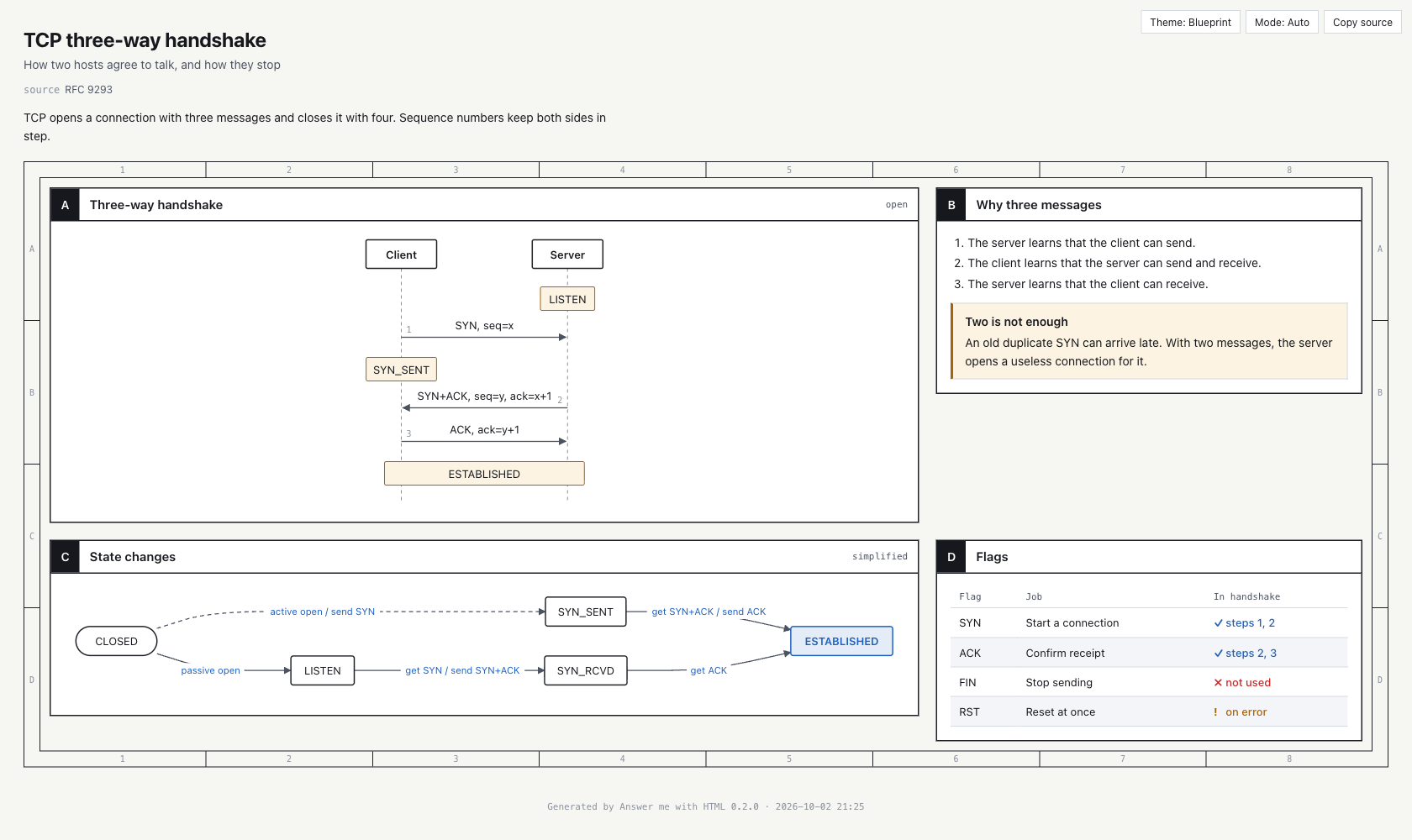
You can use the bundled CLI without an agent. A draft starts with optional front matter and uses each level-two heading as a panel. The following example creates sequence and flow diagrams for a TCP handshake:
---
title: TCP three-way handshake
theme: blueprint
---
## A Three-way handshake {span=2}
```sequence num
Client -> Server: SYN, seq=x
Server -> Client: SYN+ACK, seq=y, ack=x+1
Client -> Server: ACK, ack=y+1
note Client, Server: ESTABLISHED
```

## C State changes {span=2}
```flow LR
(CLOSED) -> LISTEN: passive open
LISTEN -> SYN_RCVD: get SYN / send SYN+ACK
SYN_RCVD -> *ESTABLISHED: get ACK
```
Within a panel heading, span=2 makes the panel two columns wide, rows=2 makes it two rows high, and bare removes its title bar. You can also add metadata with meta="small text".
Render from the Command Line
The CLI file is scripts/am.mjs inside the installed skill. From a repository checkout, define its path and run the desired command:
AM=skills/answer-me-with-html/scripts/am.mjs

node $AM render examples/tcp.en.md
node $AM render notes.md -o out.html --no-open
node $AM render notes.md --theme shadcn
node $AM lint notes.md
node $AM list
node $AM config
The first command renders a draft and opens it. The second chooses an output filename and suppresses browser opening. The third overrides the theme for one run. The remaining commands run the writing check, list components, and display settings.
Agents normally send drafts through standard input. You can do the same:
node $AM render - <<'AM_EOF'
## A One panel
```flow
A -> B: hello
```
AM_EOF
Use am help <component> to inspect the full syntax for a specific component. Set the AM_HOME environment variable if you want generated pages stored somewhere other than the default directory.
Configure Themes, Browser Behavior, and Writing Checks
Settings are managed with commands, so you do not need to edit configuration files manually. The values are stored in ~/.answer-me-with-html/config.json.
For a Claude Code plugin installation, open the interactive configuration command or change a setting directly:
/answer-me-with-html:config
/answer-me-with-html:config open off
With another agent, use /answer-me-with-html config open off or ask it to stop opening the browser. From a terminal, use:
am config
am config set open off
am config resetopendefaults toonand controls whether a new page opens in the browser.alwaysdefaults toon, but it matters only when the optional always-on integration is installed.themedefaults toblueprintand also acceptsshadcn.modeacceptsauto,light, ordark.styleacceptsoff,80, orstrict. The default80mode warns without blocking rendering.
A theme declared in a draft overrides the configured default. The --open and --no-open flags override browser behavior for one render only.
Advanced Tips
Enable Always-On Mode
Normally, the agent creates a page only when the answer benefits from one. Always-on mode adds a small page whenever a reply contains a conclusion, summary, plan, comparison, review, or explanation. Routine pages use two to four panels and are rendered without opening the browser. Casual chat and replies without a conclusion remain unchanged.
For Claude Code, install the additional plugin:
/plugin marketplace add QingYunA/answer-me-with-html
/plugin install answer-me-with-html-always@answer-me-with-html
Pause it without uninstalling by running:
/answer-me-with-html:config always offOther agents can adopt the documented always-on rule in their global rules file, such as AGENTS.md. The rule should tell the agent to create a small page for conclusions and render it with --no-open, while skipping casual chat, pure command output, and requests for plain text.
Use Strict Writing Validation
The writing check is based on machine-checkable ideas adapted from ASD-STE100. It favors short sentences, common words, direct commands, and consistent terminology. English steps should remain under 20 words, descriptions under 25 words, and paragraphs at no more than six sentences. Chinese checks use corresponding character limits and flag selected repetitive or vague constructions.
Enable blocking validation globally with:
/answer-me-with-html:config style strictYou can also specify style: in a draft to control validation for that page.
Choose the Right Template
The default sheet template arranges information as a grid of panels. Use doc for a single-column page with a table of contents. For a sheet, the cols front-matter field controls the number of columns.
Override Presentation Per Page
Put presentation choices in the draft front matter when one page needs different settings:
---
template: sheet
theme: shadcn
title: Cache comparison
subtitle: Redis and Memcached
cols: 3
source: Internal architecture review
---
Additional front-matter fields are displayed beneath the page title. When a built-in component does not fit, the draft format also supports raw HTML or SVG blocks, although built-in components provide the automatic layout benefits.
Develop the Project Locally
Contributors need a regular dependency installation because the repository's source and tests are being used:
git clone https://github.com/QingYunA/answer-me-with-html.git
cd answer-me-with-html
npm install
npm test
npm run build
Run npm run build after changing files under src/ to rebuild the bundled skills/answer-me-with-html/scripts/am.mjs. The two runtime dependencies are marked for Markdown parsing and Dagre for flow-chart layout; both are bundled into the CLI.
Conclusion
Answer me with HTML separates content generation from page construction. Your agent writes a compact Markdown draft, while the CLI supplies layouts, diagrams, themes, validation, and a portable offline HTML file. Start by installing the skill and asking for a visual explanation. Then refine the workflow with direct CLI rendering, per-page themes, strict writing checks, or optional always-on mode.