

What is Jeff?
Jeff is a family of compact Qwen3.5 and Gemma 4 fine-tunes designed for fast zero-shot classification. You provide a plain-language situation, define the available options, and receive a calibrated probability for each option from one forward pass.
Unlike a conventional generative model, Jeff does not produce prose that your application must parse. It is intended to make direct decisions for tasks such as support routing, intent detection, moderation, voice commands, and game moves. Categories do not need to have appeared in its training data, provided that you describe them clearly.
Jeff uses the same request format as Jev, but it is an independent project and is not affiliated with or endorsed by TypeSafe. Its training code builds on the open-source AutoJev recipe.
Key features
- Fast local inference: Jeff-Qwen3.5-0.8B takes about 22 ms per decision on an RTX PRO 6000 and 28 ms on an Apple M4 Max using MLX in the reported benchmark.
- Calibrated outputs: Each decision includes probabilities, a selected option, and confidence.
- Zero-shot categories: Options are described at request time rather than restricted to a fixed label set.
- Three question types: Use
choice,noul, orscorequestions. - Request batching: Several independent questions about the same state can be answered together.
- Local backends: Run with PyTorch on NVIDIA GPUs or CPUs, or use MLX with a Qwen model on Apple silicon.
- Domain adaptation: Fine-tune a Jeff checkpoint when zero-shot performance is insufficient.
Choose a model
Jeff provides three model checkpoints on Hugging Face:
- Jeff-Qwen3.5-0.8B: a 0.8-billion-parameter model with 1.7 GB of 16-bit weights. It is the recommended sweet spot for fast option selection.
- Jeff-Qwen3.5-2B: a 2-billion-parameter model with 4.2 GB of 16-bit weights. It scores higher overall on the reported benchmark panel but is slower and more cautious.
- Jeff-Gemma4-E2B: a model with 2 billion effective parameters, 4.6 billion stored parameters, and 9.3 GB of 16-bit weights. The project's MLX backend supports Qwen models only.
For an initial deployment, start with Jeff-Qwen3.5-0.8B. Move to another checkpoint only after evaluating it on representative examples from your application.
Install and download Jeff
The repository uses uv to synchronize dependencies and run commands. From the project directory, install the default dependencies and download the 0.8B checkpoint:
uv sync
uv run hf download mstrasser/Jeff-Qwen3.5-0.8B --local-dir checkpoints/jeff-0.8b
The checkpoint will be placed in checkpoints/jeff-0.8b. You can replace the Hugging Face repository and local directory if you want to use another published model.
Serve with PyTorch
For an NVIDIA GPU or CPU, start the server with the default PyTorch backend:
JEFF_CHECKPOINT=checkpoints/jeff-0.8b PORT=8765 uv run jeff-serveServe on Apple silicon with MLX
On a compatible Mac, install the additional Mac dependencies and select the MLX backend. MLX serving is available for the Qwen checkpoints:
uv sync --extra mac
JEFF_BACKEND=mlx JEFF_CHECKPOINT=checkpoints/jeff-0.8b PORT=8765 uv run jeff-serve
Both commands expose the service locally on port 8765.
Send your first classification request
A request contains a state describing the situation and a questions object defining one or more decisions. The following example asks Jeff to route a customer message and independently estimate whether the customer is angry:
curl -s localhost:8765/v1/systemone \
  -H 'content-type: application/json' \
  -d '{
    "model": "jeff-latest",
    "state": "Refund request: the customer says the parcel arrived crushed and wants their money back.",
    "questions": {
      "route": {
        "type": "choice",
        "instructions": "Which team should handle this?",
        "criteria": {
          "1": "Refunds and payments",
          "2": "Damaged or lost parcels",
          "3": "Account and login problems"
        }
      },
      "angry": {
        "type": "noul",
        "instructions": "Is the customer angry?"
      }
    }
  }'
Jeff evaluates both questions in one request. Each answer provides probabilities, the chosen option, and a confidence value. Your application can use the selected answer directly or apply its own confidence threshold.
Understand the question types
Choice
A choice question selects one of up to 255 options. Put short identifiers in criteria and use the associated values to explain what the options mean.
"route": {
  "type": "choice",
  "instructions": "Which team should handle this?",
  "criteria": {
    "1": "Refunds and payments",
    "2": "Damaged or lost parcels",
    "3": "Account and login problems"
  }
}
Noul
A noul question represents a yes-or-no decision returned as a probability. It is useful for checks such as whether a message is angry, urgent, unsafe, or relevant.
"angry": {
  "type": "noul",
  "instructions": "Is the customer angry?"
}
Score
A score question places the answer on a scale that you describe. Use it when the application needs a graded assessment instead of a categorical label.
Write effective decision prompts
Prompt wording has a substantial effect on small classifiers. The following practices are particularly important when using Jeff.
- Reason in code and decide with Jeff. Calculate deterministic rules, future states, and multi-step consequences in your application. Give the resulting situation to Jeff for the final judgment.
- Describe consequences directly. Instead of asking the model to forecast that a car will arrive in two turns, state that a particular move will result in being hit by a car.
- Keep option descriptions consistent. Options should use similar structure and comparable detail. Inconsistent wording can bias the decision.
- Use short option keys. Prefer
{"1": "Engagement letter"}over a long internal identifier. Long keys add processing cost without improving the option description. - Combine independent questions. If several decisions share the same state, send them in one request rather than repeating the input.
- Test representative data. Benchmark results are useful context, but they do not guarantee performance on a specific workflow.
Jeff is a classifier, not a planner. It works best when your code prepares the relevant facts and the model chooses among clearly described alternatives.
Performance and limitations
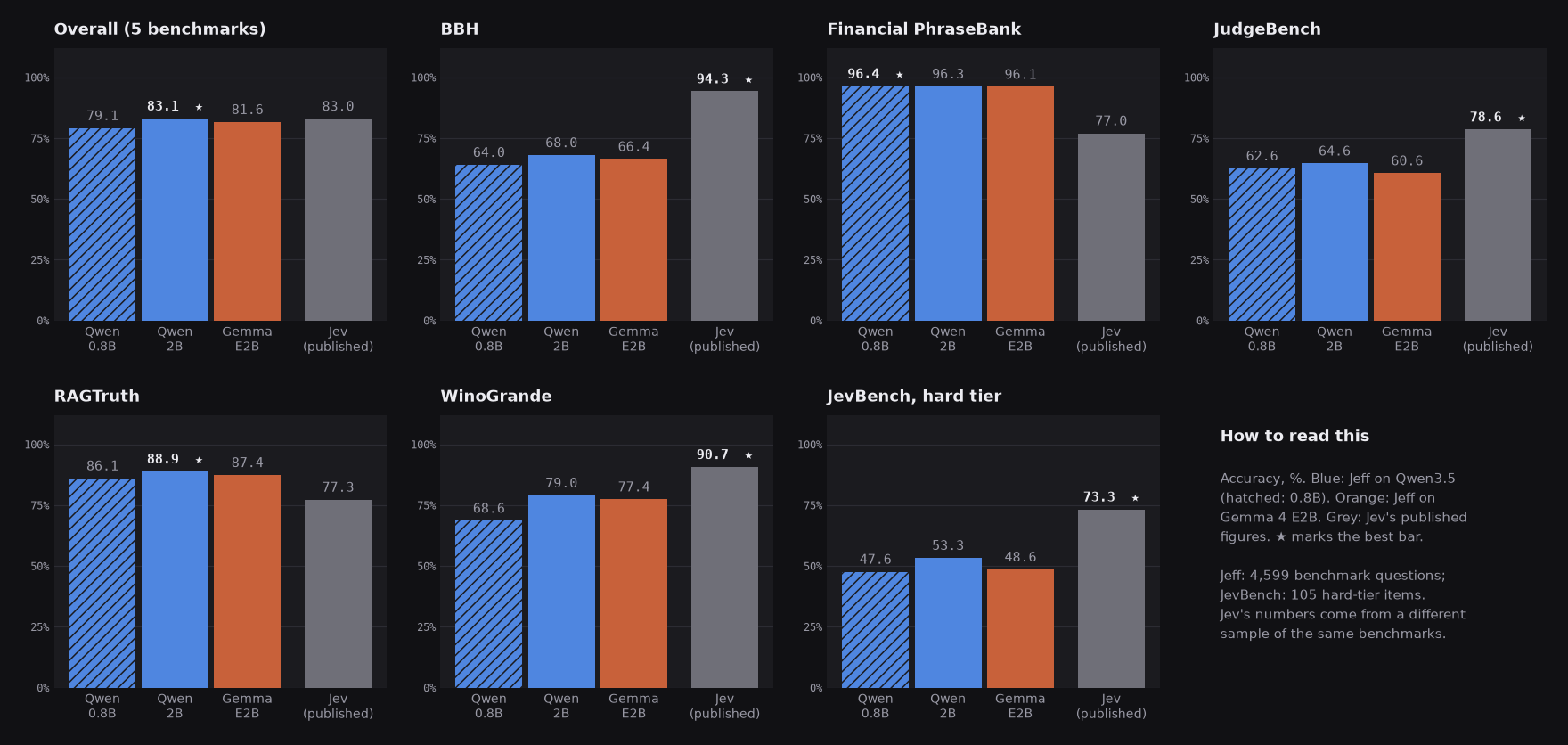
Across five public benchmarks, Jeff-Qwen3.5-0.8B scored 79.1, Jeff-Qwen3.5-2B scored 83.1, and Jeff-Gemma4-E2B scored 81.6 in the project's evaluation. The 2B Qwen result was close to Jev's published overall figure of 83.0, although the Jev and AutoJev figures were measured on different samples from the same benchmarks.
The results vary significantly by task. Jeff performs strongly on several classification and grounding evaluations, including Financial PhraseBank and RAGTruth, but remains below larger systems on reasoning-heavy benchmarks such as BBH, JudgeBench, and the JevBench hard tier.
Reported median inference times for inputs of roughly 200 tokens were 22 ms on an RTX PRO 6000, 28 ms on an M4 Max with MLX, and 463 ms on a 32-thread CPU for the 0.8B model. These numbers are hardware-specific and should be measured again in your own deployment.
Try the game harness
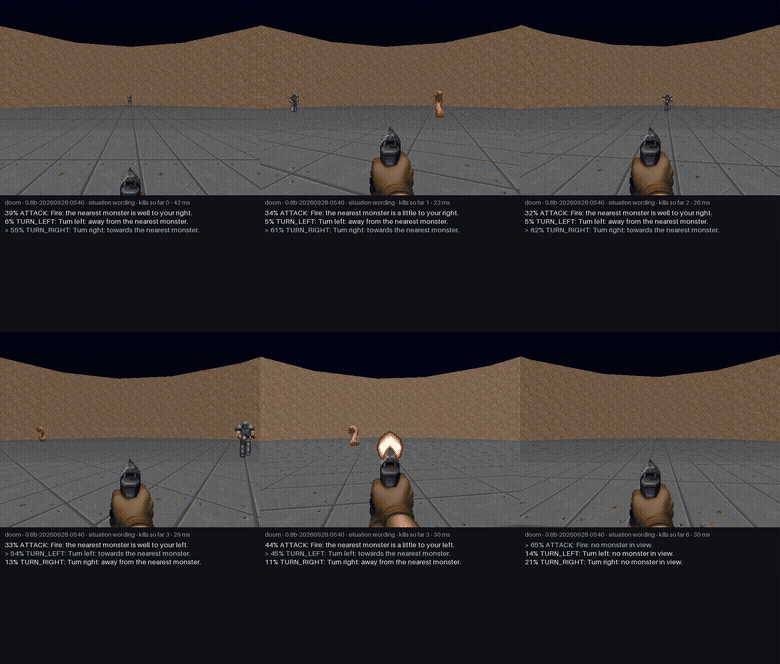
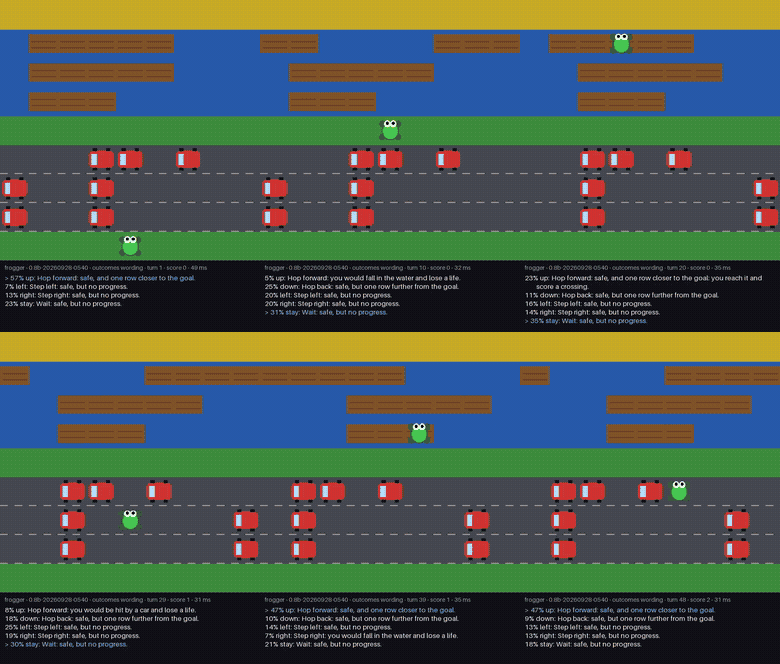
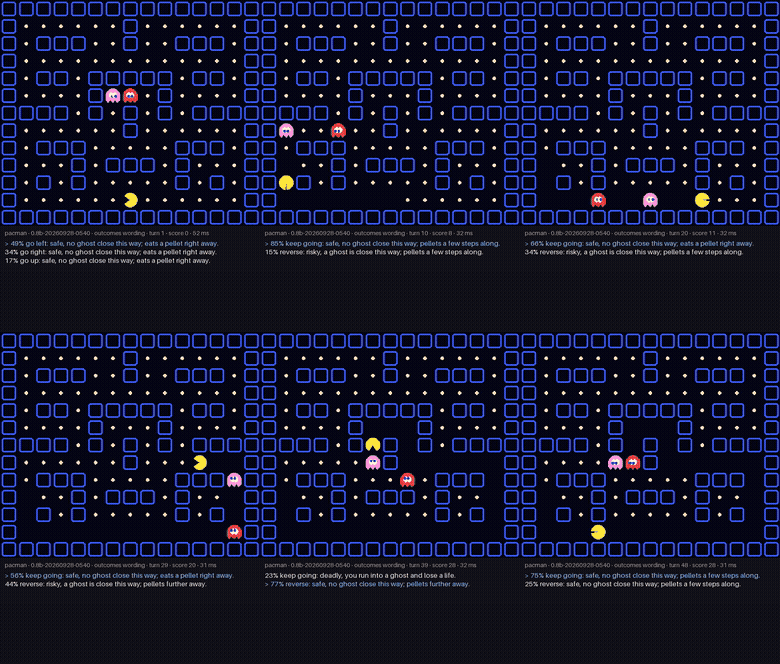
The repository includes Doom, Frogger, and Pac-Man experiments that demonstrate decisions over dynamically described legal moves. Install the optional game dependencies before running them:
uv sync --extra gamesWith a Jeff server already running, you can launch the provided Doom and Frogger evaluations:
uv run python -m jeff.games --game doom --player jeff --criteria situation --url http://127.0.0.1:8765 --video --out runs/games/doom.json
uv run python -m jeff.games --game frogger --player jeff --criteria outcomes --url http://127.0.0.1:8765 --out runs/games/frogger.json
You can also run the Pac-Man rule-based player for comparison:
uv run python -m jeff.games --game pacman --player rule --out runs/games/pacman-rule.jsonThese experiments also illustrate an important limitation: benchmark rankings do not necessarily predict interactive game performance. In the published results, the 0.8B Jeff model played the games better than the 2B Jeff model in several cases despite the 2B model's higher aggregate benchmark score.
Fine-tune Jeff for your domain
If zero-shot accuracy is not adequate, begin from a Jeff checkpoint and train on examples from your application. The README reports that a voice-navigation fine-tune using approximately 11,000 application-specific examples improved held-out accuracy from 31.7% to 95.8% in about half an hour on one GPU.
autojev-train --initial-checkpoint <jeff> --epochs 1 ...The repository also exposes its broader training workflow. A typical sequence builds the data mix, runs training, and evaluates the selected checkpoint:
uv run autojev-mix ...
scripts/train.sh RUN data/mix/public.jsonl data/mix 5e-6 40 Qwen/Qwen3.5-0.8B <revision> --epochs 1
uv run autojev-evaluate --data data/panel.jsonl --local --checkpoint checkpoints/RUN/selected --output runs/eval/RUN.json
The published recipe uses full-weight fine-tuning for one epoch, batches of 256, cross-entropy over option letters, and a fitted temperature for probability calibration. Checkpoints are selected using a development set rather than the benchmark panel.
For the complete local synthetic-data pipeline, leak filtering, learning-rate sweeps, and dashboard workflow, consult scripts/train_all.sh. The project documents its training sources and their licences in docs/data-sources.md.
Advanced deployment tips
- Measure calibration on your own data. A calibrated general model may still require application-specific thresholds for escalation or fallback behavior.
- Add a safe fallback. When confidence is too low, route the request to a human, a deterministic rule, or a more capable model.
- Keep states concise. Supply the facts required for the decision and avoid unrelated text that could distract a small model.
- Evaluate wording variants. Compare several consistent formulations of instructions and criteria before fixing your production schema.
- Choose models empirically. Use the 0.8B model for latency-sensitive option selection, but test all suitable checkpoints against your own validation set.
- Respect modality limits. Jeff supports English text only according to the README.
Conclusion
Jeff provides a practical way to add fast, local, probability-based decisions to an application without generating or parsing free-form text. Start with Jeff-Qwen3.5-0.8B, describe each option clearly, group independent questions into one request, and evaluate on real application examples. When zero-shot behavior is not sufficient, fine-tune an existing Jeff checkpoint on domain-specific data.