

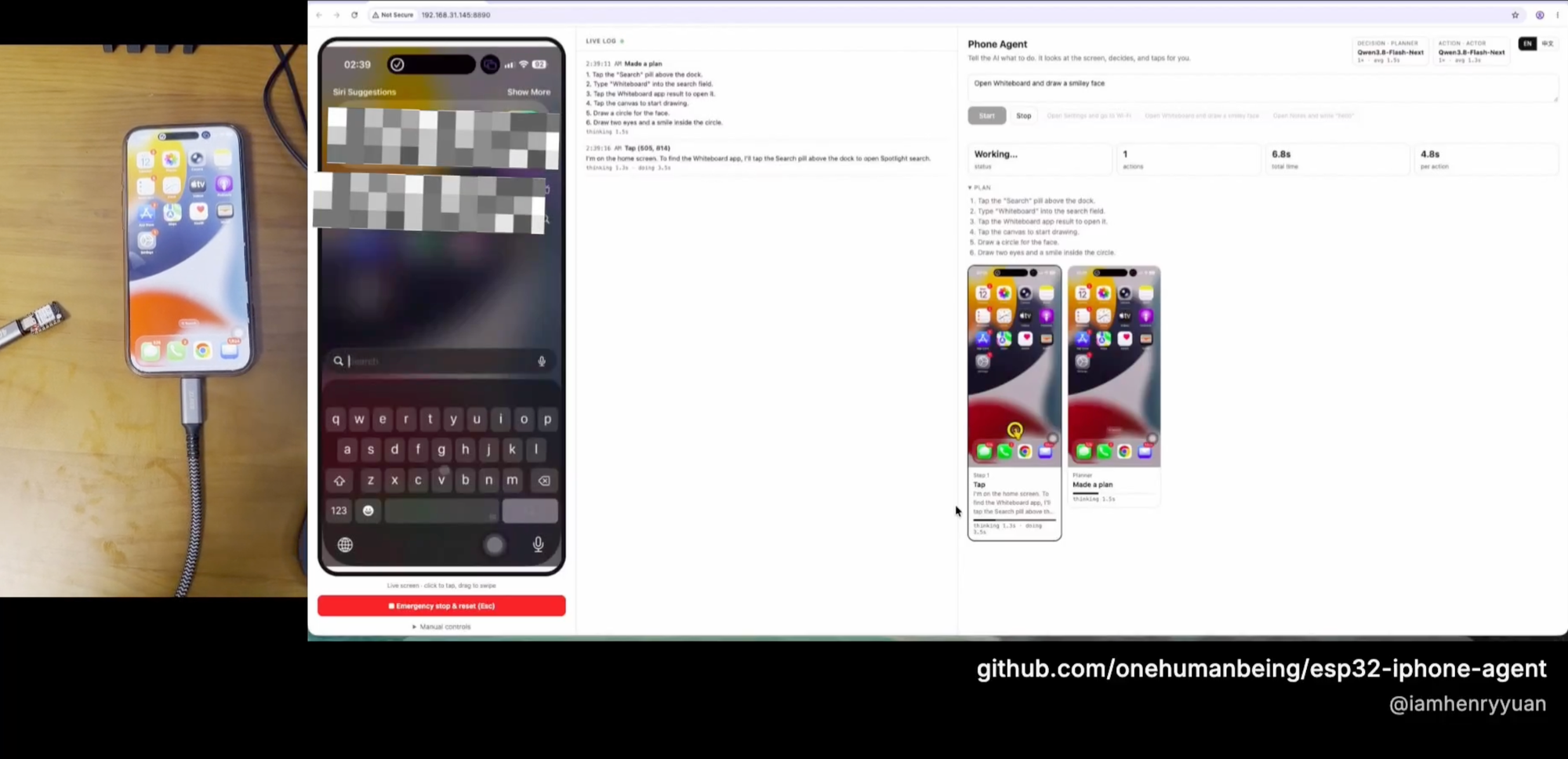
What ESP32 iPhone Agent Does
ESP32 iPhone Agent lets an AI model see and operate a real iPhone. It uses AirPlay screen mirroring for visual input and an inexpensive ESP32-S3 board as a USB mouse and keyboard. Because it interacts through the screen and a pointer, it does not require Xcode, an Apple developer account, a jailbreak, Developer Mode, or a helper app installed on the phone.
The computer can run macOS or Linux. It hosts UxPlay, the Python server, the web interface, and the connection to an OpenAI-compatible vision model. The ESP32-S3 connects to the computer over Wi-Fi while appearing to the iPhone as a standard USB Human Interface Device.
How the System Works
AirPlay provides the eyes
The iPhone mirrors its display to UxPlay on the computer. A GStreamer pipeline converts that stream into JPEG frames used by both the AI agent and the browser-based live view.
The ESP32-S3 provides the hands
When connected to the iPhone, the board behaves like a USB mouse and keyboard. With iOS AssistiveTouch enabled, mouse clicks become taps, pointer drags become swipes, the scroll wheel scrolls the interface, and keyboard commands can enter text or press shortcuts.
The firmware intentionally contains little logic. The server sends line-based commands such as move, click, scroll, type, and key over TCP. The board responds with ok or an error message.
A planner and actor provide the brain
A planner model creates a short plan from the requested goal and current screen. An actor model inspects each new screenshot and selects the next action, such as tapping, swiping, drawing a path, typing, pressing a key, returning home, or finishing. The same vision model can serve both roles.
Closed-loop checks improve reliability
Pointer movement is relative, so the server tracks its estimated position. Before a tap, it can wiggle the pointer, locate it in the mirrored image, correct a miss, and refine calibration. After an action, the agent checks whether the screen changed. Missed actions can therefore be noticed and retried instead of becoming the basis for later steps.
The system can also re-plan after repeated actions and recover from dropped links or invalid model replies. If the Wi-Fi connection drops, the board releases mouse buttons and reconnects automatically.
Key Features
- No Apple development setup: no Xcode, developer account, code signing, Developer Mode, or test-runner app is required.
- Broad app compatibility: the agent operates on pixels instead of depending on an accessibility tree, so it can work across ordinary apps and games.
- Mac or Linux host: the server is not restricted to macOS.
- Flexible model support: any OpenAI-compatible chat API that accepts images can be used.
- Manual and autonomous control: the web interface supports direct taps, swipes, scrolling, typing, Home, Back, and AI-driven tasks.
- Observable execution: the interface displays the live phone screen, plans, logs, screenshots, actions, reasoning, and timing information.
- Safety controls: an emergency stop halts the agent and releases the pointer.
What You Need
- ESP32-S3 board: the project was tested with a bare Seeed Studio XIAO ESP32S3. Another ESP32-S3 board can work if its USB-C port is connected to the chip's native USB interface.
- iPhone: USB-C models can connect directly. Lightning models require a Lightning to USB Camera Adapter.
- Computer: a macOS or Linux machine on the same network as the iPhone.
- Wi-Fi: the board configuration requires a 2.4 GHz network name and password.
- Vision model: a cloud or local OpenAI-compatible endpoint that accepts image input.
The iPhone powers the board. If the phone must charge at the same time, use a USB-C hub with power pass-through.
Install and Configure the Agent
1. Clone the repository
git clone https://github.com/onehumanbeing/esp32-iphone-agent.git
cd esp32-iphone-agent
2. Prepare and flash the ESP32-S3
Install arduino-cli and the 3.x ESP32 core. Connect the ESP32-S3 to the computer over USB, copy the example secrets file, and edit the new file.
cp hardware/hid_bridge/secrets.example.h hardware/hid_bridge/secrets.hIn hardware/hid_bridge/secrets.h, enter the 2.4 GHz Wi-Fi network name, Wi-Fi password, and IP address of the computer that will run the server. Then flash the board:
hardware/flash.shThe flash script optionally accepts a serial port and the --debug flag. Debug firmware echoes commands and their durations over USB serial.
3. Install UxPlay
On macOS, install UxPlay with Homebrew:
brew install uxplayOn Debian or Ubuntu, install UxPlay and the required GStreamer packages:
sudo apt install uxplay gstreamer1.0-plugins-good gstreamer1.0-plugins-bad gstreamer1.0-libav4. Create the Python environment
Enter the server directory, create a virtual environment, and install the project:
cd server
python3 -m venv .venv
.venv/bin/pip install -e .
Python 3.10 or newer is required.
5. Configure the model
Copy the environment template:
cp .env.example .envEdit server/.env and set at least the OpenAI-compatible endpoint, model name, and API key:
LLM_BASE_URL=https://your-endpoint.example/v1
LLM_MODEL=your-vision-model
LLM_API_KEY=your-api-key
The selected model must support images. A cloud API is sufficient; running a local model is optional.
6. Start the server
set -a && . ./.env && set +a && .venv/bin/python -m hidagentOpen http://<computer-ip>:8890 in a browser. The computer IP must be reachable from the network used by the board.
Set Up the iPhone
The following phone configuration is normally needed only once:
- Open Settings, then go to Accessibility, Touch, and AssistiveTouch.
- Turn AssistiveTouch on.
- Disconnect the flashed board from the computer and plug it into the iPhone.
- Confirm that a round pointer appears and that the web page reports the controller as connected.
- Open Control Center on the iPhone and select Screen Mirroring.
- Select iPhone Agent. The live phone display should appear in the web interface.
- In the web interface, open Manual controls and select Calibrate.
- Click exactly on the visible pointer in the live screen.
Recalibrate if you later change the AssistiveTouch tracking speed.
Run Your First Task
Enter a goal in the web interface and press Start. For example:
Open Settings and go to Wi-FiThe planner creates a short plan, and the actor repeatedly examines the current screenshot and chooses an action. Watch the live phone view and log while the task runs.
The step wall records the screenshot used for each decision. It also draws the selected tap or swipe over the image and displays the model's reasoning and timing. Selecting a step card opens a larger view.
Use manual controls
- Click the live phone image to tap at that position.
- Drag across the image to perform a swipe.
- Use scrolling input to scroll the phone.
- Use the provided controls for Home, Back, text entry, and keys.
If the agent behaves unexpectedly, activate Emergency stop or press Esc. This stops the run and releases the pointer. The interface also provides a control to clear the execution history.
Important Configuration Options
LLM_BASE_URL: OpenAI-compatible endpoint. The default ishttp://localhost:8000/v1.LLM_MODELandLLM_API_KEY: model name and API credential.LLM_EXTRA_BODY: JSON merged into every model request, such as settings that disable a model's thinking mode.ACTOR_*andPLANNER_*: role-specific overrides for the correspondingLLM_*settings.AIRPLAY_NAME: receiver name shown in the iPhone Screen Mirroring list. Its default isiPhone Agent.PORT: web interface port, defaulting to8890.DEVICE_PORT: port used by the ESP32-S3, defaulting to7300.HIDAGENT_DATA: calibration and trace directory, defaulting to~/.hidagent.HIDAGENT_DEBUG: enables server-side debug logging when set to1.
Advanced Usage and Troubleshooting
Assign separate planner and actor models
The planner and actor can use the same model, but the role-specific environment variables let you override model settings independently. Use the PLANNER_* and ACTOR_* forms of the relevant LLM_* variables when separate endpoints or models are needed.
Connect a local model server
Any OpenAI-compatible server with a vision model can be configured in the same way, including vLLM, SGLang, llama.cpp, and Ollama. The project was developed and timed with NVIDIA Qwen3.8-Flash-Next-NVFP4 served from two NVIDIA DGX Sparks using tensor parallelism.
An example configuration for that setup is:
LLM_BASE_URL=http://<dgx-spark-ip>:8888/v1
LLM_MODEL=Qwen3.8-Flash-Next
LLM_EXTRA_BODY='{"chat_template_kwargs": {"enable_thinking": false}}'
The reported development setup achieved approximately 1.3 seconds per action and 2 seconds per plan with thinking mode disabled. These figures describe that specific hardware and model configuration rather than a guaranteed speed for other deployments.
Enable trace collection
Set the following value in server/.env:
HIDAGENT_DEBUG=1Debug mode logs every board command and its latency. It also creates one directory per agent run under ~/.hidagent/traces/. The directory contains steps.jsonl, including model prompts, raw replies, latency measurements, and actions, plus the screenshots seen by model calls.
Understand the board protocol
pingperforms a health check.homepushes the pointer into the top-left corner to establish a known position.move <dx> <dy>moves the pointer relatively at a constant pace.press,release, andclickcontrol the left mouse button.scroll <v> <h>sends vertical and horizontal scroll-wheel input.type <text>enters ASCII text.key <combo>sends keys or combinations such asenter,cmd+h, orcmd+space.
Resolve AirPlay discovery problems on Linux
If the computer has several network interfaces and the iPhone does not list the receiver, limit Avahi mDNS advertising to the interface connected to the phone's network.
Known Limitations
- iOS does not mirror passcode entry, Apple Pay, DRM-protected video, and some other protected screens, so the agent cannot see them.
- Screen mirroring stops when the phone locks. Keep auto-lock disabled while the agent is running.
- Keyboard text input is limited to ASCII.
- Pointer calibration must be repeated after changing AssistiveTouch tracking speed.
- The agent depends on a working network path between the board and server and an available AirPlay stream between the phone and computer.
Responsible Operation
Only automate devices and accounts that you own or are authorized to use, and follow the terms of the applications involved.
Because the agent can act with the same kinds of input as a person, supervise active runs and keep the emergency stop accessible.
Conclusion
ESP32 iPhone Agent combines AirPlay mirroring, a low-cost ESP32-S3 USB HID bridge, and an OpenAI-compatible vision model to automate a physical iPhone without Apple's conventional development toolchain. Once the firmware, server, model endpoint, AssistiveTouch, mirroring, and pointer calibration are configured, you can issue natural-language goals, inspect every decision, intervene manually, and collect detailed traces for debugging.