

Project Overview
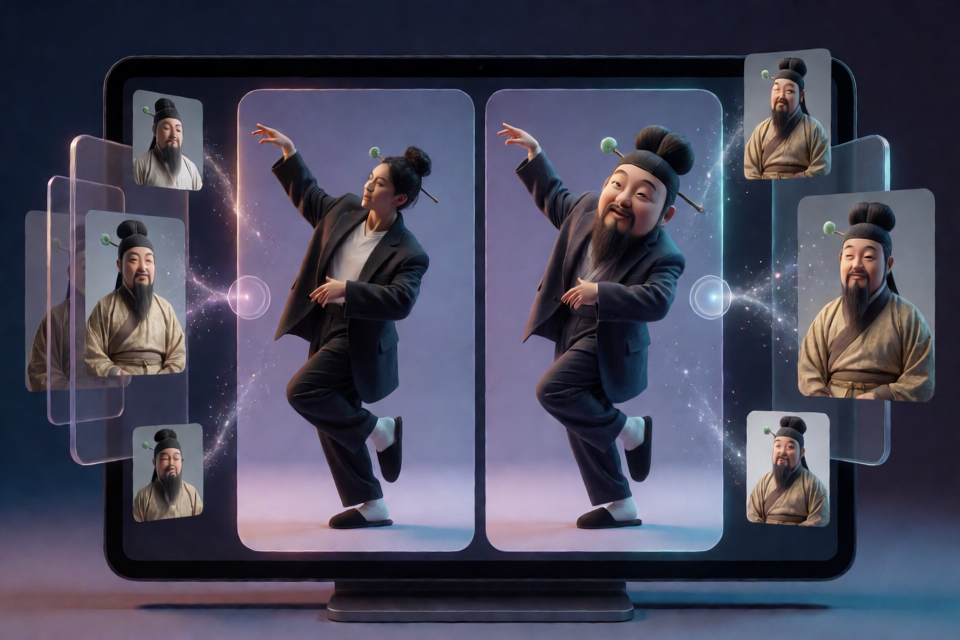
“AI Character Swap” is a Skill for Claude designed to replace people in already-popular videos with original AI characters while preserving as much of the original video's movement and pacing as possible.
The project not only uses Seedance 2.5 to swap characters in videos, but also covers character design, prompts for reference images, character profile management, source video checks, comparison video creation, and generating publishing copy for TikTok, Instagram, and Twitter.
The example character “Mr. Wen” combines the head of a Ming Dynasty scholar with the body of an office worker: an oversized topknot pierced by a jade hairpin, an oversized suit, white socks, and slippers. In the example, the person in the original video is replaced while the movements remain unchanged.
Core Features
- Design original characters: Create character concepts and reference-image prompts based on the principle that “exaggeration should grow from the person, not be worn by the person.”
- Save character profiles: Store reference images, front-facing photos, and appearance descriptions for reuse in later swaps, reducing character drift.
- Check source videos: Automatically report video resolution and duration, upscale footage when there are not enough pixels, and generate preview images.
- Generate swap prompts: Support replacing one or multiple people, using
@imagenumbering to match the relevant assets. - Call Seedance 2.5: Automatically submit tasks, poll their status, and download results through the BytePlus ModelArk or Volcano Engine Ark API.
- Create comparison videos: Arrange the original and swapped videos side by side, add labels, and avoid black bars.
- Prepare publishing content: Generate TikTok and Instagram caption suggestions, as well as copy suitable for Twitter tutorial threads.
Project File Structure
The project's main files and directories are:
skills/ai-character-swap/SKILL.md: The Skill itself for use with Claude.skills/ai-character-swap/scripts/seedance_swap.py: The accompanying Python script, which only depends on Python 3 and ffmpeg.新手说明.md: Instructions for users unfamiliar with the command line, including a method for completing the workflow through web interfaces.examples/: The directory containing the project's example comparison videos.
Prerequisites
Install ffmpeg
The project scripts use ffmpeg to process videos. macOS users can install it with Homebrew:
brew install ffmpegWindows users can install it with winget:
winget install ffmpegThe scripts themselves only depend on Python 3 and ffmpeg. After installation, confirm that both commands run successfully in the terminal.
Enable the Seedance 2.5 API
To have Claude automatically submit character-swap tasks and download videos, enable the Seedance 2.5 API and create an API Key. The project reads the key from the ARK_API_KEY environment variable:
export ARK_API_KEY="your_API_Key"On Windows, set the corresponding environment variable according to the terminal you use. Do not write a real API Key directly into public code or publish it to a repository.
Method 1: Let Claude Run It Automatically
- Install ffmpeg and prepare a Python 3 environment.
- Enable the Seedance 2.5 API, create an API Key, and set
ARK_API_KEY. - Add
skills/ai-character-swap/from the project as a Claude Skill. - Prepare an image of an original character and a video containing the person to replace.
- Send the character image and video to Claude on your computer, and specify which person to replace.
A basic task description could be:
Replace the person in the video with “Mr. Wen.” First check the video, use the images and appearance description in the character profile to generate the swap prompt, then create a side-by-side comparison video and provide publishing copy.Claude will process the character assets, source video, and Seedance task according to the workflow in the Skill. If the video contains multiple people, specify which one to replace or request that multiple people be replaced at once.
Method 2: Use the Web Interface Without Writing Code
If you are unfamiliar with the command line or APIs, read 新手说明 in the project and follow “Method 1: Web Interface.” This method uses ChatGPT together with the Seedance web interface for character design and video swaps, without directly running the project scripts.
The web-based method is suitable for experiencing the overall workflow first. When you need to submit, poll, and download tasks automatically, use the combination of the Claude Skill and the Seedance 2.5 API.
Complete Production Workflow
1. Design an Original Character
Start by defining the character's core contrast and visual hook. The project emphasizes that exaggerated features should become part of the character's body and appearance, rather than simply being added as clothing. After completing the design, generate prompts for reference images and prepare a front-facing photo of the character.
2. Build a Character Profile
Organize the reference images, front-facing photo, and appearance description into a character profile. Referencing the same profile for every subsequent swap helps maintain consistency in the hairstyle, facial features, body type, clothing, and other visual details.
3. Check the Source Video
Provide the video to Claude or the accompanying workflow and first retrieve its resolution and duration. If the source video has insufficient resolution, the workflow will upscale it automatically and generate preview images so you can confirm whether the material is suitable for further processing.
4. Generate the Swap Prompt
Generate a prompt based on the character profile and video content. When there are many assets, use @image numbering to match character images with the reference images mentioned in the prompt. When replacing one person, clearly identify the target. When replacing multiple people, specify which image and person correspond to each character.
5. Call Seedance 2.5
The API workflow automatically submits the task, polls the generation status, and downloads the result when the task is complete. The project's seedance_swap.py provides this supporting functionality, with the request format organized from BytePlus's official Seedance 2.5 integration code for ComfyUI.
When using the API for the first time, use the script's --dry-run option to check the workflow and request before processing a long video. After confirming that the configuration is correct, perform an actual test with a short video.
6. Create a Comparison Video
After confirming the swap result, create a side-by-side comparison video: keep the original video on the left, place the AI-swapped result on the right, and add clear labels. The project handles the layout with the goal of avoiding black bars in the final video, making it ready to showcase the effect.
7. Generate Publishing Copy
Finally, ask Claude to generate TikTok and Instagram caption suggestions based on the finished video, or organize the content into a Twitter tutorial thread. Before publishing, check that the copy accurately states that AI was used in the video.
Advanced Usage Tips
Keep the Character Profile Consistent
Do not describe the character from scratch for every swap. Continuously using the same reference images, front-facing photo, and appearance description can reduce inconsistencies between videos.
Start with Short Videos
The API workflow should still be tested cautiously. Use --dry-run to check the request first, then use a short video to verify the API Key, video parameters, and download workflow before processing the final material.
Clearly Match People and Images
In videos with multiple people, the prompt should clearly identify the people to replace and use @image numbering to associate the correct character assets. This makes it easier to avoid mismatches between character images and target people.
Pay Attention to Copyright and Portrait Rights
The project requires characters to be original. Do not use photos of celebrities, influencers, or people you know to create characters, as this may trigger platform blocking and could also create portrait-rights issues.
Enable AI Labels When Publishing
When publishing content on TikTok and Instagram, label AI-generated content as required by the platforms. Comparison videos and publishing copy should also avoid making viewers believe that the material came entirely from real filming.
Project Status and Troubleshooting
Video checks, prompt generation, and comparison video creation have been tested successfully with example assets. The API request format was organized from BytePlus's official integration code, so first perform a dry run and then validate the API with a short video.
If you encounter problems, first check whether ffmpeg is installed, whether ARK_API_KEY is set correctly, and whether the video is too long or has insufficient resolution. Also consult the documentation in the project repository. If the issue remains unresolved, submit an Issue to the project.
Summary
“AI Character Swap” brings character design, character consistency management, video checks, Seedance 2.5 API calls, comparison video creation, and publishing copy generation together in a single Claude Skill. You can first learn the workflow through the web interface, or configure the API and let Claude automatically handle the complete process from asset checks to final output.
Before you begin, follow two principles: use original characters and correctly label AI content when publishing. This makes characters more reliable to reuse while reducing copyright, portrait-rights, and platform-compliance risks.