


What is Rizzo Flow?
Rizzo Flow is an open-source, local-first system that converts unstructured text or JSON state into typed decisions with probabilities. Instead of asking a language model to generate prose or JSON token by token, it reads the model’s probability for a constrained set of answer letters after a forward pass.
This design supports decisions such as:
- A boolean answer with the probability of
true. - A choice among named options, with a probability for each option.
- A score across ordered rubric levels.
- A numeric estimate based on representative anchors.
Rizzo Flow runs on your own hardware through llama.cpp. It can use Apple Metal, NVIDIA CUDA, Vulkan, AMD ROCm, Intel SYCL, or CPU execution. It also provides a Jev-compatible HTTP interface, allowing compatible applications to target a local URL instead of a hosted service.
Rizzo Flow is an independent project. It reproduces the interface pattern behind Jev, not Jev’s proprietary architecture or training. Its probabilities are uncalibrated unless you calibrate them on your own representative data.
How zero-token decisions work
For each request, Rizzo Flow places the state at the beginning of the prompt and processes it once. Questions then branch from the shared state cache. Each possible answer is mapped to an uppercase letter, and the system reads only the logits for the permitted letters.
- The state is converted into text and prefilled into the model’s KV cache.
- Each question is represented as a constrained multiple-choice problem.
- Questions sharing the same state are evaluated in micro-batches.
- The allowed answer logits are converted to probabilities with softmax.
- Python code returns schema-validated boolean, choice, score, or numeric data.
There is no decoding loop, sampled text, output parsing, or JSON repair. However, zero generated tokens does not mean zero computation: the state and question prompts still require model inference.
Key features
- Fully local operation: model inference happens on your machine.
- Typed results: applications receive structured values rather than generated prose.
- Probability distributions: choice and score results expose probabilities instead of only an argmax answer.
- Four native primitives: boolean, choice, score, and numeric.
- Optional abstention: the native API can report insufficient evidence, uncertainty, or an out-of-range numeric result.
- Shared-state batching: several questions in one request reuse the state’s KV cache.
- Jev-compatible endpoints: existing clients can use
/v1/systemoneand/v1/models. - Long-context model: Spark-X2.5 supports a native context of up to 1,048,576 tokens, although Rizzo Flow defaults to 8,192 tokens per question.
- Local tools: the server includes a playground, interactive OpenAPI documentation, and a Snake demonstration.
Prerequisites
Before installing Rizzo Flow, make sure you have:
- Python 3.11 or newer.
- Git.
- uv for dependency and environment management.
- Enough disk space for the selected model and runtime.
The default Spark-X2.5-4B Q8_0 model download is approximately 4.4 GB. The runtime download varies by platform, from roughly 11 MB on a Mac to about 570 MB for the CUDA package.
Install and start the server
Clone the repository, synchronize its pinned dependencies, download the default runtime and model, and start the service:
git clone https://github.com/Rizzo-AI-Academy/rizzo-flow
cd rizzo-flow
uv sync --locked
uv run rizzo download
uv run rizzo serve
The download command selects an official prebuilt llama.cpp package for the current machine, verifies its SHA-256 checksum, and downloads Spark-X2.5-4B Q8_0. Interrupted downloads can resume from where they stopped.
Model loading takes about ten seconds according to the project documentation. Once the service is ready, open:
http://127.0.0.1:8017/playgroundfor the visual playground.http://127.0.0.1:8017/docsfor interactive OpenAPI documentation.http://127.0.0.1:8017/snakefor the Snake demonstration.
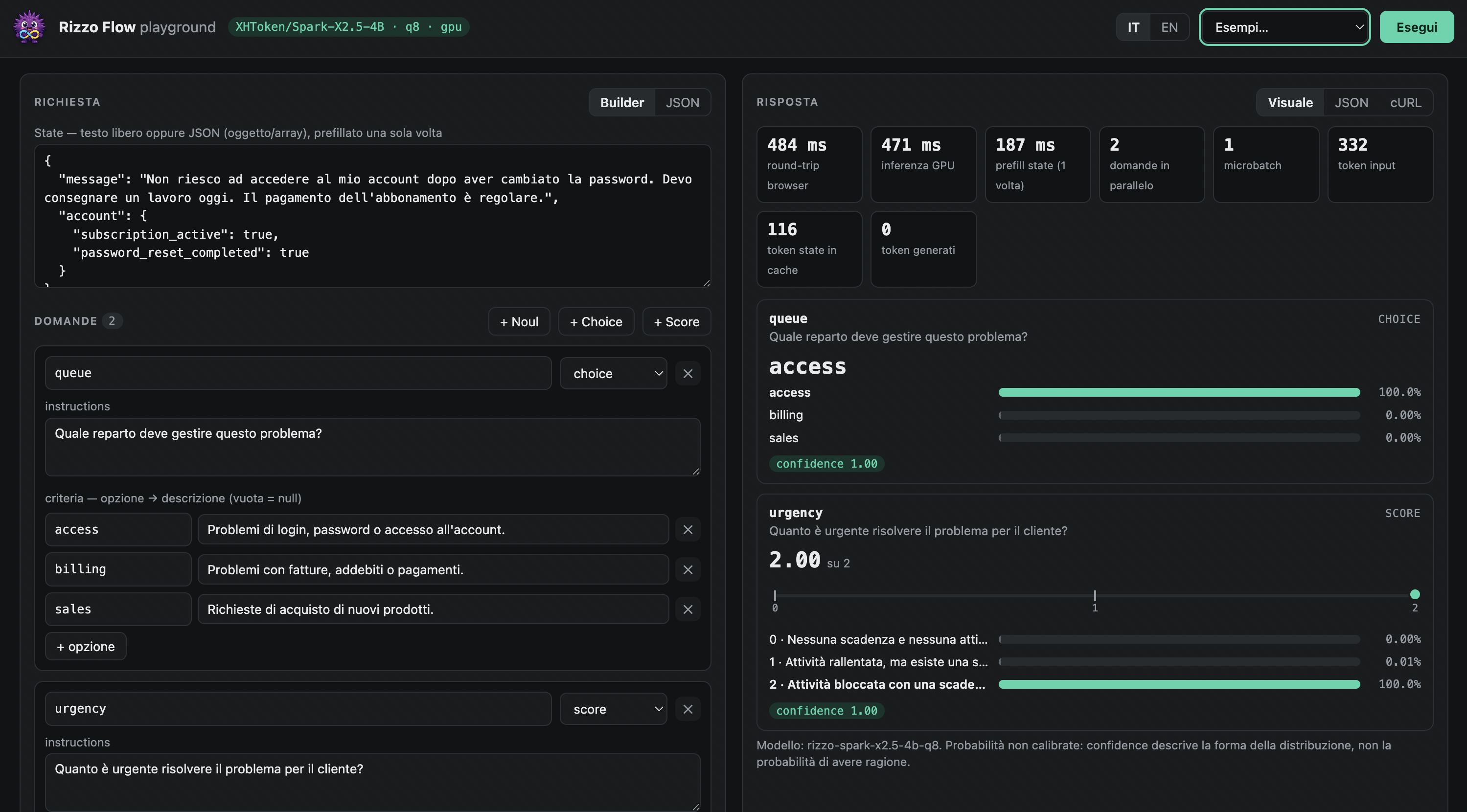
The playground includes ready-made examples, a question builder, raw JSON editors for both APIs, probability bars, timing details, and equivalent cURL commands. It does not make external calls and can be switched between English and Italian.
Use the smaller model
For a quicker first download, install the 1.7B model:
uv run rizzo download --size 1.7b
uv run rizzo serve --size 1.7b
The 1.7B Q8_0 file is approximately 1.8 GB and runs about twice as fast, but the README warns that it is much less accurate. It also tends to select the insufficient-evidence option when abstention is enabled, so test it carefully on your own workload.
Make your first decision
The quickest API test uses the Jev-compatible POST /v1/systemone endpoint. The following request asks whether a support message conveys urgency:
curl http://127.0.0.1:8017/v1/systemone \
  -H 'Content-Type: application/json' \
  -d '{
    "state": "Help! My payouts have been failing for 3 days.",
    "model": "rizzo-latest",
    "questions": {
      "is_urgent": {
        "type": "noul",
        "instructions": "Does this convey urgency?"
      }
    }
  }'
The noul result is the probability of yes, represented as a number from zero to one. The response reports the actual local model identifier, even when the request uses rizzo-latest or a convenience alias.
Ask several questions in one request
Rizzo Flow is designed to evaluate multiple questions against the same state. Combining them in one request allows the questions to share the state’s KV cache:
curl http://127.0.0.1:8017/v1/systemone \
  -H 'Content-Type: application/json' \
  -d '{
    "state": "Help! My payouts have been failing for 3 days.",
    "model": "rizzo-latest",
    "questions": {
      "is_urgent": {
        "type": "noul",
        "instructions": "Does this convey urgency?"
      },
      "department": {
        "type": "choice",
        "instructions": "Which team should handle this?",
        "criteria": {
          "billing": "Payments, invoicing, refunds",
          "technical": "Bugs and outages",
          "sales": null
        }
      },
      "frustration": {
        "type": "score",
        "instructions": "How frustrated is the customer?",
        "criteria": ["Calm", "Frustrated", "Very angry"]
      }
    }
  }'
The response contains a probability of yes for noul, probabilities for all choice options, and a probability-weighted score with its legend. The usage.output_tokens value is always zero.
Use the native decisions API
The native POST /v1/decisions endpoint exposes Rizzo Flow’s complete feature set, including numeric questions and abstention. Its four question types are:
boolean: returns a typed value and the probability of true.choice: returns the selected option and the complete option distribution.score: returns probability-weighted and normalized scores across ordered levels.numeric: returns an estimate, median, spread, and below- or above-range probability.
Estimate a numeric value from anchors
A numeric question defines increasing representative anchors. This example asks the model to read a reported fill percentage:
curl http://127.0.0.1:8017/v1/decisions \
  -H 'Content-Type: application/json' \
  -d '{
    "state": {"measurement": 75, "unit": "percent"},
    "questions": {
      "fill": {
        "type": "numeric",
        "instructions": "Read the reported fill percentage.",
        "unit": "percent",
        "anchors": [
          {"value": 0, "description": "Empty"},
          {"value": 50, "description": "Half full"},
          {"value": 75, "description": "Three quarters full"},
          {"value": 100, "description": "Completely full"}
        ]
      }
    }
  }'
Anchors are representative values, not statistical intervals. The reported mean remains between the lowest and highest anchors, while quantiles describe the discrete probability distribution over those anchors.
Understand abstention
Native questions allow abstention by default. Rizzo Flow adds an internal insufficient-evidence option, while numeric questions also include below-range and above-range possibilities. Depending on the selected option and policy, the primary value can be null and the status can report insufficient_evidence, out_of_range, or uncertain.
The Jev-compatible format does not use abstention. Its yes/no result is calculated over exactly two options. If you use the smaller 1.7B model through the native API, consider setting allow_abstain to false, as recommended by the project, and validate the effect on your data.
Run decisions without a server
For scripts, tests, or one-off evaluations, pass a request file directly to the CLI:
uv run rizzo decide examples/ticket.jsonYou can also activate the virtual environment and omit the uv run prefix:
source .venv/bin/activate
rizzo decide examples/ticket.json
In PowerShell, activate it with:
.venv\Scripts\activateSelect a model, quantization, and device
The default configuration uses Spark-X2.5-4B Q8_0. Other documented quantizations are Q4_K_M and BF16:
- 4B Q8_0: approximately 4.4 GB and the default configuration.
- 4B Q4_K_M: approximately 2.6 GB.
- 4B BF16: approximately 8.2 GB.
- 1.7B Q8_0: approximately 1.8 GB.
- 1.7B Q4_K_M: approximately 1.1 GB.
- 1.7B BF16: approximately 3.4 GB.
Inspect the devices visible to the runtime before starting the server:
uv run rizzo devicesYou can then select a device family explicitly:
uv run rizzo serve --device cuda
uv run rizzo serve --device vulkan
uv run rizzo serve --device metal
uv run rizzo serve --device cpu
Named device families are requirements rather than hints, so Rizzo Flow does not silently downgrade an explicit GPU family to CPU. Additional runtime packages can be downloaded separately:
uv run rizzo download --only runtime --runtime rocm
uv run rizzo download --only runtime --runtime sycl
uv run rizzo download --only runtime --runtime cpu
Advanced configuration and practical tips
Batch related questions
Place all questions about the same state in one request. This is central to Rizzo Flow’s design: the state is prefilled once, and question suffixes are evaluated in micro-batches. The default question micro-batch size is four and can be changed with --batch-size.
uv run rizzo serve --batch-size 8Larger batches are not automatically better. Compare latency and memory consumption on the target machine.
Increase context carefully
Although Spark-X2.5 has a native one-million-token context, the server defaults to 8,192 tokens per question. Raise the limit with --ctx:
uv run rizzo serve --ctx 32768The KV cache is allocated at startup. For the 4B model, the README estimates about 144 KiB per token, or approximately 1.4 GiB at the default limit and 4.8 GiB at 32,000 tokens. Inputs that exceed the configured limit are rejected rather than truncated. Beyond roughly 60,000 tokens, the repository’s 256 KB state cap in schema.py must also be raised.
Secure compatible endpoints
Set RIZZO_API_KEY before starting the server to require Bearer authentication on the Jev-compatible endpoints:
export RIZZO_API_KEY="replace-with-a-secret"
uv run rizzo serve
On Windows PowerShell:
$env:RIZZO_API_KEY = "replace-with-a-secret"
uv run rizzo serve
Authentication failures return HTTP 401. Invalid request data can return HTTP 422.
Redirect a compatible client
A client designed for the hosted TypeSafe API can target the local service by changing its base URL:
export TYPESAFE_BASE_URL=http://127.0.0.1:8017The project states that this environment-variable setup is designed for the official SDKs but has not yet been tested with them. The interface is compatible, but the underlying local model is not Jev.
Treat confidence and probabilities correctly
The compatible API’s confidence value describes the shape of the option distribution. It is not a verified probability that the answer is correct. Likewise, raw model probabilities can be overconfident or otherwise miscalibrated.
Validate decisions on a representative labeled dataset and calibrate them for the actual deployment environment when necessary. The server accepts a calibration file through --calibration:
uv run rizzo serve --calibration fit.jsonA calibration is tied to the model file, runtime, quantization, and hardware backend on which it was fitted. CUDA, Vulkan, and Metal can round differently, and quantization can change the returned probabilities.
Respect the answer-slot limit
Each candidate maps to one uppercase letter, producing a maximum of 26 answer slots per question. Internal abstention and range options also consume slots. Consequently, a choice supports up to 26 normal options without abstention or 25 with abstention. Numeric questions have fewer available anchors because below-range, above-range, and optional insufficient-evidence choices also occupy slots.
Use a custom model file or llama.cpp build
Start the server with a specific GGUF file by using --model:
uv run rizzo serve --model /path/to/model.ggufTo use a custom llama.cpp installation, point RIZZO_LLAMA_DIR to the directory containing libllama. The README requires llama.cpp commit 161755f because the bindings are tied to that version’s header.
Explore the Snake demonstration

The local Snake page illustrates how typed decisions can control an interactive application. Every move sends one POST /v1/decisions request containing a description of the board and a choice question listing legal moves. The page displays answer probabilities, logits, timings, and a decision log without generating text.
The demonstration also shows an important modeling lesson: input representation matters. The README reports that the 4B model performs much better with computed per-move sensors than with an ASCII grid alone. Those observations come from a small number of informal games and should not be treated as a benchmark.
Operational checks
Use GET /health to inspect model provenance and file hashes. Request and response schemas are also available in request.schema.json and response.schema.json. For reproducible deployments, keep the model, quantization, runtime, backend, context configuration, and calibration fixed.
The README reports roughly 50 milliseconds for a short decision with Spark-X2.5-4B Q8_0 on an RTX 5060 Ti, but this is hardware- and workload-specific. The same documentation notes that Apple Silicon, AMD, Intel, Linux NVIDIA, and CPU configurations have not all received equivalent testing, so benchmark your own machine before setting latency expectations.
Conclusion
Rizzo Flow provides a practical local interface for converting unstructured state into typed, probabilistic decisions without generating text. Start with the playground, combine related questions into one request, and use the native API when you need numeric estimates or abstention. Before production use, test accuracy, latency, calibration, quantization, and backend behavior on data that reflects your real application.